foundry
7 Topics
Microsoft Foundry External MCP Server Traffic Routing via Corporate Firewall
The customer would like to confirm whether traffic from an Azure AI Foundry agent to an external MCP server can be routed through a corporate firewall and whether this scenario is officially supported. To validate this scenario, I configured the following in my lab: Deployed an Azure AI Foundry resource using the Standard Agent Service with network injection. Created a dedicated subnet for the Foundry Agent Service and delegated it to Microsoft.App/environments. Associated a route table with the Foundry Agent subnet to route outbound traffic through Azure Firewall. Configured the required application and network rules on Azure Firewall. The Foundry agent is able to successfully retrieve data from the external MCP server. However, no corresponding traffic is visible in the Azure Firewall logs. Could you please confirm whether outbound traffic from the Foundry agent to an external MCP server can be routed through Azure Firewall or a corporate firewall? Also, is this routing scenario officially supported? Appreciate your support!
Is there a way to connect 2 Ai foundry to the same cosmos containers?
I defined Azure AI Foundry Connection for Azure Cosmos DB and BYO Thread Storage in Azure AI Agent Service by using these instructions: Integration with Azure AI Agent Service - Azure Cosmos DB for NoSQL | Microsoft Learn I see that it created 3 containers under the cosmos I provided: <guid>-agent-entity-store v-system-thread-message-store <guid>-thread-message-store Now I created another AI foundry and added a connection for the same AI foundry, and it created 3 different containers under the same DB. Is there a way that they'll use the same exact containers? I want to use multiple AI foundries, and they will use the same Cosmos containers to manage the data.421Views0likes1Comment8 Architectural Pillars to Boost GenAI LLM Accuracy and Performance in Low Cost
Smarter AI architecture, not bigger LLM models - how engineering teams push LLM accuracy and high performance in low cost. Enterprises using LLM (Large Language Models) hits the same ceiling and paying big price! A raw API call to a frontier model- GPT-4, Claude, Gemini delivers only 35-40% accuracy on structured output tasks like code generation, NL to DAX query generation, domain-specific reasoning. Prompt engineering pushes that to ~60%. But the final 35+ percentage points? Those come from system architecture, not model upgrades. This guide presents 8 architectural pillars, distilled from production Gen AI systems, that compound to close the accuracy gap. These patterns are model-agnostic and domain-agnostic, they apply equally to chatbots, coding assistants, content/query generators, automation agents, and any application where an LLM produces structured or semi-structured output. It’s based on my recent Gen AI projects. The key takeaway: use the LLM as one component in a larger system, not as the system itself. Surround it with deterministic guardrails, verified knowledge, and feedback loops. Pillar 1: Enhance Prompts with Verified Knowledge Context Impact: +35–40% accuracy (based on production use cases; may vary by domain) Top source of LLM errors in production is hallucinated identifiers knowledgebase, the model invents names, references, or structures that don't exist in the target system. This happens because LLMs are trained on general knowledge but deployed against specific, private enterprise systems they've never seen local database and knowledgebase. The fix is straightforward: inject verified, system-specific context (type definitions, API specs, ontologies, configuration schemas, entity catalogues) directly into the prompt so the model composes from known-good elements rather than recalling from training data. Use Knowledge Graph for better sematic knowledge. How to Implement Provide explicit context, never implicit- Whatever the LLM needs to reference identifiers, valid values, semantic knowledge, structures must appear verbatim in the prompt or retrieved context window. Filter aggressively. A full knowledge base with thousands of entities overwhelms the context window and confuses the model. Use intelligent filtering to surface only needed 5-10 most relevant elements per request. Store structured semantic knowledge in a graph or searchable index. This enables relationship-aware retrieval: "given entity X, what related entities, attributes, and constraints are also needed?" Include rich Semantic metadata. Names alone are insufficient. Include types, constraints, valid value ranges, relationships, and usage notes to minimize ambiguity. Keep context fresh. Stale context causes a different class of hallucination the model generates valid-looking output that references outdated structures. Sync your knowledge store with your source of truth. Why This Works LLMs excel at composition and reasoning combining elements, applying logic, following patterns. They are unreliable at recall of specific identifiers exact names, valid values, structural constraints. By offloading recall to a deterministic retrieval system and giving the LLM only composition tasks, you play to each system's strengths. Pillar 2: Tiered LLM Approach: Route Deterministically First, Use LLMs Last Impact: 80% cost reduction, 85% latency reduction, eliminates non-deterministic errors for most traffic. The most impactful architectural insight: most production requests don't need an LLM at all. A well-designed system handles 60-70% of traffic with deterministic logic templates, composition rules, cached results and reserves expensive, non-deterministic LLM calls only for genuinely novel inputs. The Three-Tier Model These metrics are from a real use case to convert NLP to Power BI DAX query. Tier Strategy Uses LLM ? Latency Accuracy Tier 0 Template slot-filling - handles requests that match known patterns exactly the system fills slots in a pre-built template with extracted parameters. No LLM, no non-determinism, near-perfect accuracy, sub-100ms response. No ~50ms 95-98% Tier 1 Compose from pre-validated fragments- handles requests that combine known patterns in new ways. The system retrieves pre-validated building blocks via search, composes them using deterministic rules, and validates the result. Still no LLM call. No ~200ms 90-95% Tier 2 Full LLM generation with enriched context- is reserved for genuinely novel requests that can't be served deterministically. Even here, the LLM receives maximum support: filtered context, relevant examples, explicit rules, and structured planning. Yes (1 call) 2-5s 88-93% Complexity-Based Routing A lightweight scoring function (evaluated in <1ms) routes each incoming request: Factors: reasoning depth, number of components, cross-references, constraints, nesting depth, novelty (distance from known patterns) Score 0-39: Tier 0 (deterministic template) Score 40-59: Tier 1 if confidence ≥ 85%, else Tier 2 Score 60+: Tier 2 (LLM generation) This routing achieves 96%+ accuracy in tier assignment and ensures the expensive path is only taken when necessary. Why This Matters Cost: 70-80% of requests cost zero LLM tokens Latency: Majority of responses in <200ms instead of 2-5s Reliability: Deterministic tiers produce identical output for identical input. Scalability: Deterministic tiers scale horizontally with trivial compute Pillar 3: Encode Prompt Anti-Patterns as Explicit Rules Impact: +8-10% accuracy, ~80% reduction in common structural errors LLM mistakes are patterned, not random. In any domain, 80% of errors cluster around a small set of 6-13 recurring structural mistakes. Instead of hoping the model avoids them through general instruction-following, compile these mistakes into explicit WRONG => CORRECT rules embedded directly in the system prompt. How to Implement Collect error data. Run 100+ requests through your system and categorize the failures. You'll find the same 6-13 patterns appearing repeatedly. Write concrete rules. For each pattern, show the exact wrong output and the exact correct alternative, with a one-line explanation of why. Embed in system prompt. Place rules prominently after the task description, before examples. Use formatting that's hard to ignore (headers, bold, explicit "NEVER" language). Keep the list short. 6-13 rules maximum. Beyond that, attention dilutes and the model starts ignoring rules. Prioritize by frequency. Refresh continuously. As the system improves (via other pillars), some errors disappear. New error types emerge. Update the rule set quarterly. Why This Works LLMs respond strongly to explicit negative examples. A generic instruction like "be careful with X" has minimal impact. But showing the exact wrong output the model tends to produce, paired with the correction, creates a strong avoidance signal. It's analogous to unit tests. Pillar 4: Retrieve Few-Shot Examples Dynamically Impact: +5-15% accuracy depending on domain complexity Static examples hardcoded in a prompt become stale, irrelevant of context tokens. Dynamic few-shot retrieval selects the 3-5 most relevant examples for each specific request, maximizing the signal-to-noise ratio in the prompt. Hybrid Retrieval Architecture The most effective approach combines two search strategies for intent search to understand natural language (NL) context: Keyword search (BM25) Finds examples with exact matching terms, identifiers, and domain vocabulary Vector search (semantic similarity) Finds examples with similar intent and structure, even if wording differs Rank fusion Merges results from both strategies, re-ranking by combined relevance This hybrid approach outperforms either strategy alone because keyword search catches exact identifier matches that vector search dilutes, while vector search captures semantic similarity that keyword search misses entirely. Best Gen AI Architectural Practices Match complexity to complexity. Simple requests should see simple examples. Complex requests should see complex examples. Mismatched examples confuse the model. Include negative examples. For the detected request type, include 1-2 "wrong => correct" pairs alongside positive examples. This reinforces Pillar 3's anti-pattern rules with concrete, contextually relevant demonstrations. Pre-compute embeddings. Generate vector embeddings at indexing time, not at query time. Cache retrieval results for repeated patterns. Curate quality over quantity. 3 excellent, diverse examples beat 10 mediocre ones. Each example should demonstrate a distinct pattern or edge case. Keep examples current. As your system evolves, old examples may demonstrate outdated patterns. Review and refresh the example store periodically. Pillar 5: Feedback Loop- Validate and Auto-Fix Every Output Deterministically Impact: +3-5% accuracy as a safety net, plus continuous improvement via feedback No matter how well-prompted, LLMs will occasionally produce outputs with minor structural errors - wrong casing, missing delimiters, references to slightly-incorrect identifiers, or subtle format violations. A deterministic post-processing pipeline catches and fixes these without any additional LLM calls. The Validation Pipeline LLM Output => Parse (grammar/AST) => Rule-Based Fixes => Compliance Check/validation => Final Output Each stage is fully deterministic: Parsing: Use a formal grammar or AST parser (ANTLR, tree-sitter, language-native parsers) to structurally analyse the output. Never regex-parse structured output - it's fragile and misses edge cases. Rule-based fixes: 10-20 deterministic transformation rules that correct known error patterns - name normalization, casing fixes, missing delimiters, structural repairs. Compliance check: Verify every identifier referenced in the output actually exists in the provided context. Flag unknown references. Design Principles Zero LLM calls in the fix pipeline. Every fix is a regex, an AST transformation, or a lookup table operation. Instant, free, deterministic, 100% reliable. Fail safe. If a fix is ambiguous (multiple valid corrections possible), pass through rather than corrupt. A minor error is better than a confident wrong "fix." Log everything. Track every fix applied, categorized by type. This data drives the feedback loop. The Critical Feedback Loop- The validation pipeline's most important function isn't fixing outputs, it's generating improvement signals: This creates a feedback loop: the auto-fix catches errors → the errors get promoted to upstream prevention → fewer errors reach the auto-fix → the system continuously tightens. Pillar 6: Multi-Agent Orchestration with Fewer Agents and Clear Contracts Impact: Reduced latency, clearer debugging, fewer failure modes The multi-agent pattern is powerful but commonly over-applied. The counter-intuitive lesson from production systems: fewer agents with well-defined responsibilities outperform many fine-grained agents. Why Fewer Is Better Each agent handoff introduces: Latency - serialization, network calls, context assembly Context loss - information dropped between boundaries Failure modes - each handoff is a potential error point Debugging complexity - tracing issues across many agents is exponentially harder Multi-Agent Orchestration Principles Merge agents that always run sequentially. If Agent A always feeds into Agent B with no branching or conditional logic, they should be one agent with two internal steps. Parallelize independent operations. Context retrieval and example lookup are independent, run them concurrently to halve retrieval latency. Route sub-tasks to cheaper models. Decomposed sub-problems are simpler by design. Use a smaller, faster, cheaper model (3x cost savings, 2x speed improvement). Define strict contracts. Each agent boundary should have an explicit schema defining inputs and outputs. No implicit assumptions about what crosses the boundary. Only 2 of 4 agents should call an LLM. The rest are purely deterministic. This minimizes non-deterministic behavior and cost. Pillar 7: Multi-Agent Cache at Multiple Hierarchical Levels Impact: 40-50% faster responses, 85%+ combined hit rate, significant cost reduction A single cache layer captures only one type of repetition. Production systems need hierarchical caching where multiple levels catch different repetition patterns , from exact duplicates to semantic near-misses. with -> A single cache layer captures only one type of repetition. Production systems need multi-level caching to handle exact matches, similar requests, and reusable fragments. or -> with Production systems need hierarchical caching where multiple levels handle exact matches, similar requests, and reusable fragments. Pillar 8: Measure Everything, Learn Continuously Impact: Enables data-driven iteration and prevents accuracy regressions. Architecture without observability is guesswork. The final pillar ensures every other pillar stays effective over time through comprehensive metrics and automated feedback loops. This isn't a one-time setup; it's a perpetual feedback loop. Every week, the top error patterns shift slightly. The auto-fix metrics tell you exactly where to focus next. Over months, this flywheel compounds into dramatic accuracy gains that no single prompt rewrite could achieve. Auto-Learning for New Domains When extending your system to new domains or knowledge areas: Auto-classify elements using naming conventions, type analysis, and structural patterns Auto-generate templates from universal patterns (transformations, comparisons, compositions, sequences) Bootstrap few-shot examples from successful template outputs Monitor for the first 100 requests, then curate only the edge cases manually This reduces domain onboarding from days of manual work to minutes of automated bootstrapping plus focused human review of outliers. Key Takeaways Architecture beats model size. A well-architected system with a smaller model outperforms a raw frontier model call on structured tasks at a fraction of the cost. Deterministic systems should do the heavy lifting. Reserve LLMs for genuinely novel, creative tasks. 70-80% of production requests should never touch an LLM. Verified knowledge is your top accuracy lever. Ground every prompt in context the model can trust. Errors are patterned, not random- Track them, compile them, and explicitly forbid them. Build feedback loops, not static systems- Every auto-fix, every cache miss, every routing decision is a signal for improvement. Fewer agents, done well- Fewer agents with strict contracts outperform 9 agents with fuzzy boundaries in accuracy, latency, and debuggability. Measure what matters and iterates- The system that wins isn't the one with the best day-one prompt, it's the one that improves fastest over time. Production-grade GenAI isn't about finding the perfect prompt or waiting for the next LLM model release. It's about building architectural guardrails that make failure nearly impossible and when failure does occur, the system learns from it automatically. These 8 pillars, applied together, transform any LLM from an unreliable black box into a precise, efficient, and continuously improving production system. -> Production Gen AI success is not about perfect prompts or waiting for the next LLM release. It comes from designing strong system guardrails that reduce failures and ensure consistent output. Even when failures happen, the system learns and improves automatically. When applied together, these 8 pillars turn an LLM into a reliable, efficient, and continuously improving production system.
cosmos_vnet_blocked error with BYO standard agent setup
Hi! We've tried deploying the standard agent setup using terraform as described in the https://learn.microsoft.com/en-us/azure/ai-foundry/agents/how-to/virtual-networks?view=foundry-classic and using the terraform sample available https://github.com/azure-ai-foundry/foundry-samples/tree/main/infrastructure/infrastructure-setup-terraform/15a-private-network-standard-agent-setup/code as a basis to give the necessary support in our codebase. However we keep getting the following error: cosmos_vnet_blocked: Access to Cosmos DB is blocked due to VNET configuration. Please check your network settings and make sure CosmosDB is public network enabled, if this is a public standard agent setup. Has anyone experienced this error?1KViews8likes7Comments
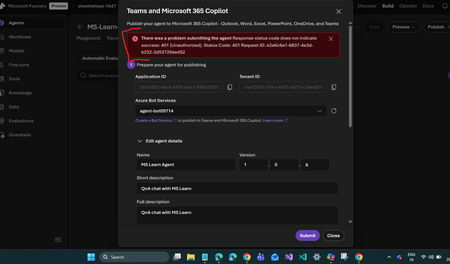
Unable to publish Foundry agent to M365 copilot or Teams
I’m encountering an issue while publishing an agent in Microsoft Foundry to M365 Copilot or Teams. After creating the agent and Foundry resource, the process automatically created a Bot Service resource. However, I noticed that this resource has the same ID as the Application ID shown in the configuration. Is this expected behavior? If not, how should I resolve it? I followed the steps in the official documentation: https://learn.microsoft.com/en-us/azure/ai-foundry/agents/how-to/publish-copilot?view=foundry Despite this, I keep getting the following error: There was a problem submitting the agent. Response status code does not indicate success: 401 (Unauthorized). Status Code: 401 Any guidance on what might be causing this and how to fix it would be greatly appreciated.Solved1.3KViews0likes3CommentsGet to know the core Foundry solutions
Foundry includes specialized services for vision, language, documents, and search, plus Microsoft Foundry for orchestration and governance. Here’s what each does and why it matters: Azure Vision With Azure Vision, you can detect common objects in images, generate captions, descriptions, and tags based on image contents, and read text in images. Example: Automate visual inspections or extract text from scanned documents. Azure Language Azure Language helps organizations understand and work with text at scale. It can identify key information, gauge sentiment, and create summaries from large volumes of content. It also supports building conversational experiences and question-answering tools, making it easier to deliver fast, accurate responses to customers and employees. Example: Understand customer feedback or translate text into multiple languages. Azure Document IntelligenceWith Azure Document Intelligence, you can use pre-built or custom models to extract fields from complex documents such as invoices, receipts, and forms. Example: Automate invoice processing or contract review. Azure SearchAzure Search helps you find the right information quickly by turning your content into a searchable index. It uses AI to understand and organize data, making it easier to retrieve relevant insights. This capability is often used to connect enterprise data with generative AI, ensuring responses are accurate and grounded in trusted information. Example: Help employees retrieve policies or product details without digging through files. Microsoft FoundryActs as the orchestration and governance layer for generative AI and AI agents. It provides tools for model selection, safety, observability, and lifecycle management. Example: Coordinate workflows that combine multiple AI capabilities with compliance and monitoring. Business leaders often ask: Which Foundry tool should I use? The answer depends on your workflow. For example: Are you trying to automate document-heavy processes like invoice handling or contract review? Do you need to improve customer engagement with multilingual support or sentiment analysis? Or are you looking to orchestrate generative AI across multiple processes for marketing or operations? Connecting these needs to the right Foundry solution ensures you invest in technology that delivers measurable results.226Views0likes0CommentsExploring Azure AI Foundry's Model Router: How It Automatically Optimizes Costs and Performance
A few days ago, I stumbled upon Azure AI Foundry's Model Router (preview) and was fascinated by its promise: a single deployment that automatically selects the most appropriate model for each query. As a developer, this seemed revolutionary no more manually choosing between GPT ( at the moment only work with OpenAI family), or the new o-series reasoning models. I decided to conduct a comprehensive analysis to truly understand how this intelligent router works and share my findings with the community. What is Model Router? Model Router is essentially a "meta-model" that acts like an orchestra conductor. When you send it a query, it evaluates in real-time factors such as: Query complexity Whether deep reasoning is required Necessary context length Request parameters It then routes your request to the most suitable model, optimizing both cost and performance. Test I developed a Python script that performs over 50 different tests, grouped into 5 main categories. Here's what I discovered (I´m form Spain, so i tested in Spanish. Sorry for that) The router proved to be surprisingly intelligent. For simple questions like "What is the capital of France?", it consistently selected more economical . But when I posed complex math or programming problems, it automatically scaled up to GPT-4 or even o-series reasoning models. Advantages I Found: Automatic cost optimization: Significant savings by using economical models when possible No added complexity: A single endpoint for all your needs Better performance: o-series models activate automatically for complex problems Transparency: You can always see which model was used in response.model Billing information When you use model router today, you're only billed for the use of the underlying models as they're recruited to respond to prompts: the model routing function itself doesn't incur any extra charges. Starting August 1, the model router usage will be charged as well. You can monitor the costs of your model router deployment in the Azure portal.