Recent Discussions

Published agent from Foundry doesn't work at all in Teams and M365
I've switched to the new version of Azure AI Foundry (New) and created a project there. Within this project, I created an Agent and connected two custom MCP servers to it. The agent works correctly inside Foundry Playground and responds to all test queries as expected. My goal was to make this agent available for my organization in Microsoft Teams / Microsoft 365 Copilot, so I followed all the steps described in the official Microsoft documentation: https://learn.microsoft.com/en-us/azure/ai-foundry/agents/how-to/publish-copilot?view=foundry Issue description The first problems started at Step 8 (Publishing the agent). Organization scope publishing I published the agent using Organization scope. The agent appeared in Microsoft Admin Center in the list of agents. However, when an administrator from my organization attempted to approve it, the approval always failed with a generic error: “Sorry, something went wrong” No diagnostic information, error codes, or logs were provided. We tried recreating and republishing the agent multiple times, but the result was always the same. Shared scope publishing As a workaround, I published the agent using Shared scope. In this case, the agent finally appeared in Microsoft Teams and Microsoft 365 Copilot. I can now see the agent here: Microsoft Teams → Copilot Microsoft Teams → Applications → Manage applications However, this revealed the main issue. Main problem The published agent cannot complete any query in Teams, despite the fact that: The agent works perfectly in Foundry Playground The agent responds correctly to the same prompts before publishing In Teams, every query results in messages such as: “Sorry, something went wrong. Try to complete a query later.” Simplification test To exclude MCP or instruction-related issues, I performed the following: Disabled all MCP tools Removed all complex instructions Left only a minimal system prompt: “When the user types 123, return 456” I then republished the agent. The agent appeared in Teams again, but the behavior did not change — it does not respond at all. Permissions warning in Teams When I go to: Teams → Applications → Manage Applications → My agent → View details I see a red warning label: “Permissions needed. Ask your IT admin to add InfoConnect Agent to this team/chat/meeting.” This message is confusing because: The administrator has already added all required permissions All relevant permissions were granted in Microsoft Entra ID Admin consent was provided Because of this warning, I also cannot properly share the agent with my colleagues. Additional observation I have a similar agent configured in Copilot Studio: It shows the same permissions warning However, that agent still responds correctly in Teams It can also successfully call some MCP tools This suggests that the issue is specific to Azure AI Foundry agents, not to Teams or tenant-wide permissions in general. Steps already taken to resolve the issue Configured all required RBAC roles in Azure Portal according to: https://learn.microsoft.com/en-us/azure/ai-foundry/concepts/rbac-foundry?view=foundry-classic During publishing, an agent-bot application was automatically created. I added my account to this bot with the Azure AI User role I also assigned Azure AI User to: The project’s Managed Identity The project resource itself Verified all permissions related to AI agents publishing in: Microsoft Admin Center Microsoft Teams Admin Center Simplified and republished the agent multiple times Deleted the automatically created agent-bot and allowed Foundry to recreate it Created a new Foundry project, configured several simple agents, and published them — the same issue occurs Tried publishing with different models: gpt-4.1, o4-mini Manually configured permissions in: Microsoft Entra ID → App registrations / Enterprise applications → API permissions Added both Delegated and Application permissions and granted Admin consent Added myself and my colleagues as Azure AI User in: Foundry → Project → Project users Followed all steps mentioned in this related discussion: https://techcommunity.microsoft.com/discussions/azure-ai-foundry-discussions/unable-to-publish-foundry-agent-to-m365-copilot-or-teams/4481420 Questions How can I make a Foundry agent work correctly in Microsoft Teams? Why does the agent fail to process requests in Teams while working correctly in Foundry? What does the “Permissions needed” warning actually mean for Foundry agents? How can I properly share the agent with other users in my organization? Any guidance, diagnostics, or clarification on the correct publishing and permission model for Foundry agents in Teams would be greatly appreciated.Solved2KViews1like5CommentsError when creating Assistant in Microsoft Foundry using Fabric Data Agent
I am facing an issue when using a Microsoft Fabric Data Agent integrated with the new Microsoft Foundry, and I would like your assistance to investigate it. Scenario: 1. I created a Data Agent in Microsoft Fabric. 2. I connected this Data Agent as a Tool within a project in the new Microsoft Foundry. 3. I published the agent to Microsoft Teams and Copilot for Microsoft 365. 4. I configured the required Azure permissions, assigning the appropriate roles to the Foundry project Managed Identity (as shown in the attached evidence – Azure AI Developer and Azure AI User roles). Issue: When trying to use the published agent, I receive the following error: Response failed with code tool_user_error: Create assistant failed. If issue persists, please use following identifiers in any support request: ConversationId = PQbM0hGUvMF0X5EDA62v3-br activityId = PQbM0hGUvMF0X5EDA62v3-br|0000000 Additional notes: • Permissions appear to be correctly configured in Azure. • The error occurs during the assistant creation/execution phase via Foundry after publishing. • The same behavior occurs both in Teams and in Copilot for Microsoft 365. Could you please verify: • Whether there are any additional permissions required when using Fabric Data Agents as Tools in Foundry; • If there are any known limitations or specific requirements for publishing to Teams/Copilot M365; • And analyze the error identifiers provided above. I appreciate your support and look forward to your guidance on how to resolve this issue.Solved
Unable to publish Foundry agent to M365 copilot or Teams
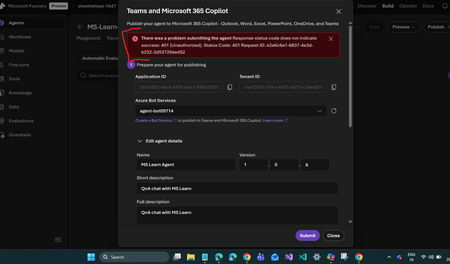
I’m encountering an issue while publishing an agent in Microsoft Foundry to M365 Copilot or Teams. After creating the agent and Foundry resource, the process automatically created a Bot Service resource. However, I noticed that this resource has the same ID as the Application ID shown in the configuration. Is this expected behavior? If not, how should I resolve it? I followed the steps in the official documentation: https://learn.microsoft.com/en-us/azure/ai-foundry/agents/how-to/publish-copilot?view=foundry Despite this, I keep getting the following error: There was a problem submitting the agent. Response status code does not indicate success: 401 (Unauthorized). Status Code: 401 Any guidance on what might be causing this and how to fix it would be greatly appreciated.Solved
Reasoning Effort for Foundry Agents
I am currently using the Azure AI Foundry Agents API and noticed that unlike the base completions endpoint, there is no option to specify the "Reasoning Effort" parameter. Could you please confirm if this feature is supported in the Agents API? If not yet supported, are there any plans to introduce Reasoning Effort control for the Agents API in future releases?Solved292Views0likes1Comment
Model Training Data Last Updated Date
Hi. Hoping someone can shed some light on something for me regarding published training data dates. I just deployed a gpt-4.1-nano model. Within the Azure AI Foundry when you are in the Model Catalog area and select the gpt-4.1-nano model it shows that the training data was last updated May 2024. However, after deploying the model (version:2025-04-14) and going into the chat playground and using that model when it was trained to it gives me a response of October 2023. Can someone help me with the discrepancy here? Any I misunderstanding something? I want to make sure we know how current the data if we use a particular model within our application. Thanks. AlanSolved663Views0likes4CommentsIntroducing Azure AI Models: The Practical, Hands-On Course for Real Azure AI Skills
Hello everyone, Today, I’m excited to share something close to my heart. After watching so many developers, including myself—get lost in a maze of scattered docs and endless tutorials, I knew there had to be a better way to learn Azure AI. So, I decided to build a guide from scratch, with a goal to break things down step by step—making it easy for beginners to get started with Azure, My aim was to remove the guesswork and create a resource where anyone could jump in, follow along, and actually see results without feeling overwhelmed. Introducing Azure AI Models Guide. This is a brand new, solo-built, open-source repo aimed at making Azure AI accessible for everyone—whether you’re just getting started or want to build real, production-ready apps using Microsoft’s latest AI tools. The idea is simple: bring all the essentials into one place. You’ll find clear lessons, hands-on projects, and sample code in Python, JavaScript, C#, and REST—all structured so you can learn step by step, at your own pace. I wanted this to be the resource I wish I’d had when I started: straightforward, practical, and friendly to beginners and pros alike. It’s early days for the project, but I’m excited to see it grow. If you’re curious.. Check out the repo at https://github.com/DrHazemAli/Azure-AI-Models Your feedback—and maybe even your contributions—will help shape where it goes next!Solved
Azure ML Studio - Attached Compute Challenges
Hello community, I'm new to ML services and have been exploring the ML Studio the last while to understand it better from an infrastructure point of view. I understand that I should be able to attach an existing VM (Ubuntu) running in my Azure environment, and use this as a compute resource in the ML Studio. I've come across two challenges, and I would appreciate your help. I'm sure perhaps I am just missing something small. Firstly, I would like to connect to my virtual machine over a private endpoint. What I have tried is to create the private endpoint to my VM following the online guidance (https://learn.microsoft.com/en-us/azure/machine-learning/how-to-configure-private-link?view=azureml-api-2&tabs=azure-portal). Both the VM and the endpoints are on the same subnet on the same vNet, yet, it is unable to attach the compute. It seems to still default to the public IP of the VM, which is not what I am after. I have the SSH port configured to port 22 still, and I have tried several options on my NSG to configure the source and destination information (Service Tags, IP address, etc.), but with no luck. Am I missing something? Is attaching an existing VM for compute over a private endpoint a supported configuration, or does the private endpoint only support compute created out of the ML Studio compute section? Secondly, if I forget about the private endpoint and attach the VM directly over internet (not desired, obviously), it is not presented to me as a compute option when I try to run my Jupyter Notebook. I only have "Azure Machine Learning Serverless Spark" as a compute option, or any compute that was indeed created through the ML Studio. I don't have the option to select the existing VM that was attached from Azure. Again, is there a fundamental step or limitation that I am overlooking? Thanks in advanceSolved573Views0likes3CommentsUnderstanding Azure OpenAI Service Provisioned Reservations
Hello Team, We are building a Azure OpenAI based finetuned model making use of GPT 4o-mini for long run. Wanted to understand the costing, here we came up with the following question over Azure OpenAI Service Provisioned Reservations plan PTU units. Need to understand how it works: Is there any Token Quota Limit Provisioned finetuned model deployment? How many finetuned model with Provisioned capacity can be deployed under the plan, How will the pricing affect if we deploy multiple finetune model? Model Deployment - GPT 4o-mini finetuned Region - North Central US We are doing it for our enterprise customer, kindly help us to resolve this issue.Solved1.1KViews1like6Comments
Talking to your relational Database using GPT not just to one table or view, but to multiple v/t
Dear Community, What is the best solution for a chat app that can interact with a relational database, not just limited to a single table or view? Thank you!Solved448Views0likes1Comment
Responsible AI
Hi, listed to the recent Responsible AI session at Build. Is it an oversight on MS part that the responsible AI dashboard and score is only in ML Studio and not Open AI studio? What responsible AI tools are available in Open AI studio Content Safety Studio really interested in picking the right tool. many thank steve mesamekiSolved650Views0likes1CommentSemantic search in Azure AI Studio
Hi everyone I've setup an Azure AI Search index that points to a SharePoint library and connected this to Azure AI Studio so a Chat-GPT model can be used to query the documents in the library. This all works fine if I use the Keyword search type in the chat playground, but if I change this to Semantic I get the following error: Semantic Ranker is enabled in my Azure AI Search service instance and all works fine when tested in the search settings in the Azure portal. The error isn't giving me any further information so I'm not quire sure where I can go from here? Any assistance would be gratefully received. Thanks in advance.Solved1.1KViews1like1CommentUpdating the pricing tier of my Azure Search Service
I have been testing out various Teams hosted bots on my Office 365 dev tenant . From a cost perspective I want to use minimal resources so looking to Free tier whilst I develop and test. Is it possible to update the pricing tier (SKU) to free (from Basic), on my search service below, say using the Azure CLI beta ( or Azure PowerShell)? az search service list --resource-group "MyResourceGroup" "name": "???????????-search", "partitionCount": 1, "provisioningState": "succeeded", "replicaCount": 1, "resourceGroup": "MyResourceGroup", "sku": { "name": "basic" }, "status": "running", I can see the "create" command does have the "Sku" parameter but the "update" command does not which is why this doesn't work: az search service update --resource-group "MyResoucegroup" --name ?????????-search --sku free I haven't found a way on the portal either.Solved30KViews1like2CommentsMicrosoft Build: Azure AI Challenge and Azure OpenAI license
In Summary: Several modules is https://learn.microsoft.com/en-au/training/challenges?id=12f32cf8-2cd8-42e1-97dd-001b4a042766 are related to Azure OpenAI Service and they require a license which cannot be obtained for a non-corporate email. Is there some kind of limited "educational" license that allows completing the learning modules? Details: The challenge is https://learn.microsoft.com/en-au/training/challenges?id=12f32cf8-2cd8-42e1-97dd-001b4a042766 and an example module is https://learn.microsoft.com/en-au/training/paths/develop-ai-solutions-azure-openai/. There, in the 2nd unit, it says: > The first step in building a generative AI solution with Azure OpenAI is to provision an Azure OpenAI resource in your Azure subscription. Azure OpenAI Service is currently in limited access. Users need to apply for service access at https://aka.ms/oai/access Unfortunately the license requesting page says - in red - that "Applications submitted with a personal email address (e.g. http://gmail.com, http://hotmail.com, http://outlook.com, etc.) will be DENIED." and it requires your company's details.Solved3.2KViews2likes1CommentImprove SharePoint search result
Hi Community, Our intranet is built on SharePoint Online. I have been looking for ways to improve the SharePoint search result, which is quite poor at the moment. Is it possible to utilise Azure Cognitive Services to build an AI powered search engine? Furthermore, if we could build a Chat bot with Azure OpenAI and deploy to the Intranet, it will not only return better results, but also providing better experience with NLP. Any suggestions are welcome. Thanks all!Solved4.6KViews0likes6Comments
If parameter "inferencingPassword" in property of topology.json could be removed
An https://github.com/Azure-Samples/video-analyzer-iot-edge-python/issues/27#issue-1030910706 raised in https://github.com/Azure-Samples/video-analyzer-iot-edge-python and would see If parameter "inferencingPassword" in property of topology.json could be removed if authentication of token is not expected to be set for repository in container registry Hi jasonxian , highly appreciate if you would comment.Solved956Views0likes1CommentQnA Maker Metadata
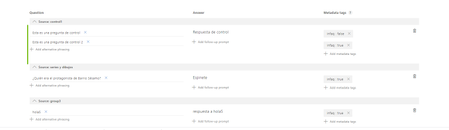
I am trying to add metadata to this, for each question and answer pair, like in the first example: The case is that I can do that in the web, but not programatically, it always takes the last object of the Metadata List. I am refereing to infaq property. Can It be done programatically or Am I doing something wrong? Thanks in advance!Solved1.9KViews0likes1CommentHandling spikes
Hi everyone. Is there a recommended setup to handle spikes? Our search is simple, our index is small (<1GB). We have currently 8 replicas and 2 partitions. But about 2x a day, we have a third party system that hits the search heavly (~30k queries per minute), and we're getting a lot of throttling responses. We have tried different configurations (6 replicas and 2 partitions, 4 replicas and 4 partitions, etc)Solved2.4KViews1like2Comments








Events
Recent Blogs
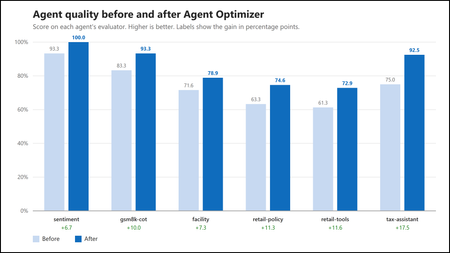
- Authors: Abi Komma, Charles Kim, Luffy Chen, Morteza Ziyadi Why hand-tuning agents does not scale An agent’s behavior comes mostly from its natural-language configuration: its instructions, skil...Aug 07, 2026119Views0likes1Comment
- 8 MIN READThe setup You've built the deployment the enterprise architecture review asked for. Nothing touches the public internet. Your Microsoft Foundry resource is private — public network access disable...Aug 07, 2026249Views1like0Comments