Recent Discussions
2/10/21 - Announcing an Azure Cognitive Services – Speech AMA!
We are very excited to announce an Azure Cognitive Services – Speech AMA! We'll be answering your questions on how to add capabilities like Text-to-Speech and Custom Neural Voice with Azure Speech service. The AMA will take place on Wednesday, February 10, 2021 from 9:00 a.m. to 10:00 a.m. PT in the Azure AI AMA space. Add the event to your calendar and view in your time zone here. An AMA is a live online event similar to a “YamJam” on Yammer or an “Ask Me Anything” on Reddit. This AMA gives you the opportunity to connect with Microsoft product experts who will be on hand to answer your questions and listen to feedback. Please note, if you are unable to participate on the day of the event, we will open up the space for new questions 24 hours before the event, so feel free to post your questions beforehand if it fits your schedule or time zone better. BEFORE THE EVENT - check out these resources: Learn more about text to speech capability: Build a natural custom voice for your brand (microsoft.com) Check out Friday's AI show featuring Edward Un and Sarah Bird!10KViews33likes20Comments3/10/21 - Announcing an Azure Cognitive Search AMA!
We are very excited to announce an Azure Cognitive Search AMA! The AMA will take place on Wednesday, March 10, 2021 from 9:00 a.m. to 10:00 a.m. PT in the Azure AI AMA space. Add the event to your calendar and view in your time zone here. An AMA is a live online event similar to a “YamJam” on Yammer or an “Ask Me Anything” on Reddit. This AMA gives you the opportunity to connect with Microsoft product experts who will be on hand to answer your questions and listen to feedback. The space is now open for new questions (24 hours before the event), so feel free to post your questions anytime beforehand if it fits your schedule or time zone better.9.4KViews10likes0Comments
Welcome to the AI Platform Tech Community!
There are several exciting things happening in the AI space and across AI platform at Microsoft. Welcome to the AI platform tech community where we would like to share our learnings from our engagements working closely with partners and customers. You will see blog articles providing deep dives, getting started and 'tips and tricks' across various AI technology areas. This community includes members from the AI Platform customer engineering and product teams. Thanks!1.5KViews9likes3Commentscosmos_vnet_blocked error with BYO standard agent setup
Hi! We've tried deploying the standard agent setup using terraform as described in the https://learn.microsoft.com/en-us/azure/ai-foundry/agents/how-to/virtual-networks?view=foundry-classic and using the terraform sample available https://github.com/azure-ai-foundry/foundry-samples/tree/main/infrastructure/infrastructure-setup-terraform/15a-private-network-standard-agent-setup/code as a basis to give the necessary support in our codebase. However we keep getting the following error: cosmos_vnet_blocked: Access to Cosmos DB is blocked due to VNET configuration. Please check your network settings and make sure CosmosDB is public network enabled, if this is a public standard agent setup. Has anyone experienced this error?722Views8likes7CommentsGet Rewarded for Sharing Your Experience with Microsoft Azure AI
We invite our valued Microsoft Azure AI customers to share your firsthand experience developing with Azure AI by writing a review on Gartner Peer Insights. Your review will not only assist other developers and technical decision-makers but also help shape the future of our AI products. Thank you for your time and contribution, and we are excited to hear your thoughts! To Write a Review & Claim Your Reward: Read our blog for next steps. You will receive a $25 gift card, a 3-month subscription to Gartner research, or a donation to a charitable cause as a token of our appreciation.6.6KViews8likes2Comments4/28/21 AMA - Conversational AI on Bot Framework Composer and the Telephony Channel
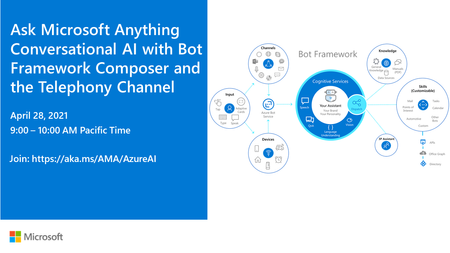
We are very excited to announce a Conversational AI with Bot Framework Composer and the Telephony Channel AMA! The AMA will take place on Wednesday, April 28, 2021 from 9:00 a.m. to 10:00 a.m. PT in the Azure AI AMA space. Add the event to your calendar and view in your time zone here. An AMA is a live text-based online event similar to a “YamJam” on Yammer or an “Ask Me Anything” on Reddit. This AMA gives you the opportunity to connect with Microsoft product experts who will be on hand to answer your questions and listen to feedback. The space will be open 24 hours before the event, so feel free to post your questions anytime beforehand during that period if it fits your schedule or time zone better.5.7KViews8likes6Comments2/10/21: That's a wrap: Azure Cognitive Services – Speech AMA
Thank you for joining us for this action-packed hour and voicing your questions and feedback in this Azure Cognitive Services - Speech AMA! Please answer our poll here: https://techcommunity.microsoft.com/t5/azure-ai-ama/request-we-would-love-to-hear-your-feedback-on-your-tts-building/td-p/2120672 If you still have Cognitive Services questions, feel free to post in our Cognitive Services discussion space: https://techcommunity.microsoft.com/t5/cognitive-services/bd-p/CognitiveServices See summary of questions and answered attached!4KViews7likes3CommentsHow to Build AI Agents in 10 Lessons
Microsoft has released an excellent learning resource for anyone looking to dive into the world of AI agents: "AI Agents for Beginners". This comprehensive course is available free on GitHub. It is designed to teach the fundamentals of building AI agents, even if you are just starting out. What You'll Learn The course is structured into 10 lessons, covering a wide range of essential topics including: Agentic Frameworks: Understand the core structures and components used to build AI agents. Design Patterns: Learn proven approaches for designing effective and efficient AI agents. Retrieval Augmented Generation (RAG): Enhance AI agents by incorporating external knowledge. Building Trustworthy AI Agents: Discover techniques for creating AI agents that are reliable and safe. AI Agents in Production: Get insights into deploying and managing AI agents in real-world applications. Hands-On Experience The course includes practical code examples that utilize: Azure AI Foundry GitHub Models These examples help you learn how to interact with Language Models and use AI Agent frameworks and services from Microsoft, such as: Azure AI Agent Service Semantic Kernel Agent Framework AutoGen - A framework for building AI agents and applications Getting Started To get started, make sure you have the proper set-up. Here are the 10 lessons Intro to AI Agents and Agent Use Cases Exploring AI Agent Frameworks Understanding AI Agentic Design Principles Tool Use Design Pattern Agentic RAG Building Trustworthy AI Agents Planning Design Multi-Agent Design Patterns Metacognition in AI Agents AI Agents in Production Multi-Language Support To make learning accessible to a global audience, the course offers multi-language support. Get Started Today! If you are eager to learn about AI agents, this course is an excellent starting point. You can find the complete course materials on GitHub at AI Agents for Beginners.6/3: Announcing an Azure Cognitive Search AMA!
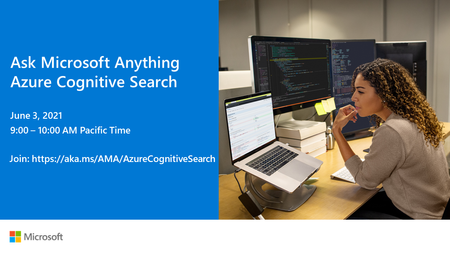
We are very excited to announce an Azure Cognitive Search AMA! The AMA will take place on Thursday, June 3, 2021 from 9:00 a.m. to 10:00 a.m. PT in the Azure AI AMA space. Add the event to your calendar and view in your time zone here. An AMA is a live text-based online event similar to a “YamJam” on Yammer or an “Ask Me Anything” on Reddit. This AMA gives you the opportunity to connect with Microsoft product experts who will be on hand to answer your questions and listen to feedback. The space will be open 24 hours before the event, so feel free to post your questions anytime beforehand if it fits your schedule or time zone better.6KViews6likes2Comments3/10/21 - That's a wrap on our Azure Cognitive Search AMA!
Thank you for joining us for this action-packed hour and voicing your questions and feedback in this Azure Cognitive Search AMA! If you still have Cognitive Services questions, feel free to post in our Cognitive Services discussion space: https://techcommunity.microsoft.com/t5/cognitive-services/bd-p/CognitiveServices We have attached a summary of the questions and answers here in this thread. See you next time!3KViews6likes1CommentAzure OpenAI: GPT-5-Codex Availability?
Greetings everyone! I just wanted to see if there's any word as to when/if https://openai.com/index/introducing-upgrades-to-codex/ will make it's way to the AI Foundry. It was released on September 15th, 2025, but I have no idea how long Azure tends to follow behind OpenAI's releases. It doesn't really seem like there's any source of information to view whenever new models drop as to what Azure is going to do with them, if any. Any conversation around this would be helpful and appreciated, thanks!656Views5likes2CommentsWhat is Convolutional Neural Network — CNN (Deep Learning)
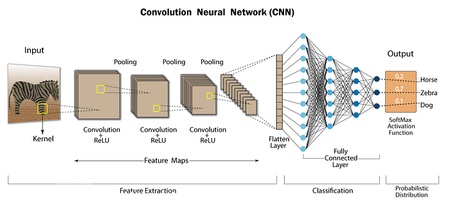
Convolutional Neural Networks (CNNs) are a type of deep learning neural network architecture that is particularly well suited to image classification and object recognition tasks. A CNN works by transforming an input image into a feature map, which is then processed through multiple convolutional and pooling layers to produce a predicted output. Convolutional Neural Network — CNN architecture In this blog post, we will explore the basics of CNNs, including how they work, their architecture, and how they can be used for a wide range of computer vision tasks. We will also provide examples of some real-world applications of CNNs, and outline some of the benefits and limitations of this deep-learning architecture. Working of Convolutional Neural Network: A convolutional neural network starts by taking an input image, which is then transformed into a feature map through a series of convolutional and pooling layers. The convolutional layer applies a set of filters to the input image, each filter producing a feature map that highlights a specific aspect of the input image. The pooling layer then downsamples the feature map to reduce its size, while retaining the most important information. The feature map produced by the convolutional layer is then passed through multiple additional convolutional and pooling layers, each layer learning increasingly complex features of the input image. The final output of the network is a predicted class label or probability score for each class, depending on the task. The architecture of Convolutional Neural Network: A typical CNN architecture is made up of three main components: the input layer, the hidden layers, and the output layer. The input layer receives the input image and passes it to the hidden layers, which are made up of multiple convolutional and pooling layers. The output layer provides the predicted class label or probability scores for each class. The hidden layers are the most important part of a CNN, and the number of hidden layers and the number of filters in each layer can be adjusted to optimize the network’s performance. A common architecture for a CNN is to have multiple convolutional layers, followed by one or more pooling layers, and then a fully connected layer that provides the final output. Applications of Convolutional Neural Network: CNNs have a wide range of applications in computer vision, including image classification, object detection, semantic segmentation, and style transfer. Image classification: Image classification is the task of assigning a class label to an input image. CNNs can be trained on large datasets of labeled images to learn the relationships between the image pixels and the class labels, and then applied to new, unseen images to make a prediction. Object detection: Object detection is the task of identifying objects of a specific class in an input image and marking their locations. This can be useful for applications such as security and surveillance, where it is important to detect and track objects in real time. Semantic segmentation: Semantic segmentation is the task of assigning a class label to each pixel in an input image, producing a segmented image that can be used for further analysis. This can be useful for applications such as medical image analysis, where it is important to segment specific structures in an image for further analysis. Style transfer: Style transfer is the task of transferring the style of one image to another image while preserving the content of the target image. This can be useful for applications such as art and design, where it is desired to create an image that combines the content of one image with the style of another. Layers of Convolutional neural network: The layers of a Convolutional Neural Network (CNN) can be broadly classified into the following categories: Convolutional Layer: The convolutional layer is responsible for extracting features from the input image. It performs a convolution operation on the input image, where a filter or kernel is applied to the image to identify and extract specific features. Convolutional Layer Pooling Layer: The pooling layer is responsible for reducing the spatial dimensions of the feature maps produced by the convolutional layer. It performs a down-sampling operation to reduce the size of the feature maps and reduce computational complexity. MaxPooling Layer Activation Layer: The activation layer applies a non-linear activation function, such as the ReLU function, to the output of the pooling layer. This function helps to introduce non-linearity into the model, allowing it to learn more complex representations of the input data. Activation Layer Fully Connected Layer: The fully connected layer is a traditional neural network layer that connects all the neurons in the previous layer to all the neurons in the next layer. This layer is responsible for combining the features learned by the convolutional and pooling layers to make a prediction. Fully Connected Layer Normalization Layer: The normalization layer performs normalization operations, such as batch normalization or layer normalization, to ensure that the activations of each layer are well-conditioned and prevent overfitting. Dropout Layer: The dropout layer is used to prevent overfitting by randomly dropping out neurons during training. This helps to ensure that the model does not memorize the training data but instead generalizes to new, unseen data. Dense Layer: After the convolutional and pooling layers have extracted features from the input image, the dense layer can then be used to combine those features and make a final prediction. In a CNN, the dense layer is usually the final layer and is used to produce the output predictions. The activations from the previous layers are flattened and passed as inputs to the dense layer, which performs a weighted sum of the inputs and applies an activation function to produce the final output. Dense layer Benefits of Convolutional Neural Network: Feature extraction: CNNs are capable of automatically extracting relevant features from an input image, reducing the need for manual feature engineering. Spatial invariance: CNNs can recognize objects in an image regardless of their location, size, or orientation, making them well-suited to object recognition tasks. Robust to noise: CNNs can often handle noisy or cluttered images, making them useful for real-world applications where image quality may be variable. Transfer learning: CNNs can leverage pre-trained models, reducing the amount of data and computational resources required to train a new model. Performance: CNNs have demonstrated state-of-the-art performance on a range of computer vision tasks, including image classification, object detection, and semantic segmentation. Limitations of Convolutional Neural Network: Computational cost: Training a deep CNN can be computationally expensive, requiring significant amounts of data and computational resources. Overfitting: Deep CNNs are prone to overfitting, especially when trained on small datasets, where the model may memorize the training data rather than generalize to new, unseen data. Lack of interpretability: CNNs are considered to be a “black box” model, making it difficult to understand why a particular prediction was made. Limited to grid-like structures: CNNs are limited to grid-like structures and cannot handle irregular shapes or non-grid-like data structures. Conclusion: In conclusion, Convolutional Neural Networks (CNNs) is a powerful deep learning architecture well-suited to image classification and object recognition tasks. With its ability to automatically extract relevant features, handle noisy images, and leverage pre-trained models, CNNs have demonstrated state-of-the-art performance on a range of computer vision tasks. However, they also have their limitations, including a high computational cost, overfitting, a lack of interpretability, and a limited ability to handle irregular shapes. Nevertheless, CNNs remain a popular choice for many computer vision tasks and are likely to continue to be a key area of research and development in the coming years.2.7KViews5likes0Comments5/20: Azure Cognitive Services - Speech AMA announcement!
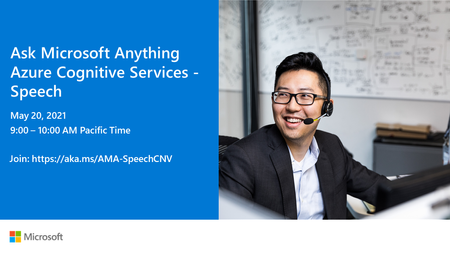
We are very excited to announce an Azure Cognitive Services - Speech AMA! The AMA will take place on Thursday, May 20, 2021 from 9:00 a.m. to 10:00 a.m. PT in the Azure AI AMA space. Add the event to your calendar and view in your time zone here. An AMA is a live text-based online event similar to a “YamJam” on Yammer or an “Ask Me Anything” on Reddit. This AMA gives you the opportunity to connect with Microsoft product experts who will be on hand to answer your questions and listen to feedback. The space will be open 24 hours before the event, so feel free to post your questions anytime beforehand if it fits your schedule or time zone better.5.1KViews5likes6Comments
Parsing unstructured medical data
I'm interested in tools for parsing, understanding and ML from unstructured medical data. Is Azure Cognitive Services being used for this type of data?3.2KViews5likes6CommentsWelcome to the Azure Cognitive Services - Speech AMA!
Welcome to the Azure Cognitive Services - Speech Ask Microsoft Anything (AMA)! This live hour gives you the opportunity to ask questions and provide feedback. Please introduce yourself by replying to this thread. Post your questions in a new thread within the Azure AI AMA space, by clicking on, "Start a New Conversation" at the top of the page.11KViews5likes31Comments
APIM within Foundry
Dear Azure AI Foundry team at Microsoft, Please reconsider the current architecture and developer experience around AI observability and token analytics. As it stands today, customers are expected to assemble an entire distributed system — APIM, Azure Functions, Static Web Apps, App Insights, Log Analytics, custom SSE parsing, and additional infrastructure — just to answer very basic operational questions: Which users are consuming the most tokens? Which models are being used the most? What are our real-time streaming costs? Which subscriptions/projects are generating spend? Even worse, many of these solutions break down when using streamed/SSE AI responses because APIM policies are not designed to reliably process chunked AI streams and partial JSON bodies. So customers end up building increasingly complicated middleware pipelines for functionality that should already exist natively inside the platform. At the same time: Azure clearly has access to token and billing telemetry internally customers are still billed for usage yet customers themselves are not given equivalent real-time visibility or tooling That creates a frustrating disconnect, making it feel like a money grab when. It's like paying for groceries and not allowing customers to receive a receipt. Another major issue is API key management. Providing effectively a single project-level credential for enterprise AI workloads creates operational and governance limitations that make multi-user auditing unnecessarily difficult. Why in the world, would the foundry team design this with only api key per project? Is there a secret reason for this, other than annoying customers? To be blunt: the current system design feels massively overengineered for customers while simultaneously underdelivering on the core metrics enterprises actually need. AI platform teams should not need to build 10+ supporting Azure services just to approximate token analytics for a single Foundry project. Azure has excellent infrastructure capabilities overall, which is exactly why this experience is so surprising. But if the platform architecture and observability story for AI workloads do not improve soon, many organizations — including ours — will seriously evaluate moving to alternative cloud providers and AI gateway solutions that provide simpler and more transparent operational tooling. Please prioritize: native streaming token telemetry first-class SSE observability proper per-user/per-model analytics better API credential management simpler AI cost governance workflows Right now, the operational overhead compared to the value delivered is far too high.97Views4likes1Comment
New AI Foundry not sending refresh tokens to MCP (401 after access token expiration)
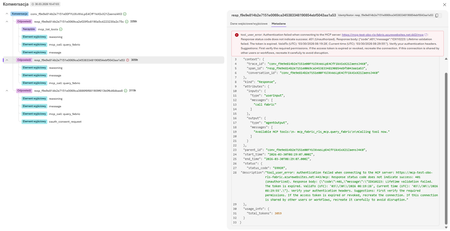
Hello, When connecting an MCP server hosted as an Azure Function using OAuth Passthrough in New AI Foundry Playground, the connection is established successfully, the Microsoft login popup appears, authentication succeeds, and the first MCP request returns data correctly. However, once the access token expires, the Playground and deployed AI Foundry agents to Copilot/Teams do not appear to refresh the token, despite offline_access being included in the requested scopes and a refresh URL being configured. All subsequent MCP calls fail with 401 Unauthorized until the connection is manually recreated. For testing, we reduced the token lifetime to 10 minutes to make the issue easier to reproduce. Impact This prevents long-lived or repeated MCP usage in AI Foundry Playground because the connection becomes unusable after token expiry and requires manual reconnection. MCP server host: Azure Function MCP server configuration in New AI Foundry: Endpoint: https://mcp-test-obo-rls-fabric.azurewebsites.net/mcp Client ID: <client_id> (redacted) Auth URL: https://login.microsoftonline.com/tenant_id(redacted)/oauth2/v2.0/authorize Token URL: https://login.microsoftonline.com/tenant_id(redacted)/oauth2/v2.0/token Refresh URL: https://login.microsoftonline.com/tenant_id(redacted)/oauth2/v2.0/token Scopes: openid profile offline_access api://(App ID)/user_impersonation Redirect URI: https://global.consent.azure-apim.net/redirect/(redacted)-fabric-rls-mcp Error returned tool_user_error: Authentication failed when connecting to the MCP server: https://mcp-test-obo-rls-fabric.azurewebsites.net:443/mcp : Response status code does not indicate success: 401 (Unauthorized). Response body: {"code":401,"message":"IDX10223: Lifetime validation failed. The token is expired. ValidTo (UTC): '03/30/2026 08:19:28', Current time (UTC): '03/30/2026 08:29:55'."}. Verify your authentication headers. Suggestions: First verify the required permissions. If the access token is expired or revoked, recreate the connection. If this connection is shared by other users or workflows, recreate it carefully to avoid disruption. Function App / Identity Provider (Entra) The Azure Function authentication configuration: Identity provider: Microsoft (MCP-Fabric-RLS-Server) App registration: MCP-Fabric-RLS-Server Supported account types: Single tenant Application (client) ID: App ID Client secret setting name: MICROSOFT_PROVIDER_AUTHENTICATION_SECRET Issuer URL: https://login.microsoftonline.com/tenant_id(redacted)/v2.0 Redirect URI is added to App Authentication Redirect URI configuration as "Web". Allowed token audiences api://App ID App ID https://mcp-test-obo-rls-fabric.azurewebsites.net Additional checks enabled Allow requests from any application Allow requests from any identity Allow requests only from issuer tenant tenant_id (redacted) Notes The first authenticated call succeeds, so the initial OAuth flow appears to be working. The failure only occurs after the access token expires. Because offline_access is requested and the refresh URL is configured, our expectation is that the client should refresh the token automatically. Our working hypothesis is that either: the refresh token is not being issued, the refresh token is not being stored/used by AI Foundry Playground, or OAuth Passthrough for MCP connections in this scenario does not currently support automatic refresh as expected. Thank you for any assistance provided.443Views4likes3CommentsBYO Thread Storage in Azure AI Foundry using Python
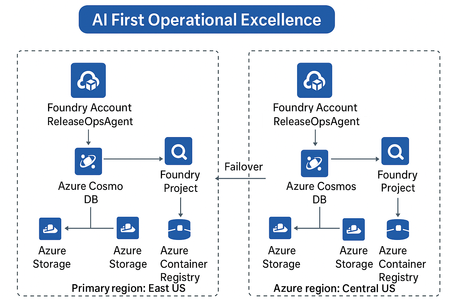
Build scalable, secure, and persistent multi-agent memory with your own storage backend As AI agents evolve beyond one-off interactions, persistent context becomes a critical architectural requirement. Azure AI Foundry’s latest update introduces a powerful capability — Bring Your Own (BYO) Thread Storage — enabling developers to integrate custom storage solutions for agent threads. This feature empowers enterprises to control how agent memory is stored, retrieved, and governed, aligning with compliance, scalability, and observability goals. What Is “BYO Thread Storage”? In Azure AI Foundry, a thread represents a conversation or task execution context for an AI agent. By default, thread state (messages, actions, results, metadata) is stored in Foundry’s managed storage. With BYO Thread Storage, you can now: Store threads in your own database — Azure Cosmos DB, SQL, Blob, or even a Vector DB. Apply custom retention, encryption, and access policies. Integrate with your existing data and governance frameworks. Enable cross-region disaster recovery (DR) setups seamlessly. This gives enterprises full control of data lifecycle management — a big step toward AI-first operational excellence. Architecture Overview A typical setup involves: Azure AI Foundry Agent Service — Hosts your multi-agent setup. Custom Thread Storage Backend — e.g., Azure Cosmos DB, Azure Table, or PostgreSQL. Thread Adapter — Python class implementing the Foundry storage interface. Disaster Recovery (DR) replication — Optional replication of threads to secondary region. Implementing BYO Thread Storage using Python Prerequisites First, install the necessary Python packages: pip install azure-ai-projects azure-cosmos azure-identity Setting Up the Storage Layer from azure.cosmos import CosmosClient, PartitionKey from azure.identity import DefaultAzureCredential import json from datetime import datetime class ThreadStorageManager: def __init__(self, cosmos_endpoint, database_name, container_name): credential = DefaultAzureCredential() self.client = CosmosClient(cosmos_endpoint, credential=credential) self.database = self.client.get_database_client(database_name) self.container = self.database.get_container_client(container_name) def create_thread(self, user_id, metadata=None): """Create a new conversation thread""" thread_id = f"thread_{user_id}_{datetime.utcnow().timestamp()}" thread_data = { 'id': thread_id, 'user_id': user_id, 'messages': [], 'created_at': datetime.utcnow().isoformat(), 'updated_at': datetime.utcnow().isoformat(), 'metadata': metadata or {} } self.container.create_item(body=thread_data) return thread_id def add_message(self, thread_id, role, content): """Add a message to an existing thread""" thread = self.container.read_item(item=thread_id, partition_key=thread_id) message = { 'role': role, 'content': content, 'timestamp': datetime.utcnow().isoformat() } thread['messages'].append(message) thread['updated_at'] = datetime.utcnow().isoformat() self.container.replace_item(item=thread_id, body=thread) return message def get_thread(self, thread_id): """Retrieve a complete thread""" try: return self.container.read_item(item=thread_id, partition_key=thread_id) except Exception as e: print(f"Thread not found: {e}") return None def get_thread_messages(self, thread_id): """Get all messages from a thread""" thread = self.get_thread(thread_id) return thread['messages'] if thread else [] def delete_thread(self, thread_id): """Delete a thread""" self.container.delete_item(item=thread_id, partition_key=thread_id) Integrating with Azure AI Foundry from azure.ai.projects import AIProjectClient from azure.identity import DefaultAzureCredential class ConversationManager: def __init__(self, project_endpoint, storage_manager): self.ai_client = AIProjectClient.from_connection_string( credential=DefaultAzureCredential(), conn_str=project_endpoint ) self.storage = storage_manager def start_conversation(self, user_id, system_prompt): """Initialize a new conversation""" thread_id = self.storage.create_thread( user_id=user_id, metadata={'system_prompt': system_prompt} ) # Add system message self.storage.add_message(thread_id, 'system', system_prompt) return thread_id def send_message(self, thread_id, user_message, model_deployment): """Send a message and get AI response""" # Store user message self.storage.add_message(thread_id, 'user', user_message) # Retrieve conversation history messages = self.storage.get_thread_messages(thread_id) # Call Azure AI with conversation history response = self.ai_client.inference.get_chat_completions( model=model_deployment, messages=[ {"role": msg['role'], "content": msg['content']} for msg in messages ] ) assistant_message = response.choices[0].message.content # Store assistant response self.storage.add_message(thread_id, 'assistant', assistant_message) return assistant_message Usage Example # Initialize storage and conversation manager storage = ThreadStorageManager( cosmos_endpoint="https://your-cosmos-account.documents.azure.com:443/", database_name="conversational-ai", container_name="threads" ) conversation_mgr = ConversationManager( project_endpoint="your-project-connection-string", storage_manager=storage ) # Start a new conversation thread_id = conversation_mgr.start_conversation( user_id="user123", system_prompt="You are a helpful AI assistant." ) # Send messages response1 = conversation_mgr.send_message( thread_id=thread_id, user_message="What is machine learning?", model_deployment="gpt-4" ) print(f"AI: {response1}") response2 = conversation_mgr.send_message( thread_id=thread_id, user_message="Can you give me an example?", model_deployment="gpt-4" ) print(f"AI: {response2}") # Retrieve full conversation history history = storage.get_thread_messages(thread_id) for msg in history: print(f"{msg['role']}: {msg['content']}") Key Highlights: Threads are stored in Cosmos DB under your control. You can attach metadata such as region, owner, or compliance tags. Integrates natively with existing Azure identity and Key Vault. Disaster Recovery & Resilience When coupled with geo-replicated Cosmos DB or Azure Storage RA-GRS, your BYO thread storage becomes resilient by design: Primary writes in East US replicate to Central US. Foundry auto-detects failover and reconnects to secondary region. Threads remain available during outages — ensuring operational continuity. This aligns perfectly with the AI-First Operational Excellence architecture theme, where reliability and observability drive intelligent automation. Best Practices Area Recommendation Security Use Azure Key Vault for credentials & encryption keys. Compliance Configure data residency & retention in your own DB. Observability Log thread CRUD operations to Azure Monitor or Application Insights. Performance Use async I/O and partition keys for large workloads. DR Enable geo-redundant storage & failover tests regularly. When to Use BYO Thread Storage Scenario Why it helps Regulated industries (BFSI, Healthcare, etc.) Maintain data control & audit trails Multi-region agent deployments Support DR and data sovereignty Advanced analytics on conversation data Query threads directly from your DB Enterprise observability Unified monitoring across Foundry + Ops The Future BYO Thread Storage opens doors to advanced use cases — federated agent memory, semantic retrieval over past conversations, and dynamic workload failover across regions. For architects, this feature is a key enabler for secure, scalable, and compliant AI system design. For developers, it means more flexibility, transparency, and integration power. Summary Feature Benefit Custom thread storage Full control over data Python adapter support Easy extensibility Multi-region DR ready Business continuity Azure-native security Enterprise-grade safety Conclusion Implementing BYO thread storage in Azure AI Foundry gives you the flexibility to build AI applications that meet your specific requirements for data governance, performance, and scalability. By taking control of your storage, you can create more robust, compliant, and maintainable AI solutions.
Using AI to convert unstructured information to structured information
We have a use case to extract the information from various types of documents like Excel, PDF, and Word and convert it into structured information. The data exists in different formats. We started building this use case with AI Builder, and we hit the roadblock and are now exploring ways using the Co-pilot studio. It would be great if someone could point us in the right direction. What should be the right technology stack that we should consider for this use case? Thank you for the pointer.3.7KViews4likes18Comments








Events
Recent Blogs
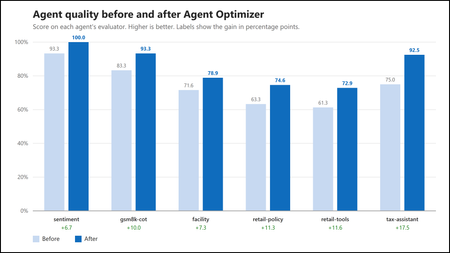
- Authors: Abi Komma, Charles Kim, Luffy Chen, Morteza Ziyadi Why hand-tuning agents does not scale An agent’s behavior comes mostly from its natural-language configuration: its instructions, skil...Aug 07, 2026119Views0likes1Comment
- 8 MIN READThe setup You've built the deployment the enterprise architecture review asked for. Nothing touches the public internet. Your Microsoft Foundry resource is private — public network access disable...Aug 07, 2026249Views1like0Comments