generative ai
110 Topics
Your Agents Need More Than a Place to Run
In architecture reviews with enterprise teams moving their first agentic applications toward production, I often hear the same plan: the team has containerized their agent and intends to run it on the managed Kubernetes cluster the organization already trusts. The reasoning is sensible, since the platform team knows the tooling and security has approved the network model, and for the first use case or two it is often the right call. Having watched this unfold in my years leading AgenticAI customer engineers and forward deployed engineers, and now helping customers reach production on Azure, I want to describe what happens next, before leaders commit rather than after. One thing to note is Azure supports multiple ways to build and operate agents. Foundry Agent Service provides an integrated managed runtime around your agent code. Azure Kubernetes Service supports teams that need Kubernetes-level control or want to extend an established platform, while Azure Container Apps provides managed container hosting. These services can work together. The decision is which capabilities and responsibilities best fit the workload. Where the cluster is the right answer A stateless retrieval application, a document extraction pipeline, or a classification job is a web service that happens to call a model, and a container platform runs web services well. A large retail customer of mine ran an invoice extraction agent on containers for over a year with almost no issues, and I never suggested they move it. The cluster remains the right home for several other situations as well. LLM invocations embedded inside existing microservices, event driven, or batch pipelines fit container platforms naturally. Genuine constraints such as air-gapped or sovereign environment, regions where a managed service is not yet offered are a good reason to run your own stack, and strong engineering team that already operates at that level can be a real asset. Even when the agents themselves move to a managed runtime, the tool servers, business APIs, and data services those agents call, often stay on your cluster, so they are complementary far more often than they are competitors. The problem is that these early wins can make agents seem like just another workload. Where the wheels come off The first failure is the state. A research agent that plans, searches, and synthesizes for ninety minutes is a long-running stateful process, while a Kubernetes pod is a disposable container the scheduler may restart at any time. A financial services team I worked with lost costly research run to a routine node upgrade, and responded as capable engineers do by building checkpointing, a durable store, and a resume mechanism. It worked, but they now owned a piece of infrastructure they had to keep correct as their agent's framework changed beneath it. A managed agent runtime absorbs this. Hosted agents in Foundry Agent Service, as one example, give every session a VM-isolated sandbox with a persistent file system, a durable state store that survives crashes and restarts and can hold checkpoints for frameworks such as LangGraph or Microsoft Agent Framework, and a resilient execution mode that recovers long-running work after a process interruption. The second is the human-in-the-loop. A commercial insurance customer’s claims agent needed sign-off from an adjuster and sometimes a second reviewer, with days between steps. Stopping an agent cleanly at the moment it needs a decision, holding its full session for four days without paying to keep it running, and resuming it correctly when the approval arrives is not something a container orchestrator gives out the box. The team built agent session suspend and resume, a queue, a durable state store, notifications, and an approval interface, and ended up with a small workflow engine nobody had planned to own. In hosted agents, an idle session is deprovisioned with its state persisted and restored onto fresh compute when the same session ID returns, so an agent waiting on an approval cost nothing while it waits, and sessions are retained for up to thirty days of inactivity. The approval experience remains yours to design, which is where your engineers' time should go. The third is multi-turn conversation, which quietly pushes teams into building their own context management system. The first version appends each turn to history, and within few turns the history outgrows the context window while cost and latency climb. So, the team adds truncation, then summarization, then retrieval of earlier turns, then per-user and per-tenant scoping, then expiry and deletion rules for privacy. An industrial customer's safety compliance assistant, with conversations stretching across days, followed exactly this path and ended up with a bespoke thread store and summarization pipeline nobody had budgeted for. Its first serious incident came when a summary silently dropped a compliance-relevant instruction. With the Responses protocol in hosted agents in Foundry, conversation history is a durable, platform-managed record keyed by a conversation ID and reachable from any channel, so the thread store is no longer yours to build, although deciding what to summarize or retrieve remains a design choice for your agent. The fourth is identity. On a cluster, the path of least resistance is a shared service account, and in one review a security architect asked which actions had been taken on behalf of which user, only to learn that the logs could not say. Hosted agents create a dedicated Microsoft Entra agent identity for each agent at deploy time, use on-behalf-of flows to act with the user's delegated permissions in interactive scenarios and the agent's own identity in autonomous ones, and keep the agent identifiable for audit in both cases. The fifth is per-user session isolation, which is the difference between an agent that serves many people and an agent that mixes them up. Agents read files, run code, and hold working data, and on a shared pod the default is that many users share a process, a file system, and often a cache. Giving every user session its own sandboxed environment and storage, so that one person's documents and intermediate results can never surface in another's, means engineering hard isolation boundaries and proving them to your security team. Hosted agents make a VM-isolated sandbox per session the default, and their durable state store can partition items per end user, so one store is safe to share across the users of a multitenant agent. And lastly, Evaluation and optimization are where the gap widens. The largest difference between teams that scale and those that stall is evaluation. Because agents are probabilistic and multi-step, staging tests often miss failures such as a wrong tool choice or a policy violation deep in a task. One customer’s agent passed every offline check but degraded unnoticed for weeks after a model update because evaluation stopped at release. Mature teams continuously evaluate production traces, combine automated judges with sampled human review, and red-team regularly.Once quality is measurable, teams can deliberately balance prompts, models, tools, latency, and cost. One team cut per-task cost by routing simple steps to smaller models after evaluation confirmed quality held. Self-built stacks require teams to assemble and maintain tracing, datasets, judges, and release gates. Hosted agents instead combines default OpenTelemetry traces with continuous evaluation, adversarial testing, and datasets generated from agent instructions. Staged closed-loop optimization uses those traces to improve instructions, tool descriptions, and model selection without extra plumbing. The real cost is the velocity gap Leaders usually expect me to quantify the initial build, and that is the smaller number. A team of four building the first agent often becomes ten or twelve within a year, and a growing share of them are maintaining a runtime for agents rather than building agents that serve the business. The enterprise has quietly created an internal agent infrastructure company in a field where the patterns for memory, tools, evaluation, and safety are rewritten every few months, while hyperscalers put hundreds of engineers on exactly this problem and ship at a cadence no single platform group can match. Foundry Agent Service, for instance, bundle content safety guardrails into the runtime and route outbound traffic through a customer virtual network, capabilities that platform teams otherwise assemble one integration at a time. This plumbing does not differentiate your organization, so the question is whether your scarcest engineers should spend years on it or on the workflows, data, and judgment only your company has. This is also why the technology companies held up as examples are a poor template. Many built their own runtimes because managed options did not yet exist and had large platform organizations to carry the load. Even they tend to invest in a custom runtime for the first handful of use cases and then migrate as managed services mature, because the maintenance burden compounds while the strategic value of owning the plumbing does not. What I would do as the leader I am not arguing against Kubernetes or for moving everything tomorrow. Comparable managed runtimes exist across the hyperscalers, and I use hosted agents as the running example only because it is the one I know best from the inside. Managed agent services are still maturing, some workloads have real data residency or customization needs, and abstraction always constrains something. What I am arguing for is a deliberate choice for each use case, guided by three questions: whether the agent must outlive a single request by running long, waiting on humans, or remembering across sessions whether it must act with its own identity, auditable delegation, and policy enforcement whether your team would be building anything a managed service already provides, and who will still maintain it in two years. Key takeaways Match the runtime to the workload. Containers on your existing cluster suit stateless, short-lived agents, while long-running, human-in-the-loop, and memory-dependent agents need capabilities your platform team was never hired to build. Count the hidden team. The real cost of self-hosting is the growing group of engineers maintaining state, identity, memory, guardrails, and tracing instead of solving business problems. Make evaluation continuous and connected to production traces. Pre-release testing alone will miss the drift and trajectory failures that hurt you, and optimization of quality, cost, and latency depends on that evaluation data. Follow the pattern of the leaders, not their early architecture. Companies that built custom runtimes did so before managed options matured, and most of them move toward managed services as those options improve. A practical place to begin is your roadmap for the next twelve months. Sort each use case into stateless and short-lived or long-running and human-dependent, and for every agent in the second group put a price on the engineers who would maintain the runtime rather than the business logic. I would like to hear how you have drawn this line, and where a managed service was not yet ready for something you needed.818Views2likes0CommentsHow to make AI responses faster on Microsoft Foundry: lessons from 2,040 measurements
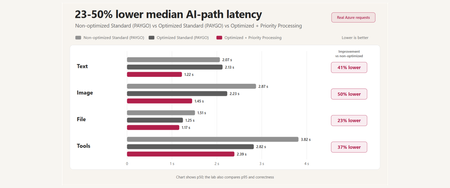
A reproducible Microsoft Foundry performance study covering prompt caching, multimodal input, tool orchestration, MCP lifecycle, Toolbox tool search, and Priority Processing - with correctness and reliability measured alongside latency.576Views0likes0CommentsChoosing a real-time voice architecture on Microsoft Foundry: three enterprise patterns
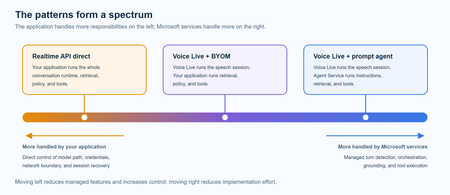
A practical comparison of three real-time voice architectures on Microsoft Foundry, including implementation tradeoffs and four enterprise release gates for residency, networking, retrieval authorization, and tool credentials.942Views2likes0CommentsBuilding Production-Ready AI Agents in Microsoft Foundry: 10 Lessons Learned
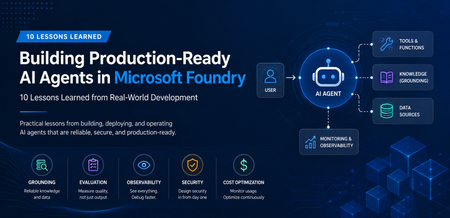
A Real-World Scenario Imagine a customer support agent that answers invoice questions. During testing, everything works perfectly. But in production: The Finance API occasionally times out. The knowledge base contains outdated information. Tool calls fail during peak traffic. Token consumption rises unexpectedly. The result isn't a broken AI model. It's an unreliable system. This is where Microsoft Foundry becomes critical. Building production-ready agents requires grounding, observability, resiliency, governance, and continuous monitoring. New challenges appear: Challenge Impact Hallucinated responses Reduced trust Missing citations Verification issues Tool failures Broken workflows High token consumption Increased cost Latency spikes Poor user experience Limited monitoring difficult troubleshooting Security concerns Compliance risks The lesson was clear: Production readiness is not about making the agent smarter. It is about making the agent reliable. My Observation While experimenting with AI agents in Microsoft Foundry, I found that model selection was rarely the primary challenge. Most production issues stemmed from grounding quality, tool reliability, observability, and security controls. Addressing these operational concerns often had a greater impact on user trust than changing the underlying model. Production AI Agent Reference Architecture A production-ready AI agent typically includes several components beyond the language model itself. Layer Technology User Interface Web App, Teams, Copilot Agent Runtime Microsoft Foundry Agent Service Knowledge Layer Azure AI Search Foundation Model GPT-4o Tool Integration APIs and Functions Monitoring Azure Monitor Security Managed Identity and Key Vault Request Flow Lesson 1: Start with the Use Case, Not the Model One of the most common mistakes is beginning with model selection. Many teams ask: Which model should I use? Should I choose GPT-4o? Should I use a larger context window? A more important question is: What business problem are we solving? Before evaluating models, define: Users Business goals Success metrics Compliance requirements Operational constraints An enterprise support agent and a financial compliance agent may use the same model but require completely different architectures. Key Takeaway Successful AI projects start with business outcomes, not model benchmarks. Lesson 2: Grounding Matters More Than Prompting Prompt engineering helps. Grounding drives trust. Without access to reliable enterprise data, even advanced models can generate confident but incorrect responses. Grounding Sources Azure AI Search SharePoint documents Internal knowledge bases Structured enterprise data Approved policy repositories Example from azure.ai.projects import AIProjectClient # Configure grounding with Azure AI Search agent = client.agents.create_agent( model="gpt-4o", name="support-agent", tools=[ { "type": "azure_ai_search", "azure_ai_search": { "index_name": "support-kb", "endpoint": "https://your-search.search.windows.net" } } ] ) In production environments, grounding through Azure AI Search helps agents retrieve trusted enterprise information rather than relying solely on model knowledge. This significantly improves response accuracy and trustworthiness. Try it yourself: Configure Azure AI Search as a knowledge source in Microsoft Foundry and compare grounded versus non-grounded responses. Key Takeaway Reliable retrieval is usually more valuable than sophisticated prompting. Lesson 3: Design Tool Usage Carefully AI agents become powerful when they can interact with external tools. Examples include: CRM systems Databases APIs Ticketing systems Business applications However, every tool increase complexity. Ask yourself: When should the agent call the tool? What happens if the tool is unavailable? How should failures be handled? Example Failure Scenario +-----------------------------+ | User asks for invoice status | +-------------+---------------+ | v +-----------------------------+ | Agent calls Finance API | +-------------+---------------+ | v +-----------------------------+ | API timeout detected | +-------------+---------------+ | v +-----------------------------+ | Fallback response returned | +-----------------------------+ Example Failure Scenario: A production-ready agent should gracefully handle external service failures and return a fallback response instead of failing completely. Key Takeaway Design for failure before designing for capability. Lesson 4: Evaluate Before Deployment Many teams test only for response quality. Production agents require broader evaluation. Evaluation Area Why It Matters Accuracy Correct answers Grounding Quality Faithful responses Latency User experience Safety Risk reduction Cost Sustainability Tool Success Rate Reliability Evaluation should become part of every deployment pipeline. Key Takeaway You cannot improve what you do not measure. Lesson 5: Make Observability a First-Class Feature Observability is often neglected until something breaks. Unfortunately, production systems always encounter unexpected behavior. Track metrics such as: Metric Purpose Request Volume Demand tracking Average Latency Performance Token Usage Cost visibility Grounding Success Rate Quality Tool Failure Rate Reliability User Satisfaction Business value Setting Up Tracing in Foundry from azure.ai.projects import AIProjectClient from azure.monitor.opentelemetry import configure_azure_monitor # Configure Azure Monitor for tracing configure_azure_monitor( connection_string="InstrumentationKey=xxx" ) # Run the agent response = agent.run( thread_id=thread.id, instructions="..." ) Tracing provides visibility into how an AI agent processes requests, invokes tools, and generates responses. By integrating Azure Monitor, teams can track latency, identify failed tool calls, analyze token usage, and troubleshoot unexpected agent behavior. This observability is essential for operating AI agents reliably in production environments. Try it yourself: Enabling tracing and monitoring for a Microsoft Foundry agent using Azure Monitor. Example Dashboard +-----------------------------+ | Production Monitoring Dashboard | +-----------------------------+ | Requests Today | 5,120 | | Average Latency | 3.2s | | Grounding Success | 97% | | Tool Failure Rate | 1% | | Average Tokens | 2,800 | +-----------------------------+ Monitoring production metrics helps teams understand agent performance, reliability, and cost efficiency. Key indicators such as latency, grounding success rate, tool failure rate, and token consumption provide valuable insights into the operational health of an AI agent and enable proactive troubleshooting before users are impacted. Key Takeaway What you can't observe, you can't effectively operate or improve. Tracing is a critical capability for maintaining production-ready AI agents. Lesson 6: Monitor Token Consumption Token usage directly impacts cost. A highly successful agent can quickly become expensive if token growth is unmanaged. Common optimization techniques: Optimization Benefit Prompt Compression Lower token usage Response Caching Reduced model calls RAG Filtering Focused context Context Trimming Smaller requests Model Selection Cost control Key Takeaway Cost optimization should be planned from day one. Lesson 7: Build Security into the Design Security should never be an afterthought. Enterprise AI systems must enforce the same security boundaries as traditional applications. Recommended Controls Control Purpose Managed Identity Secure authentication Azure Key Vault Secret management RBAC Authorization Audit Logs Compliance Content Filtering Safety Private Endpoints Network Security Guiding Principle An AI agent should never access data beyond a user's permissions. Key Takeaway Security is a design requirement, not a deployment task. Lesson 8: Expect Tool Failures External dependencies inevitably fail. Production-ready agents should anticipate: API downtime Authentication failures Network interruptions Rate limiting Unexpected responses Recommended Strategy Key Takeaway async def call_tool_with_resilience(tool_name, params): try: result = await tool_client.execute( tool_name, params, timeout=5.0 ) return result except TimeoutError: return await cache.get_fallback( tool_name, params ) Example Outcome: Introducing retry and fallback logic can significantly improve reliability. By handling temporary API failures gracefully and returning cached responses, when necessary, agents can reduce user-facing errors and provide a more consistent experience. Lesson 9: Evaluate the Process, Not Just the Output A correct answer does not always mean the process was correct. In production environments, teams should evaluate not only the final response but also the steps the agent took to generate that response. An answer may appear accurate even when it was based on incorrect retrieval results, unnecessary tool calls, or incomplete citations. Review: Retrieval quality Tool execution Citation accuracy Security compliance Reasoning path User Query | v Retrieval | v Tool Execution | v Reasoning | v Response For example, an agent might generate the correct answer by chance, even though it retrieved irrelevant documents or used an inefficient workflow. Without evaluating the process, these hidden issues may go unnoticed until they affect reliability, compliance, or user trust. Key Takeaway Inspect the entire workflow, not just the final answer. Lesson 10: Think Like a Production Engineer As adoption grows, operational excellence becomes the differentiator. Ask questions such as: Can we troubleshoot failures? Can we measure business impact? Can we control costs? Can we scale safely? Can we govern usage? These questions become more important than model selection over time. Key Takeaway Production success comes from engineering discipline, not model size. Microsoft Foundry Features That Helped Improve Reliability Foundry Capability Production Benefit Agent Service Agent orchestration Knowledge Sources Grounded responses Evaluations Quality measurement Tracing Workflow visibility Model Catalog Model flexibility Safety Systems Risk mitigation These capabilities help teams move beyond proofs of concept and build solutions that are ready for real-world adoption. Production Readiness Checklist Before releasing an AI agent, verify: ✅ Business goals defined ✅ Grounding strategy implemented ✅ Security controls enabled ✅ Evaluation pipeline established ✅ Monitoring configured ✅ Failure handling tested ✅ Cost optimization reviewed ✅ Governance process defined ✅ User feedback loop available ✅ Deployment rollback strategy prepared Get Started with Production-Ready Agents If you're building AI agents using Microsoft Foundry, start by focusing on grounding, observability, security, and evaluation from day one. Suggested next steps: Build your first agent in Microsoft Foundry Configure Azure AI Search grounding Enable tracing and monitoring Evaluate agent quality before deployment Add resilience and fallback strategies Which of these 10 lessons has been most valuable in your own AI agent journey? Share your experiences and insights in the comments.1.3KViews5likes1CommentModel router updates: new regions, a refreshed model pool, and understanding the hill climb
Across Microsoft, "hill climbing" has become shorthand for how real AI progress happens: not in one dramatic leap, but through a disciplined loop. Microsoft AI defines the hill climb as an organization that continuously improves, cycle after cycle, through more compute, better data, and sharper evaluation. Reinforcement fine-tuning in Foundry defines it as improving the deployable model package one measured step at a time across quality, latency, and cost. Different altitudes, same premise: progress is not a one-shot decision. It's a loop. For most teams, the decision of what model to use when is made manually or with custom routing tools. A developer picks a model based on benchmarks, familiarity, or the last launch that made headlines, ships it, and revisits the choice only when something breaks. In an ecosystem where the frontier moves monthly, that decision goes stale fast. Model router in Foundry Models brings the hill climb to the selection layer. What's new: a bigger pool, in more places This release expands where teams can deploy model router, broaden the supported model pool, and delivers updates through a stable endpoint. Together, these changes help teams run production workloads in more locations, match a wider range of tasks to suitable models, and adopt supported updates without changing the application integration. A refreshed model pool. The supported model list now includes Anthropic Claude Opus 4.8 — a high-capability model built for complex reasoning and long-form generation, for scenarios that demand depth, structure, and quality — and the GPT-5.6 family. Just as importantly, the pool is pruned: gpt-5-chat, gpt-5.2-chat, gpt-5.3-chat, Deepseek-V3.1 have been removed from the model router as models reach the end of their lifecycle and are deprecated in Foundry. New region availability. The model router is now available in 28 regions for global standard and 21 data zone regions. For many organizations, inference requests must stay within specific geographic boundaries for regulatory, governance, or customer-trust reasons — and intelligent routing shouldn't force a compromise on that. Find the full list of regions here. The most important detail is what you don't have to do: these updates occur automatically*. The endpoint remains stable as the supported model pool is refreshed, so teams do not need to redeploy the model router to receive the update. Applications can continue using the same integration while the model router evaluates requests against the current supported pool. Teams should continue monitoring routing traces and application outcomes to confirm that quality, cost, latency, and governance requirements are met. *Models from Anthropic still need to be deployed separately before they can be routed to through the model router. Interested in hearing more about what's new to the model router? Tune in for the next episode of Model Mondays with Sanjeev Jagtap and Lee Stott, where they talk all things model router from evaluations to hill climbing. Sign up here to watch live or view the replay: Model Mondays - Spotlight On Model router in Microsoft Foundry | Microsoft Reactor The selection-layer hill climb At the selection layer, a step is a routing decision. Each one is a micro-optimization against your objective, and each one is instrumented: every response from the model router includes a model field showing which underlying model was selected, so the climb leaves a complete, auditable trail. Model router supports three parts of the optimization loop: A/B testing to compare two router configurations to understand quality, cost, and latency tradeoffs; model decomposition to use routing results to decompose a single-model application into a multi-model or multi-agent design, and continuous routing to keep the router in production for continuous per-request selection. Each pattern turns model choice into a measured, repeatable process rather than a fixed decision. 1. A/B Testing Question: Which model or routing strategy should I use in production? A/B testing helps teams compare candidate models, model families, or router configurations against the same workload. Representative traffic is sent to competing deployments, and teams compare quality, cost, latency, and governance outcomes. The goal is to understand tradeoffs and identify the model or routing strategy that best meets workload requirements before promoting it to production. 2. Model Decomposition Question: What work is my application actually doing? Model decomposition uses model router as a diagnostic tool. By deploying the model router against a representative workload and examining routing telemetry, teams can see how requests naturally separate into different task classes. Simple retrieval, classification, and summarization requests may route to smaller models, while reasoning, planning, and agentic workflows may require more capable models. The goal is not to choose a winner, but to understand the structure of the workload and uncover opportunities for optimization, specialization, or architectural improvements. 3. Route continuously Question: Why choose a single model at all? Route continuously is the pattern model router was designed for but is not limited to. Rather than treating model selection as a one-time decision, teams leave the model router in production and allow the best-fit model to be selected for each request. As the supported model pool, regional availability, and platform capabilities evolve, teams can continue using the same endpoint while evaluating whether updates improve workload outcomes. Model selection becomes an ongoing optimization process rather than a project that must be repeated every time the model landscape changes. Together, these patterns illustrate a broader shift: the model router is more than a model. It is a tool for the optimization loop itself, helping teams evaluate tradeoffs, understand workload behavior, test hypotheses, and continuously refine model selection as requirements evolve. Whether used to compare candidate models, decompose applications into specialized tasks, or automate per-request routing in production, model router turns model selection into an observable, measurable, and repeatable process. As the model landscape continues to change, that optimization loop becomes a durable advantage. Getting Started Ready to start your own hill climb? Whether you're exploring the model router for the first time, evaluating routing strategies against your workload, or building a long-term optimization practice, these resources can help you move from experimentation to production with Microsoft Foundry. What's new in model router? Sign up for the next Model Mondays episode for a deep dive into new features, optimization patterns, and the latest model router updates. How do I build agents with model router? Check out the Model Router Agents Lab and build agent experiences with routing, retrieval, web search, tool calling, and multi-agent patterns. How do I evaluate model router? Compare model router against baseline models using your own prompts, then review quality, cost, latency, and routing decisions with the Auto Evaluation Toolkit. How do I optimize model router for my workload? Start your hill-climbing journey with the Model Mastery workshop, where you'll test one optimization lever at a time and measure how each change impacts workload outcomes. How do I build a model router optimization playbook? Explore the Model Releases repository to track new capabilities, understand the optimization question behind each release, and try focused notebooks that demonstrate one optimization lever at a time.2.9KViews2likes0CommentsIntroducing GPT-transcribe and GPT-live-transcribe in Microsoft Foundry
A transcription model hears “account number 8-4-7-2” but returns “account number eighty-four seventy-two.” A single error can break a downstream automation workflow. Developers building voice applications need transcription models that can handle real-world audio conditions, natural speech patterns, and business-critical details, including codes, dates, addresses, account numbers, mixed-language conversations, specialized terminology, and quiet or low-volume speech. GPT-transcribe and GPT-live-transcribe do just that and are available in Microsoft Foundry today. Two updates to the audio model family designed to improve automatic speech recognition across asynchronous transcription and live streaming scenarios. Built for More Accurate Transcription in Real-World Audio GPT-transcribe is the highest accuracy ASR model from Open AI, designed for asynchronous speech-to-text transcription of completed audio files and batch workloads. It accepts audio input and returns text output, making it a strong fit for workflows that process recorded, uploaded, or submitted audio, including meeting recordings, voicemails, and media files. GPT-live-transcribe is designed for low-latency streaming transcription through the Realtime API. It supports real-time audio input and text output, helping developers build live experiences where speech needs to be transcribed continuously as audio arrives. This model also introduces “tunable latency” where developers can adjust the latency/accuracy trade-off for streaming. It is a strong fit for live captions, voice assistants, contact center workflows, accessibility experiences, field service applications, real-time intake, and monitoring systems. Together, these models give developers transcription options in Microsoft Foundry for stored audio and live voice interactions. Their text output can support downstream workflows such as search, summarization, routing, analytics, automation, and quality review. What’s New in Both Models The features of the new transcription models focus on improving transcription quality in real-world audio environments where speech can be brief, noisy, accented, quiet, domain-specific, or mixed across languages. Key capabilities include: Background noise: Helps isolate speech in noisy environments so transcription quality can remain more reliable when audio conditions are not controlled. Short utterances: Improves recognition of brief commands, confirmations, interruptions, and clipped speech that can be difficult to capture accurately. Alphanumeric perception: Strengthens transcription of IDs, codes, phone numbers, dates, addresses, account numbers, and mixed letter-number sequences. Domain terminology understanding: Improves recognition of specialized vocabulary used in product, workflow, industry, and business-process contexts. Codemix: Improves understanding when speakers switch between languages within a conversation or utterance. Context awareness: Uses topic hints and past conversation context to improve transcription accuracy and help maintain consistency. Accent robustness: Improves handling of regional accents, non-native accents, dialects, and varied speaking styles. Whispering: Improves recognition of quiet or low-volume speech, including whispered commands and private dictation. Live captioning and accessibility experiences: Generate real-time captions for meetings, events, media experiences, and assistive applications. Contact center and voice workflows: Capture spoken details as conversations happen, supporting routing, quality review, summarization, and downstream automation. Monitoring, analytics, and compliance workflows: Provide text visibility into ongoing spoken input so teams can analyze, review, and act on conversation data. Also Available: GPT-realtime-2.1 and GPT-realtime-mini-2.1 gpt-realtime-2.1 and gpt-realtime-mini-2.1 are also available in Microsoft Foundry for developers building speech-to-speech applications. Unlike GPT-transcribe and GPT-live-transcribe, which return text, these models accept audio and generate audio for low-latency conversational experiences over the Realtime API. gpt-realtime-2.1 focuses on interaction quality and robustness, while gpt-realtime-mini-2.1 provides a smaller, faster, and more cost-efficient option for high-volume deployments. Together with GPT-transcribe and GPT-live-transcribe, these realtime audio updates give developers more flexibility to build voice applications that need both accurate transcription and responsive spoken interaction, whether the experience is centered on capturing speech as text, responding with audio, or combining both patterns in a single workflow. Use Cases by Model GPT-transcribe Use GPT-transcribe when the application needs accurate text transcripts from recorded, uploaded, or submitted audio. It is a strong fit for meeting and call transcription, media transcription, customer support intake, voicemail and message processing, quality review, compliance workflows, and domain-specific transcription where short utterances, structured alphanumeric details, specialized terminology, accents, background noise, code-mixed speech, or quiet audio can affect downstream accuracy. GPT-live-transcribe Use GPT-live-transcribe when the application needs live streaming transcription with low latency. It is designed for real-time captions, accessibility experiences, contact center transcription, voice-enabled workflows, live monitoring, operational dashboards, and agent-assist scenarios where spoken input needs to become text continuously as the interaction unfolds. Pricing The following pricing example shows Global Standard rates by model and modality. Rates for GPT-realtime-2.1 and GPT-realtime-mini-2.1 are listed per 1 million tokens. GPT-transcribe and GPT-live-transcribe are listed per audio hour. Model Deployment Modality Input Cached Input Output GPT-realtime-2.1 Global Standard Audio $32.00 $0.40 $64.00 Text $4.00 $0.40 $24.00 Image $5.00 $0.50 -- GPT-realtime-mini-2.1 Global Standard Audio $10.00 $0.30 $20.00 Text $0.60 $0.06 $2.40 Image $0.80 $0.08 -- GPT-live-transcribe Global Standard Audio -- -- $1.02/hour GPT-transcribe Global Standard Audio -- -- $0.27/hour Getting Started Choose GPT-transcribe when your application processes complete audio files asynchronously, or GPT-live-transcribe when it needs text continuously as speech arrives. Try the models in Microsoft Foundry, then use the resources below to explore the Realtime API, follow the audio quickstart, compare available models, and review Azure OpenAI in Foundry Models documentation. For asynchronous transcription, submit a complete audio file to GPT-transcribe and process the returned transcript after the request completes. This pattern works well for recordings, voicemails, and uploaded media. For streaming transcription, open a Realtime API session with GPT-live-transcribe, send audio as it is captured, and handle incremental transcript events. This pattern supports live captioning and agent-assist experiences that need text during an active interaction. Refer to the linked quickstart and Realtime API documentation for current SDK setup, authentication, request schemas, and supported audio formats. Explore Microsoft Learn documentation to learn more: Use GPT Realtime API for speech and audio with Azure OpenAI in Foundry Models GPT Realtime audio quickstart Azure OpenAI in Foundry Models overview3.7KViews0likes0CommentsMigrating to GPT-5.x Without Breaking GPT-4: A Practical, Backward-Compatible Playbook
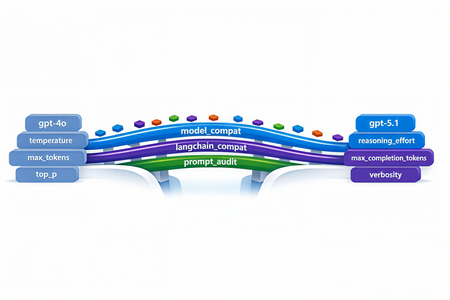
The first request your service sends after swapping gpt-4o for gpt-5.1 in production will return HTTP 400. Not in two weeks. On the first call. And the parameter the error points to isn't one you set anywhere in your code - it's bound onto the request by a LangChain helper you've used for two years. This post walks through every breaking change between the GPT-4 and GPT-5 families on Azure OpenAI in Microsoft Foundry, the integration cliffs nobody warns you about, and the small set of files you need so the same call sites work against both model families without branching. Who this is for: engineers maintaining an existing production codebase that calls Azure OpenAI / OpenAI - directly or through LangChain - and needs to onboard GPT-5.x while keeping the GPT-4 deployments alive during rollout. What you'll leave with: one copy-paste compatibility module, a tiny LangChain subclass, a prompt-audit harness, and a 10-step rollout checklist. 1. Why this migration is different Every previous Azure OpenAI bump - 3.5 → 4, 4 → 4o, 4o → 4o-mini - was additive. You changed engine="gpt-4o" and everything kept working. GPT-5.x is the first generation that is subtractive: parameters you used to send now return 400 Unsupported parameter. The wire protocol itself changed because GPT-5 is a reasoning model - it spends tokens thinking internally before it answers, so the parameters that controlled the old sampling pipeline (temperature, top_p, presence_penalty, frequency_penalty) no longer exist on the request schema. What this means for production code: A passing test suite against gpt-4o will fail on the first call against gpt-5.1 with HTTP 400. A passing test suite against gpt-5.1 will fail on every legacy gpt-4* deployment because the new reasoning controls (reasoning_effort, verbosity) are not recognised there. LangChain helpers that worked unmodified for two years (notably create_sql_query_chain) silently bind stop=[...] onto your LLM and trigger the same 400. Source-grep won't find the offending line because it lives inside the library. The good news: the divergence is mechanical. With one detection helper, one parameter-builder, and one tiny LangChain subclass you can run the same code against both families. 2. The breaking-changes matrix Concern GPT-4 / GPT-4o (legacy) GPT-5.x / o1 / o3 (reasoning) Output budget max_tokens max_completion_tokens (rejects max_tokens) temperature 0.0–1.0 Only the default (1) is accepted - omit it top_p Supported Rejected presence_penalty, frequency_penalty Supported Rejected logprobs, logit_bias Supported Rejected stop sequences Supported Rejected on most reasoning deployments reasoning_effort Rejected New: minimal | low | medium | high verbosity Rejected New: low | medium | high (sometimes via extra_body) System instruction role system developer recommended; system still works as alias Output token cost Output tokens only Output + reasoning tokens count against your cap Recommended API version 2024-12-01-preview or earlier 2025-03-01-preview or later Two consequences are easy to miss: max_completion_tokens is a shared budget. GPT-5.1 can burn 2–4× more tokens internally before emitting the first response token. A cap of 4096 that comfortably held a SQL query on GPT-4o now silently truncates the answer mid-token on GPT-5.1. Multiply your legacy budgets by ~2.5× and add a floor (e.g. 4096) before sending. The stop parameter is the silent killer. Any helper that calls llm.bind(stop=[...]) - and there are several in langchain - will turn a working code path into a 400 the moment you swap deployments. 3. Compatibility strategy: detect, don't fork The temptation is to fork: one branch for GPT-4, one for GPT-5. Don't. The right unit of abstraction is one function that classifies the deployment into a family, and one function that builds a kwargs dict the SDK will accept for that family. Every call site - SDK, LangChain, raw HTTP - drains into the same kwargs builder. When you eventually retire GPT-4 you delete the legacy branch in one file, not in fifty. 4. The industry-agnostic compatibility module Drop the following file into your project. It has no Azure / OpenAI / LangChain imports at module load time, so the same file works from a web service, a serverless function, a notebook, or a CLI tool. 4.1 model_compat.py """ Model compatibility helper for GPT-5.x with GPT-4 backward compatibility. This module centralises the parameter translation needed to talk to the "reasoning" generation of OpenAI / Azure OpenAI models (GPT-5, GPT-5.1, o1, o3, o4) while keeping older deployments (gpt-4, gpt-4o, gpt-4-32k, gpt-3.5-turbo, etc.) working unchanged. """ from __future__ import annotations import logging import os import re from typing import Any, Dict, Iterable, Mapping, Optional # --------------------------------------------------------------------------- # Family detection # --------------------------------------------------------------------------- _REASONING_PATTERNS = ( # gpt-5, gpt5, gpt-5.1, gpt_5, GPT 5, gpt5mini-prod-eu, ... re.compile(r"(?i)(^|[^a-z0-9])gpt[-_ ]?5(\.\d+)?([^0-9]|$)"), # o1, o3, o4, o1-mini, o3-preview ... re.compile(r"(?i)(^|[^a-z0-9])o[134](-mini|-preview)?([^a-z0-9]|$)"), ) _LEGACY_PATTERNS = ( re.compile(r"(?i)gpt[-_ ]?4o"), re.compile(r"(?i)gpt[-_ ]?4(?!\d)"), re.compile(r"(?i)gpt[-_ ]?4[-_ ]?32k"), re.compile(r"(?i)gpt[-_ ]?3\.?5"), re.compile(r"(?i)gpt[-_ ]?35"), ) def get_model_family(model_or_deployment: Optional[str]) -> str: """Return ``"reasoning"`` for GPT-5.x / o-series, ``"legacy"`` otherwise. Honours an ``OPENAI_MODEL_FAMILY`` env-var override for deployments whose user-defined name does not embed the model family (e.g. ``prod-default``). """ override = (os.getenv("OPENAI_MODEL_FAMILY") or "").strip().lower() if override in {"reasoning", "gpt-5", "gpt5", "gpt-5.1", "o-series", "o1", "o3"}: return "reasoning" if override in {"legacy", "gpt-4", "gpt4", "gpt-3.5", "gpt35", "chat"}: return "legacy" name = (model_or_deployment or "").strip() if not name: # Fail closed: when we don't know, assume legacy so old code keeps # working. Misclassifying a reasoning deployment as legacy fails fast # with a clear "Unsupported parameter" 400; the reverse silently # drops parameters the caller expected. return "legacy" for pat in _REASONING_PATTERNS: if pat.search(name): return "reasoning" for pat in _LEGACY_PATTERNS: if pat.search(name): return "legacy" return "legacy" def is_reasoning_model(model_or_deployment: Optional[str]) -> bool: return get_model_family(model_or_deployment) == "reasoning" # --------------------------------------------------------------------------- # Reasoning controls # --------------------------------------------------------------------------- _VALID_REASONING_EFFORT = {"minimal", "low", "medium", "high"} _VALID_VERBOSITY = {"low", "medium", "high"} def _coerce_choice(raw: Optional[str], valid: Iterable[str]) -> Optional[str]: if raw is None: return None value = str(raw).strip().lower() if not value: return None if value not in set(valid): logging.warning( "Ignoring unsupported value '%s'; expected one of %s", raw, sorted(valid), ) return None return value def get_reasoning_effort(override: Optional[str] = None) -> Optional[str]: return _coerce_choice( override if override is not None else os.getenv("OPENAI_REASONING_EFFORT"), _VALID_REASONING_EFFORT, ) def get_verbosity(override: Optional[str] = None) -> Optional[str]: return _coerce_choice( override if override is not None else os.getenv("OPENAI_VERBOSITY"), _VALID_VERBOSITY, ) # --------------------------------------------------------------------------- # max_completion_tokens scaling # --------------------------------------------------------------------------- def _reasoning_token_scale() -> float: """Multiplier applied to legacy ``max_tokens`` when targeting a reasoning model.""" try: scale = float(os.getenv("OPENAI_REASONING_TOKEN_SCALE", "2.5")) except (TypeError, ValueError): scale = 2.5 return scale if scale > 0 else 1.0 def _reasoning_token_floor() -> int: try: floor = int(os.getenv("OPENAI_REASONING_TOKEN_FLOOR", "4096")) except (TypeError, ValueError): floor = 4096 return floor if floor > 0 else 4096 def scale_max_tokens_for_reasoning(max_tokens: Optional[int]) -> Optional[int]: """Scale a legacy ``max_tokens`` budget up for reasoning models. ``None`` and ``-1`` ("no explicit cap") are passed through. """ if max_tokens is None: return None if max_tokens == -1: return -1 return max(int(round(max_tokens * _reasoning_token_scale())), _reasoning_token_floor()) # --------------------------------------------------------------------------- # Kwargs builders # --------------------------------------------------------------------------- _SAMPLING_KEYS = ("temperature", "top_p", "presence_penalty", "frequency_penalty") def _drop_none(mapping: Mapping[str, Any]) -> Dict[str, Any]: return {k: v for k, v in mapping.items() if v is not None} def build_openai_chat_kwargs( model: str, *, max_tokens: Optional[int] = None, temperature: Optional[float] = None, top_p: Optional[float] = None, presence_penalty: Optional[float] = None, frequency_penalty: Optional[float] = None, reasoning_effort: Optional[str] = None, verbosity: Optional[str] = None, extra: Optional[Mapping[str, Any]] = None, ) -> Dict[str, Any]: """Build kwargs for ``openai.OpenAI / AzureOpenAI .chat.completions.create``. Splat the result directly: ``client.chat.completions.create(**kwargs)``. Unsupported parameters are silently omitted for reasoning models; legacy deployments retain the historical behaviour. """ family = get_model_family(model) kwargs: Dict[str, Any] = {"model": model} # ---- output budget ---- if max_tokens is not None and max_tokens != -1: if family == "reasoning": kwargs["max_completion_tokens"] = scale_max_tokens_for_reasoning(int(max_tokens)) else: kwargs["max_tokens"] = int(max_tokens) # ---- sampling ---- if family == "legacy": kwargs.update(_drop_none({ "temperature": temperature, "top_p": top_p, "presence_penalty": presence_penalty, "frequency_penalty": frequency_penalty, })) else: for key, value in ( ("temperature", temperature), ("top_p", top_p), ("presence_penalty", presence_penalty), ("frequency_penalty", frequency_penalty), ): if value is not None: logging.debug( "Dropping unsupported parameter '%s' for reasoning model '%s'", key, model, ) # ---- reasoning controls ---- if family == "reasoning": effort = get_reasoning_effort(reasoning_effort) if effort is not None: kwargs["reasoning_effort"] = effort verb = get_verbosity(verbosity) if verb is not None: # ``verbosity`` is not a top-level kwarg in openai-python <= 1.65.x; # route it via ``extra_body`` so it lands in the JSON without a # TypeError from the SDK. kwargs.setdefault("extra_body", {})["verbosity"] = verb # ---- caller-supplied extras (already filtered) ---- if extra: for key, value in extra.items(): if value is None: continue if family == "reasoning" and key in _SAMPLING_KEYS: continue kwargs[key] = value return kwargs def build_langchain_chat_kwargs( deployment_name: str, *, max_tokens: Optional[int] = None, temperature: Optional[float] = None, top_p: Optional[float] = None, reasoning_effort: Optional[str] = None, verbosity: Optional[str] = None, ) -> Dict[str, Any]: """Build kwargs for ``langchain_openai.AzureChatOpenAI`` / ``ChatOpenAI``. Older ``langchain-openai`` releases don't expose ``max_completion_tokens`` as a top-level kwarg, so we forward it through ``model_kwargs`` (which langchain passes straight to the SDK). """ family = get_model_family(deployment_name) kwargs: Dict[str, Any] = {} model_kwargs: Dict[str, Any] = {} if max_tokens is not None and max_tokens != -1: if family == "reasoning": model_kwargs["max_completion_tokens"] = scale_max_tokens_for_reasoning(int(max_tokens)) else: kwargs["max_tokens"] = int(max_tokens) if family == "reasoning": effort = get_reasoning_effort(reasoning_effort) if effort is not None: model_kwargs["reasoning_effort"] = effort verb = get_verbosity(verbosity) if verb is not None: model_kwargs.setdefault("extra_body", {})["verbosity"] = verb else: if temperature is not None: kwargs["temperature"] = temperature if top_p is not None: kwargs["top_p"] = top_p if model_kwargs: kwargs["model_kwargs"] = model_kwargs return kwargs def get_system_role(model_or_deployment: Optional[str] = None) -> str: """Return ``"developer"`` for reasoning models when opted in, ``"system"`` otherwise. Defaulting to ``"system"`` preserves compatibility with LangChain prompt templates and SDK helpers that don't yet recognise the new role. Opt in with ``OPENAI_USE_DEVELOPER_ROLE=1`` once your stack supports it. """ if not is_reasoning_model(model_or_deployment): return "system" raw = os.getenv("OPENAI_USE_DEVELOPER_ROLE", "") return "developer" if raw.strip().lower() in {"1", "true", "yes", "on"} else "system" 4.2 What this buys you Every direct-SDK call collapses to two lines: from openai import AzureOpenAI from model_compat import build_openai_chat_kwargs client = AzureOpenAI( azure_endpoint=os.environ["AZURE_OPENAI_ENDPOINT"], api_version=os.environ["OPENAI_API_VERSION"], api_key=os.environ["AZURE_OPENAI_API_KEY"], ) kwargs = build_openai_chat_kwargs( model=os.environ["OPENAI_ENGINE"], max_tokens=4096, # automatically becomes max_completion_tokens for GPT-5 temperature=0.2, # automatically dropped for GPT-5 reasoning_effort="low", # automatically dropped for GPT-4 ) response = client.chat.completions.create( messages=[ {"role": "system", "content": "You are a helpful assistant."}, {"role": "user", "content": user_input}, ], **kwargs, ) The same call site now correctly targets gpt-5.1, gpt-4o, gpt-4-32k, o3-mini, or any future deployment whose name embeds the family - and you can override with the OPENAI_MODEL_FAMILY env var when the deployment alias is opaque. 4.3 Raw HTTP call sites Some legacy code paths bypass the SDK and POST JSON directly. The same builder works there: import json import requests from model_compat import build_openai_chat_kwargs, get_system_role deployment = os.environ["OPENAI_ENGINE"] api_version = os.environ["OPENAI_API_VERSION"] endpoint = ( f"{os.environ['AZURE_OPENAI_ENDPOINT']}/openai/deployments/{deployment}" f"/chat/completions?api-version={api_version}" ) payload = { "messages": [ {"role": get_system_role(deployment), "content": system_prompt}, {"role": "user", "content": user_prompt}, ], } # Splat the kwargs into the payload, then strip the SDK-only ``model`` key. payload.update(build_openai_chat_kwargs( model=deployment, max_tokens=800, temperature=0.7, top_p=0.95, reasoning_effort="low", )) payload.pop("model", None) # ``model`` is encoded in the URL for Azure payload.pop("extra_body", None) # already on the payload root resp = requests.post( endpoint, headers={"Content-Type": "application/json", "api-key": api_key}, data=json.dumps(payload), timeout=60, ) resp.raise_for_status() 5. LangChain: the hidden stop parameter langchain.chains.sql_database.query.create_sql_query_chain calls llm.bind(stop=["\nSQLResult:"]) internally to terminate the model's output before the example block in its prompt. That stop value is forwarded to the SDK on every invocation. GPT-5.1 rejects it: openai.BadRequestError: Error code: 400 - {'error': { 'message': "Unsupported parameter: 'stop' is not supported with this model.", 'type': 'invalid_request_error', 'param': 'stop', }} You can't reach into the chain to disable it. The clean fix is a thin AzureChatOpenAI subclass that drops stop for reasoning models only: 5.1 langchain_compat.py """LangChain-side compatibility shim for reasoning-class deployments.""" from __future__ import annotations from typing import Any, List, Optional from langchain_core.callbacks.manager import ( AsyncCallbackManagerForLLMRun, CallbackManagerForLLMRun, ) from langchain_core.messages import BaseMessage from langchain_core.outputs import ChatResult from langchain_openai import AzureChatOpenAI # use ChatOpenAI for non-Azure from model_compat import is_reasoning_model class ReasoningSafeAzureChatOpenAI(AzureChatOpenAI): """``AzureChatOpenAI`` variant that hides parameters reasoning models reject. Reasoning models (GPT-5.x, o1/o3/o4) return HTTP 400 when a request payload carries ``stop``. LangChain's SQL helpers unconditionally bind it, so the unsupported parameter reaches the SDK regardless of how the caller configured the LLM. This subclass strips ``stop`` for reasoning deployments while forwarding it unchanged for legacy GPT-4 / GPT-3.5 deployments - the behaviour is byte-identical to upstream LangChain for those models. """ def _deployment_id(self) -> str: # ``langchain-openai`` >= 0.2 exposes ``azure_deployment``; older # releases use ``deployment_name``. Either may be set by the caller. return ( getattr(self, "azure_deployment", None) or getattr(self, "deployment_name", None) or "" ) def _generate( self, messages: List[BaseMessage], stop: Optional[List[str]] = None, run_manager: Optional[CallbackManagerForLLMRun] = None, **kwargs: Any, ) -> ChatResult: if is_reasoning_model(self._deployment_id()): stop = None return super()._generate(messages, stop=stop, run_manager=run_manager, **kwargs) async def _agenerate( self, messages: List[BaseMessage], stop: Optional[List[str]] = None, run_manager: Optional[AsyncCallbackManagerForLLMRun] = None, **kwargs: Any, ) -> ChatResult: if is_reasoning_model(self._deployment_id()): stop = None return await super()._agenerate(messages, stop=stop, run_manager=run_manager, **kwargs) Use it as a drop-in replacement: from langchain_compat import ReasoningSafeAzureChatOpenAI from model_compat import build_langchain_chat_kwargs llm_kwargs = build_langchain_chat_kwargs( deployment_name=os.environ["OPENAI_ENGINE"], max_tokens=6000, temperature=0, reasoning_effort="low", ) llm = ReasoningSafeAzureChatOpenAI( azure_endpoint=os.environ["AZURE_OPENAI_ENDPOINT"], azure_deployment=os.environ["OPENAI_ENGINE"], openai_api_version=os.environ["OPENAI_API_VERSION"], api_key=os.environ["AZURE_OPENAI_API_KEY"], **llm_kwargs, ) That single substitution makes create_sql_query_chain, SQLDatabaseChain, and the ChatOpenAI-based RAG helpers all work against GPT-5.1 without any other changes. 6. The second LangChain gotcha: prose where SQL should be create_sql_query_chain is documented to return the literal string "I don't know" (or a similar fallback) when the LLM cannot form a query. The default code path takes the chain output and runs it against the database: sql = chain.invoke({...}) # -> "I don't know" result = db.run(sql) # -> sends "I don't know" to pyodbc The database faithfully returns: [42000] Unclosed quotation mark after the character string 't know'. (105) Which surfaces to the end user as a misleading "SQL syntax error". The mitigation is a one-line guard that validates the chain output looks like SQL before execution: import re _SQL_START_RE = re.compile( r"^\s*(?:WITH|SELECT|INSERT|UPDATE|DELETE|CREATE|DROP|ALTER|MERGE|EXEC|EXECUTE|TRUNCATE)\b", re.IGNORECASE, ) def looks_like_sql(text: str) -> bool: """True only if ``text`` starts with a recognised SQL DML/DDL keyword.""" if not text or not text.strip(): return False return bool(_SQL_START_RE.match(text)) sql = extract_sql_query(chain.invoke({...})) if not looks_like_sql(sql): logging.warning("SQL chain returned a non-SQL response: %r", sql[:200]) return ( "I couldn't form a SQL query for that question. " "Please rephrase or add more context." ) result = db.run(sql) This isn't specific to GPT-5.1 - it's good hygiene for any LLM that backs a SQL agent - but the failure mode becomes much more frequent on reasoning models because they're better at refusing. 7. Cleaning Markdown out of create_sql_query_chain output Reasoning models like to wrap their answer in a markdown fence and append a "Note:" or "Explanation:" paragraph. None of that survives db.run(). A defensive extract_sql_query handles all the variants: import re def extract_sql_query(text: str) -> str: """Strip markdown fences, leading prose, and trailing explanations.""" # 1) Prefer SQL inside a markdown code fence. m = re.search(r"```(?:sql|SQL|Sql)?\s*\n(.*?)\n```", text, re.DOTALL) if m: text = m.group(1) text = text.strip() # 2) Drop any prose *before* the SQL by jumping to the first SQL keyword. m = re.search( r"(?im)^\s*(WITH|SELECT|INSERT|UPDATE|DELETE|CREATE|DROP|ALTER|MERGE|EXEC|EXECUTE|TRUNCATE)\b", text, ) if m: text = text[m.start(1):] # 3) Cut at the first "Explanation:" / "Note:" / "This query..." marker. m = re.compile( r"(?im)^\s*(?:Explanation|Note|Notes|Here(?:'|\u2019)?s|" r"This\s+(?:query|SQL|statement|returns|counts|selects|will|gets|finds)|" r"The\s+(?:query|SQL|above|result|statement)|" r"Result|Results|Description|Output|Answer)\b[^\n]*" ).search(text) if m: text = text[: m.start()].rstrip() # 4) Drop any trailing fence that survived step 1. if text.endswith("```"): text = text[:-3].rstrip() return text.strip() 8. Package versioning The bare minimum your requirements.txt / environment.yml needs: Package Last GPT-4-only version First GPT-5.x-safe version Notes openai 1.55.x 1.65.x (recommend 1.65.4+) Earlier versions reject max_completion_tokens and reasoning_effort as unknown kwargs langchain-openai 0.2.14 0.3.7+ 0.3.x line exposes azure_deployment and forwards model_kwargs correctly to the new SDK langchain 0.3.14 0.3.21+ Pin together with langchain-openai and langchain-core langchain-core 0.3.29 0.3.49+ Update in lockstep with the others langchain-community 0.3.14 0.3.20+ Mostly transitive; needed for SQLDatabase helpers tiktoken 0.7.x 0.8.0+ Encodings for GPT-5.1 ship in 0.8.0; older versions fall back to cl100k_base for unknown models tokencost (optional) 0.1.16 0.1.20+ Update for GPT-5.x price tables Azure OpenAI API version 2024-12-01-preview 2025-03-01-preview First version that ships reasoning_effort and the GPT-5.x routing Pin exact versions after testing - LangChain has a habit of moving public re-exports between minor releases. requirements.txt snippet: openai==1.65.4 langchain==0.3.21 langchain-core==0.3.49 langchain-openai==0.3.7 langchain-community==0.3.20 tiktoken==0.8.0 9. New GPT-5.x knobs worth using Once you're on a reasoning deployment, two new parameters become available. Both are optional, both default to a sensible value, and both are stripped by the kwargs builder above when the target is a legacy model. reasoning_effort minimal - one-shot lookups, classification. low - deterministic structured output (SQL, JSON-schema extraction, rule-based rewrites). Lowest cost overhead. medium (default) - RAG, summarisation, normal Q&A. high - multi-step analytical reasoning, complex code synthesis. A useful pattern is to choose the level by task profile rather than at the call site: TASK_EFFORT = { "sql": "low", "structured_extract": "low", "kg_cleaning": "low", "rag_qa": "medium", "vision": "medium", "analytical": "high", } verbosity low | medium | high. Controls the length of the response, not its substance. Useful for grounding chat UIs where you want crisp answers - set low for /answer endpoints and high for "explain like a senior engineer" panels. Note: in openai-python <= 1.65.x, verbosity is not yet a top-level keyword argument; pass it through extra_body (the builder above already does this). developer role GPT-5.x prefers {"role": "developer", "content": "..."} for instructions that previously used system. The change is non-breaking on the Azure side - system is still accepted as an alias - but some downstream LangChain prompt templates predate the role and will reject it on construction. Treat developer as opt-in (OPENAI_USE_DEVELOPER_ROLE=1) for now; flip the default after your prompt-template version is known good. 10. Auditing your existing prompts When the wire-level migration is done your service will talk to GPT-5.x - but that doesn't mean it says the right thing. Reasoning models read prompts differently in ways that won't show up as 400s: They take instructions more literally. A prompt that worked when GPT-4o rounded the corners may surface every edge case verbatim. They refuse more often. "I don't know" / "I cannot help with that" are more frequent because reasoning models are less willing to confabulate. They ignore "be concise" / "be terse". Use the new verbosity knob. Step-by-step / chain-of-thought instructions become redundant. The model already reasons internally; extra "think before you answer" prose competes with its own chain of thought and often hurts output quality. Negative-only instructions can backfire. "Never output X" prompts occasionally cause refusals where you'd rather have a workaround. 10.1 Build a prompt regression harness Capture every system+user prompt your service emits in a CSV, then replay each one against both deployments and diff the output. The diff is the single most useful artefact you can produce before the cutover: # prompt_audit.py - minimal differential tester import csv from openai import AzureOpenAI from model_compat import build_openai_chat_kwargs LEGACY = "gpt-4o" REASONING = "gpt-5.1" client = AzureOpenAI( azure_endpoint=os.environ["AZURE_OPENAI_ENDPOINT"], api_version=os.environ["OPENAI_API_VERSION"], api_key=os.environ["AZURE_OPENAI_API_KEY"], ) def run(model: str, system: str, user: str) -> str: kw = build_openai_chat_kwargs( model=model, max_tokens=4096, temperature=0.2, # auto-dropped for reasoning reasoning_effort="medium", # auto-dropped for legacy ) resp = client.chat.completions.create( messages=[ {"role": "system", "content": system}, {"role": "user", "content": user}, ], **kw, ) return resp.choices[0].message.content or "" with open("prompts.csv") as f_in, open("diff.tsv", "w", newline="") as f_out: writer = csv.writer(f_out, delimiter="\t") writer.writerow(["id", "legacy_first80", "reasoning_first80", "len_legacy", "len_new", "identical"]) for row in csv.DictReader(f_in): legacy = run(LEGACY, row["system"], row["user"]) new = run(REASONING, row["system"], row["user"]) writer.writerow([ row["id"], legacy[:80].replace("\n", " "), new[:80].replace("\n", " "), len(legacy), len(new), legacy.strip() == new.strip(), ]) Capture three signals per prompt - they're enough to triage 95% of drift: Format compliance. Did the output still parse as the expected JSON / YAML / Markdown / SQL? Run your existing downstream parser on both columns. Token cost delta. Reasoning models tend to be more verbose by default. Anything beyond +20% is a candidate for the verbosity="low" knob. Semantic drift. Spot-check 5–10% of rows by hand. You're looking for changes in intent, not changes in wording. 10.2 Common rewrites to make prompts model-agnostic The goal isn't to write two prompts. It's to write one prompt that produces correct output on both families by moving constraints out of the natural-language body and into the request shape. 10.2a. Format constraints belong in response_format, not the prose Don't: Output ONLY a JSON object with keys `name` and `score`. Do not include any explanation. Do not wrap in markdown. Do not say anything else. Do: resp = client.chat.completions.create( messages=[...], response_format={ "type": "json_schema", "json_schema": { "name": "scored_entity", "schema": { "type": "object", "properties": { "name": {"type": "string"}, "score": {"type": "number"}, }, "required": ["name", "score"], "additionalProperties": False, }, "strict": True, }, }, **kw, ) response_format is honoured by both gpt-4o (>= 2024-08-06) and the entire GPT-5.x line. The prompt loses three lines of brittle natural-language constraints and you get schema-validated output for free. 10.2b. Replace "think step by step" with reasoning_effort Don't: Let's think step by step. First identify the entity. Then find the category. Then compute the score. Then format the answer. Do: delete the prose and pass reasoning_effort="medium" (or "high") for reasoning deployments. The kwargs builder drops the parameter automatically for GPT-4 models, so the same prompt now produces: step-by-step reasoning internally on GPT-5.x (lower output token cost), the same final answer on GPT-4o that the verbose prompt used to elicit. 10.2c. Replace temperature-based variety with n sampling If your code relied on temperature=0.9 to get diverse completions, GPT-5.x will return roughly the same answer every time. Generate variety the explicit way: resp = client.chat.completions.create(messages=[...], n=5, **kw) candidates = [c.message.content for c in resp.choices] Or call the model N times with slightly different framings. Both patterns work against either family with no further code changes. 10.2d. Move procedural instructions to the developer role For multi-step workflows, the new developer role gives clearer separation between what the system enforces and what the user is asking: messages = [ {"role": get_system_role(deployment), "content": role_card_for_assistant}, {"role": "developer", "content": procedural_instructions}, {"role": "user", "content": user_question}, ] get_system_role returns "system" for legacy models and "developer" for reasoning models opted in via OPENAI_USE_DEVELOPER_ROLE=1. Once your LangChain templates support the new role you can flip the default. 10.2e. Add a literal-execution header for strict formats For prompts where the exact output shape matters (table generation, SQL with a fixed column order, structured incident reports), prepend an explicit literal-execution header so reasoning models don't drift into "helpful improvements": LITERAL_EXECUTION_HEADER = ( "Execution mode: follow the instructions below literally and in order. " "Do not infer intent, skip, reorder, merge, or add steps. Honour the " "exact formatting, tone, and verbosity specified. If a step is " "ambiguous, respond with the literal interpretation and flag the " "ambiguity instead of guessing." ) def apply_literal_execution(prompt: str) -> str: if LITERAL_EXECUTION_HEADER in prompt: return prompt return f"{LITERAL_EXECUTION_HEADER}\n\n{prompt}" It's a no-op on GPT-4o (the older models already follow instructions literally enough) and a meaningful guard rail on GPT-5.1. Wire it behind an OPENAI_LITERAL_EXECUTION flag so you can disable it without redeploying. 10.3 A prompt-shaped checklist Run every prompt your service emits past these questions: Question Action Does it specify output format in prose? Move to response_format (10.2a) Does it include "think step by step"? Remove; set reasoning_effort (10.2b) Does it set tone constraints ("be concise")? Use verbosity Does it use negative-only instructions ("never X")? Add positive alternative ("do Y instead") Does it embed example outputs with values that would change? Replace concrete values with placeholder tokens (<VALUE>) Does it rely on temperature > 0 for variety? Use n=K sampling (10.2c) Is the system prompt > 2k tokens? Split into role-card (system) + procedure (developer) Does output ordering matter? Add the literal-execution header (10.2e) 10.4 Score before you ship Don't approve a rewritten prompt by eyeballing one example. Score it: Format compliance rate. Percentage of N=50 outputs that pass your existing downstream parser / JSON schema validation. Token cost delta. Cap regression at +20% versus the legacy baseline. Beyond that, dial verbosity="low" or tighten the prompt. Latency p50 / p95 delta. Reasoning models add tail latency. If your SLA is tight, set reasoning_effort="low" for the path or move it to a background queue. A prompt that regresses on any of those by more than your tolerance window ships behind a feature flag with rollback wired in. 11. Testing strategy Two test layers catch >90% of regressions: Family-classification tests import pytest from model_compat import get_model_family, build_openai_chat_kwargs @pytest.mark.parametrize("name,expected", [ ("gpt-5.1", "reasoning"), ("gpt5", "reasoning"), ("gpt-5-prod-eu", "reasoning"), ("o3-mini", "reasoning"), ("o1", "reasoning"), ("gpt-4o", "legacy"), ("gpt-4", "legacy"), ("gpt-4-32k", "legacy"), ("gpt-35-turbo", "legacy"), ("", "legacy"), # unknown -> fail closed to legacy (None, "legacy"), ]) def test_family(name, expected): assert get_model_family(name) == expected def test_kwargs_for_reasoning_drops_temperature(): kw = build_openai_chat_kwargs( model="gpt-5.1", max_tokens=1000, temperature=0.2, top_p=0.9, reasoning_effort="low", ) assert "temperature" not in kw assert "top_p" not in kw assert kw["max_completion_tokens"] >= 4096 # floor applied assert kw["reasoning_effort"] == "low" def test_kwargs_for_legacy_keeps_temperature(): kw = build_openai_chat_kwargs( model="gpt-4o", max_tokens=1000, temperature=0.2, top_p=0.9, ) assert kw["max_tokens"] == 1000 assert kw["temperature"] == 0.2 assert kw["top_p"] == 0.9 assert "reasoning_effort" not in kw Wire-level smoke tests For each LLM call site you maintain, write a single integration test that exercises the chain against a real (or mocked) endpoint and asserts: HTTP 200, non-empty content, finish_reason != "length" (so you catch silent truncation), (optional) classifier-style assertions against a golden output. Run those tests once against the legacy deployment and once against the new one - same test code, two OPENAI_ENGINE values. 12. Things that don't change It's easy to over-correct. Several pieces of plumbing keep working without modification: Authentication. AAD token providers, managed identity, and API keys are unchanged. Embeddings. text-embedding-3-small, text-embedding-3-large, and text-embedding-ada-002 are not part of the reasoning generation; the embeddings call shape is identical. Function calling / tool use. Same JSON schema, same response shape. Streaming. SSE format is unchanged. Token counters. tiktoken still works, but bump to 0.8.0+ so the new model name resolves to the right encoding instead of silently falling back to cl100k_base. 13. Next steps If you only do four things from this post, do these - in order: Deploy a GPT-5.1 model side-by-side with your current GPT-4 deployment in Microsoft Foundry. Keep the GPT-4 deployment live; you'll need both for the parallel-run period. Drop model_compat.py and langchain_compat.py into your project (Sections 4 and 5). Replace every AzureChatOpenAI(...) construction with ReasoningSafeAzureChatOpenAI and route every kwargs literal through the builders. Run the prompt-audit harness (Section 10.1) against your top 50 most frequently invoked prompts. Triage the diff with the checklist in 10.3. Roll out behind a percentage-based flag. Start at 5% of traffic for 24 hours, compare quality and cost telemetry against the GPT-4o baseline, then ramp. Reference material Azure OpenAI in Microsoft Foundry - model overview Azure OpenAI model retirements and deprecations Reasoning models in Azure OpenAI Structured Outputs in Azure OpenAI openai-python SDK changelog langchain-openai release notes Talk to us Open an issue on the Microsoft Foundry GitHub samples repository if you hit a gap this post didn't cover. Share your migration story or numbers in the comments below - field data is the fastest way to make this guide better for the next team. If you operate a regulated workload (finance, health, public sector) and need help sequencing the rollout with your model retirement deadlines, reach out to your Microsoft account team or a Microsoft Foundry partner. GPT-5.x is the first major model bump in two years that requires code changes - but the changes collapse into one small compatibility module and a one-line LangChain subclass. With those in place your code is forwards-compatible (works on reasoning models today) and backwards- compatible (still works on every GPT-4 deployment you haven't migrated yet). The investment pays a recurring dividend: when the next reasoning bump ships, the only file that needs updating is model_compat.py. Appendix A - Minimal .env template # Endpoint and auth (unchanged between families) AZURE_OPENAI_ENDPOINT=https://<resource>.openai.azure.com AZURE_OPENAI_API_KEY=<key> # The deployment name decides the family. The classifier reads it. OPENAI_ENGINE=gpt-5.1 OPENAI_API_VERSION=2025-03-01-preview # Optional override for opaque deployment names # OPENAI_MODEL_FAMILY=reasoning # or "legacy" # Optional reasoning controls (ignored for legacy deployments) OPENAI_REASONING_EFFORT=medium OPENAI_VERBOSITY=medium OPENAI_REASONING_TOKEN_SCALE=2.5 OPENAI_REASONING_TOKEN_FLOOR=4096 # Flip when your LangChain templates support it # OPENAI_USE_DEVELOPER_ROLE=1 Appendix B - One-liner sanity checks # Does a deployment name classify correctly? python -c "from model_compat import get_model_family; print(get_model_family('gpt-5.1'))" # -> reasoning # Does the LangChain LLM strip ``stop`` when the deployment is GPT-5.1? python -c " from langchain_compat import ReasoningSafeAzureChatOpenAI import inspect; print(inspect.getsource(ReasoningSafeAzureChatOpenAI._generate)) " Companion repository: drop model_compat.py and langchain_compat.py next to each other in your utils/ package. They are zero-dependency on import, so you can vendor them into any service - web, function, batch job - without dragging Azure SDK or LangChain into module-load.1.5KViews2likes1CommentFoundry IQ: Improve recall by up to 54% with knowledge bases
Foundry IQ: Improve recall by up to 54% with knowledge bases. Foundry IQ (Azure AI Search) has improved its agentic retrieval engine resulting in better answer quality and improved token cost savings. We compared standalone retrieval tools to knowledge bases using the challenging BrowseComp-Plus benchmark and found: Replacing single-shot RAG with a knowledge base improves evidence recall by up to 46%. Combining a smaller agent model with agentic retrieval improves evidence recall by up to 54% while controlling costs and increasing agent responsiveness. In both cases, the amount of retrieval tool calls your agent makes is reduced, resulting in 34% token cost savings.4KViews4likes1CommentFoundry IQ: New governance and enterprise AI security capabilities
Enterprise AI isn’t just about better retrieval—it’s about secure access to business‑critical content. Discover how Foundry IQ (Azure AI Search) enables governance, compliance, and private connectivity across agentic retrieval workflows. We are introducing the following features: - Incremental SharePoint permissions sync for indexed document content, SharePoint Lists and ASPX pages. - Purview sensitivity labels in Foundry IQ knowledge bases - Purview auditing for elevated admin queries - Private connectivity support between for Foundry IQ and Foundry resources via NSP1.1KViews1like0CommentsWhat's New in Microsoft Foundry Labs – May 2026
Four new releases this month — a new benchmark for how agents interact, an experimental end-to-end agentic stack, a faster image model, and a first-party geospatial model. Last month we kicked off this series with a roundup of new Foundry Labs releases across speech, vision, and multimodal AI. This month, we're back with another update — read on to see learn what's new! SocialReasoning-Bench: measuring whether AI agents act in their user's best interest We are moving into a world where agents are interacting with other agents on behalf of their users, and thus, task completion is no longer a sufficient measure of usefulness. What matters is whether the agent advocates well for the person it represents. SocialReasoning-Bench, a new open-source benchmark from Microsoft Research AI Frontiers, measures exactly that. The benchmark currently supports two main scenarios — Calendar Coordination and Marketplace Negotiation — and scores them on two new metrics: Outcome Optimality (the share of available value the agent captures for its principal) and Due Diligence (the quality of the process used, scored against a deterministic reasonable-agent policy). Together they define an operational notion of duty of care. Learn more about SocialReasoning-Bench in Foundry Labs Try it on GitHub MagenticLite, Magentic Orchestrator & Fara 1.5: an end-to-end agentic stack Microsoft Research AI Frontiers also released a complete agentic stack: MagenticLite is the application layer — the next generation of Magentic-UI, with a redesigned chat-and-browser interface and a harness rebuilt for small models. It works across both your browser and your local file system in a single workflow, with browser sessions and code execution sandboxed by Quicksand, the project's open-source QEMU runtime. Transparency is baked in: you see what the agent is reasoning about, you can take direct control at any moment, and critical actions pause for explicit approval. MagenticBrain is the orchestrator of the stack — an orchestration model fine-tuned on Qwen 3 8B that plans, codes, and delegates. Critically, it was trained end-to-end inside the MagenticLite harness with the same tool schemas it sees at inference, eliminating the gap between training and execution. Fara1.5 is the next generation of Microsoft's computer-use model family — three models (4B, 9B, 27B) on Qwen 3.5, with the 9B as the recommended flagship. Fara1.5 sets a new state of the art among small computer-use models on the Online‑Mind2Web benchmark, nearly doubling the performance of the previously released Fara‑7B, and the 27B variant records 90+% on the same benchmark 1 . Together, they represent an open-source, end-to-end agentic stack that work together, so developers can build, plan, and run agents on infrastructure they control. Learn more about MagenticLite on Foundry Labs Try it on GitHub MAI-Image-2-Efficient: high-quality image generation at speed and scale MAI-Image-2-Efficient — Image‑2e for short — is Microsoft's latest text-to-image model, built on the same architecture as MAI-Image-2 (which debuted at #3 on the Arena.ai leaderboard for image model families) but engineered for the production workloads where every millisecond and every GPU hour matters. When normalized by latency and GPU usage, Image‑2e is up to 22% faster and 4x more efficient than MAI-Image-2 — and outpaces leading text-to-image models by 40% on average 1 . In short, it delivers more output for less compute, giving teams the headroom to iterate faster without blowing through their GPU budget. That efficiency unlocks new categories of work. E-commerce platforms, media companies, and marketing teams generating thousands of images per day for targeted ads, concept art, and mood boards translate it directly into larger batches at lower GPU cost. Chatbots, creative copilots, and AI-powered design tools translate it into latency low enough for real-time interaction. The model also has a distinct visual signature — sharp, defined lines that fit illustration, animation, and attention-grabbing photoreal imagery. Learn more about MAI-Image-2-Efficient in Foundry Labs Try it in Microsoft Foundry EO/OS Object Detection: production-grade earth observation Object detection on satellite and aerial imagery has historically required months of in-house computer vision engineering — bespoke models, custom labels, fragile pipelines. EO/OS Object Detection collapses that into a managed first-party endpoint in Microsoft Foundry. Built by the team behind Planetary Computer, EO/OS Object Detection is a model that identifies and localizes objects in overhead imagery and returns bounding-box detections optimized for batch processing of large image archives. It's part of a new GeoAI category in Microsoft Foundry, opening Microsoft's geospatial intelligence stack to anyone building on satellite or aerial data. Defense and intelligence teams analyzing satellite feeds, infrastructure operators monitoring assets at scale, agriculture and energy companies tracking change across vast landscapes, and disaster response teams triaging post-event imagery can all swap a custom one-off detector for a managed endpoint that fits inside their existing Foundry stack. Put simply, the work shifts from "build the detector" to "use the detector" — and the detection signal lands faster, more consistently, and inside the same Microsoft platform their broader AI work already runs on. Learn more about EO/OS Object Detection in Foundry Labs Try EO/OS Object Detection in Microsoft Foundry What's Next Foundry Labs is where Microsoft's most ambitious AI research becomes accessible to builders and where the products you'll rely on tomorrow are taking shape today. There's plenty more in the pipeline. Explore more AI innovations on Foundry Labs Join the Microsoft Foundry Discord community to shape the future of AI together References As tested on April 13, 2026. Compared to MAI-Image-2 when normalized by latency and GPU usage. Throughput per GPU vs MAI-Image-2 on NVIDIA H100 at 1024×1024; measured with optimized batch sizes and matched latency targets. Results vary with batch size, concurrency, and latency constraints.1.1KViews2likes0Comments