updates
61 TopicsMigrating to GPT-5.x Without Breaking GPT-4: A Practical, Backward-Compatible Playbook
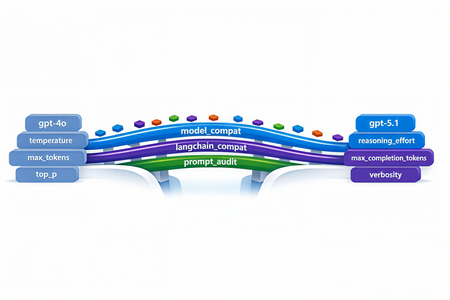
The first request your service sends after swapping gpt-4o for gpt-5.1 in production will return HTTP 400. Not in two weeks. On the first call. And the parameter the error points to isn't one you set anywhere in your code - it's bound onto the request by a LangChain helper you've used for two years. This post walks through every breaking change between the GPT-4 and GPT-5 families on Azure OpenAI in Microsoft Foundry, the integration cliffs nobody warns you about, and the small set of files you need so the same call sites work against both model families without branching. Who this is for: engineers maintaining an existing production codebase that calls Azure OpenAI / OpenAI - directly or through LangChain - and needs to onboard GPT-5.x while keeping the GPT-4 deployments alive during rollout. What you'll leave with: one copy-paste compatibility module, a tiny LangChain subclass, a prompt-audit harness, and a 10-step rollout checklist. 1. Why this migration is different Every previous Azure OpenAI bump - 3.5 → 4, 4 → 4o, 4o → 4o-mini - was additive. You changed engine="gpt-4o" and everything kept working. GPT-5.x is the first generation that is subtractive: parameters you used to send now return 400 Unsupported parameter. The wire protocol itself changed because GPT-5 is a reasoning model - it spends tokens thinking internally before it answers, so the parameters that controlled the old sampling pipeline (temperature, top_p, presence_penalty, frequency_penalty) no longer exist on the request schema. What this means for production code: A passing test suite against gpt-4o will fail on the first call against gpt-5.1 with HTTP 400. A passing test suite against gpt-5.1 will fail on every legacy gpt-4* deployment because the new reasoning controls (reasoning_effort, verbosity) are not recognised there. LangChain helpers that worked unmodified for two years (notably create_sql_query_chain) silently bind stop=[...] onto your LLM and trigger the same 400. Source-grep won't find the offending line because it lives inside the library. The good news: the divergence is mechanical. With one detection helper, one parameter-builder, and one tiny LangChain subclass you can run the same code against both families. 2. The breaking-changes matrix Concern GPT-4 / GPT-4o (legacy) GPT-5.x / o1 / o3 (reasoning) Output budget max_tokens max_completion_tokens (rejects max_tokens) temperature 0.0–1.0 Only the default (1) is accepted - omit it top_p Supported Rejected presence_penalty, frequency_penalty Supported Rejected logprobs, logit_bias Supported Rejected stop sequences Supported Rejected on most reasoning deployments reasoning_effort Rejected New: minimal | low | medium | high verbosity Rejected New: low | medium | high (sometimes via extra_body) System instruction role system developer recommended; system still works as alias Output token cost Output tokens only Output + reasoning tokens count against your cap Recommended API version 2024-12-01-preview or earlier 2025-03-01-preview or later Two consequences are easy to miss: max_completion_tokens is a shared budget. GPT-5.1 can burn 2–4× more tokens internally before emitting the first response token. A cap of 4096 that comfortably held a SQL query on GPT-4o now silently truncates the answer mid-token on GPT-5.1. Multiply your legacy budgets by ~2.5× and add a floor (e.g. 4096) before sending. The stop parameter is the silent killer. Any helper that calls llm.bind(stop=[...]) - and there are several in langchain - will turn a working code path into a 400 the moment you swap deployments. 3. Compatibility strategy: detect, don't fork The temptation is to fork: one branch for GPT-4, one for GPT-5. Don't. The right unit of abstraction is one function that classifies the deployment into a family, and one function that builds a kwargs dict the SDK will accept for that family. Every call site - SDK, LangChain, raw HTTP - drains into the same kwargs builder. When you eventually retire GPT-4 you delete the legacy branch in one file, not in fifty. 4. The industry-agnostic compatibility module Drop the following file into your project. It has no Azure / OpenAI / LangChain imports at module load time, so the same file works from a web service, a serverless function, a notebook, or a CLI tool. 4.1 model_compat.py """ Model compatibility helper for GPT-5.x with GPT-4 backward compatibility. This module centralises the parameter translation needed to talk to the "reasoning" generation of OpenAI / Azure OpenAI models (GPT-5, GPT-5.1, o1, o3, o4) while keeping older deployments (gpt-4, gpt-4o, gpt-4-32k, gpt-3.5-turbo, etc.) working unchanged. """ from __future__ import annotations import logging import os import re from typing import Any, Dict, Iterable, Mapping, Optional # --------------------------------------------------------------------------- # Family detection # --------------------------------------------------------------------------- _REASONING_PATTERNS = ( # gpt-5, gpt5, gpt-5.1, gpt_5, GPT 5, gpt5mini-prod-eu, ... re.compile(r"(?i)(^|[^a-z0-9])gpt[-_ ]?5(\.\d+)?([^0-9]|$)"), # o1, o3, o4, o1-mini, o3-preview ... re.compile(r"(?i)(^|[^a-z0-9])o[134](-mini|-preview)?([^a-z0-9]|$)"), ) _LEGACY_PATTERNS = ( re.compile(r"(?i)gpt[-_ ]?4o"), re.compile(r"(?i)gpt[-_ ]?4(?!\d)"), re.compile(r"(?i)gpt[-_ ]?4[-_ ]?32k"), re.compile(r"(?i)gpt[-_ ]?3\.?5"), re.compile(r"(?i)gpt[-_ ]?35"), ) def get_model_family(model_or_deployment: Optional[str]) -> str: """Return ``"reasoning"`` for GPT-5.x / o-series, ``"legacy"`` otherwise. Honours an ``OPENAI_MODEL_FAMILY`` env-var override for deployments whose user-defined name does not embed the model family (e.g. ``prod-default``). """ override = (os.getenv("OPENAI_MODEL_FAMILY") or "").strip().lower() if override in {"reasoning", "gpt-5", "gpt5", "gpt-5.1", "o-series", "o1", "o3"}: return "reasoning" if override in {"legacy", "gpt-4", "gpt4", "gpt-3.5", "gpt35", "chat"}: return "legacy" name = (model_or_deployment or "").strip() if not name: # Fail closed: when we don't know, assume legacy so old code keeps # working. Misclassifying a reasoning deployment as legacy fails fast # with a clear "Unsupported parameter" 400; the reverse silently # drops parameters the caller expected. return "legacy" for pat in _REASONING_PATTERNS: if pat.search(name): return "reasoning" for pat in _LEGACY_PATTERNS: if pat.search(name): return "legacy" return "legacy" def is_reasoning_model(model_or_deployment: Optional[str]) -> bool: return get_model_family(model_or_deployment) == "reasoning" # --------------------------------------------------------------------------- # Reasoning controls # --------------------------------------------------------------------------- _VALID_REASONING_EFFORT = {"minimal", "low", "medium", "high"} _VALID_VERBOSITY = {"low", "medium", "high"} def _coerce_choice(raw: Optional[str], valid: Iterable[str]) -> Optional[str]: if raw is None: return None value = str(raw).strip().lower() if not value: return None if value not in set(valid): logging.warning( "Ignoring unsupported value '%s'; expected one of %s", raw, sorted(valid), ) return None return value def get_reasoning_effort(override: Optional[str] = None) -> Optional[str]: return _coerce_choice( override if override is not None else os.getenv("OPENAI_REASONING_EFFORT"), _VALID_REASONING_EFFORT, ) def get_verbosity(override: Optional[str] = None) -> Optional[str]: return _coerce_choice( override if override is not None else os.getenv("OPENAI_VERBOSITY"), _VALID_VERBOSITY, ) # --------------------------------------------------------------------------- # max_completion_tokens scaling # --------------------------------------------------------------------------- def _reasoning_token_scale() -> float: """Multiplier applied to legacy ``max_tokens`` when targeting a reasoning model.""" try: scale = float(os.getenv("OPENAI_REASONING_TOKEN_SCALE", "2.5")) except (TypeError, ValueError): scale = 2.5 return scale if scale > 0 else 1.0 def _reasoning_token_floor() -> int: try: floor = int(os.getenv("OPENAI_REASONING_TOKEN_FLOOR", "4096")) except (TypeError, ValueError): floor = 4096 return floor if floor > 0 else 4096 def scale_max_tokens_for_reasoning(max_tokens: Optional[int]) -> Optional[int]: """Scale a legacy ``max_tokens`` budget up for reasoning models. ``None`` and ``-1`` ("no explicit cap") are passed through. """ if max_tokens is None: return None if max_tokens == -1: return -1 return max(int(round(max_tokens * _reasoning_token_scale())), _reasoning_token_floor()) # --------------------------------------------------------------------------- # Kwargs builders # --------------------------------------------------------------------------- _SAMPLING_KEYS = ("temperature", "top_p", "presence_penalty", "frequency_penalty") def _drop_none(mapping: Mapping[str, Any]) -> Dict[str, Any]: return {k: v for k, v in mapping.items() if v is not None} def build_openai_chat_kwargs( model: str, *, max_tokens: Optional[int] = None, temperature: Optional[float] = None, top_p: Optional[float] = None, presence_penalty: Optional[float] = None, frequency_penalty: Optional[float] = None, reasoning_effort: Optional[str] = None, verbosity: Optional[str] = None, extra: Optional[Mapping[str, Any]] = None, ) -> Dict[str, Any]: """Build kwargs for ``openai.OpenAI / AzureOpenAI .chat.completions.create``. Splat the result directly: ``client.chat.completions.create(**kwargs)``. Unsupported parameters are silently omitted for reasoning models; legacy deployments retain the historical behaviour. """ family = get_model_family(model) kwargs: Dict[str, Any] = {"model": model} # ---- output budget ---- if max_tokens is not None and max_tokens != -1: if family == "reasoning": kwargs["max_completion_tokens"] = scale_max_tokens_for_reasoning(int(max_tokens)) else: kwargs["max_tokens"] = int(max_tokens) # ---- sampling ---- if family == "legacy": kwargs.update(_drop_none({ "temperature": temperature, "top_p": top_p, "presence_penalty": presence_penalty, "frequency_penalty": frequency_penalty, })) else: for key, value in ( ("temperature", temperature), ("top_p", top_p), ("presence_penalty", presence_penalty), ("frequency_penalty", frequency_penalty), ): if value is not None: logging.debug( "Dropping unsupported parameter '%s' for reasoning model '%s'", key, model, ) # ---- reasoning controls ---- if family == "reasoning": effort = get_reasoning_effort(reasoning_effort) if effort is not None: kwargs["reasoning_effort"] = effort verb = get_verbosity(verbosity) if verb is not None: # ``verbosity`` is not a top-level kwarg in openai-python <= 1.65.x; # route it via ``extra_body`` so it lands in the JSON without a # TypeError from the SDK. kwargs.setdefault("extra_body", {})["verbosity"] = verb # ---- caller-supplied extras (already filtered) ---- if extra: for key, value in extra.items(): if value is None: continue if family == "reasoning" and key in _SAMPLING_KEYS: continue kwargs[key] = value return kwargs def build_langchain_chat_kwargs( deployment_name: str, *, max_tokens: Optional[int] = None, temperature: Optional[float] = None, top_p: Optional[float] = None, reasoning_effort: Optional[str] = None, verbosity: Optional[str] = None, ) -> Dict[str, Any]: """Build kwargs for ``langchain_openai.AzureChatOpenAI`` / ``ChatOpenAI``. Older ``langchain-openai`` releases don't expose ``max_completion_tokens`` as a top-level kwarg, so we forward it through ``model_kwargs`` (which langchain passes straight to the SDK). """ family = get_model_family(deployment_name) kwargs: Dict[str, Any] = {} model_kwargs: Dict[str, Any] = {} if max_tokens is not None and max_tokens != -1: if family == "reasoning": model_kwargs["max_completion_tokens"] = scale_max_tokens_for_reasoning(int(max_tokens)) else: kwargs["max_tokens"] = int(max_tokens) if family == "reasoning": effort = get_reasoning_effort(reasoning_effort) if effort is not None: model_kwargs["reasoning_effort"] = effort verb = get_verbosity(verbosity) if verb is not None: model_kwargs.setdefault("extra_body", {})["verbosity"] = verb else: if temperature is not None: kwargs["temperature"] = temperature if top_p is not None: kwargs["top_p"] = top_p if model_kwargs: kwargs["model_kwargs"] = model_kwargs return kwargs def get_system_role(model_or_deployment: Optional[str] = None) -> str: """Return ``"developer"`` for reasoning models when opted in, ``"system"`` otherwise. Defaulting to ``"system"`` preserves compatibility with LangChain prompt templates and SDK helpers that don't yet recognise the new role. Opt in with ``OPENAI_USE_DEVELOPER_ROLE=1`` once your stack supports it. """ if not is_reasoning_model(model_or_deployment): return "system" raw = os.getenv("OPENAI_USE_DEVELOPER_ROLE", "") return "developer" if raw.strip().lower() in {"1", "true", "yes", "on"} else "system" 4.2 What this buys you Every direct-SDK call collapses to two lines: from openai import AzureOpenAI from model_compat import build_openai_chat_kwargs client = AzureOpenAI( azure_endpoint=os.environ["AZURE_OPENAI_ENDPOINT"], api_version=os.environ["OPENAI_API_VERSION"], api_key=os.environ["AZURE_OPENAI_API_KEY"], ) kwargs = build_openai_chat_kwargs( model=os.environ["OPENAI_ENGINE"], max_tokens=4096, # automatically becomes max_completion_tokens for GPT-5 temperature=0.2, # automatically dropped for GPT-5 reasoning_effort="low", # automatically dropped for GPT-4 ) response = client.chat.completions.create( messages=[ {"role": "system", "content": "You are a helpful assistant."}, {"role": "user", "content": user_input}, ], **kwargs, ) The same call site now correctly targets gpt-5.1, gpt-4o, gpt-4-32k, o3-mini, or any future deployment whose name embeds the family - and you can override with the OPENAI_MODEL_FAMILY env var when the deployment alias is opaque. 4.3 Raw HTTP call sites Some legacy code paths bypass the SDK and POST JSON directly. The same builder works there: import json import requests from model_compat import build_openai_chat_kwargs, get_system_role deployment = os.environ["OPENAI_ENGINE"] api_version = os.environ["OPENAI_API_VERSION"] endpoint = ( f"{os.environ['AZURE_OPENAI_ENDPOINT']}/openai/deployments/{deployment}" f"/chat/completions?api-version={api_version}" ) payload = { "messages": [ {"role": get_system_role(deployment), "content": system_prompt}, {"role": "user", "content": user_prompt}, ], } # Splat the kwargs into the payload, then strip the SDK-only ``model`` key. payload.update(build_openai_chat_kwargs( model=deployment, max_tokens=800, temperature=0.7, top_p=0.95, reasoning_effort="low", )) payload.pop("model", None) # ``model`` is encoded in the URL for Azure payload.pop("extra_body", None) # already on the payload root resp = requests.post( endpoint, headers={"Content-Type": "application/json", "api-key": api_key}, data=json.dumps(payload), timeout=60, ) resp.raise_for_status() 5. LangChain: the hidden stop parameter langchain.chains.sql_database.query.create_sql_query_chain calls llm.bind(stop=["\nSQLResult:"]) internally to terminate the model's output before the example block in its prompt. That stop value is forwarded to the SDK on every invocation. GPT-5.1 rejects it: openai.BadRequestError: Error code: 400 - {'error': { 'message': "Unsupported parameter: 'stop' is not supported with this model.", 'type': 'invalid_request_error', 'param': 'stop', }} You can't reach into the chain to disable it. The clean fix is a thin AzureChatOpenAI subclass that drops stop for reasoning models only: 5.1 langchain_compat.py """LangChain-side compatibility shim for reasoning-class deployments.""" from __future__ import annotations from typing import Any, List, Optional from langchain_core.callbacks.manager import ( AsyncCallbackManagerForLLMRun, CallbackManagerForLLMRun, ) from langchain_core.messages import BaseMessage from langchain_core.outputs import ChatResult from langchain_openai import AzureChatOpenAI # use ChatOpenAI for non-Azure from model_compat import is_reasoning_model class ReasoningSafeAzureChatOpenAI(AzureChatOpenAI): """``AzureChatOpenAI`` variant that hides parameters reasoning models reject. Reasoning models (GPT-5.x, o1/o3/o4) return HTTP 400 when a request payload carries ``stop``. LangChain's SQL helpers unconditionally bind it, so the unsupported parameter reaches the SDK regardless of how the caller configured the LLM. This subclass strips ``stop`` for reasoning deployments while forwarding it unchanged for legacy GPT-4 / GPT-3.5 deployments - the behaviour is byte-identical to upstream LangChain for those models. """ def _deployment_id(self) -> str: # ``langchain-openai`` >= 0.2 exposes ``azure_deployment``; older # releases use ``deployment_name``. Either may be set by the caller. return ( getattr(self, "azure_deployment", None) or getattr(self, "deployment_name", None) or "" ) def _generate( self, messages: List[BaseMessage], stop: Optional[List[str]] = None, run_manager: Optional[CallbackManagerForLLMRun] = None, **kwargs: Any, ) -> ChatResult: if is_reasoning_model(self._deployment_id()): stop = None return super()._generate(messages, stop=stop, run_manager=run_manager, **kwargs) async def _agenerate( self, messages: List[BaseMessage], stop: Optional[List[str]] = None, run_manager: Optional[AsyncCallbackManagerForLLMRun] = None, **kwargs: Any, ) -> ChatResult: if is_reasoning_model(self._deployment_id()): stop = None return await super()._agenerate(messages, stop=stop, run_manager=run_manager, **kwargs) Use it as a drop-in replacement: from langchain_compat import ReasoningSafeAzureChatOpenAI from model_compat import build_langchain_chat_kwargs llm_kwargs = build_langchain_chat_kwargs( deployment_name=os.environ["OPENAI_ENGINE"], max_tokens=6000, temperature=0, reasoning_effort="low", ) llm = ReasoningSafeAzureChatOpenAI( azure_endpoint=os.environ["AZURE_OPENAI_ENDPOINT"], azure_deployment=os.environ["OPENAI_ENGINE"], openai_api_version=os.environ["OPENAI_API_VERSION"], api_key=os.environ["AZURE_OPENAI_API_KEY"], **llm_kwargs, ) That single substitution makes create_sql_query_chain, SQLDatabaseChain, and the ChatOpenAI-based RAG helpers all work against GPT-5.1 without any other changes. 6. The second LangChain gotcha: prose where SQL should be create_sql_query_chain is documented to return the literal string "I don't know" (or a similar fallback) when the LLM cannot form a query. The default code path takes the chain output and runs it against the database: sql = chain.invoke({...}) # -> "I don't know" result = db.run(sql) # -> sends "I don't know" to pyodbc The database faithfully returns: [42000] Unclosed quotation mark after the character string 't know'. (105) Which surfaces to the end user as a misleading "SQL syntax error". The mitigation is a one-line guard that validates the chain output looks like SQL before execution: import re _SQL_START_RE = re.compile( r"^\s*(?:WITH|SELECT|INSERT|UPDATE|DELETE|CREATE|DROP|ALTER|MERGE|EXEC|EXECUTE|TRUNCATE)\b", re.IGNORECASE, ) def looks_like_sql(text: str) -> bool: """True only if ``text`` starts with a recognised SQL DML/DDL keyword.""" if not text or not text.strip(): return False return bool(_SQL_START_RE.match(text)) sql = extract_sql_query(chain.invoke({...})) if not looks_like_sql(sql): logging.warning("SQL chain returned a non-SQL response: %r", sql[:200]) return ( "I couldn't form a SQL query for that question. " "Please rephrase or add more context." ) result = db.run(sql) This isn't specific to GPT-5.1 - it's good hygiene for any LLM that backs a SQL agent - but the failure mode becomes much more frequent on reasoning models because they're better at refusing. 7. Cleaning Markdown out of create_sql_query_chain output Reasoning models like to wrap their answer in a markdown fence and append a "Note:" or "Explanation:" paragraph. None of that survives db.run(). A defensive extract_sql_query handles all the variants: import re def extract_sql_query(text: str) -> str: """Strip markdown fences, leading prose, and trailing explanations.""" # 1) Prefer SQL inside a markdown code fence. m = re.search(r"```(?:sql|SQL|Sql)?\s*\n(.*?)\n```", text, re.DOTALL) if m: text = m.group(1) text = text.strip() # 2) Drop any prose *before* the SQL by jumping to the first SQL keyword. m = re.search( r"(?im)^\s*(WITH|SELECT|INSERT|UPDATE|DELETE|CREATE|DROP|ALTER|MERGE|EXEC|EXECUTE|TRUNCATE)\b", text, ) if m: text = text[m.start(1):] # 3) Cut at the first "Explanation:" / "Note:" / "This query..." marker. m = re.compile( r"(?im)^\s*(?:Explanation|Note|Notes|Here(?:'|\u2019)?s|" r"This\s+(?:query|SQL|statement|returns|counts|selects|will|gets|finds)|" r"The\s+(?:query|SQL|above|result|statement)|" r"Result|Results|Description|Output|Answer)\b[^\n]*" ).search(text) if m: text = text[: m.start()].rstrip() # 4) Drop any trailing fence that survived step 1. if text.endswith("```"): text = text[:-3].rstrip() return text.strip() 8. Package versioning The bare minimum your requirements.txt / environment.yml needs: Package Last GPT-4-only version First GPT-5.x-safe version Notes openai 1.55.x 1.65.x (recommend 1.65.4+) Earlier versions reject max_completion_tokens and reasoning_effort as unknown kwargs langchain-openai 0.2.14 0.3.7+ 0.3.x line exposes azure_deployment and forwards model_kwargs correctly to the new SDK langchain 0.3.14 0.3.21+ Pin together with langchain-openai and langchain-core langchain-core 0.3.29 0.3.49+ Update in lockstep with the others langchain-community 0.3.14 0.3.20+ Mostly transitive; needed for SQLDatabase helpers tiktoken 0.7.x 0.8.0+ Encodings for GPT-5.1 ship in 0.8.0; older versions fall back to cl100k_base for unknown models tokencost (optional) 0.1.16 0.1.20+ Update for GPT-5.x price tables Azure OpenAI API version 2024-12-01-preview 2025-03-01-preview First version that ships reasoning_effort and the GPT-5.x routing Pin exact versions after testing - LangChain has a habit of moving public re-exports between minor releases. requirements.txt snippet: openai==1.65.4 langchain==0.3.21 langchain-core==0.3.49 langchain-openai==0.3.7 langchain-community==0.3.20 tiktoken==0.8.0 9. New GPT-5.x knobs worth using Once you're on a reasoning deployment, two new parameters become available. Both are optional, both default to a sensible value, and both are stripped by the kwargs builder above when the target is a legacy model. reasoning_effort minimal - one-shot lookups, classification. low - deterministic structured output (SQL, JSON-schema extraction, rule-based rewrites). Lowest cost overhead. medium (default) - RAG, summarisation, normal Q&A. high - multi-step analytical reasoning, complex code synthesis. A useful pattern is to choose the level by task profile rather than at the call site: TASK_EFFORT = { "sql": "low", "structured_extract": "low", "kg_cleaning": "low", "rag_qa": "medium", "vision": "medium", "analytical": "high", } verbosity low | medium | high. Controls the length of the response, not its substance. Useful for grounding chat UIs where you want crisp answers - set low for /answer endpoints and high for "explain like a senior engineer" panels. Note: in openai-python <= 1.65.x, verbosity is not yet a top-level keyword argument; pass it through extra_body (the builder above already does this). developer role GPT-5.x prefers {"role": "developer", "content": "..."} for instructions that previously used system. The change is non-breaking on the Azure side - system is still accepted as an alias - but some downstream LangChain prompt templates predate the role and will reject it on construction. Treat developer as opt-in (OPENAI_USE_DEVELOPER_ROLE=1) for now; flip the default after your prompt-template version is known good. 10. Auditing your existing prompts When the wire-level migration is done your service will talk to GPT-5.x - but that doesn't mean it says the right thing. Reasoning models read prompts differently in ways that won't show up as 400s: They take instructions more literally. A prompt that worked when GPT-4o rounded the corners may surface every edge case verbatim. They refuse more often. "I don't know" / "I cannot help with that" are more frequent because reasoning models are less willing to confabulate. They ignore "be concise" / "be terse". Use the new verbosity knob. Step-by-step / chain-of-thought instructions become redundant. The model already reasons internally; extra "think before you answer" prose competes with its own chain of thought and often hurts output quality. Negative-only instructions can backfire. "Never output X" prompts occasionally cause refusals where you'd rather have a workaround. 10.1 Build a prompt regression harness Capture every system+user prompt your service emits in a CSV, then replay each one against both deployments and diff the output. The diff is the single most useful artefact you can produce before the cutover: # prompt_audit.py - minimal differential tester import csv from openai import AzureOpenAI from model_compat import build_openai_chat_kwargs LEGACY = "gpt-4o" REASONING = "gpt-5.1" client = AzureOpenAI( azure_endpoint=os.environ["AZURE_OPENAI_ENDPOINT"], api_version=os.environ["OPENAI_API_VERSION"], api_key=os.environ["AZURE_OPENAI_API_KEY"], ) def run(model: str, system: str, user: str) -> str: kw = build_openai_chat_kwargs( model=model, max_tokens=4096, temperature=0.2, # auto-dropped for reasoning reasoning_effort="medium", # auto-dropped for legacy ) resp = client.chat.completions.create( messages=[ {"role": "system", "content": system}, {"role": "user", "content": user}, ], **kw, ) return resp.choices[0].message.content or "" with open("prompts.csv") as f_in, open("diff.tsv", "w", newline="") as f_out: writer = csv.writer(f_out, delimiter="\t") writer.writerow(["id", "legacy_first80", "reasoning_first80", "len_legacy", "len_new", "identical"]) for row in csv.DictReader(f_in): legacy = run(LEGACY, row["system"], row["user"]) new = run(REASONING, row["system"], row["user"]) writer.writerow([ row["id"], legacy[:80].replace("\n", " "), new[:80].replace("\n", " "), len(legacy), len(new), legacy.strip() == new.strip(), ]) Capture three signals per prompt - they're enough to triage 95% of drift: Format compliance. Did the output still parse as the expected JSON / YAML / Markdown / SQL? Run your existing downstream parser on both columns. Token cost delta. Reasoning models tend to be more verbose by default. Anything beyond +20% is a candidate for the verbosity="low" knob. Semantic drift. Spot-check 5–10% of rows by hand. You're looking for changes in intent, not changes in wording. 10.2 Common rewrites to make prompts model-agnostic The goal isn't to write two prompts. It's to write one prompt that produces correct output on both families by moving constraints out of the natural-language body and into the request shape. 10.2a. Format constraints belong in response_format, not the prose Don't: Output ONLY a JSON object with keys `name` and `score`. Do not include any explanation. Do not wrap in markdown. Do not say anything else. Do: resp = client.chat.completions.create( messages=[...], response_format={ "type": "json_schema", "json_schema": { "name": "scored_entity", "schema": { "type": "object", "properties": { "name": {"type": "string"}, "score": {"type": "number"}, }, "required": ["name", "score"], "additionalProperties": False, }, "strict": True, }, }, **kw, ) response_format is honoured by both gpt-4o (>= 2024-08-06) and the entire GPT-5.x line. The prompt loses three lines of brittle natural-language constraints and you get schema-validated output for free. 10.2b. Replace "think step by step" with reasoning_effort Don't: Let's think step by step. First identify the entity. Then find the category. Then compute the score. Then format the answer. Do: delete the prose and pass reasoning_effort="medium" (or "high") for reasoning deployments. The kwargs builder drops the parameter automatically for GPT-4 models, so the same prompt now produces: step-by-step reasoning internally on GPT-5.x (lower output token cost), the same final answer on GPT-4o that the verbose prompt used to elicit. 10.2c. Replace temperature-based variety with n sampling If your code relied on temperature=0.9 to get diverse completions, GPT-5.x will return roughly the same answer every time. Generate variety the explicit way: resp = client.chat.completions.create(messages=[...], n=5, **kw) candidates = [c.message.content for c in resp.choices] Or call the model N times with slightly different framings. Both patterns work against either family with no further code changes. 10.2d. Move procedural instructions to the developer role For multi-step workflows, the new developer role gives clearer separation between what the system enforces and what the user is asking: messages = [ {"role": get_system_role(deployment), "content": role_card_for_assistant}, {"role": "developer", "content": procedural_instructions}, {"role": "user", "content": user_question}, ] get_system_role returns "system" for legacy models and "developer" for reasoning models opted in via OPENAI_USE_DEVELOPER_ROLE=1. Once your LangChain templates support the new role you can flip the default. 10.2e. Add a literal-execution header for strict formats For prompts where the exact output shape matters (table generation, SQL with a fixed column order, structured incident reports), prepend an explicit literal-execution header so reasoning models don't drift into "helpful improvements": LITERAL_EXECUTION_HEADER = ( "Execution mode: follow the instructions below literally and in order. " "Do not infer intent, skip, reorder, merge, or add steps. Honour the " "exact formatting, tone, and verbosity specified. If a step is " "ambiguous, respond with the literal interpretation and flag the " "ambiguity instead of guessing." ) def apply_literal_execution(prompt: str) -> str: if LITERAL_EXECUTION_HEADER in prompt: return prompt return f"{LITERAL_EXECUTION_HEADER}\n\n{prompt}" It's a no-op on GPT-4o (the older models already follow instructions literally enough) and a meaningful guard rail on GPT-5.1. Wire it behind an OPENAI_LITERAL_EXECUTION flag so you can disable it without redeploying. 10.3 A prompt-shaped checklist Run every prompt your service emits past these questions: Question Action Does it specify output format in prose? Move to response_format (10.2a) Does it include "think step by step"? Remove; set reasoning_effort (10.2b) Does it set tone constraints ("be concise")? Use verbosity Does it use negative-only instructions ("never X")? Add positive alternative ("do Y instead") Does it embed example outputs with values that would change? Replace concrete values with placeholder tokens (<VALUE>) Does it rely on temperature > 0 for variety? Use n=K sampling (10.2c) Is the system prompt > 2k tokens? Split into role-card (system) + procedure (developer) Does output ordering matter? Add the literal-execution header (10.2e) 10.4 Score before you ship Don't approve a rewritten prompt by eyeballing one example. Score it: Format compliance rate. Percentage of N=50 outputs that pass your existing downstream parser / JSON schema validation. Token cost delta. Cap regression at +20% versus the legacy baseline. Beyond that, dial verbosity="low" or tighten the prompt. Latency p50 / p95 delta. Reasoning models add tail latency. If your SLA is tight, set reasoning_effort="low" for the path or move it to a background queue. A prompt that regresses on any of those by more than your tolerance window ships behind a feature flag with rollback wired in. 11. Testing strategy Two test layers catch >90% of regressions: Family-classification tests import pytest from model_compat import get_model_family, build_openai_chat_kwargs @pytest.mark.parametrize("name,expected", [ ("gpt-5.1", "reasoning"), ("gpt5", "reasoning"), ("gpt-5-prod-eu", "reasoning"), ("o3-mini", "reasoning"), ("o1", "reasoning"), ("gpt-4o", "legacy"), ("gpt-4", "legacy"), ("gpt-4-32k", "legacy"), ("gpt-35-turbo", "legacy"), ("", "legacy"), # unknown -> fail closed to legacy (None, "legacy"), ]) def test_family(name, expected): assert get_model_family(name) == expected def test_kwargs_for_reasoning_drops_temperature(): kw = build_openai_chat_kwargs( model="gpt-5.1", max_tokens=1000, temperature=0.2, top_p=0.9, reasoning_effort="low", ) assert "temperature" not in kw assert "top_p" not in kw assert kw["max_completion_tokens"] >= 4096 # floor applied assert kw["reasoning_effort"] == "low" def test_kwargs_for_legacy_keeps_temperature(): kw = build_openai_chat_kwargs( model="gpt-4o", max_tokens=1000, temperature=0.2, top_p=0.9, ) assert kw["max_tokens"] == 1000 assert kw["temperature"] == 0.2 assert kw["top_p"] == 0.9 assert "reasoning_effort" not in kw Wire-level smoke tests For each LLM call site you maintain, write a single integration test that exercises the chain against a real (or mocked) endpoint and asserts: HTTP 200, non-empty content, finish_reason != "length" (so you catch silent truncation), (optional) classifier-style assertions against a golden output. Run those tests once against the legacy deployment and once against the new one - same test code, two OPENAI_ENGINE values. 12. Things that don't change It's easy to over-correct. Several pieces of plumbing keep working without modification: Authentication. AAD token providers, managed identity, and API keys are unchanged. Embeddings. text-embedding-3-small, text-embedding-3-large, and text-embedding-ada-002 are not part of the reasoning generation; the embeddings call shape is identical. Function calling / tool use. Same JSON schema, same response shape. Streaming. SSE format is unchanged. Token counters. tiktoken still works, but bump to 0.8.0+ so the new model name resolves to the right encoding instead of silently falling back to cl100k_base. 13. Next steps If you only do four things from this post, do these - in order: Deploy a GPT-5.1 model side-by-side with your current GPT-4 deployment in Microsoft Foundry. Keep the GPT-4 deployment live; you'll need both for the parallel-run period. Drop model_compat.py and langchain_compat.py into your project (Sections 4 and 5). Replace every AzureChatOpenAI(...) construction with ReasoningSafeAzureChatOpenAI and route every kwargs literal through the builders. Run the prompt-audit harness (Section 10.1) against your top 50 most frequently invoked prompts. Triage the diff with the checklist in 10.3. Roll out behind a percentage-based flag. Start at 5% of traffic for 24 hours, compare quality and cost telemetry against the GPT-4o baseline, then ramp. Reference material Azure OpenAI in Microsoft Foundry - model overview Azure OpenAI model retirements and deprecations Reasoning models in Azure OpenAI Structured Outputs in Azure OpenAI openai-python SDK changelog langchain-openai release notes Talk to us Open an issue on the Microsoft Foundry GitHub samples repository if you hit a gap this post didn't cover. Share your migration story or numbers in the comments below - field data is the fastest way to make this guide better for the next team. If you operate a regulated workload (finance, health, public sector) and need help sequencing the rollout with your model retirement deadlines, reach out to your Microsoft account team or a Microsoft Foundry partner. GPT-5.x is the first major model bump in two years that requires code changes - but the changes collapse into one small compatibility module and a one-line LangChain subclass. With those in place your code is forwards-compatible (works on reasoning models today) and backwards- compatible (still works on every GPT-4 deployment you haven't migrated yet). The investment pays a recurring dividend: when the next reasoning bump ships, the only file that needs updating is model_compat.py. Appendix A - Minimal .env template # Endpoint and auth (unchanged between families) AZURE_OPENAI_ENDPOINT=https://<resource>.openai.azure.com AZURE_OPENAI_API_KEY=<key> # The deployment name decides the family. The classifier reads it. OPENAI_ENGINE=gpt-5.1 OPENAI_API_VERSION=2025-03-01-preview # Optional override for opaque deployment names # OPENAI_MODEL_FAMILY=reasoning # or "legacy" # Optional reasoning controls (ignored for legacy deployments) OPENAI_REASONING_EFFORT=medium OPENAI_VERBOSITY=medium OPENAI_REASONING_TOKEN_SCALE=2.5 OPENAI_REASONING_TOKEN_FLOOR=4096 # Flip when your LangChain templates support it # OPENAI_USE_DEVELOPER_ROLE=1 Appendix B - One-liner sanity checks # Does a deployment name classify correctly? python -c "from model_compat import get_model_family; print(get_model_family('gpt-5.1'))" # -> reasoning # Does the LangChain LLM strip ``stop`` when the deployment is GPT-5.1? python -c " from langchain_compat import ReasoningSafeAzureChatOpenAI import inspect; print(inspect.getsource(ReasoningSafeAzureChatOpenAI._generate)) " Companion repository: drop model_compat.py and langchain_compat.py next to each other in your utils/ package. They are zero-dependency on import, so you can vendor them into any service - web, function, batch job - without dragging Azure SDK or LangChain into module-load.1.3KViews2likes1CommentBlack Forest Labs FLUX.2 Visual Intelligence for Enterprise Creative now on Microsoft Foundry
Black Forest Labs’ (BFL) FLUX.2 is now available on Microsoft Foundry. Building on FLUX1.1 [pro] and FLUX.1 Kontext [pro], we’re excited to introduce FLUX.2 [pro] which continues to push the frontier for visual intelligence. FLUX.2 [pro] delivers state-of-the-art quality with pre-optimized settings, matching the best closed models for prompt adherence and visual fidelity while generating faster at lower cost. Prompt: "Cinematic film still of a woman walking alone through a narrow Madrid street at night, warm street lamps, cool blue shadows, light rain reflecting on cobblestones, moody and atmospheric, shallow depth of field, natural skin texture, subtle film grain and introspective mood" This prompt shines because it taps into FLUX.2 [pro]'s cinematic‑lighting engine, letting the model fuse warm street‑lamp glow and cool shadows into a visually striking, film‑grade composition. What’s game-changing about FLUX.2 [pro]? FLUX.2 is designed for real-world creative workflows where consistency, accuracy, and iteration speed determine whether AI generation can replace traditional production pipelines. The model understands lighting, perspective, materials, and spatial relationships. It maintains characters and products consistent across up to 10 reference images simultaneously. It adheres to brand constraints like exact hex colors and legible text. The result: production-ready assets with fewer touchups and stronger brand fidelity. What’s New: Production‑grade quality up to 4MP: High‑fidelity, coherent scenes with realistic lighting, spatial logic, and fine detail suitable for product photography and commercial use cases. Multi‑reference consistency: Reference up to 10 images simultaneously with the best character, product, and style consistency available today. Generate dozens of brand-compliant assets where identity stays perfectly aligned shot to shot. Brand‑accurate results: Exact hex‑color matching, reliable typography, and structured controls (JSON, pose guidance) mean fewer manual fixes and stronger brand compliance. Strong prompt fidelity for complex directions: Improved adherence to complex, structured instructions including multi-part prompts, compositional constraints, and JSON-based controls. 32K token context supports long, detailed workflows with exact positioning specifications, physics-aware lighting, and precise compositional requirements in a single prompt. Optimized inference: FLUX.2 [pro] delivers state-of-the-art quality with pre-optimized inference settings, generating faster at lower cost than competing closed models. FLUX.2 transforms creative production economics by enabling workflows that weren't possible with earlier systems. Teams ship complete campaigns in days instead of weeks, with fewer manual touchups and stronger brand fidelity at scale. This performance stems from FLUX.2's unified architecture, which combines generation and editing in a single latent flow matching model. How it Works FLUX.2 combines image generation and editing in a single latent flow matching architecture, coupling a Mistral‑3 24B vision‑language model (VLM) with a rectified flow transformer. The VLM brings real‑world knowledge and contextual understanding, while the flow transformer models spatial relationships, material properties, and compositional logic that earlier architectures struggled to render. FLUX.2’s architecture unifies visual generation and editing, fuses language‑grounded understanding with flow‑based spatial modeling, and delivers production‑ready, brand‑safe images with predictable control especially when you need consistent identity, exact colors, and legible typography at high resolution. Technical details can be found in the FLUX.2 VAE blog post. Top enterprise scenarios & patterns to try with FLUX.2 [pro] The addition of FLUX.2 [pro] is the next step in the evolution for delivering faster, richer, and more controllable generation unlocking a new wave of creative potential for enterprises. Bring FLUX.2 [pro] into your workflow and transform your creative pipeline from concept to production by trying out these patterns: Enterprise scenarios Patterns to try E‑commerce hero shots Start with a small set of references (product front, material/texture, logo). Prompt for a studio hero shot on a white seamless background, three‑quarter view, softbox key + subtle rim light. Include exact hex for brand accents and specify logo placement. Output at 4MP. Product variants at scale Reuse the hero references; ask for specific colorway, angle, and background variants (e.g., “Create {COLOR} variant, {ANGLE} view, {BG} background”). Keep brand hex and logo position constant across variants. Campaign consistency (character/product identity) Provide 5–10 reference images for the character/product (faces, outfits, mood boards). Request the same identity across scenes with consistent lighting/style (e.g., cinematic warm daylight) and defined environments (e.g., urban rooftop). Marketing templates & localization Define a template (e.g., 3‑column grid: left image, right text). Set headline/body sizes (e.g., 24pt/14pt), contrast ≥ 4.5:1, and brand font. Swap localized copy per locale while keeping layout and spacing consistent. Best practices to get to production readiness with Microsoft Foundry FLUX.2 [pro] brings state-of-the-art image quality to your fingertips. In Microsoft Foundry, you can turn those capabilities into predictable, governed outcomes by standardizing templates, managing references, enforcing brand rules, and controlling spend. These practices below leverage FLUX.2 [pro]’s visual intelligence and turn them into repeatable recipes, auditable artifacts, and cost‑controlled processes within a governed Foundry pipeline. Best Practice What to do Foundry tip Approved templates Create 3–5 templates (e.g., hero shot, variant gallery, packaging, social card) with sections for Composition (camera, lighting, environment), Brand (hex colors, logo placement), Typography (font, sizes, contrast), and Output (resolution, format). Store templates in Foundry as approved artifacts; version them and restrict edits via RBAC. Versioned reference sets Keep 3–10 references per subject (product: front/side/texture; talent: face/outfit/mood) and link them to templates. Save references in governed Foundry storage; reference IDs travel with the job metadata. Resolution staging Use a three‑stage plan: Concept (1–2MP) → Review (2–3MP) → Final (4MP). Leverage FLUX.1 [pro] and FLUX1.1 Kontext [pro] before the Final stage for fast iteration and cost control Enforce stage‑based quotas and cap max resolution per job; require approval to move to 4MP. Automated QA & approvals Run post‑generation checks for color match, text legibility, and safe‑area compliance; gate final renders behind a review step. Use Foundry workflows to require sign‑off at the Review stage before Final stage. Telemetry & feedback Track latency, success rate, usage, and cost per render; collect reviewer notes and refine templates. Dashboards in Foundry: monitor job health, cost, and template performance. Foundry Models continues to grow with cutting-edge additions to meet every enterprise need—including models from Black Forest Labs, OpenAI, and more. From models like GPT‑image‑1, FLUX.2 [pro], and Sora 2, Microsoft Foundry has become the place where creators push the boundaries of what’s possible. Watch how Foundry transforms creative workflows with this demo: Customer Stories As seen at Ignite 2025, real‑world customers like Sinyi Realty have already demonstrated the efficiency of Black Forest Lab’s models on Microsoft Foundry by choosing FLUX.1 Kontext [pro] for its superior performance and selective editing. For their new 'Clear All' feature, they preferred a model that preserves the original room structure and simply removes clutter, rather than generating a new space from scratch, saving time and money. Read the story to learn more. “We wanted to stay in the same workspace rather than having to maintain different platforms,” explains TeWei Hsieh, who works in data engineering and data architecture. “By keeping FLUX Kontext model in Foundry, our data scientists and data engineers can work in the same environment.” As customers like Sinyi Realty have already shown, BFL FLUX models raise the bar for speed, precision, and operational efficiency. With FLUX.2 now on Microsoft Foundry, organizations can bring that same competitive edge directly into their own production pipelines. FLUX.2 [pro] Pricing Foundry Models are fully hosted and managed on Azure. FLUX.2 [pro] is available through pay-as-you-go and on Global Standard deployment type with the following pricing: Generated image: The first generated megapixel (MP) is charged $0.03. Each subsequent megapixel is charged $0.015. Reference image(s): We charge $0.015 for each megapixel. Important Notes: For pricing, resolution is always rounded up to the next megapixel, separately for each reference image and for the generated image. 1 megapixel is counted as 1024x1024 pixels For multiple reference images, each reference image is counted as 1 megapixel Images exceeding 4 megapixels are resized to 4 megapixels Reference the Foundry Models pricing page for pricing. Build Trustworthy AI Solutions Black Forest Labs models in Foundry Models are delivered under the Microsoft Product Terms, giving you enterprise-grade security and compliance out of the box. Each FLUX endpoint offers Content Safety controls and guardrails. Runtime protections include built-in content-safety filters, role-based access control, virtual-network isolation, and automatic Azure Monitor logging. Governance signals stream directly into Azure Policy, Purview, and Microsoft Sentinel, giving security and compliance teams real-time visibility. Together, Microsoft's capabilities let you create with more confidence, knowing that privacy, security, and safety are woven into every Black Forest Labs deployment from day one. Getting Started with FLUX.2 in Microsoft Foundry If you don’t have an Azure subscription, you can sign up for an Azure account here. Search for the model name in the model catalog in Foundry under “Build.” FLUX.2-pro Open the model card in the model catalog. Click on deploy to obtain the inference API and key. View your deployment under Build > Models. You should land on the deployment page that shows you the API and key in less than a minute. You can try out your prompts in the playground. You can use the API and key with various clients. Learn More ▶️ RSVP for the next Model Monday LIVE on YouTube or On-Demand 👩💻 Explore FLUX.2 Documentation on Microsoft Learn 👋 Continue the conversation on Discord2.9KViews0likes2CommentsThe Future of AI: The paradigm shifts in Generative AI Operations
Dive into the transformative world of Generative AI Operations (GenAIOps) with Microsoft Azure. Discover how businesses are overcoming the challenges of deploying and scaling generative AI applications. Learn about the innovative tools and services Azure AI offers, and how they empower developers to create high-quality, scalable AI solutions. Explore the paradigm shift from MLOps to GenAIOps and see how continuous improvement practices ensure your AI applications remain cutting-edge. Join us on this journey to harness the full potential of generative AI and drive operational excellence.7.8KViews1like1CommentThe Future of AI: Computer Use Agents Have Arrived
Discover the groundbreaking advancements in AI with Computer Use Agents (CUAs). In this blog, Marco Casalaina shares how to use the Responses API from Azure OpenAI Service, showcasing how CUAs can launch apps, navigate websites, and reason through tasks. Learn how CUAs utilize multimodal models for computer vision and AI frameworks to enhance automation. Explore the differences between CUAs and traditional Robotic Process Automation (RPA), and understand how CUAs can complement RPA systems. Dive into the future of automation and see how CUAs are set to revolutionize the way we interact with technology.15KViews6likes0CommentsThe Future of AI: Vibe Code with Adaptive Custom Translation
This blog explores how vibe coding—a conversational, flow-based development approach—was used to build the AdaptCT playground in Azure AI Foundry. It walks through setting up a productive coding environment with GitHub Copilot in Visual Studio Code, configuring the Copilot agent, and building a translation playground using Adaptive Custom Translation (AdaptCT). The post includes real-world code examples, architectural insights, and advanced UI patterns. It also highlights how AdaptCT fine-tunes LLM outputs using domain-specific reference sentence pairs, enabling more accurate and context-aware translations. The blog concludes with best practices for vibe coding teams and a forward-looking view of AI-augmented development paradigms.1.1KViews0likes0Comments
Upgrade your voice agent with Azure AI Voice Live API
Today, we are excited to announce the general availability of Voice Live API, which enables real-time speech-to-speech conversational experience through a unified API powered by generative AI models. With Voice Live API, developers can easily voice-enable any agent built with the Azure AI Foundry Agent Service. Azure AI Foundry Agent Service, enables the operation of agents that make decisions, invoke tools, and participate in workflows across development, deployment, and production. By eliminating the need to stitch together disparate components, Voice Live API offers a low latency, end-to-end solution for voice-driven experiences. As always, a diverse range of customers provided valuable feedback during the preview period. Along with announcing general availability, we are also taking this opportunity to address that feedback and improve the API. Following are some of the new features designed to assist developers and enterprises in building scalable, production-ready voice agents. More natively integrated GenAI models including GPT-Realtime Voice Live API enables developers to select from a range of advanced AI models designed for conversational applications, such as GPT-Realtime, GPT-5, GPT-4.1, Phi, and others. These models are natively supported and fully managed, eliminating the need for developers to manage model deployment or plan for capacity. These natively supported models may each have a distinct stage in their life cycle (e.g. public preview, generally available) and be subject to varying pricing structures. The table below lists the models supported in each pricing tier. Pricing Tier Generally Available In Public Preview Voice Live Pro GPT-Realtime, GPT-4.1, GPT-4o GPT-5 Voice Live Standard GPT-4o-mini, GPT-4.1-mini GPT-4o-Mini-Realtime, GPT-5-mini Voice Live Lite NA Phi-4-MM-Realtime, GPT-5-Nano, Phi-4-Mini Extended speech languages to 140+ Voice Live API now supports speech input in over 140 languages/locales. View all supported languages by configuration. Automatic multilingual configuration is enabled by default, using the multilingual model. Integrated with Custom Speech Developers need customization to better manage input and output for different use cases. Besides the support for Custom Voice released in May 2025, Voice Live now supports seamless integration with Custom Speech for improved speech recognition results. Developers can also improve speech input accuracy with phrase lists and refine speech synthesis pronunciation using custom lexicons, all without training a model. Learn how to customize speech and voice models for Voice Live API. Natural HD voices upgraded Neural HD voices in Azure AI Speech are contextually aware and engineered to provide a natural, expressive experience, making them ideal for voice agent applications. The latest V2 upgrade enhances lifelike qualities with features such as natural pauses, filler words, and seamless transitions between speaking styles, all available with Voice Live API. Check out the latest demo of Ava Neural HD V2. Improved VAD features for interruption detection Voice Live API now features semantic Voice Activity Detection (VAD), enabling it to intelligently recognize pauses and filler word interruptions in conversations. In the latest en-US evaluation on Multilingual filler words data, Voice Live API achieved ~20% relative improvement from previous VAD models. This leap in performance is powered by integrating semantic VAD into the n-best pipeline, allowing the system to better distinguish meaningful speech from filler noise and enabling more accurate latency tracking and cleaner segmentation, especially in multilingual and noisy environments. 4K avatar support Voice Live API enables efficient integration with streaming avatars. With the latest updates, avatar options offer support for high-fidelity 4K video models. Learn more about the avatar update. Improved function calling and integration with Azure AI Foundry Agent Service Voice Live API enables function calling to assist developers in building robust voice agents with their chosen generative AI models. This release improves asynchronous function calls and enhances integration with Azure AI Foundry Agent Service for agent creation and operation. Learn more about creating a voice live real-time voice agent with Azure AI Foundry Agent Service. More developer resources and availability in more regions Developer resources are available in C# and Python, with more to come. Get started with Voice Live API. Voice Live API is available in more regions now including Australia East, East US, Japan East, and UK South, besides the previously supported regions such as Central India, East US 2, South East Asia, Sweden Central, and West US 2. Check the features supported in each region. Customers adopting Voice Live In healthcare, patient experience is always the top priority. With Voice Live, eClinicalWorks’ healow Genie contact center solution is now taking healthcare modernization a step further. healow is piloting Voice Live API for Genie to inform patients about their upcoming appointments, answer common questions, and return voicemails. Reducing these routine calls saves healthcare staff hours each day and boosts patient satisfaction through timely interactions. “We’re looking forward to using Azure AI Foundry Voice Live API so that when a patient calls, Genie can detect the question and respond in a natural voice in near-real time,” said Sidd Shah, Vice President of Strategy & Business Growth at healow. “The entire roundtrip is all happening in Voice Live API.” If a patient asks about information in their medical chart, Genie can also fetch data from their electronic health record (EHR) and provide answers. Read the full story here. “If we did multiple hops to go across different infrastructures, that would add up to a diminished patient experience. The Azure AI Foundry Voice Live API is integrated into one single, unified solution, delivering speech-to-text and text-to-speech in the same infrastructure.” Bhawna Batra, VP of Engineering at eClinicalWorks Capgemini, a global business and technology transformation partner, is reimagining its global service desk managed operations through its Capgemini Cloud Infrastructure Services (CIS) division. The first phase covers 500,000 users across 45 clients, which is only part of the overall deployment base. The goal is to modernize the service desk to meet changing expectations for speed, personalization, and scale. To drive this transformation, Capgemini launched the “AI-Powered Service Desk” platform powered by Microsoft technologies including Dynamics 365 Contact Center, Copilot Studio, and Azure AI Foundry. A key enhancement was the integration of Voice Live API for real-time voice interactions, enabling intelligent, conversational support across telephony channels. The new platform delivers a more agile, truly conversational, AI-driven service experience, automating routine tasks and enhancing agent productivity. With scalable voice capabilities and deep integration across Microsoft’s ecosystem, Capgemini is positioned to streamline support operations, reduce response times, and elevate customer satisfaction across its enterprise client base. "Integrating Microsoft’s Voice Live API into our platform has been transformative. We’re seeing measurable improvements in user engagement and satisfaction thanks to the API’s low-latency, high-quality voice interactions. As a result, we are able to deliver more natural and responsive experiences, which have been positively received by our customers.” Stephen Hilton, EVP Chief Operating Officer at CIS Capgemini Astra Tech, a fast-growing UAE-based technology group part of G42, is bringing Voice Live API to its flagship platform, botim, a fintech-first and AI-native platform. Eight out of 10 smartphone users in the UAE already rely on the app. The company is now reshaping botim from a communications tool into a fintech-first service, adding features such as digital wallets, international remittances, and micro-loans. To achieve its broader vision, Astra Tech set out to make botim simpler, more intuitive, and more human. “Voice removes a lot of complexity, and it’s the most natural way to interact,” says Frenando Ansari, Lead Product Manager at Astra Tech. “For users with low digital literacy or language barriers, tapping through traditional interfaces can be difficult. Voice personalizes the experience and makes it accessible in their preferred language.” " The Voice Live API acts as a connective tissue for AI-driven conversation across every layer of the app. It gives us a standardized framework so that different product teams can incorporate voice without needing to hire deep AI expertise.” Frenando Ansari, Lead Product Manager at Astra Tech “The most impressive thing about the Voice Live API is the voice activity detection and the noise control algorithm.” Meng Wang, AI Head at Astra Tech Get started Voice Live API is transforming how developers build voice-enabled agent systems by providing an integrated, scalable, and efficient solution. By combining speech recognition, generative AI, and text-to-speech functionalities into a unified interface, it addresses the challenges of traditional implementations, enabling faster development and superior user experiences. From streamlining customer service to enhancing education and public services, the opportunities are endless. The future of voice-first solutions is here—let’s build it together! Voice Live API introduction (video) Try Voice Live in Azure AI Foundry Voice Live API documents Voice Live quickstart Voice Live Agent code sample in GitHub 4KViews2likes0Comments
Building AI Apps with the Foundry Local C# SDK
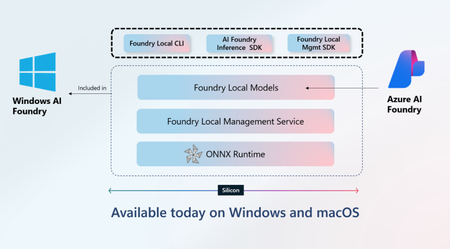
What Is Foundry Local? Foundry Local is a lightweight runtime designed to run AI models directly on user devices. It supports a wide range of hardware (CPU, GPU, NPU) and provides a consistent developer experience across platforms. The SDKs are available in multiple languages, including Python, JavaScript, Rust, and now C#. Why a C# SDK? The C# SDK brings Foundry Local into the heart of the .NET ecosystem. It allows developers to: Download and manage models locally. Run inference using OpenAI-compatible APIs. Integrate seamlessly with existing .NET applications. This means you can build intelligent apps that run offline, reduce latency, and maintain data privacy—all without sacrificing developer productivity. Bootstrap Process: How the SDK Gets You Started One of the most developer-friendly aspects of the C# SDK is its automatic bootstrap process. Here's what happens under the hood when you initialise the SDK: Service Discovery and Startup The SDK automatically locates the Foundry Local installation on the device and starts the inference service if it's not already running. Model Download and Caching If the specified model isn't already cached locally, the SDK will download the most performant model variant (e.g. GPU, CPU, NPU) for the end user's hardware from the Foundry model catalog. This ensures you're always working with the latest optimised version. Model Loading into Inference Service Once downloaded (or retrieved from cache), the model is loaded into the Foundry Local inference engine, ready to serve requests. This streamlined process means developers can go from zero to inference with just a few lines of code—no manual setup or configuration required. Leverage Your Existing AI Stack One of the most exciting aspects of the Foundry Local C# SDK is its compatibility with popular AI tools such as: OpenAI SDK - Foundry local provides an OpenAI compliant chat completions (and embedding) API meaning. If you’re already using `OpenAI` chat completions API, you can reuse your existing code with minimal changes. Semantic Kernel - Foundry Local also integrates well with Semantic Kernel, Microsoft’s open-source framework for building AI agents. You can use Foundry Local models as plugins or endpoints within Semantic Kernel workflows—enabling advanced capabilities like memory, planning, and tool calling. Quick Start Example Follow these three steps: 1. Create a new project Create a new C# project and navigate to it: dotnet new console -n hello-foundry-local cd hello-foundry-local 2. Install NuGet packages Install the following NuGet packages into your project: dotnet add package Microsoft.AI.Foundry.Local --version 0.1.0 dotnet add package OpenAI --version 2.2.0-beta.4 3. Use the OpenAI SDK with Foundry Local The following example demonstrates how to use the OpenAI SDK with Foundry Local. The code initializes the Foundry Local service, loads a model, and generates a response using the OpenAI SDK. Copy-and-paste the following code into a C# file named Program.cs: using Microsoft.AI.Foundry.Local; using OpenAI; using OpenAI.Chat; using System.ClientModel; using System.Diagnostics.Metrics; var alias = "phi-3.5-mini"; var manager = await FoundryLocalManager.StartModelAsync(aliasOrModelId: alias); var model = await manager.GetModelInfoAsync(aliasOrModelId: alias); ApiKeyCredential key = new ApiKeyCredential(manager.ApiKey); OpenAIClient client = new OpenAIClient(key, new OpenAIClientOptions { Endpoint = manager.Endpoint }); var chatClient = client.GetChatClient(model?.ModelId); var completionUpdates = chatClient.CompleteChatStreaming("Why is the sky blue'"); Console.Write($"[ASSISTANT]: "); foreach (var completionUpdate in completionUpdates) { if (completionUpdate.ContentUpdate.Count > 0) { Console.Write(completionUpdate.ContentUpdate[0].Text); } } Run the code using the following command: dotnet run Final thoughts The Foundry Local C# SDK empowers developers to build intelligent, privacy-preserving applications that run anywhere. Whether you're working on desktop, mobile, or embedded systems, this SDK offers a robust and flexible way to bring AI closer to your users. Ready to get started? Dive into the official documentation: Getting started guide C# Reference documentation You can also make contributions to the C# SDK by creating a PR on GitHub: Foundry Local on GitHub1.5KViews0likes0CommentsAnnouncing a new Azure AI Translator API (Public Preview)
Microsoft has launched the Azure AI Translator API (Public Preview), offering flexible translation options using either neural machine translation (NMT) or generative AI models like GPT-4o. The API supports tone, gender, and adaptive custom translation, allowing enterprises to tailor output for real-time or human-reviewed workflows. Customers can mix models in a single request and authenticate via resource key or Entra ID. LLM features require deployment in Azure AI Foundry. Pricing is based on characters (NMT) or tokens (LLMs).2.1KViews0likes0CommentsAnnouncing gpt-realtime on Azure AI Foundry:
We are thrilled to announce that we are releasing today the general availability of our latest advancement in speech-to-speech technology: gpt-realtime. This new model represents a significant leap forward in our commitment to providing advanced and reliable speech-to-speech solutions. gpt-realtime is a new S2S (speech-to-speech) model with improved instruction following, designed to merge all of our speech-to-speech improvements into a single, cohesive model. This model is now available in the Real-time API, offering enhanced voice naturalness, higher audio quality, and improved function calling capabilities. Key Features New, natural, expressive voices: New voice options (Marin and Cedar) that bring a new level of naturalness and clarity to speech synthesis. Improved Instruction Following: Enhanced capabilities to follow instructions more accurately and reliably. Enhanced Voice Naturalness: More lifelike and expressive voice output. Higher Audio Quality: Superior audio quality for a better user experience. Improved Function Calling: Enhanced ability to call custom code defined by developers. Image Input Support: Add images to context and discuss them via voice—no video required. Check out the model card here: gpt-realtime Pricing Pricing for gpt-realtime is 20% lower compared to the previous gpt-4o-realtime preview: Pricing is based on usage per 1 million tokens. Below is the breakdown: Getting Started gpt-realtime is available on Azure AI Foundry via Azure Models direct from Azure today. We are excited to see how developers and users will leverage these new capabilities to create innovative and impactful solutions. Check out the model on Azure AI Foundry and see detailed documentation in Microsoft Learn docs.5.1KViews1like0Comments
Announcing the Text PII August preview model release in Azure AI language
Azure AI Language is excited to announce a new preview model release for the PII (Personally Identifiable Information) redaction service, which includes support for more entities and languages, addressing customer-sourced scenarios and international use cases. What’s New | Updated Model 2025-08-01-preview Tier 1 language support for DateOfBirth entity: expanding upon the original English-only support earlier this year, we’ve added support for all Tier 1 languages: French, German, Italian, Spanish, Portuguese, Brazilian Portuguese, and Dutch New entity support: SortCode - a financial code used in the UK and Ireland to identify the specific bank and branch where an account is held. Currently we support this in only English. LicensePlateNumber - the standard alphanumeric code for vehicle identification. Note that our current scope does not support a license plate that contains only letters. Currently we support this in only English. AI quality improvements for financial entities, reducing false positives/negatives These updates respond directly to customer feedback and address gaps in entity coverage and language support. The broader language support enables global deployments and the new entity types allow for more comprehensive data extraction for our customers. This ensures an improved service quality for financial, criminal justice, and many other regulatory use cases, enabling more accurate and reliable service for our customers. Get started A more detailed tutorial and overview of the service feature can be found in our public docs. Learn more about these releases and several others enhancing our Azure AI Language offerings on our What’s new page. Explore Azure AI Language and its various capabilities Access full pricing details on the Language Pricing page Find the list of sensitive PII entities supported Try out Azure AI Foundry for a code-free experience We are looking forward to continuously improving our product offerings and features to meet customer needs and are keen to hear any comments and feedback.521Views1like0Comments