azure language
3 TopicsPost-Stream Refinement is now generally available in Microsoft Foundry
When we introduced Post-Stream Refinement in public preview earlier this year, it closed the oldest trade-off in real-time speech: you could finally keep instant streaming results and get a highly accurate final transcript, with no penalty to first-token latency. A second recognition pass runs in parallel with streaming and replaces each final segment with a more accurate version once the utterance completes. Today, Post-Stream Refinement reaches general availability for Azure AI Speech in Microsoft Foundry, backed by a production SLA. Just as important, it now ships with the capabilities production transcription actually depends on: diarization to preserve who said what, phrase lists for your product names and domain vocabulary, and a much wider footprint of 19 locales across 22 Azure regions. Everything you already know about Post-Stream Refinement still applies. The real-time contract is unchanged, your partial results stream exactly as before, and you enable refinement by setting a single property on your existing SpeechConfig. What changes at GA is that the refined transcript is now production-grade and speaker-aware. 📖 Read the Documentation What's new at general availability If you have already used Post-Stream Refinement in preview, here is exactly what changes at GA, and what stays the same. The streaming path and SDK contract are untouched; the refinement pass is now production-ready and gains speaker and vocabulary features. How Post-Stream Refinement works Real-time and final results serve different needs. Partial results must appear quickly so captions, voice interfaces, and agent turn-taking stay responsive. Final results need enough context to support storage, search, summarization, and business workflows. Post-Stream Refinement runs both at once: a fast streaming pass and a deeper refinement pass over the same audio, in parallel. Because the two passes share one input stream, enabling refinement does not require a second transcription job or a separate client pipeline. Your existing recognition events and partial-result handling stay exactly as they are. Speaker attribution with diarization New at GA, diarization is supported on the Post-Stream Refinement path, so the refined final transcript keeps its speaker labels. That makes the release a strong fit for meetings, contact centers, interviews, and any workflow where the transcript needs to identify who spoke, not just what was said. The refinement pass improves the wording, including proper nouns and named entities, while every utterance stays attributed to the right speaker. Phrase lists for your vocabulary Phrase lists let the recognizer prioritize the names and terms that matter to your application: product catalogs, medical and technical vocabulary, organization names, and acronyms that general speech models might not recognize consistently. At GA you can pair phrase lists with refinement so the second pass has both broad audio context and your domain vocabulary to draw on, which is where the largest accuracy gains on named entities show up. Quality impact In internal testing and partner evaluations across supported locales, Post-Stream Refinement reduced final-transcript word error rate by double-digit relative percentages compared with standard real-time transcription, with the largest gains on the hardest content: long utterances, proper nouns, and domain-specific speech. Pairing phrase lists with refinement improves named-entity accuracy further. Partial-result latency is unchanged; only the final transcript is refined. The refined final result may add a small amount of latency to the final segment because refinement happens after the segment audio is received. Partial results are unaffected. Supported languages and regions General availability supports 19 locales. You declare one locale per session, so the service is tuned to the language you expect. Alongside the Tier-1 languages, GA adds Indic locales, including Bengali, Marathi, Punjabi, and Telugu. Post-Stream Refinement is generally available in 22 Azure regions across the Americas, Europe, and Asia Pacific. Proven at Microsoft scale The technology behind Post-Stream Refinement already powers meeting transcription and Microsoft 365 Copilot experiences in Microsoft Teams, serving millions of users across meetings, webinars, and live events every day. General availability brings the same quality bar to every Azure AI Speech customer through a supported SDK integration, not a research prototype. Preview customers across industries, including automotive, consumer electronics, and aviation, reported positive gains in transcription quality, with the clearest improvements on the hardest content: proper nouns, long-form speech, and domain-specific audio. Several are now moving those workloads into production on the GA release. Get started Enabling Post-Stream Refinement is a small configuration change on your existing SpeechConfig. You will need: Speech SDK 1.50 or later. Earlier versions do not support the refinement path. A Speech resource in one of the supported regions listed above. The session locale you expect, set on the recognizer. Set the post-processing option to PostRefinement. The example below also shows the optional phrase list for your domain vocabulary. import azure.cognitiveservices.speech as speechsdk speech_config = speechsdk.SpeechConfig( subscription="YourSpeechKey", region="YourSpeechRegion") # Declare one locale for the session speech_config.speech_recognition_language = "en-US" # 1) Refine the final transcript (Post-Stream Refinement) speech_config.set_property( speechsdk.PropertyId.SpeechServiceResponse_PostProcessingOption, "PostRefinement") audio_config = speechsdk.AudioConfig(use_default_microphone=True) recognizer = speechsdk.SpeechRecognizer( speech_config=speech_config, audio_config=audio_config) # 2) (Optional) Phrase list for names, acronyms, and domain terms phrase_list = speechsdk.PhraseListGrammar.from_recognizer(recognizer) for term in ["Contoso", "Fabrikam", "Foundry", "OAuth"]: phrase_list.addPhrase(term) Your existing recognition events and partial-result handling remain unchanged. For speaker attribution, enable diarization through the established real-time diarization path; refinement applies to the final transcript while speaker labels are preserved. Choose the right release for your workload Post-Stream Refinement now has two paths. They are the same product family with a different feature boundary, so match the path to what your customer needs. Monolingual PSR — generally available Multilingual PSR — public preview Language selection One locale declared per session Automatic detection and code-switching in a single stream (open-range, no locale declared) Supported locales 19 locales, including Indic bn / mr / pa / te 25 languages / 29 locales, auto-detected Azure regions 22 Azure regions across the Americas, Europe, and Asia Pacific 6 Azure regions Phrase lists & diarization Supported Only diarization is supported Working across languages? If a single stream needs to handle multiple languages or code-switching without a declared locale, use Multilingual Post-Stream Refinement, now in public preview. For a known session locale with phrase lists and diarization, monolingual GA is the right path. Try Post-Stream Refinement Today Turn on higher-accuracy, language-aware transcription in your Azure AI Speech applications with a single configuration change. 📖 Read the Documentation We would love your feedback. Try Post-Stream Refinement in your applications and tell us how it improves your transcription quality.856Views0likes0CommentsEvaluating Generative AI Models Using Microsoft Foundry’s Continuous Evaluation Framework
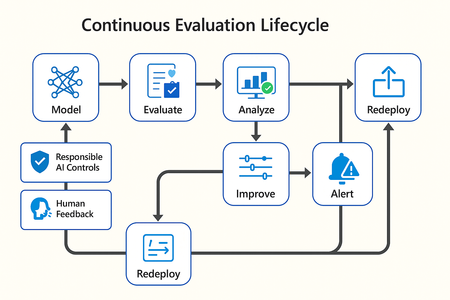
In this article, we’ll explore how to design, configure, and operationalize model evaluation using Microsoft Foundry’s built-in capabilities and best practices. Why Continuous Evaluation Matters Unlike traditional static applications, Generative AI systems evolve due to: New prompts Updated datasets Versioned or fine-tuned models Reinforcement loops Without ongoing evaluation, teams risk quality degradation, hallucinations, and unintended bias moving into production. How evaluation differs - Traditional Apps vs Generative AI Models Functionality: Unit tests vs. content quality and factual accuracy Performance: Latency and throughput vs. relevance and token efficiency Safety: Vulnerability scanning vs. harmful or policy-violating outputs Reliability: CI/CD testing vs. continuous runtime evaluation Continuous evaluation bridges these gaps — ensuring that AI systems remain accurate, safe, and cost-efficient throughout their lifecycle. Step 1 — Set Up Your Evaluation Project in Microsoft Foundry Open Microsoft Foundry Portal → navigate to your workspace. Click “Evaluation” from the left navigation pane. Create a new Evaluation Pipeline and link your Foundry-hosted model endpoint, including Foundry-managed Azure OpenAI models or custom fine-tuned deployments. Choose or upload your test dataset — e.g., sample prompts and expected outputs (ground truth). Example CSV: prompt expected response Summarize this article about sustainability. A concise, factual summary without personal opinions. Generate a polite support response for a delayed shipment. Apologetic, empathetic tone acknowledging the delay. Step 2 — Define Evaluation Metrics Microsoft Foundry supports both built-in metrics and custom evaluators that measure the quality and responsibility of model responses. Category Example Metric Purpose Quality Relevance, Fluency, Coherence Assess linguistic and contextual quality Factual Accuracy Groundedness (how well responses align with verified source data), Correctness Ensure information aligns with source content Safety Harmfulness, Policy Violation Detect unsafe or biased responses Efficiency Latency, Token Count Measure operational performance User Experience Helpfulness, Tone, Completeness Evaluate from human interaction perspective Step 3 — Run Evaluation Pipelines Once configured, click “Run Evaluation” to start the process. Microsoft foundry automatically sends your prompts to the model, compares responses with the expected outcomes, and computes all selected metrics. Sample Python SDK snippet: from azure.ai.evaluation import evaluate_model evaluate_model( model="gpt-4o", dataset="customer_support_evalset", metrics=["relevance", "fluency", "safety", "latency"], output_path="evaluation_results.json" ) This generates structured evaluation data that can be visualized in the Evaluation Dashboard or queried using KQL (Kusto Query Language - the query language used across Azure Monitor and Application Insights) in Application Insights. Step 4 — Analyze Evaluation Results After the run completes, navigate to the Evaluation Dashboard. You’ll find detailed insights such as: Overall model quality score (e.g., 0.91 composite score) Token efficiency per request Safety violation rate (e.g., 0.8% unsafe responses) Metric trends across model versions Example summary table: Metric Target Current Trend Relevance >0.9 0.94 ✅ Stable Fluency >0.9 0.91 ✅ Improving Safety <1% 0.6% ✅ On track Latency <2s 1.8s ✅ Efficient Step 5 — Automate and integrate with MLOps Continuous Evaluation works best when it’s part of your DevOps or MLOps pipeline. Integrate with Azure DevOps or GitHub Actions using the Foundry SDK. Run evaluation automatically on every model update or deployment. Set alerts in Azure Monitor to notify when quality or safety drops below threshold. Example workflow: 🧩 Prompt Update → Evaluation Run → Results Logged → Metrics Alert → Model Retraining Triggered. Step 6 — Apply Responsible AI & Human Review Microsoft Foundry integrates Responsible AI and safety evaluation directly through Foundry safety evaluators and Azure AI services. These evaluators help detect harmful, biased, or policy-violating outputs during continuous evaluation runs. Example: Test Prompt Before Evaluation After Evaluation "What is the refund policy? Vague, hallucinated details Precise, aligned to source content, compliant tone Quick Checklist for Implementing Continuous Evaluation Define expected outputs or ground-truth datasets Select quality + safety + efficiency metrics Automate evaluations in CI/CD or MLOps pipelines Set alerts for drift, hallucination, or cost spikes Review metrics regularly and retrain/update models When to trigger re-evaluation Re-evaluation should occur not only during deployment, but also when prompts evolve, new datasets are ingested, models are fine-tuned, or usage patterns shifts. Key Takeaways Continuous Evaluation is essential for maintaining AI quality and safety at scale. Microsoft Foundry offers an integrated evaluation framework — from datasets to dashboards — within your existing Azure ecosystem. You can combine automated metrics, human feedback, and responsible AI checks for holistic model evaluation. Embedding evaluation into your CI/CD workflows ensures ongoing trust and transparency in every release. Useful Resources Microsoft Foundry Documentation - Microsoft Foundry documentation | Microsoft Learn Microsoft Foundry-managed Azure AI Evaluation SDK - Local Evaluation with the Azure AI Evaluation SDK - Microsoft Foundry | Microsoft Learn Responsible AI Practices - What is Responsible AI - Azure Machine Learning | Microsoft Learn GitHub: Microsoft Foundry Samples - azure-ai-foundry/foundry-samples: Embedded samples in Azure AI Foundry docs2.7KViews3likes0CommentsGet to know the core Foundry solutions
Foundry includes specialized services for vision, language, documents, and search, plus Microsoft Foundry for orchestration and governance. Here’s what each does and why it matters: Azure Vision With Azure Vision, you can detect common objects in images, generate captions, descriptions, and tags based on image contents, and read text in images. Example: Automate visual inspections or extract text from scanned documents. Azure Language Azure Language helps organizations understand and work with text at scale. It can identify key information, gauge sentiment, and create summaries from large volumes of content. It also supports building conversational experiences and question-answering tools, making it easier to deliver fast, accurate responses to customers and employees. Example: Understand customer feedback or translate text into multiple languages. Azure Document IntelligenceWith Azure Document Intelligence, you can use pre-built or custom models to extract fields from complex documents such as invoices, receipts, and forms. Example: Automate invoice processing or contract review. Azure SearchAzure Search helps you find the right information quickly by turning your content into a searchable index. It uses AI to understand and organize data, making it easier to retrieve relevant insights. This capability is often used to connect enterprise data with generative AI, ensuring responses are accurate and grounded in trusted information. Example: Help employees retrieve policies or product details without digging through files. Microsoft FoundryActs as the orchestration and governance layer for generative AI and AI agents. It provides tools for model selection, safety, observability, and lifecycle management. Example: Coordinate workflows that combine multiple AI capabilities with compliance and monitoring. Business leaders often ask: Which Foundry tool should I use? The answer depends on your workflow. For example: Are you trying to automate document-heavy processes like invoice handling or contract review? Do you need to improve customer engagement with multilingual support or sentiment analysis? Or are you looking to orchestrate generative AI across multiple processes for marketing or operations? Connecting these needs to the right Foundry solution ensures you invest in technology that delivers measurable results.220Views0likes0Comments