ai foundry
7 Topics
Is there a way to connect 2 Ai foundry to the same cosmos containers?
I defined Azure AI Foundry Connection for Azure Cosmos DB and BYO Thread Storage in Azure AI Agent Service by using these instructions: Integration with Azure AI Agent Service - Azure Cosmos DB for NoSQL | Microsoft Learn I see that it created 3 containers under the cosmos I provided: <guid>-agent-entity-store v-system-thread-message-store <guid>-thread-message-store Now I created another AI foundry and added a connection for the same AI foundry, and it created 3 different containers under the same DB. Is there a way that they'll use the same exact containers? I want to use multiple AI foundries, and they will use the same Cosmos containers to manage the data.410Views0likes1CommentThe Cloud Foundation for Safe Agentic AI
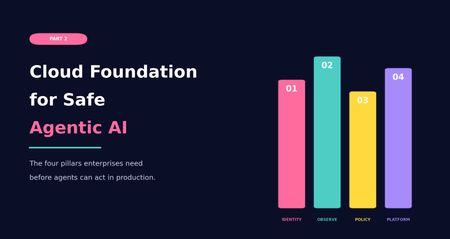
Why enterprise agents need more than a working prototype Most AI conversations start with the model. Which model should we use? Which framework? Which agent platform? Which demo can we build quickly enough to make the idea feel real? Those questions are not wrong, but they are rarely the first questions that matter in an enterprise environment. In real projects, the hard part usually appears after the first prototype works. The demo can answer a question, call a tool, retrieve a document, or update a record. Then someone asks whether it can be connected to production data, used by more teams, or allowed to trigger real actions. That is where the conversation changes. In the first part of this series, I looked at why many companies are less ready for agentic AI than they think. The blockers were practical and familiar: unclear business problems, immature processes, weak data foundations, and no clear owner when an AI system makes a poor recommendation or takes a wrong action. The message was simple: Before a company asks what agents can do, it needs to understand what it is ready to delegate. But business readiness is only the first layer. Even when the use case is clear, the process is understood, and leadership is aligned, another question appears. Is the platform ready to support agents safely? This is where Part 2 begins. Agentic AI does not behave like a normal application workload. A traditional application usually follows predefined paths. It receives a request, processes logic, returns a response, writes to a database, or calls an API. Agents introduce a different pattern. They reason over context, retrieve information, choose tools, trigger actions, interact with other services, and sometimes operate across multiple systems at once. That makes the surrounding cloud platform much more important. There is also a shadow AI angle to this. In many organizations, agent-like capabilities are already entering through SaaS platforms, vendor copilots, browser extensions, and productivity tools. These systems may not run inside the organization’s governed Azure subscriptions, but they can still interact with enterprise data and business workflows. If the official platform is not ready, teams will often find less governed ways to experiment anyway. That is not always malicious. Sometimes it is just people trying to solve their work with the tools available to them. The marketing analyst pasting customer data into a public chatbot because the official AI platform is six months away. The support team using a browser extension that summarizes tickets, without anyone realizing those tickets are also being sent to a third-party service. From a governance point of view, the effect is the same. Cloud readiness for agentic AI is not defined by access to cloud services or model endpoints alone. The real question is whether the platform can support controlled autonomy. Before enterprises can trust agents to act, the platform must be able to identify them, observe their behavior, restrict their permissions, enforce policy, and contain failure. Without that, an organization is not really deploying an intelligent assistant in a controlled way. It is introducing a workload that can interact with enterprise systems without anyone clearly watching what it does or being able to stop it. From business readiness to cloud readiness After the business foundation is clear, the next layer is the cloud foundation. A company may have a strong use case, executive support, and even a working prototype. But that does not mean it is ready to deploy agents in production. A prototype can run with broad access, manual supervision, loose logging, and a small group of test users. Production requires more discipline. It requires clear identity, controlled access, traceable activity, enforceable policy, and operational ownership. Cloud readiness for agentic AI comes down to four pillars, in this order: Identity-first architecture Observability Policy controls Platform constraints The order matters. 1. Identity-first architecture Identity comes first because nothing can be governed properly if it cannot be identified. In traditional cloud systems, we already learned this lesson with users, applications, service principals, managed identities, and workloads. Agents add another layer of non-human actors into the enterprise environment. If an agent can retrieve data, call tools, trigger workflows, or interact with business systems, it needs a clear identity. Without that foundation, governance becomes fragile. Teams may struggle to control what the agent can access, understand what it did, or determine who is accountable when something goes wrong. I have seen agents running in production where nobody could clearly say who owned them. They worked. Until they did not. Identity-first architecture means each agent or agentic workload should have a defined identity, ownership model, permission scope, and lifecycle. It should be clear whether the agent is acting on behalf of a user, acting as a service, or operating within a delegated boundary. This matters because permissions are not an implementation detail. They define the blast radius and accountability model of the system. In Azure environments, this is where Microsoft Entra ID and newer agent identity capabilities become important. As agents become more common across Azure AI Foundry, Copilot Studio, Microsoft 365, and custom frameworks, organizations need a way to understand which agents exist, who owns them, what they can access, and how their lifecycle is managed. Identity is not only about authentication. It is also about visibility, traceability, ownership, permission boundaries, and accountability. Agents should not remain hidden inside application logic or operate through shared identities. If they can retrieve data, call tools, or trigger actions, they need to be managed with the same care as any other production workload. 2. Observability Once identity is established, observability becomes the next pillar. Knowing that an agent exists is not enough. The platform must be able to show what the agent did. For normal applications, observability often focuses on service health, latency, failures, and resource usage. For agents, those signals still matter, but they are incomplete. Agent observability also needs to capture the execution path across model calls, retrieved context, orchestration steps, tool calls, policy decisions, approvals, denials, and final actions. This changes how we think about monitoring. With agentic systems, the question is not only whether a request succeeded or failed. Teams also need to understand the path that led to the outcome, the context used, the tools called, the policies applied, and the point where behavior changed. Without that visibility, it is difficult to investigate failures and improve reliability. This is also where observability starts to support governance, not just troubleshooting. Once teams can measure how agents behave, they can move toward KPI-based governance. That may include reliability, escalation rates, policy denials, grounding quality, tool-call failures, cost per interaction, latency, and business outcome metrics. Without this measurement layer, maturity remains mostly opinion-based. With it, governance becomes evidence-based. In Azure, Azure Monitor is the obvious starting point. Together with services such as Application Insights and Log Analytics, it provides the telemetry foundation needed to understand how AI workloads behave in production. For agentic systems, this usually requires combining platform telemetry with application-level traces from orchestration, retrieval, model calls, policy decisions, and tool execution. This visibility is what makes continuous improvement possible. It is also what allows governance to mature from “we think the agent is behaving correctly” to “we can measure how the agent behaves over time.” Small difference. Large consequence. 3. Policy controls The third pillar is policy controls. This comes after identity and observability because policy needs both. Identity defines who or what the rule applies to. Observability helps teams understand whether the rule is effective, bypassed, misconfigured, or too restrictive. Policy controls define the boundaries for what agents are allowed to do. They determine how agents access data, which tools they can use, which environments are in scope, when approval is required, and when an action or response should be blocked. The key point is simple: Prompts can guide behavior, but they are not a reliable enforcement layer. For enterprise systems, policy needs to be external, testable, auditable, and enforceable. This becomes especially important because agents may operate across multiple systems. An agent may retrieve information from one source, reason over the result, call a tool, update a ticket, send a message, or trigger a workflow. Each step may appear safe in isolation, while the full chain creates risk. Policy controls provide boundaries around that chain. In Azure, this starts at the cloud governance layer. Azure landing zones, management group structures, and Azure Policy can help define where AI workloads are deployed, how environments are separated, and which rules apply consistently across subscriptions. At runtime, Azure AI Content Safety can help detect harmful content, prompt attacks, unsafe interactions, or outputs that drift away from the intended task. For tool and API access, Azure API Management can also be used as a controlled gateway between agents and downstream systems. This can support centralized authentication, throttling, mediation, logging, and policy enforcement. It is not mandatory in every design, but it is a useful option when agents need governed access to APIs instead of direct backend connectivity. The goal is not to create friction for the sake of control. The goal is to make sure the agent operates inside boundaries that are defined outside the prompt and outside the model response. 4. Platform constraints The fourth pillar is platform constraints. This area often receives less attention early in the project, but it strongly shapes whether an agentic system can operate safely and reliably in production. These constraints include network isolation, private connectivity, data residency, regional availability, quota limits, model throughput, latency, logging retention, integration boundaries, cost behavior, and operational ownership. They may seem like implementation details during early design discussions, but they often determine whether the system can actually run in production. For agentic workloads, these constraints also shape where experimentation happens. Sandboxed environments, isolated subscriptions, limited tool access, and controlled test data can help teams evaluate agent behavior before exposing it to production systems. This becomes even more important when agents are allowed to generate code, call external tools, or execute actions that may not be fully trusted at design time. Platform constraints are where the earlier pillars meet implementation reality. Identity affects how agents connect to services. Observability affects logging cost, retention, and investigation capability. Policy affects routing, network design, tool exposure, and user experience. By the time an agentic system reaches production, these constraints are no longer background details. They become design boundaries. In Azure, this is where landing zone design, private networking, regional planning, quota management, cost management, and operational runbooks matter. Azure landing zones, private endpoints, private DNS, Azure Firewall, NSGs, and controlled network paths all influence whether the agent architecture can move from prototype to production without being redesigned halfway through. And yes, that redesign usually happens at the least convenient moment. Architecture has a sense of humor. Not a kind one. From principles to Azure capabilities The four pillars are not only architectural principles. They need to be translated into platform capabilities, operating practices, and governance controls. In practice, controlled agent deployment is rarely achieved by a single product or service. It requires multiple layers working together. Identity, monitoring, policy, networking, runtime safety, API exposure, and operational controls all play a part. Azure provides several services and patterns that can help implement these controls, but there is no fixed blueprint that applies to every organization. The right combination depends on the use case, regulatory requirements, existing landing zone design, integration landscape, and the level of autonomy expected from the agent. The examples below should be seen as a practical toolset, not as a mandatory checklist. Pillar Goal Example Azure capabilities Identity-first architecture Make agents visible, owned, permissioned, and governable as enterprise workloads. Microsoft Entra ID, Microsoft Entra Agent ID, managed identities, service principals, workload identities, access reviews, Conditional Access, Privileged Identity Management Observability Understand runtime behavior, trace execution paths, investigate failures, and improve reliability. Azure Monitor, Application Insights, Log Analytics, Azure AI Foundry tracing, diagnostic settings, distributed tracing, correlation IDs, application-level telemetry Policy controls Enforce boundaries around access, actions, content safety, APIs, and governance. Azure landing zones, management groups, Azure Policy, Azure AI Content Safety, Prompt Shields, Microsoft Purview, Azure API Management, RBAC, approval flows Platform constraints Operate within real cloud boundaries such as networking, region, quota, compliance, and operations. Azure landing zones, private endpoints, private DNS, private networking, Azure Firewall, NSGs, quota planning, regional architecture, cost management The purpose of this mapping is not to suggest that Azure has one single service for each pillar. It does not. The practical goal is to combine the right services and patterns so the platform can identify agents, monitor their behavior, enforce boundaries, and operate within known cloud constraints. Conclusion Agentic AI does not become enterprise-ready simply because a model is available, a prototype works, or a business sponsor is excited. The real question is whether the surrounding cloud foundation can support agents that act within boundaries the platform actually enforces. Together, these pillars move the discussion from building an agent to preparing the environment in which the agent can operate responsibly. That distinction is important. A prototype can rely on broad access, limited logging, and close manual supervision. A production system needs clearer boundaries around ownership, access, traceability, and control. This is also where the series moves naturally into Part 3. Once the business foundation is clear and the cloud foundation is in place, the next challenge is the design of the agent itself. The cloud foundation matters here because it provides the controlled environment in which agents can be tested, limited, and observed before they are trusted with broader enterprise access. For more advanced scenarios, that also includes sandboxing patterns for generated code, tool execution, and untrusted actions. In Part 3, I will move closer to implementation and look at how to design an enterprise-ready agent. That means defining the agent’s scope, grounding it with reliable knowledge, deciding which tools it can use, designing safe execution loops, adding human oversight where it matters, and thinking carefully about when a single agent is enough versus when multi-agent coordination is justified. That is where agentic AI starts becoming more than an idea. And, as usual, that is also where the architecture starts to matter. This article is part of my Agentic AI readiness series and was also published on Medium.145Views0likes0Comments
Published agent from Foundry doesn't work at all in Teams and M365
I've switched to the new version of Azure AI Foundry (New) and created a project there. Within this project, I created an Agent and connected two custom MCP servers to it. The agent works correctly inside Foundry Playground and responds to all test queries as expected. My goal was to make this agent available for my organization in Microsoft Teams / Microsoft 365 Copilot, so I followed all the steps described in the official Microsoft documentation: https://learn.microsoft.com/en-us/azure/ai-foundry/agents/how-to/publish-copilot?view=foundry Issue description The first problems started at Step 8 (Publishing the agent). Organization scope publishing I published the agent using Organization scope. The agent appeared in Microsoft Admin Center in the list of agents. However, when an administrator from my organization attempted to approve it, the approval always failed with a generic error: “Sorry, something went wrong” No diagnostic information, error codes, or logs were provided. We tried recreating and republishing the agent multiple times, but the result was always the same. Shared scope publishing As a workaround, I published the agent using Shared scope. In this case, the agent finally appeared in Microsoft Teams and Microsoft 365 Copilot. I can now see the agent here: Microsoft Teams → Copilot Microsoft Teams → Applications → Manage applications However, this revealed the main issue. Main problem The published agent cannot complete any query in Teams, despite the fact that: The agent works perfectly in Foundry Playground The agent responds correctly to the same prompts before publishing In Teams, every query results in messages such as: “Sorry, something went wrong. Try to complete a query later.” Simplification test To exclude MCP or instruction-related issues, I performed the following: Disabled all MCP tools Removed all complex instructions Left only a minimal system prompt: “When the user types 123, return 456” I then republished the agent. The agent appeared in Teams again, but the behavior did not change — it does not respond at all. Permissions warning in Teams When I go to: Teams → Applications → Manage Applications → My agent → View details I see a red warning label: “Permissions needed. Ask your IT admin to add InfoConnect Agent to this team/chat/meeting.” This message is confusing because: The administrator has already added all required permissions All relevant permissions were granted in Microsoft Entra ID Admin consent was provided Because of this warning, I also cannot properly share the agent with my colleagues. Additional observation I have a similar agent configured in Copilot Studio: It shows the same permissions warning However, that agent still responds correctly in Teams It can also successfully call some MCP tools This suggests that the issue is specific to Azure AI Foundry agents, not to Teams or tenant-wide permissions in general. Steps already taken to resolve the issue Configured all required RBAC roles in Azure Portal according to: https://learn.microsoft.com/en-us/azure/ai-foundry/concepts/rbac-foundry?view=foundry-classic During publishing, an agent-bot application was automatically created. I added my account to this bot with the Azure AI User role I also assigned Azure AI User to: The project’s Managed Identity The project resource itself Verified all permissions related to AI agents publishing in: Microsoft Admin Center Microsoft Teams Admin Center Simplified and republished the agent multiple times Deleted the automatically created agent-bot and allowed Foundry to recreate it Created a new Foundry project, configured several simple agents, and published them — the same issue occurs Tried publishing with different models: gpt-4.1, o4-mini Manually configured permissions in: Microsoft Entra ID → App registrations / Enterprise applications → API permissions Added both Delegated and Application permissions and granted Admin consent Added myself and my colleagues as Azure AI User in: Foundry → Project → Project users Followed all steps mentioned in this related discussion: https://techcommunity.microsoft.com/discussions/azure-ai-foundry-discussions/unable-to-publish-foundry-agent-to-m365-copilot-or-teams/4481420 Questions How can I make a Foundry agent work correctly in Microsoft Teams? Why does the agent fail to process requests in Teams while working correctly in Foundry? What does the “Permissions needed” warning actually mean for Foundry agents? How can I properly share the agent with other users in my organization? Any guidance, diagnostics, or clarification on the correct publishing and permission model for Foundry agents in Teams would be greatly appreciated.Solved2.5KViews1like5Comments
Title: Synthetic Dataset Format from AI Foundry Not Compatible with Evaluation Schema
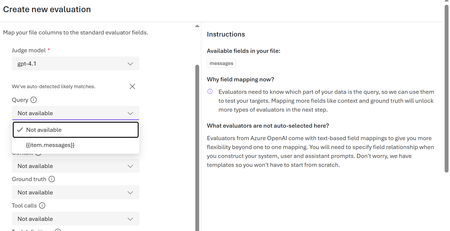
Current Situation The synthetic dataset created from AI Foundry Data Synthetic Data is generated in the following messages format { "messages": [ { "role": "system", "content": "You are a helpful assistant" }, { "role": "user", "content": "What is the primary purpose?" }, { "role": "assistant", "content": "The primary purpose is..." } ] } Challenge When attempting evaluation, especially RAG evaluation, the documentation indicates that the dataset must contain structured fields such as question - The query being asked ground_truth - The expected answer Recommended additional fields reference_context metadata Example required format { "question": "", "ground_truth": "", "reference_context": "", "metadata": { "document": "" } } Because the synthetic dataset is in messages format, I am unable to directly map it to the required evaluation schema. Question Is there a recommended or supported way to convert the synthetic dataset generated in AI Foundry messages format into the structured format required for evaluation? Can the user role be mapped to question? Can the assistant role be mapped to ground_truth? Is there any built in transformation option within AI Foundry?248Views1like2Comments
Less models in ai foundry that supports agentic use
Hi, I have seen that nearly 11,000 models are available in Azure ai foundry, but when I try to deploy models that support Agents, only 18 models are available for selection. Is there any reason behind this ? Are we planning to support many models from external providers or rely on gpt models as first priority287Views0likes1Comment
AI Foundry - Open API spec tool issue
Hello, I'm trying to invoke my application's API as a tool within the AI Foundry OpenAPI specification tool. However, I keep encountering a 401 Unauthorized error. I'm using a Bearer token for authentication, and it works perfectly when tested via Postman. I'm unsure whether the issue lies in the input/output schema or the connection configuration. Unfortunately, the AI Foundry Traces aren't providing enough detail to pinpoint the exact problem. Additionally, my API and AI Foundry accounts are hosted in different Azure subscriptions and networks. Could this network separation be affecting the connection? I would appreciate any guidance or help to resolve this issue. -Tamizh204Views0likes1Comment
Is AI Foundry in new exam for DP-100
A 25-30% of the DP-100 exam is now dedicated to Optimizing Language Models for AI Applications - is this requiring Azure AI Foundry? It doesn't say specifically in the study guide: https://learn.microsoft.com/en-us/credentials/certifications/resources/study-guides/dp-100 Also, the videos could benefit from being updated to cover the changes as of 16 January 2025.