Recent Discussions

Teams audio driver causing sound problems in WoW
hi, a couple of days ago I updated Teams on my Mac and since that moment I no longer had sound in World of Warcraft. This seems to be an issue that exists for years already. https://eu.forums.blizzard.com/en/wow/t/suddenly-no-sound-out-of-speakers-only-via-bluetooth-headphones/471188 Is anything being done to get this fixed? I mean Blizzard is basically owned by Microsoft now. It can't be rocket science to come up with a solution. rgds Igor41Views1like1Comment
Recurring talking points on Teams meetings?
So I want to build this new meeting structure between some of the mentors and mentees in my team where they regularly meet up and have these structured conversations. I want to create almost these templates where talking points in meeting agendas keep recurring. I would also love to be able to set some non-recurring talking points alongside them so this wouldnt be a bulk thing. Does anyone know how I can do this in Teams meetings?40Views0likes1Comment
Make an alert icon of new messages from other accounts/Orgs on top right in TEAMs
The icon of activity in other accounts and orgs moved to bottom left sucks, user would easily miss noticing new messages from other accounts/org. It's better to keep an alert icon next to user icon on top right for easier notification.25Views0likes0CommentsMeet compared to the new Events app
Am I the only one not impressed by the "Events" app that replaced "Meet"? Meet was easy to use and was great to find recent items. Now with the Events app, that app is just empty - no content at all. Now I have to instruct users to go dig around their chats for recorded meetings. Is there way to have that old Meet functionality somewhere?43Views0likes1CommentNew build crashes on camera while April build works just fine..
Win 10 Pro on work machine using the April 2026 build Teams works fine. Each night I shutdown and reboot, Teams updates to the latest version and each time I try to bring up a video call where it accesses my logitech camera, Teams shuts down, restarts, shuts down again, then restarts. If I bring up my devices in the new version and try to view the camera, bang, Teams crashes. It's crashing in the AMD driver (using a 9060XT.) So April version works like a champ but part of my daily ritual is to remove teams, install the April build work for the day then do it again tomorrow. Claude offered what it could, disable graphics acceleration to Teams, stuff like that. Nothing worked so far. I've done an AMD wipe using their clean tool and reinstalled everything including chipset, graphics drivers. Nothing else on the system is unstable, even Zoom works just fine. Problem signature: P1: MSTeams_26198.304.4946.9672_x64__8wekyb3d8bbwe P2: praid:MSTeams P3: 26198.304.4946.9672 P4: 6a6370cb P5: amdxx64.dll P6: 32.0.31035.1003 P7: 6a59861b P8: c0000005 P9: 00000000000d0c8246Views0likes1Comment
Change meeting category default options
When creating a new meeting in Teams and clicking the drop down button to select a category, a list of about six options appears that appear to be randomly selected. These don't bear any relation to the most commonly used categories I use, meaning I then have to click through to the list of all categories to find them. Is there a way to change what categories appear in that initial short list to save me a click each time?38Views0likes1CommentTeams completely freezes after clicking on Contacts.
Hello, Is anyone else experiencing an issue when clicking on Contacts in the Teams desktop client? The Contacts section works without any problems in Teams Web, but not in the desktop application. Thank you in advance for your feedback.434Views3likes1Comment
Teams HAL driver update skips coreaudiod restart mediaremoted spins at 100% CPU
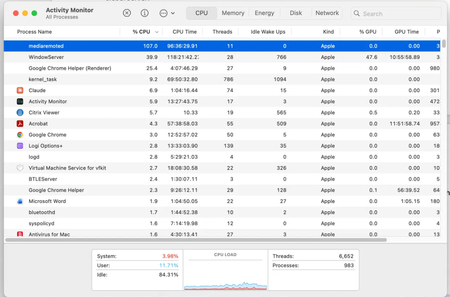
Environment: macOS 15.7.7 build 24G720, Apple M3 Max. Teams updated from 26183.1901.4874.5228 to 26198.202.4929.7171 via Microsoft AutoUpdate. What happens: The delta package installs the MSTeamsAudioDevice component into the system-wide CoreAudio HAL plug-ins folder. The system install log shows the bundle being atomically replaced, after which the postinstall script logs that it is a non-interactive command line installation and therefore will not restart coreaudiod, then exits. Because MAU always runs non-interactively, coreaudiod is never restarted and continues running against the replaced HAL bundle. Impact: Long-lived processes holding references to the Teams audio device never converge. In my case mediaremoted entered a permanent single-core spin at 107 percent CPU, sustained for days. A sample shows 100 percent of main-thread time inside AudioObjectGetPropertyData and AudioObjectGetPropertyDataSize, with the HALObjectMap CopyObjectByObjectID and ReleaseObject methods accounting for roughly 99 percent of top-of-stack samples. HALPlugIn ObjectHasProperty also emits an os_log call on every probe, so logd burns additional CPU. Teams itself was not running. Workaround: Force-quit the core audio daemon and then the media remote daemon; both relaunch automatically under launchd. Suggested fix: Restart coreaudiod from the postinstall regardless of interactivity whenever the HAL bundle payload actually changed, or defer the bundle swap until the next coreaudiod restart.69Views0likes2CommentsApp Validation failing for no clear reason
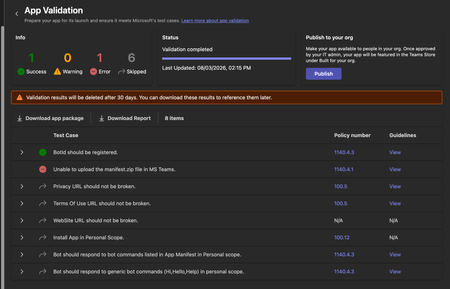
We're trying to get our (very simple) Teams App listed on the app store, but during the App Validation we keep getting the same error: "Unable to upload the manifest.zip file in MS Teams." as seen below: Downloading the report doesn't give any more information, it only lists the only successful validation step ("BotID should be registered") and the error doesn't appear there. I've validated the manifest.json file against the schema, tried reuploading the same manifest to a different org (creating a new app and bot) - validation fails there too. Does anyone have any pointers? Here is my (anonymized) manifest file: { "$schema": "https://developer.microsoft.com/en-us/json-schemas/teams/v1.19/MicrosoftTeams.schema.json", "manifestVersion": "1.19", "version": "1.1.1", "id": "[redacted]", "developer": { "name": "[redacted]", "websiteUrl": "https://www.[redacted].com", "privacyUrl": "[redacted]", "termsOfUseUrl": "[redacted]" }, "icons": { "color": "color.png", "outline": "outline.png" }, "name": { "short": "[redacted]", "full": "[redacted]" }, "description": { "short": "[redacted]", "full": "[redacted]" }, "accentColor": "#4A3AFF", "bots": [ { "botId": "[redacted]", "scopes": ["personal"], "supportsFiles": false, "isNotificationOnly": false, "commandLists": [ { "scopes": ["personal"], "commands": [ { "title": "help", "description": "Show what this bot does and how to connect your account" }, { "title": "connect", "description": "Get a fresh link to (re-)connect your account" } ] } ] } ], "staticTabs": [ { "entityId": "conversations", "scopes": ["personal"] }, { "entityId": "about", "scopes": ["personal"] } ], "permissions": ["identity", "messageTeamMembers"], "validDomains": ["app.[redacted].com", "auth.[redacted].com"] }58Views0likes1Comment
Running engagement pulse checks in Teams, how do you track trends over time?
My lead asked me to start doing monthly pulse checks across our team of 20. I've been using Forms and dropping the link in the channel. Response rate sits around 50% which I can live with, but the real problem is that every survey is its own isolated result set. I can see this month's numbers fine. Comparing them to three months ago means exporting everything to Excel and rebuilding the comparison by hand.42Views0likes1CommentTeams Premium + Bookings : Automatic recording and transcription for Bookings meetings ?
Hello, I have a Teams Premium license, recording and transcription policies are enabled on the admin side, and Video Recap works correctly when both are active simultaneously in the same meeting. My use case : my clients book time slots via Microsoft Bookings. Teams meetings are therefore created automatically by Bookings and I have no control over their scheduling. According to Microsoft Learn documentation (https://learn.microsoft.com/microsoftteams/virtual-appointment-meeting-template and https://learn.microsoft.com/microsoft-365/bookings/bookings-overview), there is no documented mechanism to automatically apply a Teams meeting template, and therefore automatic recording and transcription, to meetings generated by Bookings. My question: has anyone found a workaround for this limitation (Power Automate, Graph API, or anything else)? And does Microsoft have a documented roadmap on this topic? This gap directly prevents Teams Premium users from accessing Video Recap on their client meetings, which is one of the core use cases Teams Premium is designed for. Thank you for your help59Views1like1CommentShare content didn't appear or freeze during teams meeting.
Hi Everyone, I having an issue where when participant trying to share content during microsoft teams meeting, the content didn't show on the display and sometime the content is freeze. We join the meeting from Cisco Room Bar Pro on Cisco Room OS Platform. This issue also happen intermittently. Have reboot the device but it's still occurred. Anyone encounter this issue before? Thanks,51Views0likes2CommentsWho verifies Teams Meeting summary accurately reflects what was actually agreed in the meeting
Can we really trust AI-generated meeting summaries? Microsoft Teams and Copilot can create impressive meeting summaries, action items, and insights. But a question remains: Who verifies that the summary accurately reflects what was actually agreed in the meeting? In many organisations, meeting notes become the basis for: project decisions customer commitments compliance records accountability for actions Yet when there is disagreement, we often hear: "That is not what I said." "I don't remember agreeing to that." "The summary missed the context." How is your organisation handling this today? Do you: Trust AI-generated summaries as they are? Have a human review process? Keep the original transcript/audio as evidence? Use another approach? Interested to hear how Teams users are managing this challenge.70Views0likes3Comments
Create event sometimes returns 201 but no Teams meeting link
Hello, I am creating calendar events through Microsoft Graph and setting them as Teams online meetings. Most of the time it works correctly, but very rarely the API returns 201 Created and the event is created without the Teams join link in the response. I have already checked the following: isOnlineMeeting is always set to true. The correct online meeting provider is being used. The issue is intermittent, not consistent. The same integration normally creates Teams meetings successfully. What I need to understand is: Why can Graph return 201 Created but still omit the Teams meeting link? Is this a known intermittent issue with event creation or Teams meeting provisioning? Is there anything I should check in the response, headers, permissions, or follow-up GET call to verify the meeting link was actually created54Views0likes1Comment
TeamsTab.ReadWriteSelfForTeam: deleting a tab fails with 400 "appId cannot be null or whitespace"
We have a published Teams app that pins a configurable tab into a team channel via Microsoft Graph and removes it again when the user uninstalls our app from that channel. Creating the tab works. Deleting it always fails with a 400 that looks like an unhandled null-argument exception inside the Graph Teams service rather than a permission problem. I reported this in October 2025 as https://github.com/MicrosoftDocs/msteams-docs/issues/13432, but that is a documentation repository and the issue has had no response, so I am reposting here, as we can still reproduce the issue. We're using a delegated token for the operation. The only tab-related scopes are `TeamsTab.Read.All` (read-only) and `TeamsTab.ReadWriteSelfForTeam`. According to the docs (https://learn.microsoft.com/en-us/graph/api/channel-delete-tabs), `TeamsTab.ReadWriteSelfForTeam` is the **least privileged** delegated permission for the delete, so the token should be ok. What works Creating the tab, with the same delegated user token: POST https://graph.microsoft.com/v1.0/teams/«teamId»/channels/«channelId»/tabs Content-Type: application/json { "displayName": "«AppName»", "email address removed for privacy reasons": "https://graph.microsoft.com/v1.0/appCatalogs/teamsApps/«teamsAppId»", "configuration": { "entityId": "«entityId»", "contentUrl": "https://«ourhost»/teams/tabs/channel/«entityId»", "websiteUrl": "https://«ourhost»/app/tickets?channel=«entityId»", "removeUrl": "https://«ourhost»/teams/remove-tab/«entityId»" } } → `201 Created`. The tab appears in the channel and renders correctly. Listing the tabs afterwards also works and returns our tab together with its `id`: GET https://graph.microsoft.com/v1.0/teams/«teamId»/channels/«channelId»/tabs?$expand=teamsApp Works as well and lists our tab. Might be served by the TeamsTab.Read.All permission. What fails DELETE https://graph.microsoft.com/v1.0/teams/«teamId»/channels/«channelId»/tabs/«tabId» → `400 Bad Request` { "error":{ "code":"BadRequest", "message":"appId cannot be null or whitespace. (Parameter 'appId')", "innerError":{ "date":"2026-07-27T13:45:31", "request-id":"f930c847-0b48-4a46-b17e-f0ee10ff8177", "client-request-id":"f930c847-0b48-4a46-b17e-f0ee10ff8177" } } } (leaving in the error details, maybe that helps diagnosing the issue) appID is not even part of the request, it's probably resolved against the TeamsTab.ReadWriteSelfForTeam permission on your side. Let me know if you need any more details.59Views0likes2CommentsFeature request: Historical Agent Activity Timeline for Microsoft Teams Queues
Hi everyone, We're currently using the new Microsoft Teams Queues app for our IT Service Desk and are very pleased with the improvements Microsoft has introduced. One capability we feel is still missing is a historical Agent Activity Timeline. Today supervisors can only see an agent's current Opt-in/Opt-out status. There is no historical overview showing: When an agent opted in When an agent opted out Which agents were opted in at a specific moment Whether the change was made by the agent, a supervisor or automatically This makes it difficult to investigate: Missed calls Queue performance SLA deviations Staffing questions Incident investigations A simple historical timeline containing the timestamp, queue, agent and source of the status change would already provide tremendous value for supervisors and service desk managers. We've submitted this as a feature request through the Microsoft Feedback Portal: https://feedbackportal.microsoft.com/feedback/idea/2df346ee-bc89-f111-9b47-7c1e52444ef6 If you experience the same limitation, we'd really appreciate your vote. I'm also interested in hearing how other organisations deal with this today. Are you using manual checks, screenshots or another workaround? Thank you! Romain Weimer Head of ICT Operations and Support Witteveen+Bos55Views1like1CommentIs Microsoft Teams a good Intranet?
Our company is fully on Microsoft 365, but employees still struggle to find basic information like policies, company updates, forms, department resources, and important links. Most of it is scattered across SharePoint sites, Teams channels, emails, and random folders. I want to turn Microsoft Teams into that hub where all of this lives, kind of like an intranet. Any suggestions?114Views0likes2CommentsIs Microsoft Teams a good Intranet?
Our company is fully on Microsoft 365, but employees still struggle to find basic information like policies, company updates, forms, department resources, and important links. Most of it is scattered across SharePoint sites, Teams channels, emails, and random folders. I want to turn Microsoft Teams into that hub where all of this lives, kind of like an intranet. Any suggestions?62Views0likes2CommentsAuto Attendant & Call Queue Call forwarding to external numbers failing.
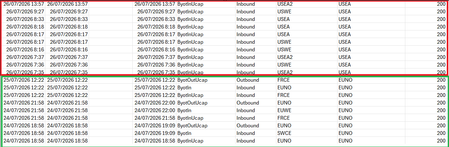
Hi all, Since this weekend users accross our org. have been noticing that AA/CQ that forward Calls to external numbers FAIL. This was not the case last week. Flow example : User dials number of AA, this AA has a menu which has Internal and external numbers. Internal numbers -> no problem. Externa numbers -> message (new never heard this): "Please Hold while we forward your call, .... Sorry we could not forward your call at this time, try again later". On user level we are not experiencing this issue when I redirect my calls from work number to external number there is no issue. What is very strange in this entire scenario is that we are EU bases, the resource accounts "Usage location" is on the proper country in EU. But in the Microsoft PSTN USAGE logs we see that the "Azure region for Media" is USSC, USEA, USWE, JPWE, JPEA, MAWE, KRCE where it should be EUWE, FRCE and EUNO ... But No Fail Codes, just Bye ... The dates hold up with the issue... before 26/07 everything passed over EU Region. After 26/07 everything passes over US, KR, MA, JP ... Anyone else having this issue ? Related to the new AI routing implementation gone bad ?81Views0likes2CommentsTeams PowerShell Embraces Web Account Manager and Imposes Control Over Federated Chat
Teams released a new version of their PowerShell module on July 19. The new module contains WAM support and cmdlets to limit federated chat for specific users and tenants. The new controls are welcome, but it’s a sad state of affairs that to configure the settings you must install a new version of a module that doesn’t work so well alongside other Microsoft 365 modules. https://office365itpros.com/2026/07/24/federated-chat-controls/22Views0likes0Comments


Events
Recent Blogs
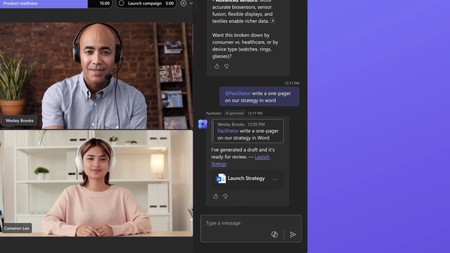
- Most people don't need more meetings—they need meetings that lead to action. At their best, meetings drive decisions and keep work moving forward. But poorly managed meetings can actually slow progre...Aug 11, 2026952Views0likes1Comment
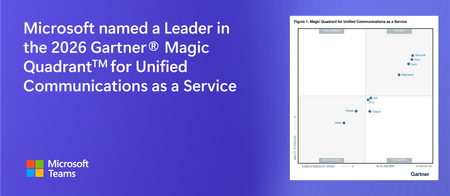
- 8 MIN READMicrosoft has been recognized as a Leader in the 2026 Gartner® Magic Quadrant™ for Unified Communications as a Service—our eighth consecutive year with this recognition. We’re also excited to sha...Aug 06, 2026969Views0likes0Comments