Recent Discussions

Unable to unmirror camera on Microsoft Teams
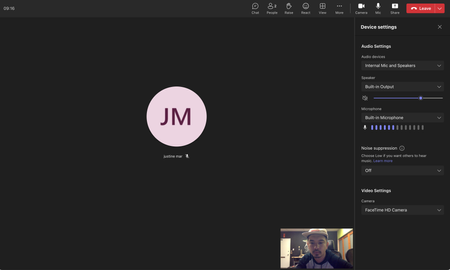
Hello, I am currently unable to un-mirror any camera feeds that go in microsoft teams. The button and option is completely missing in the options. See pic below. What is even more baffling is that I did see this option there earlier but now it is missing. I am on a Mac running macOS Big Sur 11.6 and Microsoft teams desktop app is running version 1.6.00.19353. Why is this option missing and how can I bring it back?1.8KViews0likes3Comments
Why is my conversation view left aligned for me and the person I'm talking to
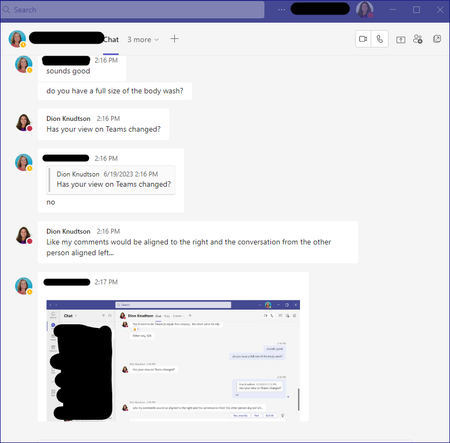
Note - My question is NOT about the Compact view for the left side list of Team conversations. My question is for the conversation area itself. Why is my conversation fully left aligned versus split between my comments on the right and replies on the left? What it is NOW: What is WAS and what I want back. Just an fyi, my screenshot is from someone else, I had to use their screenshot to get the example. Either way, my comments since I'm making them should be right aligned:15KViews0likes10Comments
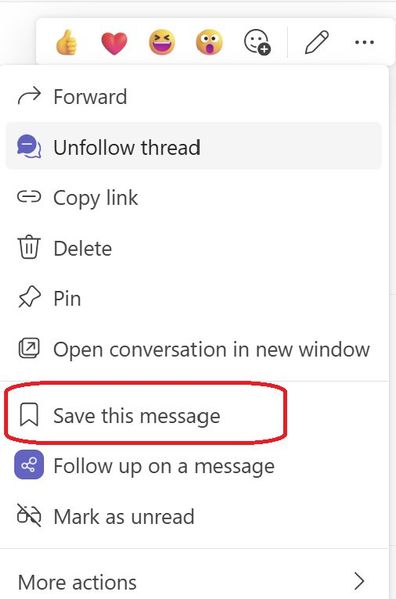
Introducing a new feature on Microsoft Teams: "Save this message"
Exciting news - alongside pinning your posts/messages, you can now save them too. All your saved messages will be neatly organized under the "Saved" menu within Teams, right below the "Followed Thread" section. Look out for a special icon marking your saved messages for easy reference. And the best part? You have the flexibility to unsave messages whenever you wish. Stay organized and never lose track of important information with this handy984Views1like3Comments
Multi-Language Closed Captions in Webinars?
Hi community! Here is an interesting one. We are planning to use Microsoft Teams' webinar functionality for our upcoming events. Are translated captions a thing? Can we hold a webinar in English and have Teams generate closed captions in Spanish, for example? The latest interpreter features really have my hopes up for this one10Views0likes0CommentsHow do you handle employee recognition in Microsoft Teams without it feeling forced?
Hey community, Our HR team is trying to implement a point-based recognitions / incentive program (or rewards whatever you are all calling it in your companies). We are having a bit of trouble finding the right features inside MS Teams to do this. We really don't want this to live outside of Teams because you know how initiatives work in modern work: If people don't see it, they are going to forget about it in a month or two tops. Any recommendations?82Views0likes2Comments
Document Library Settings
Many times when someone opens a document from a teams document library, it shows the document as modified even though no actual changes were made to the document. The default at my company is that documents open in edit mode and they auto save so one solution would be to set it to open in view only mode, but my company doesn't want to change that at the company wide level. Is there any way to do this at the SharePoint library level? I also don't want to make document checkout mandatory.38Views0likes1CommentNew teams: call queues not showing in search
tried out New Teams and found a big problem: In the calls section, if I type the name of a "call queue" (shared line) .. it will not come up in search. So our staff wouldn't be able to find the Tech support Helpline, for example, through search. In 'old' Teams these call queues showed up with the headset icon making them distinctive. It seems to me that currently the only way to call these call queues using new Teams would be via 10-digit dialing. That won't be acceptable.Solved10KViews3likes45Comments
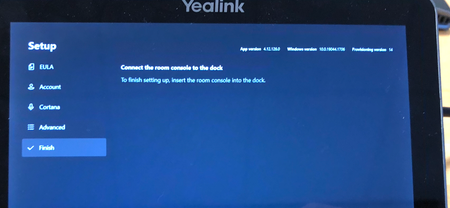
ERROR - Yealink MVC500 - To finish setting up, insert the room console into the Dock’,
Hi All, I am an IT Technician at a medium-sized company. We have a Yealink MVC500 video conference call system which we purchased in September 2020 for our meeting room. It has worked fine until last month when the MShare (HDMI sharing peripheral unit) stopped working which meant we were unable to screen share. The error which we got was: "The room display is unplugged plug it back in for the best experience". I checked the cabling and could see that the MShare and MTouch (Touch screen device) cables were correctly connected into the corresponding USB ports on the PC but we were still getting the error: "The room display is unplugged plug it back in for the best experience". I checked the driver for the Mshare and could see that it was the latest driver was already installed. I then factory reset the trying MVC 500. Now the problem is I am stuck on the initial settings set-up where the Mtouch (Tablet device) saying is ’To finish setting up, insert the room console into the Dock’, I do not understand what this error means. Even when checking the Yealink MVC500 Official documentation I cannot find any reference to these terms. I'd really appreciate it if someone who knows about the Yealink conference systems can help me. Thanks, Shoaib13KViews1like4Comments
Allow muting a person only for me
Sometimes I am in a meeting where one of the persons in the meeting is actually near me in the world outside the screen. In this case the sound is a bit maddening since there is a small delay between the sound from the person and the sound through the teams interface. In these cases, I would like to mute the person only for me since I am sitting near and can hear the person fine without headphones. Right now I need to takeoff headphones when the person is talking and putting it back as the person finishes talking.129KViews195likes152CommentsTeams keeps opening prompt for me to log in again, while I'm already logged in
Like many others I've been having lots of sign in difficulties with Microsoft Teams (issues of infinite loops when trying to sign in, generic error messages when attempting to load, etc.). I've been able to resolve those issues (not sure how though) but now I'm having a new problem. While signed into teams, the program opens a pop-up window asking me to sign in again, while I'm still signed in. Basically ,I see my signed-in Teams in one window, and another pops up on top of it asking me to sign in. If I close this pop up window, it will pop up again, but if I keep closing it when it pops up, after about 3-5 times, it stops popping up again and I can use Teams normally. But then after about 30 minutes or so the popup appears again. I've attached a screenshot of what it looks like when this popup appears. As you can see, my signed in teams is still visible in the background of the login prompt. Quitting Teams and restarting the program (or restarting windows) causes the same issue to occur again. Logging out of Teams, deleting the cache and uninstalling and re-installing the program results in a return of the sign in issues that so many others have (where I sign in, enter my 2FA code, then it returns to my password screen again, setting off an infinite loop of signing in and over and over again; OR, when I sign in it just stays stuck on a loading screen forever). Eventually through some number of continued re-installs and cache deletes I can sign in successfully, but then this weird annoying pop-up problem I described re-occurs.117KViews1like7CommentsTeams Hotline (PLAR) Phones and Kari’s Law Compliance – Is Direct 911 Dialing Guaranteed?
We are reviewing Microsoft Teams hotline (PLAR) phones that automatically dial a non‑emergency number (for example, a security desk). It is unclear whether all Teams hotline configurations allow a user to manually dial 911 from the phone. Since Kari’s Law requires direct 911 dialing on MLTS endpoints, we’re looking for clarification on the following: Are Teams hotline/PLAR phones guaranteed to allow manual dialing of 911? Does this behavior vary by Teams certified device model? Thanks in advance for any help.23Views1like0CommentsProviding Early Feedback - Simplified Teams app bar 557169
How do we provide early feedback to prevent this from happening or requesting the option to disable this feature? If anything, I want Teams to de-simplify. Microsoft keeps going out of their way to hide things that are crititical to productivity. https://www.microsoft.com/en-us/microsoft-365/roadmap?filters=&searchterms=557169 I mean - generally - how do we get Microsoft to stop making things worse? It seems like the recommendation is to use the feedback button in the app; but by that time it's too late. Telling the 100+ people who ask me what Microsoft broke this week to use the feedback button is not helping avoid their distaste and distrust of this platform. This is why people are avoiding Teams and prefer text messaging and WhatsApp. We desperately need to increase adoption but Microsoft keeps obscuring features that lead to increased confusion. Where do we make requests to decrease simplicity and increase productivity?86Views0likes2CommentsAdaptive card do not render image on Teams Desktop
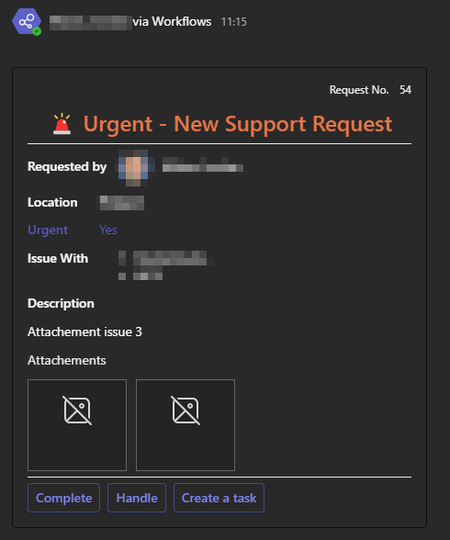
Hello Community, We are facing a challenge with the image rendering in our Adaptive cards only in the Teams Desktop application. All is working fine with the Teams on the Web, and when we test it in the https://adaptivecards.io/designer/ The images are stored in our SharePoint. Will this be the problem ? See bellow our json adaptive card, and some screenshots { "$schema": "http://adaptivecards.io/schemas/adaptive-card.json", "version": "1.3", "type": "AdaptiveCard", "body": [ { "type": "Container", "items": [ { "type": "ColumnSet", "columns": [ { "type": "Column", "width": "stretch", "items": [ { "type": "TextBlock", "text": "Request No. ", "wrap": true, "size": "Small", "isSubtle": true, "horizontalAlignment": "Right" } ], "backgroundImage": { "horizontalAlignment": "Right" }, "horizontalAlignment": "Right" }, { "type": "Column", "width": "auto", "items": [ { "type": "TextBlock", "text": "44", "wrap": true, "size": "Small", "isSubtle": true, "horizontalAlignment": "Right" } ], "horizontalAlignment": "Right" } ], "horizontalAlignment": "Right" }, { "type": "ColumnSet", "columns": [ { "type": "Column", "width": "stretch", "items": [ { "type": "TextBlock", "wrap": true, "text": " Urgent - New Support Request", "horizontalAlignment": "Center", "size": "ExtraLarge", "weight": "Bolder", "color": "Warning", "spacing": "None", "height": "stretch" } ] } ] } ] }, { "type": "Container", "items": [ { "type": "ColumnSet", "columns": [ { "type": "Column", "width": "auto", "items": [ { "type": "TextBlock", "text": "Requested by ", "wrap": true, "weight": "Bolder" } ], "verticalContentAlignment": "Center" }, { "type": "Column", "width": "auto", "items": [ { "type": "Image", "size": "Small", "style": "Person", "url": "data:image/png;base64" } ] }, { "type": "Column", "width": "stretch", "items": [ { "type": "TextBlock", "text": " Doe, John", "wrap": true } ], "verticalContentAlignment": "Center" } ] }, { "type": "ColumnSet", "columns": [ { "type": "Column", "width": "auto", "items": [ { "type": "TextBlock", "text": "Location", "wrap": true, "weight": "Bolder" }, { "type": "TextBlock", "text": "Urgent", "wrap": true, "weight": "Bolder", "color": "Accent" }, { "type": "TextBlock", "text": "Issue With", "wrap": true, "weight": "Bolder" } ] }, { "type": "Column", "width": "stretch", "items": [ { "type": "TextBlock", "text": "France", "wrap": true, "weight": "Bolder" }, { "type": "TextBlock", "text": "Yes", "wrap": true, "color": "Accent" }, { "type": "TextBlock", "text": "Office", "wrap": true } ] } ] }, { "type": "ColumnSet", "columns": [ { "type": "Column", "width": "auto", "items": [ { "type": "TextBlock", "text": "Description", "wrap": true, "weight": "Bolder" }, { "type": "TextBlock", "text": "This is my error please help me", "wrap": true } ] } ] } ], "separator": true }, { "type": "Container", "items": [ { "type": "ColumnSet", "columns": [ { "type": "Column", "width": "stretch", "items": [ { "type": "TextBlock", "text": "Attachements", "wrap": true, "isSubtle": true }, { "type": "ImageSet", "imageSize": "Large", "images": [ { "type": "Image", "url": "SharePointURL", "selectAction": { "type": "Action.OpenUrl", "url": "SharePointURL" } }, { "type": "Image", "url": "SharePointURL", "selectAction": { "type": "Action.OpenUrl", "url": "SharePointURL" } } ] } ] } ] } ] }, { "type": "ActionSet", "horizontalAlignment": "Left", "actions": [ { "type": "Action.ShowCard", "title": "Complete", "card": { "type": "AdaptiveCard", "body": [ { "type": "TextBlock", "text": "What was the error?", "wrap": true }, { "type": "Input.Text", "isMultiline": true, "id": "error" }, { "type": "TextBlock", "text": "What was the solution?", "wrap": true }, { "type": "Input.Text", "isMultiline": true, "id": "solution" } ], "actions": [ { "type": "Action.Submit", "title": "Send", "id": "send", "associatedInputs": "auto", "data": { "action": "complete", "request": "44", "link": "Link to the SharePoint List", "issuewith": "Office" } } ], "verticalContentAlignment": "Top" }, "id": "complete" }, { "type": "Action.Submit", "title": "Handle", "id": "handle", "data": { "action": "handle", "request": "44", "link": "Link to the SharePoint List", "issuewith": "Office" } }, { "type": "Action.Submit", "title": "Create a task", "id": "task", "associatedInputs": "auto", "data": { "action": "task", "request": "44", "link": "Link to the SharePoint List", "issuewith": "Office" } } ], "height": "stretch", "separator": true } ] } Thank you for you help.3.8KViews2likes10Comments
Formal Complaint: The UX Failure of Microsoft Authenticator and Teams Guest Access
To the Microsoft Product & Engineering Teams, I am writing this not just as a frustrated user, but as a systems engineer and developer who has just spent several hours navigating the Kafkaesque labyrinth that is your current authentication ecosystem. The transition to a new mobile device while maintaining "Guest" access to an external organization (Rihter d.o.o.) has been an exercise in systemic failure. Specifically, I would like to highlight the following critical UX flaws: The Identity Paradox: Your system’s inability to gracefully handle a personal Outlook account acting as a Guest in an Entra ID tenant is baffling. Receiving the error "You can't sign in here with a personal account" while trying to access a tenant I am already a member of is a fundamental logic failure. Visual Inconsistency (The "Briefcase" vs. "Initials"): The fact that an account can appear in Authenticator as a "One-time password" nalog with initials, yet be completely non-functional for Teams until it is manually re-added as a "Work/School" nalog with a briefcase icon, is a UI disaster. The "Action Required" Loop: I was trapped in a cycle where the app demanded action but provided no path to resolution within the mobile environment. I had to resort to using a desktop browser in Incognito mode just to force the system to generate a valid QR code for the new hardware. Mandatory Hardware Security (Passwordless): Forcing users to implement device-wide PINs or biometrics on their private hardware just to use the "Approve" notification feature is overreach. There should be a clear, frictionless fallback to TOTP codes within Teams without degrading the entire app's functionality. App vs. Web Desynchronization: It is unacceptable that a web browser (in Desktop mode) can successfully authenticate a session while the native Teams app on the same device remains stuck with stale tokens and cached AADSTS90023 errors. As someone who designs low-level architectural specifications (DREL), I find the lack of interoperability and the "black box" nature of these errors (like AADSTS90023) to be a significant step backward for professional productivity. I hope this feedback reaches someone who prioritizes user flow over bureaucratic security layers. Best regards, Milan Lakatoš Petrović Systems Engineer & Freelance Programmer67Views0likes0Comments
Tracking Competencies & Development in MS Teams?
Does anyone have any experience building an employee development program inside Microsoft Teams? Our team had the idea to map out competencies and integrate employee development programs into our overall performance management cycle. We would love to keep all of this inside Teams. Is Power Apps the way to go?21Views0likes1Comment



Events
Recent Blogs
- Welcome to the February edition of What’s new in Microsoft Teams. This month’s updates are all about helping you stay in flow: getting the most useful information to you faster, and reducing a few ev...Feb 26, 20262.2KViews0likes0Comments
- The latest Microsoft Teams and Microsoft 365 expert community briefings, podcasts and upcoming community events. Expert Briefings: Microsoft Places in 2026: APIs, Desk Booking, and Copilot Contex...Feb 20, 2026150Views0likes0Comments