Recent Discussions

Seeking Solutions for Delayed Voicemail Connection in Microsoft Auto Attendant
Hello Community, I am encountering an issue with Microsoft Auto Attendant where there is a noticeable delay (approximately 5 seconds) after the greeting message and before the call is connected to the shared voicemail box. This delay occurs right before the voicemail tone prompts the caller to leave a message, leading to confusion and a less professional experience. Here are the specifics of my setup: Auto Attendant is configured with a greeting message. Calls are intended to be forwarded to a shared voicemail box via an MS365 Group. The system is set to skip the voicemail system notification. The greeting message is an uploaded audio file, not text-to-speech. Despite the setup, there is an awkward silence after the greeting and before the voicemail tone. I have attempted to find solutions, noticing that others might have faced similar issues, yet a clear resolution or workaround seems elusive. Has anyone encountered this issue and found a way to minimize or eliminate this delay? Any suggestions or insights into settings or configuration changes that could improve this situation would be greatly appreciated. Thank you for your help!1.1KViews0likes4Comments
Sharing part of the screen
Several users in our organisation use wide screens (42-49") which when shared in Teams as one screen are illegible for others. Even when sharing between two users, video is very pixelated and difficult to read. We tried using window sharing which works fine, but there is a need to often switch between several windows, which is creating multiple issues, especially when information from one window is referenced in another. I was unable to find a function enabling us to share just a portion of the main screen as we use in PowerTools. Am I missing something here or would this require a request for a new feature?Solved206KViews22likes32Comments
Customizing Participant Data in Teams Meetings
Hello, I have a Teams Premium account, and I would like to customize the participant data. Most of the participants are outside of my organization. Ideally, I would like participants to add their full names as well as their department when they log into the meeting. Otherwise, I am having to ask participants to add that information into the chat, and they don't always do it. What is the best way to achieve this? Thanks, David18Views0likes2Comments
Direct Routing PSTN calls to Teams Auto Attendant does not forward to Shared Voicemail
Hi all, I’m running into a strange issue with a Teams Auto Attendant and I’m hoping someone here has seen it before. We have a Direct Routing number where business hours calls go to a Call Queue, which works, and after hours calls should go to Shared Voicemail for a Microsoft 365 Group. If I call the Auto Attendant from inside our Teams tenant, the after-hours Shared Voicemail works correctly. I can leave a message and the voicemail is delivered to the group inbox as expected. If I call the same number from the PSTN over Direct Routing, I hear the after-hours greeting, so the schedule and call flow are clearly being hit, but once the greeting finishes I get: “Sorry, we cannot connect your call at the moment, please try again later.” I have already verified that the resource account has the correct Teams Phone Resource Account license, Enterprise Voice is enabled, the LineURI is assigned, the Online Voice Routing Policy is assigned, the Direct Routing route and SBC look healthy, the Auto Attendant is associated with the correct resource account, the after-hours call flow points to the correct Microsoft 365 Group, and the group mailbox exists and is healthy. What makes this more confusing is that redirects to internal or tenant-side destinations work, but redirect to Shared Voicemail from a PSTN-originated call does not work. I also tested redirect to an external PSTN number, and that fails with the same error as well. Because the after-hours greeting plays correctly, and because internal Teams calls can successfully leave voicemail in the shared mailbox, I do not think the issue is with the Auto Attendant configuration itself or with the Microsoft 365 Group mailbox. At this point it looks more like the handoff or redirect path for PSTN-originated calls over Direct Routing is where things break. Has anyone run into this with a Teams Auto Attendant, Shared Voicemail, and inbound PSTN over Direct Routing? I’m trying to figure out whether this is a known limitation, a bug, or if there is some specific setting related to PSTN-originated redirects that I am missing. Thanks!2Views0likes0CommentsPhishing Simulation Training with Teams?
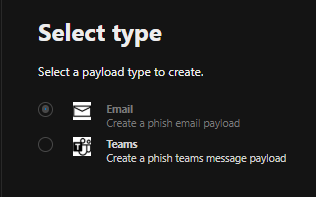
Hey all, while setting up some Exchange Online Phishing Simulation Training, I saw the (greyd-out) option to use a teams payload when it comes to setting up a phishing simulation. I didnt find any very useful articles, why this is greyed out. Business Premium+ Defender and Purview Suite for BP is licensed. How do I set this up and configure it? Does this also support all types of attacks (Credital harvest, ...) I'd be happy for any recommendations! BR Schnittlauch44Views1like2Comments
Issue with Teams 'Add a User to Group Chat' API call?
I am getting a very strange error when trying to add a new user to an existing group chat using a GraphQL call. I have looked through the documentation, asked AI, and even contacted Microsoft support and no one can seem to explain why this API call is failing. Below is the API call that I am making. I can find no reason that I should be receiving the error message '#microsoft.graph.aadUserConversationMember' To get the basic questions out of the way.... Yes, the account making the API call DOES have permission to add users to the channel (and can do so using the frontend as normal.) Yes, the thread in question is a group chat, so adding members to that chat should be a valid command. Yes, ALL members in the group chat currently have the type '#microsoft.graph.aadUserConversationMember', so it is definitely a valid type for users in this channel. Yes, I have tried both the beta and stable channel; each gives the same error message. Yes, the invited user is internal to our organization, and is a valid target for the invite (invites work through frontend as well.) No, I cannot use the 'add member to channel' endpoint, because the chat is a group chat, not a channel. I can only assume, at this point, that the error message is a red herring and there's something else wrong with my API call?Why am I receiving this error message when trying to add a member to a pre-existing group chat? Thanks in advance for any assistance. POST to URL: https://graph.microsoft.com/beta/chats/[[THREAD_ID]]@thread.v2/members BODY: { "@odXXX.type": "#microsoft.graph.aadUserConversationMember", "roles": [], "email address removed for privacy reasons": "https://graph.microsoft.com/v1.0/users/[[USER_ID]]" } ERROR MESSAGE: {"error":{"code":"BadRequest","message":"The provided '#microsoft.graph.aadUserConversationMember' for 'odXXX.type' is not valid for this operation.","innerError":{"date":"2026-01-29T18:10:32","request-id":"<PII:moderator removed>","client-request-id":"<PII:moderator removed>"}}}335Views0likes9CommentsWeb Notifications API from Personal Tab app doesn't work
I have a client-side web application that we're trying to get to run as a Teams personal tab app. I have the app working as a teams app, as long as we "open in new window" so that the app doesn't get put to sleep as it needs a permanently up session with something else. Our app uses Web Notifications API (https://developer.mozilla.org/en-US/docs/Web/API/Notification) to create desktop notificiations, but this does not seem to work when running as a Teams tab app popped out into a new window. No notifications are displayed. Permissions have been requested correctly and given and Windows is set to allow notifications, but these web notifications never make it out of teams to the desktop. There are no errors in the browser console to say the web notifications are not supported in Teams. Is this not supported as a teams app? The inbuilt activity feed is useless for our purpose (for a few reasons), so please don't suggest I use graph to make use of that instead.64Views0likes3CommentsWhats the best Practise for on-call duty via teams external calling?
Hey community, I'm a bit in a struggle when setting up our Teams Operator Connect Phone system. We have an Auto attendence which is offering different menus (Press 1..., etc) We're planning on setting up a twentyfour x seven on-call duty where customers can call and are getting redirected to the mobile phones of our technician. I saw the option to forward to one number, but there isn't an option to forward to multiple numbers. How do you guys solve such a scenario, where you have to wake up colleagues mid night? We are changing shifts weekly, always 2 guys, sometimes 3 ppl. on shift. Thank in advance, SchnittlauchSolved137Views0likes3Comments
Teams Transcription (Licensing / Button greyed out for some users)
Hello, i have questions regarding transcription in Teams. Our org has Microsoft 365 Business Standard licenses, two users have icrosoft 365 Copilot Business on top of that. First question: is transcription possible for users without Copilot Business License? If the meeting policy is specified as something other than "off", some people can start the transcription, even if all participants of the meeting have no Copilot Business License. Is this on purpose or am i using a loophole and am i violating my license agreement in any way? Second question: some users can start the transcriptions, while others with the same teams version, license and meeting policy can not I read that having the personal setting disabled to identify yourself automatically in meetings will prevent you from starting the transcription, but that setting is enabled for every participant. On the teams app for android, one participant can enable the transcription, in the same meeting in the desktop app it is not available (disabled by Administrator per Policy) Teams version is 26072.519.4556.7438. Any pointers how i can locate the user specific difference, that is responsible for the transcription? I checked the assigned meeting policy and it is the same. Thanks for your time and help! Best regards, AndiY38Views0likes1Commentad-hoc call transcripts via graph api endpoint
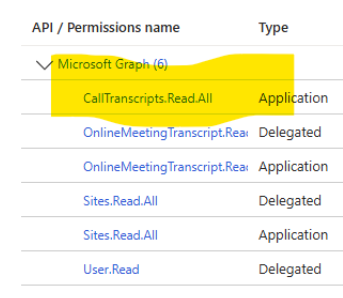
I have an app with the below permissions. I can successfully get list of transcripts and transcript content for online meetings. But when I try to get list for ad-hoc calls, I get the 400 Bad Request error. Any suggestions on how to get ad hoc call transcripts? Permissions Error:54Views0likes3CommentsOption to change default recording & transcription settings?
I've been asked to look at changing the default settings for recordings & transcriptions, specifically the “Who has access to the recording or transcript.” setting, changing it from "Everyone" to "Specific people". I've looked through Meeting Policies in Teams Admin Center but can't see an option that governs this behaviour. Although we've advised users to change this setting if needed, we have had instances where the user has forgotten to change the default and has inadvertently allowed guest/temporary participants (who may have only been in attendance for a specific item) to see the whole meeting transcript. Many thanks, Olly388Views2likes2Comments
Continuous feedback in Teams without it getting lost in chat?
Our company is trying to move from annual reviews to continuous feedback. The idea is that managers and peers give quick feedback throughout the year and it all gets captured somewhere. Right now people just send feedback in Teams chat or email and it vanishes. By the time reviews come around nobody remembers what was said 6 months ago. Is there a structured way to give and receive feedback inside Teams that actually saves it and makes it retrievable later?20Views0likes0Comments
Struggling to keep 1:1 meeting notes organized across weeks in Teams
I have 8 direct reports and we do weekly 1:1s. Right now I'm keeping notes in OneNote but theres no easy way to carry over action items from last week or see what we talked about 3 months ago without scrolling forever. Teams meeting notes are even worse because each meeting creates a separate note. Someone in my company suggested using a Loop page but that still doesnt solve the continuity problem. How are other managers keeping a running history of 1:1 conversations thats actually searchable and organized?49Views2likes1CommentImages compressing and sending on team.
Hey everyone, I'm facing an issue with Team. When I try to send over 20 images, each around 20MB to 10MB in size, they won't go through. I've tried using online tool such as https://jpegcompressor.com/ to compress them, but it only supports up to 10MB images. I need a solution or software that can compress them easily so I can share them with my colleagues hassle free. Thanks, and regards, Jiya Hana.698Views0likes1CommentDisplay Teams chat message with date stamp rather than relative day
Is there a way to force Teams Chat messages to display the date of a message rather than "yesterday" or "today"? e.g. display "27/08/2024" instead of displaying "yesterday 2:12 pm". (I'm creating this post on 28/08.) We use screenshots of Teams messages in our processes, and having to wait for the actual date to displayed invariably means taking the screenshot is forgotten. Immersive reader always shows the actual date, but not the recipient of the message. No help there.7.5KViews16likes16CommentsMaking Teams start on Secondary Monitor
Is there a way to force Teams to start on my secondary monitor (Screen 2)? Every morning I start Teams, it comes up on Screen 1 and I have to move it over to Screen 2 so I can do my work while still seeing the chat/calls windows. I checked settings in Teams as well as looking in Windows (Apps & Features, and Properties) but can't find anything that can set it to start on the secondary monitor instead of primary. It does not appear to retain the last screen position on exit.Solved43KViews2likes8Comments
Auto-saving transcription files in a folder?
I'm currently working in a project which requires the usage of meeting transcription files (not recordings!), and I couldn't find a foulder at OneDrive, or Sharepoint that contains the transcription files (.vtt), I know I can manually download it at the meeting recap but manually downloading it would make my project kinda pointless, is there any way that I can configure it to automatically save the transcription file at a folder like it happens with recordings? Thank you!Solved515Views0likes2CommentsQuestion about Teams Phone licensing
Hi everyone, I have a question about Teams Phone licensing: If I have some users who have Teams Phone to make and receive external calls, when one of them receives an external call, can they transfer it to another user who only has a regular Teams license but not a Teams Phone license? Or does the user I want to transfer the call to also need a Teams Phone license? I couldn't find a KB article that clarifies this. Thanks regards47Views1like1Comment


Events
Recent Blogs
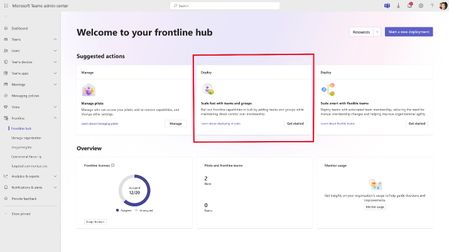
- We announced several exciting updates at the Microsoft 365 Community Conference this week: you can now scale Teams pilots to your broader frontline organization faster, fill open shifts automatically...Apr 24, 2026120Views2likes0Comments
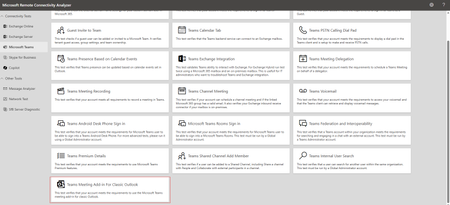
- Hi Teams Community, We're back with another great addition from Christopher Tart to Support Diagnostics for Microsoft Teams. We're excited to share that the Teams Support team has added a new di...Apr 23, 2026151Views0likes2Comments