Recent Discussions
Upcoming change: disabling Teams meeting recording expiration notification emails
Hello, We wanted to share an important update regarding email notifications for expired Microsoft Teams meeting recordings. Based on valuable feedback from our community, we’ve decided to make a change to how notifications are handled. What’s changing: Starting June 1st, we will stop sending email notifications for expired Microsoft Teams meeting recordings. We are making this change due to complaints we received from many customers about the high volume of notifications which they deemed low value. This change allows us to respect your preferences while ensuring critical communications remain accessible. Recording expiration and deletion policies remain unchanged and items that expire will be deleted even when notifications are not being sent. How to keep receiving notifications: For those customers that would like to continue receiving email notifications, we will create a new setting and make it available before June 1st. This will be a per-tenant setting. We will send another message center post once this setting is available and update our documentation in this discussion and on our support page. After June 1st: If you didn’t change notification settings before the deadline, you can still re-enable them at any time by running the PowerShell command. Note: Our original message center post incorrectly asked recipients to fill out a survey and failed to include a link to the survey. We are committed to providing options that work for your organization, and we would like to hear from you. If you have questions or additional feedback about this change, please complete this survey and join the discussion: Teams Meeting Recording Notification Changes – Fill out form Thank you for being part of our community.203Views1like2Comments
Cannot delete organisation from Teams
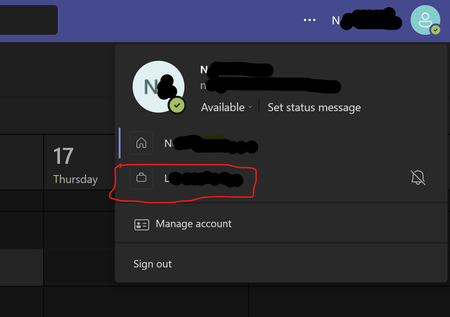
Hi, It appears to be impossible to delete an organization from Teams Please see the picture below. I am unable to remove the organization beginning with L. I have used my personal email for many years, so I should be the one in control of it! I am the owner/ admin of the email account. However there is no way to delete the rogue /linked organization to which I no longer have access. How can I take back full control of my email/Teams account and remove this rogue organization? I've clicked on everything I can find and nowhere else mentions this organization. Clicking on the organization in Teams just takes me to a page saying "Microsoft Teams Free (Classic) is no longer available" with options to upgrade. I don't want to upgrade I want it deleted! TIA84KViews12likes69CommentsNew Audio-Only Recording Option for Teams Meetings
A new audio-only recording option for Teams meeting suppresses the video feed from meeting participants to generate the MP4 file for the meeting recording. The idea is to better preserve user privacy during recording playbacks. Few will miss the video stream because the audio is usually more important. The audio is also the basis for the meeting transcript, and that leads to AI-generated outputs like meetings summaries and action items. https://office365itpros.com/2025/10/20/audio-only-recording-teams/1KViews0likes4Comments
Teams stuck in "Loading latest updates..." error
I have been having the same error with Teams for the past few months, across two different computers, and with me having uninstalled and reinstalled Teams several times. Effectively, Teams works fine the first time it is reinstalled, but when I go to use it the following day, even if the computer has not been shut down in the meantime, I get a "Loading latest updates... in the meantime, you can still send and respond to messages" line in the toolbar. I cannot actually send or respond to messages (or receive them) while this is going on, though. If anyone has any suggestions, I would really appreciate the guidance - Teams is effectively unusable for me right now, which is a problem given how much we use it to communicate in my department.40KViews8likes16CommentsBest External Access configuration
I’m looking for guidance on the best Microsoft Teams configuration for the following goal: Objective Prevent random external domains from: Looking up users in Teams Sending 1:1 chats Making direct audio/video calls At the same time: External users invited to Teams meetings should not appear as Anonymous47Views0likes1Comment
Allow muting a person only for me
Sometimes I am in a meeting where one of the persons in the meeting is actually near me in the world outside the screen. In this case the sound is a bit maddening since there is a small delay between the sound from the person and the sound through the teams interface. In these cases, I would like to mute the person only for me since I am sitting near and can hear the person fine without headphones. Right now I need to takeoff headphones when the person is talking and putting it back as the person finishes talking.129KViews196likes153CommentsWhen I install my app to a second channel in Teams, the this.onMessage will nto trigger
I have a bot which when installed to a channel will read messages using this.onMessage, if I add another channel to the same team it will also read the messages without installing the bot on that channel. However if a user installs the bot again, to the second channel which some users do, the second channel will not trigger the onMessage listener except when using the @botname command. I cant log errors anything because it just wont trigger. I feel like the context gets screwed up, all the other listeners fire on other channel Any help please?Solved76Views0likes3Comments
App Validation Issue - Bot must send a proactive welcome message in personal scope
I'm working on a bot application for MS Teams using the Python SDK and encountered a challenge with app validation and the proactive welcome message requirement. What Happened: Initially, our bot handled the welcome message through on_installation_update, but app validation failed with the error: "Bot must send a proactive welcome message in personal scope." To satisfy validation, we added on_members_added_activity to send the welcome message for personal scope, which resolved the validation error. However, this created a new problem: on_members_added_activity is being triggered when we call the Graph API to query chats or users: {graph_url}/me/chats $filter=chatType eq 'oneOnOne' and installedApps/any(a:a/teamsApp/id eq '{teams_app_id}') {graph_url}/users/{user_id}/chats $filter=chatType eq 'oneOnOne' and installedApps/any(a:a/teamsApp/id eq '{teams_app_id}') According to a Stack Overflow discussion (https://stackoverflow.com/questions/57496329/proactive-messaging-bot-in-teams-without-mentioning-the-bot-beforehand), this appears to be a known issue: calling this API triggers a conversation update event even though there were no actual updates, resulting in duplicate events and duplicate welcome messages. Questions: What is the official/recommended way to handle known issue: calling this API triggers a conversation update event? Whats the recommended way to read personal chat history of a user? Should we be using a different approach for this app validation requirement? Any guidance or pointers to official documentation would be greatly appreciated!322Views0likes5CommentsWould Microsoft Teams SDK for Python (Preview) affect marketplace submission
Hi, I need to know if it's possible to publish a custom teams app and get validated to have the app in marketplace for public if it's developed using Teams SDK with python which is mentioned as still in preview. Teams SDK is now generally available for JavaScript and C#, supports Python in developer preview https://learn.microsoft.com/en-us/microsoftteams/platform/bots/overview https://learn.microsoft.com/en-us/microsoftteams/platform/resources/dev-preview/developer-preview-intro?tabs=new-teams-client https://github.com/microsoft/teams.py Thank you!81Views0likes2Comments
Customize the Basic Approval Request
Is there any way that I can customize the Basic Approval Request in Teams? For example, at the top, it states Approvals. Can this be changed to state Acknowledgement instead? Is there anything else that can be customized just by using the MS Teams Basic Approval template?38Views0likes0CommentsDelayed emails when registering for a Webinar
We are seeing delays with receiving the emails with the meeting link after registering for a Webinar. It is taking around 7 minutes for the email to appear. This is the case with various email domains. Also, Gmail users are consistently receiving the email in their spam folder.31Views0likes0Comments
Does editing a chat group name affect all participants?
I have a number of chats open with various combinations of team members. Since Teams insists on using full names and not "goes by" names, I've edited the chat names for myself to make it easier to locate the appropriate chat on the fly. For example, a co-worker named Albert J. Swingleton goes by Jack, so I changed the name of the chat with Jack and Jill to "Jack & Jill" instead of the default "Albert and Jillian". This is great for me, but if it changed the way that the chat is named for Jack and Jill too, that's a major issue, because now they can't tell by looking at it that I'm a participant.11KViews2likes3Comments
Teams Voice Migration Checklist for IT Leaders
✅ Microsoft Teams Voice Migration Requires the Right Strategy Moving from a traditional PBX or legacy VoIP system to Microsoft Teams Phone offers flexibility, cost savings, and better integration with Microsoft 365. But successful migrations require careful planning across infrastructure, licensing, and user readiness. 🔑 Key Steps in a Teams Voice Migration • Assess Your Current Telephony Environment – Review your PBX, phone numbers, call flows, and existing voice infrastructure before migrating. • Choose the Right Calling Option – Decide between Microsoft Calling Plans, Direct Routing, or Operator Connect based on your organization’s needs. • Prepare Your Network – Ensure bandwidth, QoS, and connectivity are optimized for high-quality voice and video communication. • Plan User and Device Readiness – Confirm compatible devices, configure policies, and train users to ensure a smooth transition. 🚀 Why This Matters • Reliability – Proper planning ensures stable voice performance • User Adoption – Clear preparation improves the transition experience • Operational Efficiency – Consolidate communication tools into Microsoft 365 • Scalability – Modern cloud telephony supports hybrid and global teams 🔒 Plan the Migration Before You Move A structured migration checklist helps IT teams avoid disruptions, reduce risk, and ensure a successful transition to Microsoft Teams Phone.48Views0likes0Comments
How do you track 1-on-1 meeting notes anywhere in Microsoft Teams?
Hey everyone! How are you all keeping track of your meeting notes? Are you using the built in meeting features? Are you using a seperate app? I've noticed most of our employees are just using their Teams chats as a notepad and it doesn't seem very efficient...Solved115Views0likes3CommentsTeams duplicates contacts until it maxed out at 15000
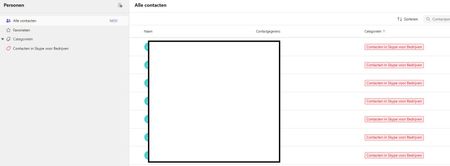
Hi, I have a weird issue with some users, Teams seems to be duplicating old Skype for Business contacts until it maxes out at 15000 contacts. I have been digging into it a bit and found out the location of the folder through Exchange powershell but I can't clear or delete it. Skype for Business is phased out and disabled in my tenant for a long time now so I couldn't do much there, I can't login to it through powershell. We've had Teams since like 2017 so I suspect this is a niche legacy issue popping up recently somehow. Manual deleting is possible through the browser environment but that is such a hassle because it keeps glitching if you delete per 100 and skipping pages and stuff, need to refresh constantly. Just a pain, it would take days. And no guarentee its not coming back either. See screenshots. Does anyone know why this is happening and how to fix this? Thanks for reading, cheers!64Views0likes3CommentsGroup email addresses for Teams sometimes contain “+” or “/” characters
We are using Microsoft Teams in our organization. When creating multiple Teams with exactly the same team name, using ASCII alphanumeric characters only, we occasionally see that the automatically generated group email address contains unexpected characters such as “+” or “/”. I would like to know whether this behavior is expected or if it is specific to our environment. This issue seems to have been occurring since around August 2025. We manually create Teams using the Windows Teams client. For example, if we create several Teams with a simple name such as “example2026”, the corresponding group email addresses are generated in the following format: email address removed for privacy reasons However, in some cases, the XXXXXX portion includes characters like “+” or “/”. When creating around 50 Teams, this issue appears in a few of them. This causes two problems for us: A “+” character interferes with plus-addressing behavior. When a “/” is included, we cannot create events inside the Team. Has anyone else encountered this issue or knows why this happens? Any insights would be appreciated.39Views0likes2Comments
New Teams: No notification badges in system tray
SOLVED BY THE FOLLOWING: NEW TEAMS IS NOT READY FOR PRIME TIME. When I activate New Teams, I give up having a notification badge in my system tray. I do get notification badges in the taskbar when Teams is minimized there, but not when it's closed and in the system tray. Notifications are turned on in Teams, but interestingly, the System > Notifications & actions setting has a toggle only for "Microsoft Teams Classic." Is that what's missing? I'm still getting the option to switch between new and old Teams. Not sure if that's a Microsoft thing or an organization thing. Will that right itself once New Teams is the only option?Solved74KViews8likes28Comments



Events
Recent Blogs
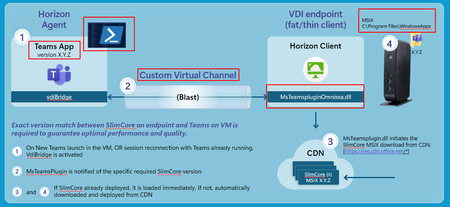
- Today, we’re excited to announce the tech preview of the new Microsoft Teams VDI optimization for Omnissa Horizon environments, bringing a modern, high-performance collaboration experience to custome...Mar 05, 2026725Views1like0Comments
- Virtual Desktop Infrastructure (VDI) has long been a critical deployment model for Microsoft Teams, especially for organizations that rely on centralized desktops for security, compliance, and scale....Mar 02, 20261.6KViews4likes1Comment