Forum Widgets
Latest Discussions

Add content type file to every new document library created in a site
I created a new template via content type that I want to be available in every document library (existing and new). For existing document libraries on the site and subsites, I can manually add the template but there are 300 subsites with 4 folders each. I'm looking for a faster way to do this. Also, I want the template added to every new folder that is created on the main site or subsites. What is the solution?NouVMar 03, 2026Occasional Reader7Views0likes0Comments
SharePoint view filtered to Me
Hello! Is it possible to create a view, or JSON format a view, when a field contains my information that is not a people picker field? I have a multiple line of text field where I enter a JSON object with user emails. Is there a way to change the view to only show the line item if that text field contains my email? I have tried using that field with Contains [Me] but that does not work. Presumably as [Me] is for people picker fields. Is there a way to add a filter to the view to look for my email?10Views0likes0CommentsHelp creating a link that opens OneNote in the APP that is hosted on SharePoint
I have a notebook that is hosted on a SharePoint site. I have several coworkers that have to move around from PC to PC depending on where they are assigned each week. Currently each time they move to a different area they are required to open the hyperlink to the OneNote and then select the "Open In App" to get it to populate in the regular app for them. Does anyone have a solution where I can leave a shortcut that opens directly to the app so they can skip the "open in app" step. My co-workers aren't particularly computer savvy and that one extra step is hanging a lot of them up.SolvedccmccaugheyMar 02, 2026Copper Contributor18KViews0likes4Comments
Hero and Quick Links web parts not supporting library and folder links
In the last few days, I noticed the "picker" modal used by the Hero and Quick Links visually changed. I didn't think anything of it at first until I realized the Hero web part was no longer allowing me to select libraries or folders to serve as the link. This was using the "Site" blade, which appropriately shows all the libraries and lets me drill into each and see the contents, but the ability to select a library or folder doesn't work. To make matters much worse, the "From a link" blade doesn't work either. "From a link" now seems to have a new validation component, so when I attempt to paste in a library or folder URL (i.e. https://tenant.sharepoint.com/sites/HR/Benefits) it detects that it's a SharePoint resource and displays a folder for me to select before I'm allowed to commit it - problem is, I still can't select this. I've tried pointing to the .aspx page that correlates to a library/folder view - doesn't work. I tried creating a Link in the library/folder that points to itself - I can't select these either. The Quick Links web part, on the other hand, does allow me to select these - same exact UI but allows for selecting libraries and folders. This does work for folders, but does not work for libraries. It visually looks like it works for libraries, but when you save the change is not really committed. I'm genuinely surprised to not have found this issue reported elsewhere so far. I assume this has to be a bug and hope it's fixed soon - allowing your most popular web parts to link to the root of content in your own platform is one of the most basic feature requirements and for this to break and not be noticed is pretty alarming.Jordan_PowerMar 01, 2026Copper Contributor397Views6likes6Comments
Sites webpart not showing all sites in the hub
Hi there A few days ago I created a parent hub, and associated some sites. Then I made those sites a second level hub, and associated sites to the second level. In the second level hub sites, I created a sites web part to show all sites in the hub. But it only chooses one, or maybe 3 to 4 but not all of the sites. I have the permission to add sites to the hubs. I put in a call to Microsoft, heard back after 2 days which they said they would go away and find an answer and I've not heard back. Is there a particular method to doing this. Eg. Should I go back to the Admin Centre, disassociated sites, unregister hubs then redo it all in a particular order? (not preferred option) or is there another way I can get the sites web part to render sites. Thanks in advance.MelF840Mar 01, 2026Copper Contributor422Views0likes6Comments
Managed MetaData and Document Libraris
Hello, we are currently going through the process of setting up managed metadata tags on our SharePoint Online systems. The requirement has been identified that any documents need to be tagged with some labels, and I would like to make it so that, when the user creates or uploads a document to the libraries in question, that there be a popup window or some other form of forced interaction for the user that will require them to set the tags that we are wanting to use. Any thoughts would be greatly appreciated, cheers.akellyFeb 27, 2026Copper Contributor25Views1like0CommentsWhat Are the Best Practices for Implementing Microsoft Power Automate in a Growing Organization?
Hello Everyone, We’re planning to scale Microsoft Power Automate across our growing organization and would appreciate your expert insights. What are the best practices for implementing Microsoft Power Automate effectively — especially regarding governance, security, environment management, licensing, and user adoption? If you’ve implemented Microsoft Power Automate in a mid-sized or scaling company, please share: Key lessons learned Common mistakes to avoid Governance and CoE strategies Tips for managing citizen developers Looking forward to your valuable suggestions. Thank you!Jackryan365Feb 27, 2026Copper Contributor25Views0likes1CommentNEW! SharePoint Lists & Libraries: Default Approvers for Configure Approvals Explained
🚀 New SharePoint Feature Alert! Microsoft has just introduced a super useful capability in SharePoint Lists and Document Libraries: the option to set Default Approvers when configuring approval workflows. This small but powerful enhancement removes repetitive manual steps and makes approval automation more consistent across teams using SharePoint + Power Automate. In my latest YouTube video, I walk through how this feature works, how to set it up, and why it can significantly streamline your approval processes. 🎥 Watch the full breakdown here: https://youtu.be/Xxn-IrKVh6E 👍 If you find it useful, let me know in the comments! #SharePoint #Microsoft365 #PowerAutomate #Productivity #M365 #SharePointOnline #Automation #DigitalTransformation109Views1like0Comments
Adjust Context Menu Modern Document Library
Is there an option to adjust Context Menu for Modern Document Library. End Users prefer to have Version History and Checkout to be available on menu bar rather than click three dots to access those options. Please let me know.Solved6.6KViews0likes3CommentsSharePoint Library - Invisibile Metadata
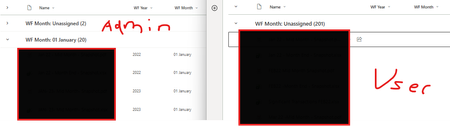
Hi All, Strange issue I'm running into on a library Left is my Admin profile where files are grouped by WF Year (metadata column) Right is a couple users with the issue where its showing Unassigned due to blank Year and Month I've exported the data from both accounts and both have the Year and Month Tried going to Properties on User account and the Year field appears like this ...very strange, any help would be appreciated :)SolvedVIP234Feb 26, 2026Copper Contributor220Views0likes6Comments



Tags
- SharePoint Online18,253 Topics
- Document Library3,213 Topics
- Lists3,134 Topics
- Sites2,606 Topics
- admin2,248 Topics
- sharepoint server2,043 Topics
- Permissions1,982 Topics
- files1,723 Topics
- developer1,604 Topics
- microsoft lists1,575 Topics