sharepoint online
18392 Topics
I don't want 100 different SharePoint sites. How to create private teams w/o a new site?
Guys. WTF. I've inherited a problem where a company of 50 people has 100 sharepoint sites - because users created different Teams for different projects, and Microsoft makes it incredibly opaque what this actually means. Now we have 100 SharePoint sites, many of which are unused, but all of which appear in the list of sites in 365AC. The structure we WANT is 1 Sharepoint site for our 1 org, but multiple locations within that site, and multiple groups for multiple projects. I THOUGHT what could work was converting the excess Teams into Private Channels. But I have now learned that private channels ALSO create SharePoint sites, because _______. Most confusingly, all of these sharepoint 'sites' DO exist within our main SharePoint website - they're just pages (but not 'pages') pretending to be a fresh sharepoint website. This confuses the **** out of people, the way they've redefined what a 'site' is, what a 'team' is, etc. This is genuinely hot garbage, and it's suddenly clear to me why people always push back on using SharePoint over OneDrive. Recommendations for... not having this disaster? Making a structure that is intuitive and doesn't redefine what a site and page are, and allows you to have private locations for management or projects, but DOESN'T create a 'site' within the main 'site', with it's OWN 'documents', and it's own 'Notebook' (which isn't a document) and it's own 'Conversations' (which are NOT conversations), and it's own 'pages'? I don't work with dumb people - these are very technical people. But even our main SharePoint guy is mystified by these interactions. Does it make more sense in another language? If anyone at Microsoft is reading - the english term 'site', comes from the word 'website', which generally refers to a distinct web service with a distinct domain name. These contained different webPAGES.. When websites started existing off a shared domain name, like company1.sharepoint.com and company2.sharepoint.com - this confused people, but they put up with it, because it was relatively easy to explain the tech behind this - having websites under a single site, that wasn't too hard to understand. But what SharePoint seems to do, is extend this practice into absolute hysteria, where a particular webPAGE of a webSITE is ALSO a site, but also is a TEAM, or COULD be a CHANNEL. OR it could be a PAGE - WHO knows? If it's a TEAM, that TEAM could have CONVERSATIONS, which aren't actually Team Conversations - they're EMAILS. But this is fine, because all CONVERSATIONS of a TEAM done in TEAMS are actually stored as EMAILS so really those, CONVERSATIONS should be CONVERSATIONS... So why aren't these conversations in Teams between a Team that are stored as Emails not showing in the Conversations which show emails within that Team? aefggaddadsfasd692Views4likes7Comments
Ongoing SharePoint Search Issue Across Multiple Tenants: Missing Managed Metadata Crawled Properties
We've been seeing Microsoft Search issues across multiple tenants where Managed Metadata fields are not appearing as crawled properties, making it impossible to map them to managed properties. A member of the PnP Modern Search community pointed us to Service Health incident SP1393483 ("Admins may have been unable to see the configuration search schema mappings in SharePoint Online"), which Microsoft reported as resolved at the end of July: https://admin.cloud.microsoft/?source=applauncher#/servicehealth/history/:/alerts/SP1393483 However, we're still seeing these issues across multiple environments. Sharing this as a heads up in case you're troubleshooting similar SharePoint Search or metadata mapping challenges. It might not just be your tenant!189Views0likes1CommentSPMT Needs True Mirror Mode and Resource Throttling
Subject: SPMT Needs True Mirror Mode and Resource Throttling SPMT incremental migration does not behave like a true synchronization or mirror operation. New and modified files are copied, but deleted, renamed, or moved files are not reconciled at the destination, often resulting in orphaned content and duplicates. Microsoft has previously confirmed this as expected behavior. Administrators have had reliable mirror-style functionality available since the circa 1990s through tools such as Robocopy. In comparison, SPMT's incremental migration capability feels incomplete for modern enterprise migration scenarios. Requested enhancements: Optional mirror mode similar to robocopy /MIR Delete destination content that no longer exists in the source Detect and process renames Detect and process moves Pre-migration analysis and dry-run reporting Configurable safeguards for deletions Additionally, SPMT appears to consume storage resources aggressively. During migrations, disk I/O activity can become saturated and disk idle time can fall close to zero regardless of migration batch size. This behavior can negatively impact file servers and production workloads. Requested performance controls: I/O throttling CPU throttling Concurrency controls Bandwidth limits Scheduling and business-hours policies Dynamic backoff based on source-server load Current behavior requires administrators to perform manual cleanup and reconciliation after incremental migrations while also managing significant infrastructure impact during migration runs. A modern migration tool should provide both synchronization intelligence and resource governance controls. Frankly, from an infrastructure perspective, your complaint about the I/O behavior is probably the stronger one. Many migration tools deliberately maximize throughput, but not providing an obvious way to cap I/O, threads, or overall system impact can be problematic in production environments. The lack of mirror semantics combined with aggressive scanning/copy behavior is what tends to frustrate admins the most.75Views0likes0Comments
Unable to change "tab title" of SharePoint site
Hello, We are setting up a new SharePoint site, and I am unable to figure out how to change the "tab title" of the site itself. We utilized a template for setting up the site, and the words "RESEARCH & DEVELOPMENT" still appear in browser tabs (shown below). There does not seem to be a way to adjust this, despite changing the Site name in Site Information, we still see the unwanted text:Solved15KViews0likes12CommentsSPFx webpart not displaying after insert webpart (error below)
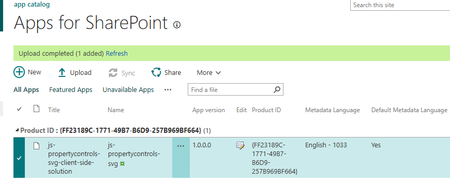
I deployed my SPFx webpart successfully to my site, however after inserting it on a page I get the following error: Uncaught (in promise) Error: Script error for "ea2f4f01-db05-44e9-8900-22d9ef8d632f_0.0.1/SvgGhostWebPartStrings" https://requirejs.org/docs/errors.html#scripterror at makeError (eval at V (sp-pages-assembly_en-us_12745640b376ada2f337a0ad84b60ffc.js:233:13154), <anonymous>:5:1843) at HTMLScriptElement.onScriptError (eval at V (sp-pages-assembly_en-us_12745640b376ada2f337a0ad84b60ffc.js:233:13154), <anonymous>:5:17037) Below is an image of the webpart uploading successfully173Views0likes2Comments
SharePoint Managed Property Online Search Issue – Custom User Profile Property
I’m facing an issue with SharePoint Online search and could use some help. I created a custom User Profile Property (Text) in SharePoint and mapped it to a Managed Property for search. However, when I query the managed property, the value is always returned as null. What I’ve tried so far: - Reindexed the User Profiles using a PowerShell script. - Updated the user profile property values multiple times. - Waited for search/indexing to complete. - Verified that existing/default user profile properties are appearing in search results correctly. Interestingly, existing user profile properties work as expected in search. The issue only occurs with the newly created and mapped property. Has anyone faced a similar issue with a newly mapped User Profile Property → Managed Property? Is there any additional step required to make a newly created user profile property searchable? Any suggestions on what else I can check would be appreciated.85Views0likes0CommentsPowerPoint Brand Images: folders appear as tabs, but images only show under “All”
Hi, I’m testing PowerPoint Brand Images with a SharePoint Organizational Asset Library and I’m seeing unexpected behaviour with folders. The image library is registered correctly as an ImageDocumentLibrary. PowerPoint detects the library and all images are visible under All. I created several first-level folders in SharePoint, for example: Photos Icons Logos Test PowerPoint correctly reads these folders and shows them as separate tabs in Insert > Pictures > Brand Images. The issue: the tabs remain empty. For example, I created a completely new folder called Test directly in SharePoint and uploaded a new PNG directly into that folder. Result: Test appears as a tab in PowerPoint the PNG appears under All the PNG does not appear under Test I see exactly the same behaviour in PowerPoint Desktop and PowerPoint for the web. I have already checked: OrgAssetType: ImageDocumentLibrary Private CDN: enabled library registered as Private CDN origin CopilotSearchable: enabled SharePoint Online Management Shell: 16.0.27515.12000 PowerPoint Microsoft 365 Beta Channel, version 2609, build 16.0.20416.20004, 64-bit direct upload through SharePoint instead of OneDrive/File Explorer completely new folder and image manual reindexing of the SharePoint library So PowerPoint finds both the folder names and the images, but the folder-to-image relationship does not seem to work in Brand Images. Has anyone successfully used first-level SharePoint folders as working tabs in the new PowerPoint Brand Images experience? Is there an additional configuration step required, or could this be an issue with folder-scoped retrieval in the current rollout?308Views0likes2CommentsNew List Version History broken
Microsoft has updated how version history is displayed for SharePoint Lists. In my tenant the changes are not showing for changes made by a power automate flow. SharePoint did create a version but no changes are showing. There must have been changes or else a new version would not have been created.176Views0likes2Comments
Recycle Bin and Site Content Hidden for Site Members and Site Visitors
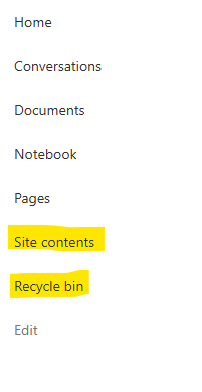
I posted this before but made a mistake with my write up, so I am reposting. I have a requirement that the Recycle bin and Site Contents should be be hidden from the Site Members and Site Visitors. Please how can I achieve this because the Server Infrastructure activation is not working for me. Any workarounds? Please help230Views0likes1Comment