document library
3253 Topics
Moving Files from a Shared Drive to a SharePoint site
Hi, I've seen the moving of files from a Shared Drive to a SharePoint site can be tricky, depending on the size of the files that are to be moved. What is the best and most effective way to move folder, files. I'm not sure yet of the number of folders and size of the files that will need to be moved? Can anyone provide an advise on this, please.. Regards Chris356Views1like4Comments
Missing "search this library" bar in SharePoint
We have an office of (8) users on SharePoint and over the last week we've been experiencing the search functionality bar at top of page missing for handful of users and then reappearing later in the day. Is there a known issue regarding the search bar capability? Thank you!352Views0likes2Comments
SharePoint Migration Tool after failed copying
Hi, a user tried to migrate a local storage to SharePoint Online. He set up a sync between his Windows Explorer and the SharePoint library and did a plain copy of all folders & files from the network storage to the synced library. Now not all files or folders arrived on SharePoint but he already started to worked in the synced folder. Can I re-migrate fromn the network drive to SharePoint with the SPMT and keep the newer versions of the files? If so, how do I have to set up the SPMT? Thx and best regards941Views0likes5Comments
Best way to share with External Users?
Hey all, just after the best way to share files with External users in SharePoint. Our users are increasingly having issues with external users not being able to access our files. Sometimes its user issue like sending a sharing link only for employees with external users. Sometimes its external users tenant conflicting with ours. However, we've been having issues with many external users having dropped access or no access at all even though they were added to permissions. We haven't changed any setting in our tenant, and this was a lot smoother couple of months ago. Whats the process in your tenant for external sharing? It would be helpful if you could give me a step by step on how you do it at your org. Right now, this is us: User fille out a form with necessary info. Security looks at the domain and make sure it's safe. We whitelist the domain if it's not already and if full name is specified, we add the guest through Azure and add the person to SharePoint permissions. If full name not specified, go to the SharePoint link and add the user straight to the folder permissions. Thanks in advance all851Views0likes2Comments
SharePoint file links are not working
Recently we have noticed that when you copy the link and share with others (even ourselves), the link fails to open. If we use the path link under details, that works 100% of the time. The only difference we see is there are more gibberish in the link path. Initially, we thought the PDF files were having issues but it can be any file type. Our thought is the issue is with the SharePoint site.537Views0likes2Comments
PnP Modern Search v4 multitext column search on a non queryable managed property
In order to use PnP Search, i tried to map a crawled property into the Refinablestring managed one, however all of them does not have or allow to use the "queryable" property. Results in Copilot and GPT prompts say it should be checked, already tried to change in the site collection and in only one site. When i tried to create a new managed property, couldn't make it "refinable" but "queryable" was available for selection. The use of the filtering in the PnP Search would be: (1)One Sharepoint library with choice and text columns filled with metadata regarding PDF documents from my org, like tecnical notes, laws, etc. This one is intended to have some kind of search inside the doc too. (2)One Sharepoint list that would contain a text column with entire sections of a manual and a column with the sharepoint link to it inside a page. Expected behavior is: User types text -> Finds section -> Redirection. This manual is stored in SP Online as a page with collapsed sections and has lots of images and text, so it probably will be moved into more than one page shortly, the links are generated when the text webparts get some kind of "Title" on it. Its also on a PDF and thats roughly 500 pages now. The PnP webparts used are search, search verticals and search results. Any ideas if i can make the Refinablestring queryable or create a new property thats refinable?395Views0likes1CommentSites with long file path length
I have a big problem to solve with SharePoint online Teams sites where data was migrated from On-Prem file shares and there are more items with a long file path length than we are able to fix. In some directories, it has gotten better but employees didn't listen to us when we told them to start creating less nested folders, shorter file and folder name and to try and fix older directories. In the beginning around 2 years ago, we migrated everything and turned on OneDrive sync and found out quickly how that wasn't going to work for one department, so we then told them to work out of the browser which seemed to solve the problem. Well, not everyone kept working from only the browser and more and more people continued to get OneDrive sync issues. Now I have ran some reports to get the actual file path length for some of the sites. For the biggest site, I show the largest file path length at 397, and I figured 220 would give a good starting point to have OneDrive successfully sync without errors given that OneDrive and File Explorer will add extra characters in the path. Starting at 220 characters, there are more than 61,000 affected files with a path ranging from 220 - 397, and more than 107,000 starting at 200 characters. The first problem to solve is to get the department to stop naming files in this way and stop creating all the nested folders. They need to establish a better naming convention. The second problem to solve is fixing as many of these as possible, but with this many items to correct it seems impossible. Has anyone worked on a SP online site to programmatically fix something like this to reduce the path length? Even trying this with a script sounds impossible, but there has to be something that can be done to help? Right??473Views0likes1Comment
PowerPoint Brand Images: folders appear as tabs, but images only show under “All”
Hi, I’m testing PowerPoint Brand Images with a SharePoint Organizational Asset Library and I’m seeing unexpected behaviour with folders. The image library is registered correctly as an ImageDocumentLibrary. PowerPoint detects the library and all images are visible under All. I created several first-level folders in SharePoint, for example: Photos Icons Logos Test PowerPoint correctly reads these folders and shows them as separate tabs in Insert > Pictures > Brand Images. The issue: the tabs remain empty. For example, I created a completely new folder called Test directly in SharePoint and uploaded a new PNG directly into that folder. Result: Test appears as a tab in PowerPoint the PNG appears under All the PNG does not appear under Test I see exactly the same behaviour in PowerPoint Desktop and PowerPoint for the web. I have already checked: OrgAssetType: ImageDocumentLibrary Private CDN: enabled library registered as Private CDN origin CopilotSearchable: enabled SharePoint Online Management Shell: 16.0.27515.12000 PowerPoint Microsoft 365 Beta Channel, version 2609, build 16.0.20416.20004, 64-bit direct upload through SharePoint instead of OneDrive/File Explorer completely new folder and image manual reindexing of the SharePoint library So PowerPoint finds both the folder names and the images, but the folder-to-image relationship does not seem to work in Brand Images. Has anyone successfully used first-level SharePoint folders as working tabs in the new PowerPoint Brand Images experience? Is there an additional configuration step required, or could this be an issue with folder-scoped retrieval in the current rollout?1KViews0likes2CommentsRecycle Bin and Site Content Hidden for Site Members and Site Visitors
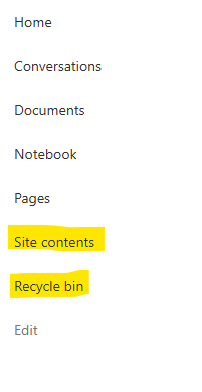
I posted this before but made a mistake with my write up, so I am reposting. I have a requirement that the Recycle bin and Site Contents should be be hidden from the Site Members and Site Visitors. Please how can I achieve this because the Server Infrastructure activation is not working for me. Any workarounds? Please help784Views0likes1CommentStrengthening Security in SharePoint Document Libraries: 5 Essential Best Practices
SharePoint Online has become a critical platform for storing, managing, and collaborating on documents across Microsoft 365 environments. Its flexibility and ease of access make it invaluable to modern organisations. However, if document libraries are not properly managed, businesses can face risks such as unauthorised access, accidental sharing of sensitive data, and compliance challenges. Effective SharePoint security is not about restricting productivity. It is about creating a secure framework that allows teams to collaborate confidently while ensuring business information remains protected. This article was written by https://www.bridgeall.com/a leading https://www.bridgeall.com/microsoft-365-consultancy/sharepoint/offering https://www.bridgeall.com/microsoft-365-consultancy/sharepoint/sharepoint-document-management-systems-implementation/ Five Ways to Improve SharePoint Document Library Security Limit Access Using Role-Based Permissions One of the most effective ways to secure SharePoint is by restricting access to only those who genuinely need it. Many organisations grant broad permissions across sites, creating unnecessary exposure. Following a least-access approach ensures users receive only the permissions required for their responsibilities. Rather than assigning permissions to individual files and folders, consider using Microsoft 365 Groups or SharePoint Security Groups to manage access centrally. This not only improves governance but also makes ongoing administration significantly easier. Review and Restrict External Sharing External collaboration is often necessary, but it can also become a source of data leakage if not controlled appropriately. Review sharing settings at both the tenant and site level to ensure they align with your organisation's security requirements. Good practices include: Preventing anonymous sharing links for libraries containing confidential information. Allowing access only to verified external users where appropriate. Applying expiry dates to shared links so access is automatically revoked after a defined period. Regularly auditing active external sharing relationships. By tightening these controls, organisations can reduce the likelihood of sensitive information being exposed outside the business. Protect Content with Sensitivity Labels Protecting the library itself is important, but protecting the documents within it adds another layer of security. Microsoft Purview Sensitivity Labels enable organisations to categorise content according to its sensitivity and automatically apply protection measures. Depending on the classification, labels can: Encrypt files. Restrict downloading, printing, or copying. Display visual markings such as headers, footers, or watermarks. Maintain protection even when a document is shared or moved outside SharePoint. This approach helps ensure security travels with the information rather than relying solely on where it is stored. Strengthen User Authentication Document-level security should always be backed by strong identity protection measures. Multi-Factor Authentication (MFA) remains one of the most effective ways to prevent unauthorised access resulting from compromised credentials. Combining MFA with Microsoft Entra Conditional Access policies provides even stronger protection. For example, organisations can: Block access from unmanaged devices. Restrict downloads on non-compliant endpoints. Trigger additional verification requirements for sign-ins from unfamiliar locations. Apply risk-based access controls based on user behaviour. These safeguards help ensure only trusted users and devices can access critical information. Continuously Monitor and Review Access Security is not a one-off project. Permissions and risks evolve over time, making ongoing monitoring essential. Microsoft Purview auditing capabilities provide visibility into activities such as file sharing, downloads, edits, deletions, and permission changes. Regular access reviews help identify: Outdated permissions. Dormant guest accounts. Excessive access rights. Unnecessary group memberships. Routine governance reviews help maintain a secure SharePoint environment and reduce the risk of privilege creep. Building a Secure and Collaborative SharePoint Environment A well-secured SharePoint platform should balance protection with usability. Organisations that invest in strong governance, identity controls, information protection, and ongoing monitoring are better positioned to support collaboration without compromising sensitive business data. By implementing these best practices, businesses can significantly reduce security risks while ensuring employees continue to work efficiently within Microsoft 365. At Bridgeall we offer a range of https://www.bridgeall.com/microsoft-365-consultancy/sharepoint/sharepoint-document-management-systems-implementation/ that help you build and maintain a secure platform of SharePoint document librarires.389Views0likes0Comments