Forum Widgets
Latest Discussions

SharePoint Permissions Management
Over the last 3 years of managing permissions across a suite of sites, I have uncovered more new issues with the way SharePoint permissioning is designed at every turn. A few examples, before the question: If I "Share" a file or folder somewhere on the site (breaking permissions inheritance), it is very inconvenient to find it again. If I "copy link" in this one particular way, permissions inheritance is broken. When looking at site-level permissions, I see site-level permissions groups, but there could be hundreds of other users who have been added to my site(s) without my knowing. If I want to reset permissions in an area (set of folders or library), I have to do it file-by-file or folder-by folder. If I want to get an excel snapshot of - anything really - IT has to pull it and it takes a couple days. Not to mention the permissions interface is incredibly clunky. All-in-all, there seem to be a million ways to break permissions inheritance, creating an access tracking and security nightmare. AND there's no easy way to truly see and understand who has access to what or what is broken, without spending hours with IT to pull a bunch of narrow-visibility reports. So my question is: what is the best way to navigate full permissions visibility? Am I doing something wrong? Is anyone else experiencing these issues? We have resorted to having a very strict "no outsides besides a few exceptions" policy and only managing permissions at the site-level, which really hampers on the collaboration benefits that SharePoint is trying to enable. It is also very administratively intensive. One of the benefits to SharePoint is that users don't really need to understand how it works to use it, but that's becoming less and less true with the increasing lack of security we feel in the platform.emilywolffApr 27, 2026Copper Contributor49Views2likes2Comments
SharePoint Video Playback Quality Defaults to 480p – Horrendous
I manage multimedia training for over 600 locations and two distribution centers, supporting nearly 10,000 team members. We have made a significant investment in producing high-quality training content through professional equipment, structured scripting, and dedicated production and editing time. However, once videos are uploaded to SharePoint, the default playback quality often degrades the experience to what appears to be approximately 480p. As a result, professionally produced content can look noticeably poor on initial playback. Many of our store-level team members are not in a position to manually adjust playback settings, so the default experience matters. The source files are high resolution, but the default playback does not reflect that quality. This also creates issues when leadership reviews training content, because the playback quality can reflect poorly on the production even though the original video is clear. We moved away from third-party hosting due to ad exposure during onboarding and the need for a controlled internal platform. We are intentionally using SharePoint and Stream as part of our existing Microsoft 365 ecosystem for scalability, governance, and centralized access. Introducing additional paid hosting platforms or external streaming solutions is not a direction we are pursuing. From an enterprise training standpoint, defaulting to low-resolution playback undermines engagement and credibility. Are there plans to allow administrators to define a default playback resolution for SharePoint or Stream videos? Are there recommended encoding settings that influence the initial playback quality more reliably? Are there roadmap updates around improving adaptive streaming behavior or default resolution selection? Any guidance or insight would be appreciated.TheTrainingGuyApr 27, 2026Occasional Reader8Views0likes0CommentsSharepoint Listas Columna Autonumerada
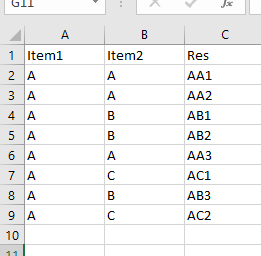
Buenas a todos. Necesitaria crear una lista en la cual exista una columna que concatene la primer letra de 2 columnas anteriores y realice una numeración consecutiva. Les dejo una imagen de como sería esta numeracion necesaria. Es decir que necesitaria un indice por cada combinacion de letras Supongo debo usar alguna formula. Alguien me podrá ayudar? Saludos DiegodnunezApr 26, 2026Copper Contributor4.1KViews0likes2CommentsSharePoint Online: "List cannot be deleted while on hold or retention policy."
I am trying to help a client clean up some very old lists and sites. However, whenever I try to delete anything, I get the message above. I've checked for an eDiscovery site, for classification labels/policies, DLP policies, and am finding nothing. Any ideas?Solved114KViews2likes16Comments
Saving MS Form with many question responses to SharePoint
Hi, A department wants to save responses received from a MS Form to a SharePoint list. When I received the MS Form to create the columns in the SP list, noted there was 115 questions. Most of them are a Yes / No answer and a few where comments have been asked for. Then a Flow will need to be created. Firstly - This is too many questions. Secondly - Would SharePoint be the best place to store these answers knowing that an Excel spreadsheet is created for the responses? Thirdly - As the MS Form will be used regularly and responses coming in Day and Night is there another solution. The results will be used to Analyse the results using PowerBI.SolvedChris_Clark1968Apr 24, 2026Iron Contributor82Views0likes2Comments
HTML-code breaks displaying of multi-line column with RichText in PowerApp Canvas App
I have a canvas app that works on the basis of a SharePoint list. I work in an environment where a researcher makes a work order, this is then sent to the responsible that has to approve it, then the planner plans it and following that, it is executed. This chain of events is all managed with a SharePoint list that has a status that can be changed. Different people have different permissions to edit items. To manage this, we display the list through a CanvasApp where logic is built to ensure that people with a certain role can only select/edit/see certain items. However, a big part of the canvas app is the description of the work order. In the SP-list this is a multi-line field where RichText is enabled. When the work order description is long, and especially when rich text formatting is used (for example colored text), part of the content is displayed incorrectly. The text gets cut off, part of the HTML formatting code appears in the description itself, and the full content is no longer shown. This is an example of a list item: Which is displayed in the Canvas App like this: What I observed is the following: In the normal SharePoint list view, the description is displayed correctly. But when I click/open the item in singe item view itself in SharePoint, the editor/form also . This issue only occurs for items that are created from the Canvas App. If I create a similar item directly in SharePoint and enter a comparable formatted description there, the problem does not occur. So it seems the issue is related to how the Canvas App saves the rich text content to SharePoint. It must have to do something with the way PowerAutomate parses that HTML code into SP.sacoppeApr 23, 2026Copper Contributor26Views0likes0Comments
SharePoint Site 404 error on Home
We have created a modest SharePoint site that has been working for some time. All of a sudden when you go into SharePoint directly to your home screen and click on the link to go to the site in question, you get a 404 error. I went back in through MS Teams to get to the site so that I could get to the files. I reconnected the navigation link to the link for the home once I found it in site contents and it worked for a little while. It seems to work if I access SharePoint through Teams, but not SharePoint directly. If I go directly to SharePoint, I get the 404 error again. We don't seem to have anyone that can figure this out. I got this far on my own. Is there anyway that as a user I can fix this or is this something that has to be fixed on the back end? Starting over is not an option. Too many files within the site. Any help would be appreciated!SolvedSue12Apr 23, 2026Copper Contributor675Views0likes4Comments
SharePoint Online's "Move To" feature no longer showing my sites
Some point a few weeks ago the Move To function changed. Now when you want to move a file out of a Site and into another, it doesn't let you pick from your Followed Sites, it only lets you pick from your Recent document libraries. We have many Sites and it's making it difficult to move items efficiently (if the location you're moving something to doesn't show up, you have to click around in it in another tab for it to eventually show up in Recent). Previous, it just showed all of my sites that I am a member/followed. Any idea why this might have changed? These are all stand-alone sites, no O365 connection, but they are all part of the same hub-site network. Thank you!MysticodeApr 22, 2026Copper Contributor22KViews1like11Comments
Shared SharePoint & Power Query incompatible?
Hello, I am currently working on a file in a Shared SharePoint from an external company. I am only able to open the file in the browser and when I try refreshing the Queries, it gives me an error saying "Power Query refresh in Excel for the Web is only supported for workbooks saved in SharePoint or OneDrive for work or school." What I've been doing is downloading a local copy of the file, updating the Queries, and reuploading the file. It's not really a problem, but it is a hassle when needing to do this to multiple files. I'm not sure if this is more of a feature request, or if its due to security risks and restrictions from my admins, or if it's a different problem entirely... so I posted here first. Thanks!fhuangApr 22, 2026Copper Contributor25Views0likes0Comments


Tags
- SharePoint Online18,293 Topics
- Document Library3,220 Topics
- Lists3,142 Topics
- Sites2,619 Topics
- admin2,255 Topics
- sharepoint server2,047 Topics
- Permissions1,990 Topics
- files1,725 Topics
- developer1,609 Topics
- microsoft lists1,581 Topics