Forum Widgets
Latest Discussions

Classic SharePoint features appearing on a Modern Site
I have a modern SharePoint site, with a modern list that has never been associated with classic SharePoint features. But today, two users have experienced intermittent instances of the list appearing in the classic interface. They have not accessed this site before now so I do not believe there should be a cache issue. Does anyone know why this is happening and how it's possible when this site has no association with Classic features? They are using the same browser, same permissions across the site but sometimes the list opens in Classic mode, sometimes it opens in Modern. It also is happening in incognito mode. They are unable to use the site while in Classic Interface at all - the people pickers deny them access ("Error: Sorry, you do not have permission to query for users" and they cannot edit anything because of this error.9Views0likes0CommentsSharePoint Rule Send an Email created by Former EE fail
SP Rules created by a former employee are no longer sent. The Rule was created to email other current users when a field was modified. The Rule was not set to email the former ee, but other users. The only thing that changed is the person who created the rule is no longer with our company. Once the Rule was duplicated by a current user it started working again. Rules are sent via <email address removed for privacy reasons> so why should it matter who created the rule? I see this becoming a large problem as SharePoint Alerts retire and users are now using Rules. For business critical Rules, we've used a Service Account to create the rules to prevent failure in the future. I can certainly understand rules that are created to go to former ee to no longer work since their account is no longer active, but if it's set up to go to other users that are still active, it should remain active and not fail regardless of the status of the created by.lgonyeaFeb 04, 2026Iron Contributor8Views0likes1Comment
Set Default Page Template SharePoint Online?
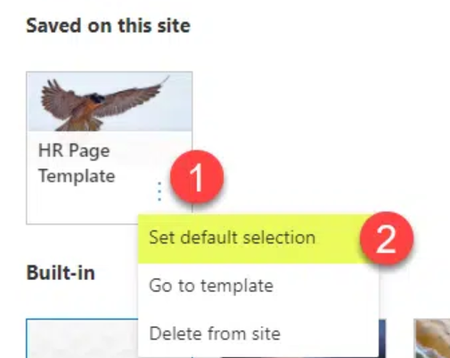
Hello, I have been running into difficulty setting my page template as the default page template. In tutorial videos I watch, there seems to be an option to do this: However, on my site, there is no option like this. Has this feature been removed, or how might I access this? Thanks! (See below, no 3 dots for options, on the following page, only drop down option is to create a private draft). I am a site owner, if that helps with troubleshooting.kevinallen1Feb 03, 2026Copper Contributor2Views0likes0Comments
PromotedState does not update anymore
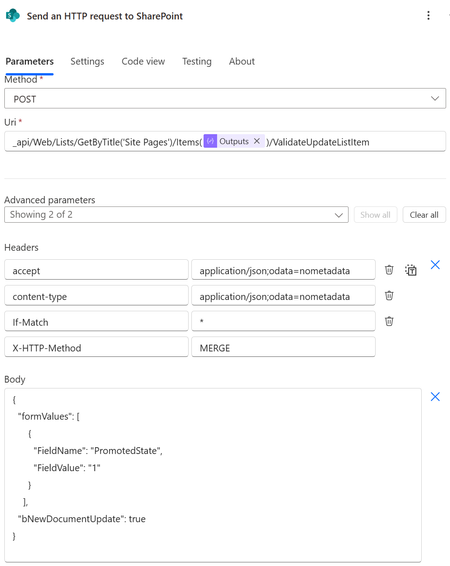
I wish to update the promoted status to 0 (page), 1 (unpublished news) or 3 (published news). I was always doing this via SharePoints column formatting. See .json column formatting below. This worked perfectly fine until about this week. Now it doesn't seem to work anymore. Now I tried updating the PromotedState also via PowerAutomate. This also doesn't seem to work... How should I now change the PromotedState. Does someone have any clue how I can update the PromotedState or why the column formatting way of wokring, suddently doesn't work anymore? The json code for column formatting. { "$schema": "https://developer.microsoft.com/json-schemas/sp/v2/column-formatting.schema.json", "elmType": "div", "style": { "flex-wrap": "nowrap", "display": "flex", "flex-direction": "row" }, "children": [ { "elmType": "div", "txtContent": "=if(@currentField == 0 ,'0 : Page' , if(@currentField == 1, '1 : News (Unpublished)' , if(@currentField == 2 , '2 : News','') ) )", "style": { "box-sizing": "border-box", "padding": "4px 8px 5px 8px", "display": "flex", "border-radius": "16px", "align-items": "center", "overflow": "hidden", "margin": "4px 4px 4px 4px", "border": "1px solid" }, "attributes": { "class": "=if(@currentField == 0 ,'ms-fontColor-themePrimary ms-borderColor-themePrimary ms-bgColor-white' , if(@currentField == 1, 'ms-fontColor-themePrimary ms-borderColor-themePrimary ms-bgColor-themeLighter' , if(@currentField == 2 , 'ms-fontColor-white ms-borderColor-themePrimary ms-bgColor-themePrimary','') ) )" } }, { "elmType": "div", "style": { "font-size": "18px", "cursor": "pointer", "padding": "10px", "border-radius": "50%" }, "attributes": { "iconName": "MoreVertical", "class": "ms-fontColor-themePrimary ms-bgColor-themeLighter--hover" }, "customCardProps": { "openOnEvent": "click", "directionalHint": "rightCenter", "isBeakVisible": true, "formatter": { "elmType": "div", "style": { "display": "flex", "flex-direction": "column", "align-items": "flex-start" }, "children": [ { "elmType": "div", "txtContent": "Change to Page (0)", "style": { "padding": "10px 20px 10px 20px", "cursor": "pointer", "width": "200px" }, "attributes": { "class": "ms-bgColor-themeLighter--hover" }, "customRowAction": { "action": "setValue", "actionInput": { "PromotedState": "0" } } }, { "elmType": "div", "txtContent": "Change to unpublished news (1)", "style": { "padding": "10px 20px 10px 20px", "cursor": "pointer", "width": "200px" }, "attributes": { "class": "ms-bgColor-themeLighter--hover" }, "customRowAction": { "action": "setValue", "actionInput": { "PromotedState": "1" } } }, { "elmType": "div", "txtContent": "Change to published news (2)", "style": { "padding": "10px 20px 10px 20px", "cursor": "pointer", "width": "200px" }, "attributes": { "class": "ms-bgColor-themeLighter--hover" }, "customRowAction": { "action": "setValue", "actionInput": { "PromotedState": "2" } } } ] } } } ] } The HTTP SharePoint call to update the PromotedStatus.WYellowFeb 03, 2026Brass Contributor66Views0likes2CommentsIntermittent failures when creating new libraries in modern SharePoint
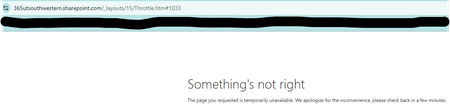
Hi everyone, I’m seeing an issue in our modern SharePoint Online site collection where creating new document libraries has started failing. This site has worked normally for years, but over the past week, most library creation attempts haven't worked. 1) The page briefly flashes or glitches during the creation process. and 2) A non‑ending spinning wheel when I hit "create" or 3) Creation attempts return “Something's not right.” error page. The failures happen across all subsites, in multiple browsers, and I’m a Site Collection Administrator. No permission changes were made recently. Has anyone seen similar intermittent library creation failures in a modern site collection, or know what might cause this kind of inconsistent behavior? Any guidance would be appreciated. Thanks! MeaganMeaganUTSWFeb 03, 2026Copper Contributor131Views1like4CommentsMultiple Page Libraries on site
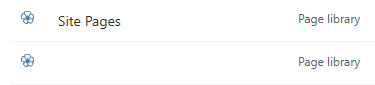
Hi everyone I have a strange issue that I haven't come across before. A customer has got an old subsite on SharePoint Online that was created with the STS#0 template (classic Team Site with no group) and they want to modernise their old wiki pages. This should have been straightforward as I was planning on using the https://learn.microsoft.com/en-us/sharepoint/dev/transform/modernize-userinterface-site-pages-powershell. However, on this site they have two page libraries - the standard Site Pages library and then what looks like a custom page library (I've blanked out the name of the custom library as it contains the company name): All of the pages they want to modernize are in the custom library but the issue with this is that the only content type available is Wiki Page: This means that although the PnP PowerShell runs successfully against pages in this library, the new versions don't actually appear in the library. I assume this is because the modern Site Page content type isn't available in the library. I was under the impression that a site could only have one page library so I'm not sure how this site has the two. On a more urgent note I need to work out the best way of modernizing these pages. Currently the only way I can see is using Power Automate to copy the pages to the Site Pages library and then convert them there. The only issue with that is that there are links within the pages to other pages so I'd need to go through them and fix these once they've been moved. here are over 300 pages so I don't really want to do this. Does anyone have any ideas on the best way forward with this. Also, if you know how there are multiple page libraries I'd be keen to hear it as I haven't come across this before. Thanks in advance for your help.gjayne84Feb 03, 2026Brass Contributor49Views0likes0Comments
SharePoint Visitor Permissions Group - Teams Phones License
Hi, The Visitor permissions group used in SharePoint 'Everyone except external users' looks like it includes all accounts from Azure including non-personal accounts such as Service Accounts, Meeting Rooms and CAP's. All the accounts included seem to be to requiring Teams Phones MS licenses. Which many of the accounts, mentioned will not require. As anyone come across this and how did you manage it? We are looking at creating a new group which excludes the above mentioned accounts. Is this the best and only solution??Chris_Clark1968Feb 03, 2026Brass Contributor4Views0likes0Comments
Active Site Usage Not Matching Storage Used?
At my new position our SharePoint storage is getting used quickly. As of right now we have 69GB available of 11.75TB. When look at the active sites the total Storage Used only adds up to 2TB. Where is the other 8.75TB coming from? Version history was changed to 100 major versions and to delete versions after 1 year. Is it possible that the versions still being retained could add up to 8.75TB? I archived a site that was 13GB but it's still showing 69GB available. How long does it take to reclaim that storage?vis-mesFeb 02, 2026Copper Contributor59Views0likes1Comment
Trimming SharePoint Version History - Minor Versions
Hello, I am a SharePoint Admin at my organization and I have been asked to reduce our total storage usage by reducing the number of versions and minor versions in our environment on all SharePoint sites. I have written a simple PowerShell script that loops through a csv file with site addresses, and runs this command per site -> New-SPOSiteFileVersionBatchDeleteJob -Identity $site.siteURL -MajorVersionLimit 100 -MajorWithMinorVersionsLimit 5 It was my understanding that for all sites in the csv file, for all document libraries on the site, and for all files in the libraries this command will reduce the file to the last 100 Major versions, and the last 5 minor versions of each major version. Unfortunately, this command is not actually reducing the minor versions. It is working with the Major versions just fine, but all minor versions are being retained for each major version retained. Is my understanding of this command wrong, or is it not working? Are there other factors to consider? Does anyone know of an alternative that can fit my needs? The overall plan is to trim the current version history, then apply the automatic version setting to each library in our tenant. Here is the MS guide I referenced, maybe I missed something -> https://learn.microsoft.com/en-us/sharepoint/tutorial-queue-a-trim-job Any help is greatly appreciated, Cam31Views1like0Comments


Resources
Tags
- SharePoint Online18,224 Topics
- Document Library3,203 Topics
- Lists3,124 Topics
- Sites2,597 Topics
- admin2,241 Topics
- sharepoint server2,041 Topics
- Permissions1,980 Topics
- files1,718 Topics
- developer1,601 Topics
- microsoft lists1,569 Topics