
Forum Widgets
Latest Discussions

Teams app window keeps jumping back to main Window
I'm using three monitors, on one monitor I usually have the Teams app window. That monitor is not my main display. I can move the Teams app windows to any of my three monitors and it stays there but as soon as I switch focus to the Teams app windows it pops back to my main display. Very annoying. Anyone experienced this behavior?SolvedDaniel PerssonJun 04, 2026Brass Contributor25KViews12likes17Comments
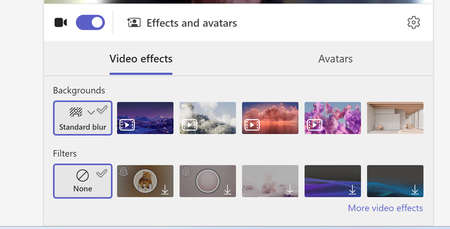
"None" option missing from Teams background options
Hi, Our teams "none" background option is missing. Forcing users to use a background or the blur backgrounds. I have tried to revert back to classic teams to see if that is a fix, but I am unable to toggle it off and it takes me to download the classic teams which is just the new teams download. I do see this message "Your org sets background to blur unless something else is selected" when trying to update the background in a call. We are not disabling this option as an organization. And I can switch to other backgrounds.kyle_snyder_stratusJun 04, 2026Copper Contributor1.6KViews1like6Comments
How much should Teams presence influence call routing
One thing I've noticed recently is that many Teams Phone environments still treat presence as a destination state rather than a routing input. A typical flow might look like: Caller selects an option Call is transferred User is unavailable Caller ends up in voicemail or another queue Technically the routing worked. From the caller's perspective, it often didn't. I'm curious how others are approaching this. Are you using Teams presence as part of your call-routing logic? For example: Available → transfer immediately Busy → offer an alternative path In a meeting → capture context Offline → route elsewhere Or are traditional queues and escalation paths still sufficient for most scenarios? Interested to hear what people are doing in real deployments.Mefteh_WJun 03, 2026Copper Contributor21Views1like0Comments
How to make a image and video tab in teams channel
I wan't to make separate new tabs for images and video on teams channel. because of we have more photos to display to other person but currently it's not possible. so what can i do.Vinaypanchal2829Jun 02, 2026Copper Contributor12KViews0likes4CommentsIs anyone building individual development plans inside Teams?
So hear me out. I discovered that if something is in a live document, sharepoint, etc, I've found that employees dont really check up on it or follow through with it unless they are regularly reminded. Same goes for any software we try to implement that requires a seperate login and lives in another app completely. Our employees spend most of their time communicating in Teams so I want to take our IDP process into Teams. Are there any decent talent or employee development apps for Teams that anyone can recommend for IDPs?JordanT86Jun 02, 2026Brass Contributor16Views0likes0CommentsAnyone found a good way to run performance reviews inside Teams?
Our company just switched to doing everything in Teams and the one thing that still lives outside is performance reviews. We use a separate web app that nobody logs into until the last minute and managers hate it. Is there anything that actually handles the full review cycle with self assessments, manager ratings, maybe even 360 feedback? Our IT team said they'd prefer something that uses our existing M365 directory so we dont have to manage another user list.HarryPJun 02, 2026Copper Contributor72Views0likes2Comments
Allow muting a person only for me
Sometimes I am in a meeting where one of the persons in the meeting is actually near me in the world outside the screen. In this case the sound is a bit maddening since there is a small delay between the sound from the person and the sound through the teams interface. In these cases, I would like to mute the person only for me since I am sitting near and can hear the person fine without headphones. Right now I need to takeoff headphones when the person is talking and putting it back as the person finishes talking.er008Jun 02, 2026Steel Contributor131KViews207likes157CommentsStop Automatic Calling when Screensharing
I screenshare a lot in my position; I call the coworker (Phone/Headset) and train them on what I need them to look at. I am in a large office building, and the automatic calling of the receivers' PC is disruptive, as I do not was the whole office to hear my conversation or have people hear my trainee. I see no way to disable the team auto-call once I start to screen share or in the Options. All my coworkers feel this frustration as well. I do use the computer microphone/speaks aspect when working from home, but would disable it totally, if it would stop the auto-call. I do not want it to affect meeting invites to others, as others around the country can use their PC speak/microphone, if they want. Please advise.5Views0likes0Comments
Teams for Android Auto - Receive Messages but Replies always Fail
I have a Pixel 10 with all latest OS and Patches as well as latest MS Teams App. For months now I've had a problem where all my incoming work messages on Teams come through fine, but when I attempt to reply it never sends the message. When I look at my Teams App there is a red retry icon because the message failed to send. When I send a new message in the app it works fine but the previous reply through Android auto remains in retry status ie Failed. Is anyone able to reply to a Work account teams message using Android Auto? It has never worked for me.KevinInKyMay 30, 2026Copper Contributor51Views0likes1Comment

Tags
- microsoft teams13,509 Topics
- How-to2,944 Topics
- Administrator2,656 Topics
- meetings2,565 Topics
- Settings2,306 Topics
- User Interface1,657 Topics
- tips & tricks1,507 Topics
- calling1,256 Topics
- teams1,039 Topics
- best practices999 Topics