Recent Discussions

combine multiple text into single line of text
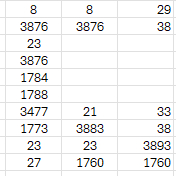
Hi is there a way to combine all the cells into a single cell (of text) ignoring the duplicates/repeat values. i know concatenate but that function becomes very lengthy as ill have to define every cell into the function individually. is there any other function where i simply select the entire data (like an array) and it can do the required.Solved106Views0likes3Comments
Help Clean Up This Formula
Hello, I am looking for a way to compact this formula more. I have about 20 rows I need to do. =C25-IF(OR(COUNTIF(D3,{"A","B","C"})),C3,0)-IF(OR(COUNTIF(D4,{"A","B","C"})),C4,0)-IF(OR(COUNTIF(D5,{"A","B","C"})),C5,0) I am trying to minus the amounts in column C# if Column D# = conditions A, B or C from C25. The math is all happening in one cell. Both columns are 3 through 24. I am hoping there is a way or am I SOL and have to do each row by hand? Thank you, CaseySolved60Views0likes2Comments
2 spacing after every full stop of a sentence
Hi, I believe the old norm is to have two spacing after the end of a sentence before starting a new sentence. But nowadays many people are using only one spacing. I need to try to make it a consistent way to follow. Is there an easy way to scan through all the document and make sure changes are applied to follow at least one norm.Solved27Views0likes1Comment
List Styles & Style Sets
Does anyone know if it is possible to include a list style within a style set? I know to add the styles I want to include in a style set into the style gallery, then save the style set under the design tab. However, even though the styles in my style set are linked to list styles for the numbering, those list styles do not get transferred to a document I add the style set to. I really need the list styles to also transfer to the document I'm adding the style set to. Of course, list styles do not show up in the styles pane or the style gallery (or at least I cannot determine how to get them to). Thoughts?Solved120Views0likes8Comments
Filtering an Array based on a list of Criteria
I have an array that tracks every project that every project manager, project engineer, and superintendent is on and I am trying to set up a function to search through a single list of names and return just their projects. The PM, PE, and SUP on the array all have their own columns since there can be 1 of each on a single project. and the list im pulling from is within a single separate column pulling on the names I select. I have had success pulling from one column at a time using a FILTER(ISNUMBER(MATCH)) function but I cant get it to search and return all values from all three columns. Any thought on how to expand the search? Thank you!Solved101Views0likes3Comments
Finding return value from multiple columns/cells with specific text
Hello, I have to verify multiple cells (C2 to F2) with two possible statuses: "Eligible" and "Not Eligible". In Excel, would it be possible to: If all cells "Eligible", then the result is "Passed". If any of the columns is "Not Eligible", then the result is "Failed". (additional issue) this is not super important but it would be helpful to add one more condition: if any of the columns is "Consult", then the result is "No Result". I'm fine if only the 1st and 2nd issue works, though. I have tried finding solutions in other discussions, but usually the formula that I copy-pasted keep showing "Passed" even if one of the documents is listed as "Not Eligible". Thanks in advance. A B C D E F G 1 No. Name Document 1 Document 2 Document 3 Document 4 Result 2 1 Candidate A Eligible Eligible Eligible Eligible Passed 3 2 Candidate B Eligible Not Eligible Eligible Eligible Failed 4 3 Candidate C Eligible Eligible Consult Eligible No Result 5 4 Candidate D Eligible Eligible Eligible Not Eligible FailedSolved85Views0likes4Comments
Need a consecutive XLookup
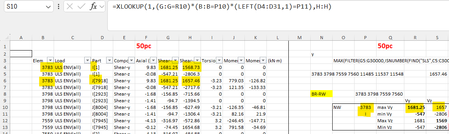
Hello All, OK let me describe what I am trying to do: I need to create a Task List. In this list I will have let’s say 200 tasks, and 50 people to perform these tasks. i need a way to assign the first task to the first person, then the second task to the second person, then the 3rd task to the 3rd person and so on until the first 50 tasks are assigned. then I need to assign the 51st task to the first person, the 52nd to the second person, and the 53rd task to the 3rd person until that batch of tasks and People are matched. but this is not linear, I may want to choose task 52 to person 3 because the 3rd task is related to the 52nd task. i can live without this feature and fine tune the list manually but the main question is how can I look up a name and match it to a task. i hope this makes sense to you, please ask for any clarification and i shall add that bit. thanks in advance… wassimSolved165Views0likes4CommentsApp-only authentication for unattended scripts in MicrosoftPlaces
Like other modules such as ExchangeOnline (https://learn.microsoft.com/en-us/powershell/exchange/app-only-auth-powershell-v2?view=exchange-ps) , the Microsoft Places module should include the option do an App-only authentication.Solved54Views0likes2CommentsSPILL error
Hi. I'm just using a very simple formula to calculate how much money is still due from an original total amount. The formula I have typed is simply in this format: 6000 -(B2-B8), but in the next again cell where I am looking to display the result, I am getting a SPILL error. The correct total is displayed in the cell, but a number of cells immediately below are displaying the "6000" figure!! I'm struggling to correct this - can you help :-) Thank you 👍Solved144Views0likes4CommentsNewly created folder and files doesn't appear in power query transform data
Hi team Happy Thursday !! I wants to merge all files in a SharePoint folder. However, that newly created file and folder doesn't appear in the Power query. I have tried to clear caches, it still doens't appear there Can anyone please assist to solve this issue ? ThanksSolved94Views0likes4Comments
Complex formulae with data model
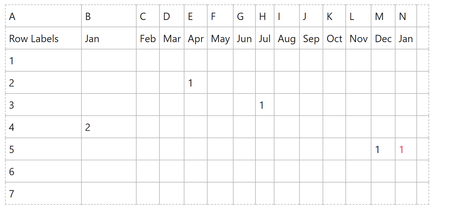
Over the years, I have developed a significant excel data sheet which has gotten slower and slower with time. I have discovered the idea of excel's data model this week and have learnt how to import the data I need from its source CSV to the data model and I now have a power pivot which looks like what I originally had in excel. What I would like to do next, is to replicate some of the formulae I had in excel to calculate if something should be counted or not. I would not want the red one to be counted as this row would have been counted in the previous month. In excel I was using the following formula- =IF(COUNTIF(B5:M4,">0"),SUM(Patient!B5:M5*0),Patient!N5) is there a way of achieving this with the data model or would I have to hardcode this into another sheet? I was trying to avoid doing this to minimise the number of formulae... Many thanks for your help...Solved190Views0likes7Comments
Can a font become 'corrupted,' and how to replace?
This refers to MS Word from Office 2019, running under Windows 10 Pro. I have a somewhat large (10MB) Word .docx I've been adding to as time permits. It has text, illustrations, pictures and captions for the pictures in text boxes. suddenly, when I open the file, some of the captions are garbled. The font I used is Arial 10pt, bold and regular. The bold is just fine, the regular is garbled. However, if I highlight the garbled text and change it to bold, italic or any other font, it appears just fine. Here is an example of what I'm talking about. First the .docx as it appears on my screen: Then if I highlight that garbled text and change it to Bold, or any other font, it looks good: If I change point size the problem persists. It's just Arial Regular that garbles, and only in this document, and . Other .docx files using that same font display fine. Also, I can take this file and open it on my other computer, which is running Office 2010 under Windows 10 Pro, and it opens properly. I do have Word programmed to embed non-system fonts in the document, so I'm assuming that Word is fetching Arial Regular to display when opening the file on this computer, and that my other computer maybe has a good Arial Regular installation, which is why it looks good there. Something else I just noticed, referring to the two screenshots that follow. Other 10pt. Arial Regular that was NOT in a text box seemed okay in this document. But on close examination, the kerning seemed a bit off. So I changed that non-text box text to another Helvetica-style font and it did look better, but then when I set it back to Arial, it was garbled too. So do I have a bad Arial Regular on this computer? If so, why don't other documents show this problem. And, most important, how do I fix it? Thanks in advance, and... HELP!Solved102Views0likes3CommentsI want to completely stop entire spreadsheet from horizontal scrolling
I've asked multiple Chatbots for help, but none of them worked for me. If you have a solution, please give to me as micro instructions. Would really appreciate advice, because I'm getting seasick. Obi-wan, you are my last hope.Solved95Views0likes2CommentsAdd 1 Year to the Second to a Date
Hi! I have a need to add 1 year to the second to a date in Excel. For example: Start: 3/16/2026 4:06:28 PM MST End: 3/16/2027 4:06:28 PM MST I know that EDate can be used to easily add 1 year to the date portion of the datetime value, but that zeros out the time portion of the value. I'm thinking that I could extract the time portion of the starting datetime value, use EDate to add 1 year to the date portion, and then add the time portion back on. My Excel skills are a bit rusty, but I could probably figure that out. That being said, I'm hoping there is an easier way, like maybe a function that I'm not aware of that can handle it easily. I would prefer to do this without needing macros. What's the best way to add 1 year to the second to a datetime value in Excel? Thanks in advance for any help that you can offer! --TomSolved80Views0likes2CommentsSumif inside Xlookup
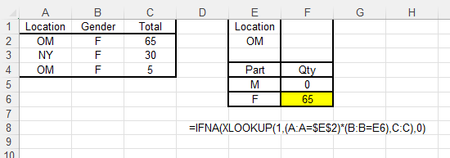
Can someone tell me how to sum within Xlookup please? Correct answer above would have been 65+5=70. I am looking for total qty, if part is "F" and Location is "OM". Main Table has two matches. My current Xlookup formula only selects one record. This Xlookup formulas only works for one unique record. Thank you in advance.Solved171Views0likes7Commentsmac Excel: can't select form Group Box
Hi, I'm using Excel 16.107 on a Mac. I have Developer mode enabled and placed form elements, including group boxes. What I've found is if I delete the text label for a group box, the group box then becomes impossible to select -- there's nothing to click on with my pointer. See attached. Any attempt merely selects the cell, not the group box. How can I select group boxes like this, so that I can delete it or edit its properties?Solved103Views0likes2CommentsSelecting a specific year using the FILTER function
I am trying to use the filter function to get all the records from a table for a specific year. I have a table that has a date column The filter I am trying to use is =FILTER(Venues14,Venues14[Date=K5,"Is not found"). Cell K5 is a dropdown list that has 2026, 2027 and 2028 in it. I am trying to use the dropdown list to extract all the entries in the table using a date I select. It gives me all the dates instead of just the one.Solved124Views0likes4Comments

Events

You’re passionate about what you do, and we’re passionate about empowering your potential. Microsoft 365 Community Conference - is your chance to keep up with AI, build game-changing skills, and take...
Tuesday, Apr 21, 2026, 08:00 AM PDTIn-Person
0likes
7Attendees
0Comments
Recent Blogs
- 2 MIN READOne of the best ways to get value from the Microsoft 365 Community Conference isn’t just attending sessions, it’s helping shape what gets built next. The Research sessions at Microsoft 365 Communit...Apr 10, 2026122Views0likes0Comments
- Inspired by real work, this video series will show you how Copilot can help you with everyday tasks.Apr 10, 2026322Views1like0Comments