Security and AI Essentials
Protect your organization with AI-powered, end-to-end security.
Defend Against Threats
Get ahead of threat actors with integrated solutions.
Secure All Your Clouds
Protection from code to runtime.
Secure All Access
Secure access for any identity, anywhere, to any resource.
Protect Your Data
Comprehensive data security across your entire estate.
Recent Blogs

This blog post describes how to instantly revoke Entra service principal bearer tokens with continuous access evaluation, even before their lifetime has expired.
Aug 25, 2026502Views
0likes
1Comment
We are pleased to announce the enterprise-ready release of the security baseline for Microsoft Edge version 151!
We have reviewed the settings in Microsoft Edge version 151 and updated our guid...
Aug 25, 2026261Views
0likes
0Comments

Executive Summary
This triumvirate of tools present a cohesive and unified platform that tells a compelling story:
Microsoft Security Copilot as the assistive AI experience and extensible ...
Aug 24, 2026381Views
0likes
0Comments

David Weston leads Agentic Security at Microsoft, where he and his team build the AI models, autonomous agents, and evaluation systems redefining how defenders operate. At Microsoft since the Windows...
Aug 24, 202695Views
0likes
0Comments
Recent Discussions

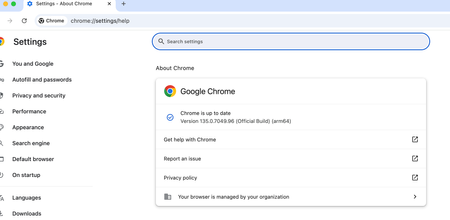
Purview endpoint DLP cant block file upload to web.whatsapp on open in app mode chrome browser MacOS
we are using purview endpoint DLP to block file upload to web.whatsapp.com on browser for MacOS. its working fine on chrome browser when i try dirrectly upload file contain ssn pattern and its blocked by purview but if we upload using open in app mode (pwa) purview cant detect that activity and file is uploaded to web whatsapp susscessfully. try to upload senstive file to web.whatsapp.com from chrome browser and its blocked. but when i try to use "open in app" mode (pwa) dlp purview cant detect the sensitive upload to web.whatsapp.com how to detect and block file uploaded to unwanted url if user using pwa especially on chrome browser? try the same scenario on edge, purview able to detect pwa and can intercept the activity but why in chrome its not the same behaviour expected.845Views1like3CommentsWindows Forwarded Events connector with Windows Security Events NRT rules
Hello, We are testing Microsoft Sentinel using the official Windows Forwarded Events connector. Environment - Windows Server WEC - Windows Event Forwarding - Azure Arc - Azure Monitor Agent - Windows Forwarded Events connector Everything works correctly. Forwarded security events are successfully ingested into the WindowsEvent table. For example: - Event ID 1102 - Event ID 4732 However, the built-in Windows Security Events NRT Analytics Rules (Content Hub version 1.0.1) query only the SecurityEvent table. Example: NRT Security Event log cleared SecurityEvent | where EventID == 1102 As a result, forwarded events received through the Windows Forwarded Events connector never trigger these NRT rules. Question: Is this expected behavior? Should Windows Forwarded Events customers use a different set of analytics rules (ASIM or other templates), or should these built-in NRT rules also support WindowsEvent? Thank you.144Views0likes4CommentsAn Entra app credential is expiring. Which workload still uses it?
A credential rotation ticket often starts with three things: an application name, an expiry date and a deadline. That is enough to know something must happen, but not enough to rotate safely. Before touching the credential, I want to know whether that exact key is still requesting tokens, which resources it accesses and where those requests appear to come from. If Microsoft Entra sign-in logs are already connected to Log Analytics or Microsoft Sentinel, KQL can answer most of that without changing anything in the tenant. This is the workflow I use. What needs to be in the workspace The important diagnostic category is ServicePrincipalSignInLogs. In Log Analytics it becomes the AADServicePrincipalSignInLogs table. Normal SigninLogs are for interactive user sign-ins and are not the right data source for an app authenticating with its own secret or certificate. The diagnostic setting is configured under: Microsoft Entra ID > Monitoring & health > Diagnostic settings Make sure ServicePrincipalSignInLogs is being sent to the workspace you are querying. Microsoft documents the available log categories and their purpose here: https://learn.microsoft.com/en-us/entra/identity/monitoring-health/concept-diagnostic-settings-logs-options From the Entra recommendation or the affected application, copy the Application (client) ID. Do not confuse it with the application object ID or the service principal object ID. In the Kusto table: AppId is the Application (client) ID. ServicePrincipalId is the object ID of the service principal in the tenant. ServicePrincipalCredentialKeyId identifies the secret or certificate key used for the token request. ServicePrincipalCredentialThumbprint can help identify a certificate. ResourceDisplayName and ResourceServicePrincipalId identify the target resource. Those fields are part of the documented AADServicePrincipalSignInLogs schema: https://learn.microsoft.com/en-us/azure/azure-monitor/reference/tables/aadserviceprincipalsigninlogs Step 1: See every credential recently used by the application Replace TargetAppId with the Application (client) ID from Entra: let Lookback = 30d; let TargetAppId = "00000000-0000-0000-0000-000000000000"; AADServicePrincipalSignInLogs | where TimeGenerated >= ago(Lookback) | extend SignInTime = coalesce(CreatedDateTime, TimeGenerated) | where SignInTime >= ago(Lookback) | where AppId =~ TargetAppId | extend SignInSucceeded = tostring(ResultType) == "0" | summarize FirstSeen = min(SignInTime), LastSeen = max(SignInTime), Attempts = count(), SuccessfulSignIns = countif(SignInSucceeded), FailedSignIns = countif(SignInSucceeded == false), CredentialTypes = make_set(ClientCredentialType, 10), SourceIPs = make_set(IPAddress, 20), UserAgents = make_set(UserAgent, 10), TargetResources = make_set( strcat(ResourceDisplayName, " [", ResourceServicePrincipalId, "]"), 20 ) by AppId, ServicePrincipalId, ServicePrincipalName, ServicePrincipalCredentialKeyId, ServicePrincipalCredentialThumbprint, FederatedCredentialId | order by LastSeen desc This gives me a short usage map for the application. If the expiring credential's key ID appears in the result, that exact credential was used for at least one recorded token request during the selected lookback period. The target resources show what it requested a token for. Source IPs and user agents usually help narrow down the workload. They are clues, not host identification. A source IP might be a NAT gateway, proxy or shared outbound address, and user-agent strings are neither guaranteed nor trustworthy. I use them to narrow the search in deployment settings, automation jobs, Key Vault references and CI/CD configuration, not as final proof of where the workload runs. Rows with a populated FederatedCredentialId represent workload identity federation. They should not be mistaken for use of the expiring secret or certificate. Step 2: Inspect the exact credential Once the expiring key ID is known, this query shows the individual sign-in records for that key: let Lookback = 30d; let TargetAppId = "00000000-0000-0000-0000-000000000000"; let ExpiringCredentialKeyId = "11111111-1111-1111-1111-111111111111"; AADServicePrincipalSignInLogs | where TimeGenerated >= ago(Lookback) | extend SignInTime = coalesce(CreatedDateTime, TimeGenerated) | where SignInTime >= ago(Lookback) | where AppId =~ TargetAppId | where ServicePrincipalCredentialKeyId =~ ExpiringCredentialKeyId | extend Result = iff(tostring(ResultType) == "0", "Success", "Failure") | project SignInTime, Result, ResultType, ResultDescription, ServicePrincipalName, ServicePrincipalId, ClientCredentialType, ServicePrincipalCredentialKeyId, ServicePrincipalCredentialThumbprint, IPAddress, UserAgent, ResourceDisplayName, ResourceServicePrincipalId, CorrelationId | order by SignInTime desc A successful row is direct evidence that Entra accepted that credential for a token request at that time. Repeated failures can also be useful: they might show an incomplete rotation, an expired credential that is still configured somewhere, or a forgotten workload that keeps retrying. No rows do not mean "safe to delete." They only mean that no matching event exists in the data currently available to this workspace for the selected period. The workload might run monthly, the event might be outside retention, the diagnostic category might have been enabled recently, or the relevant logs might be routed elsewhere. The table also does not contain the application's business owner. I confirm ownership on the application or enterprise application in Entra, or enrich the result from an existing CMDB or Sentinel watchlist. I would not invent an owner from the last source IP or from whoever originally created the app. Step 3: Prove the replacement is actually in use After adding the replacement credential and updating the workload, I use the cutover time plus the old and new key IDs to verify the change: let CutoverTime = datetime(2026-08-26T12:00:00Z); let TargetAppId = "00000000-0000-0000-0000-000000000000"; let OldCredentialKeyId = "11111111-1111-1111-1111-111111111111"; let NewCredentialKeyId = "22222222-2222-2222-2222-222222222222"; AADServicePrincipalSignInLogs | where TimeGenerated >= CutoverTime | extend SignInTime = coalesce(CreatedDateTime, TimeGenerated) | where SignInTime >= CutoverTime | where AppId =~ TargetAppId | where ServicePrincipalCredentialKeyId in~ (OldCredentialKeyId, NewCredentialKeyId) | extend Credential = case( ServicePrincipalCredentialKeyId =~ OldCredentialKeyId, "old", ServicePrincipalCredentialKeyId =~ NewCredentialKeyId, "new", "other" ) | where Credential != "other" | summarize FirstSeen = min(SignInTime), LastSeen = max(SignInTime), Attempts = count(), SuccessfulSignIns = countif(tostring(ResultType) == "0"), FailedSignIns = countif(tostring(ResultType) != "0"), SourceIPs = make_set(IPAddress, 20), TargetResources = make_set(ResourceDisplayName, 20) by Credential, ServicePrincipalCredentialKeyId | order by LastSeen desc Before I remove the old credential, I want to see a successful token request with the new key ID after the cutover. I also run a real operation against the intended resource. A generic process health check is not enough if it never exercises the dependency that uses Entra authentication. Continued sign-ins with the old key after the cutover are a clear sign that another instance, deployment slot or workload still has the old value. An absence of old-key sign-ins becomes meaningful only after the expected workload schedule has been covered and the logs have arrived in the workspace. One final trap is token caching. Service principal sign-in logs show token requests, not every API call made with a token. Removing the old client credential prevents it from obtaining new tokens, but an access token already issued by Microsoft Entra normally remains valid until it expires. The rotation test must therefore force the workload to acquire a fresh token. Access token documentation: https://learn.microsoft.com/en-us/entra/identity-platform/access-tokens My rotation order is simple: Identify the exact old credential and the workload using it. Add the replacement while the old credential is still valid. Deploy the new credential to the workload's secret store. Force a fresh token request and execute a real operation. Confirm the new key ID in AADServicePrincipalSignInLogs. Watch for unexpected use of the old key for an appropriate period. Remove the old credential after the evidence and rollback window are sufficient for that workload. Microsoft Entra's preview recommendations for expiring application credentials and expiring service principal credentials are useful starting points. For me, the KQL correlation is the part that turns the warning into a controlled change instead of a blind rotation. Recommendation documentation: https://learn.microsoft.com/en-us/entra/identity/monitoring-health/recommendation-renew-expiring-application-credential https://learn.microsoft.com/en-us/entra/identity/monitoring-health/recommendation-renew-expiring-service-principal-credential How are you carrying application ownership into Sentinel? A maintained watchlist works, but it can easily become just another stale inventory.Your Sentinel AMA Logs & Queries Are Public by Default - AMPLS Architectures to Fix That
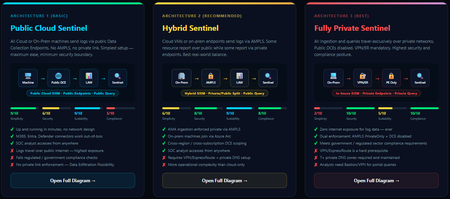
When you deploy Microsoft Sentinel, security log ingestion travels over public Azure Data Collection Endpoints by default. The connection is encrypted, and the data arrives correctly — but the endpoint is publicly reachable, and so is the workspace itself, queryable from any browser on any network. For many organisations, that trade-off is fine. For others — regulated industries, healthcare, financial services, critical infrastructure — it is the exact problem they need to solve. Azure Monitor Private Link Scope (AMPLS) is how you solve it. What AMPLS Actually Does AMPLS is a single Azure resource that wraps your monitoring pipeline and controls two settings: Where logs are allowed to go (ingestion mode: Open or PrivateOnly) Where analysts are allowed to query from (query mode: Open or PrivateOnly) Change those two settings and you fundamentally change the security posture — not as a policy recommendation, but as a hard platform enforcement. Set ingestion to PrivateOnly and the public endpoint stops working. It does not fall back gracefully. It returns an error. That is the point. It is not a firewall rule someone can bypass or a policy someone can override. Control is baked in at the infrastructure level. Three Patterns — One Spectrum There is no universally correct answer. The right architecture depends on your organisation's risk appetite, existing network infrastructure, and how much operational complexity your team can realistically manage. These three patterns cover the full range: Architecture 1 — Open / Public (Basic) No AMPLS. Logs travel to public Data Collection Endpoints over the internet. The workspace is open to queries from anywhere. This is the default — operational in minutes with zero network setup. Cloud service connectors (Microsoft 365, Defender, third-party) work immediately because they are server-side/API/Graph pulls and are unaffected by AMPLS. Azure Monitor Agents and Azure Arc agents handle ingestion from cloud or on-prem machines via public network. Simplicity: 9/10 | Security: 6/10 Good for: Dev environments, teams getting started, low-sensitivity workloads Architecture 2 — Hybrid: Private Ingestion, Open Queries (Recommended for most) AMPLS is in place. Ingestion is locked to PrivateOnly — logs from virtual machines travel through a Private Endpoint inside your own network, never touching a public route. On-premises or hybrid machines connect through Azure Arc over VPN or a dedicated circuit and feed into the same private pipeline. Query access stays open, so analysts can work from anywhere without needing a VPN/Jumpbox to reach the Sentinel portal — the investigation workflow stays flexible, but the log ingestion path is fully ring-fenced. You can also split ingestion mode per DCE if you need some sources public and some private. This is the architecture most organisations land on as their steady state. Simplicity: 6/10 | Security: 8/10 Good for: Organisations with mixed cloud and on-premises estates that need private ingestion without restricting analyst access Architecture 3 — Fully Private (Maximum Control) Infrastructure is essentially identical to Architecture 2 — AMPLS, Private Endpoints, Private DNS zones, VPN or dedicated circuit, Azure Arc for on-premises machines. The single difference: query mode is also set to PrivateOnly. Analysts can only reach Sentinel from inside the private network. VPN or Jumpbox required to access the portal. Both the pipe that carries logs in and the channel analysts use to read them are fully contained within the defined boundary. This is the right choice when your organisation needs to demonstrate — not just claim — that security data never moves outside a defined network perimeter. Simplicity: 2/10 | Security: 10/10 Good for: Organisations with strict data boundary requirements (regulated industries, audit, compliance mandates) Quick Reference — Which Pattern Fits? Scenario Architecture Getting started / low-sensitivity workloads Arch 1 — No network setup, public endpoints accepted Private log ingestion, analysts work anywhere Arch 2 — AMPLS PrivateOnly ingestion, query mode open Both ingestion and queries must be fully private Arch 3 — Same as Arch 2 + query mode set to PrivateOnly One thing all three share: Microsoft 365, Entra ID, and Defender connectors work in every pattern — they are server-side pulls by Sentinel and are not affected by your network posture. Please feel free to reach out if you have any questions regarding the information provided.
WDSI Submission Review Has Been Pending for 10 Days
I submitted the application I developed to WDSI for review because the Microsoft Defender SmartScreen warning appears when running it. I would like the application to be added to the virus database so that this warning no longer appears, but the review has still not been completed after 10 days. Could you please help me? Submission ID: 61955163-f60b-4141-aafa-cd4afe171996 Link: https://www.microsoft.com/en-us/wdsi/submission/61955163-f60b-4141-aafa-cd4afe171996
EnableConvertWarnToBlock will not enable - stays False
We have a GPO applied to Windows 11 Pro machine - fully patched and onboarded to MDE. The GPO enables "EnableConvertWarnToBlock" as follows: The GPO is applied to the machine and the following registry key is populated: But when I check the status on the client - it will not enable: I have enabled troubleshooting mode and disabled tamper protection in case this is blocking but nothing seems to work. Its as if MDAV/MDE is not even looking/reading that registry key. Anyone else have the same issue or ideas on resolution?193Views0likes5Comments
Entra Connect 2.6.84.0 displays error when trying to configure containers
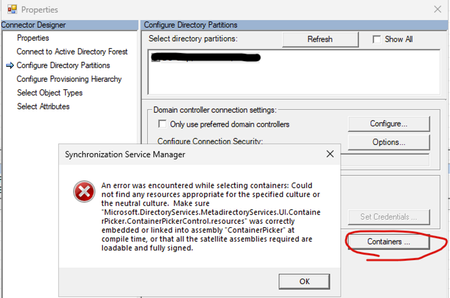
I installed Entra Connect 2.6.84.0 on a fresh install of Windows Server 2025 and get an error message when trying to configure the containers of the local AD: (after pressing the button Containers... you need to enter a AD user and password, afterwards the below error message is displayed) Microsoft support could not help and recommended to use the configuration wizard to filter OUs. This works for me, but I still wonder if anyone else had this error?115Views1like2CommentsWarning: PIM disconnects users from Teams Mobile
I have been working with Microsoft Support on this issue for three months. Hopefully I can save others the trouble. Sometime around April 2024, I and my colleagues started seeing regular alerts on our mobile devices saying "Open Teams to continue receiving notifications for <email address>", or "<email address> needs to sign in to see notifications". Just as promised, after this message appears, we do not get notified about messages and Teams calls do not ring on our mobile devices until we open Teams. We eventually determined that these alerts coincided with activating or deactivating PIM roles. Apparently, a change was made to Privileged Identity Management in Microsoft Entra ID around that time whereby users' tokens are invalidated when a role is activated or deactivated. Quoting the Microsoft Support rep: "When a user's role changes (either due to activation or expiration), Skype AAD[?] will revoke existing tokens of that users. Skype AAD will also notify PNH about that token revocation. This is expected behavior and is working as designed. These changes were rolled out in Skype AAD in April/May 2024 which is since when you are facing the issue as well." Anyway, as far as I can tell, this change was not announced or documented anywhere, so hopefully this message will show up in the search results of my fellow admins who are dealing with this.2.5KViews1like5CommentsThank you
Thank You, Microsoft Defender Team I want to express my appreciation to the Microsoft Defender team. As a user who spends a lot of time online supporting educators, families, and community partners, it is reassuring to know that web protection, phishing protection, and reputation-based security features are working behind the scenes to help keep my devices and information safe. Technology often gets noticed when something goes wrong, but today I want to recognize what is working well. Thank you for creating tools that help protect users from threats while allowing us to focus on our work. Your efforts are appreciated!
Deleted labels showing pending deletion status
Hi All, We encountered an issue after deleting a sensitivity label through the Microsoft Purview portal. When we tried to recreate the same label a few hours later, a message indicated that a label with the same name still exists. We also attempted to remove it using PowerShell with the label GUID but received the error: “We cannot remove rule ‘label name’ since it is already in a pending deletion state.” Anyone comes across similar Thank you181Views0likes3CommentsMcAfee License has Expired pop out message
We recently had a Microsoft Defender desktop getting this scam popout message. After doing a little googling we think it is caused by a change in the browser that is allowing a push notification from a specific website. My question is why didn't Defender detect this? I get that it was not malware but isn't this something Defender should be a detect and alert about?1.4KViews0likes2CommentsMicrosoft Defender
Goodmorning: I am working with a laptop Acer Aspire 3 15 , Windows 11. Microsoft Defender worked fine until two days ago. Then it started being blocked at 91 percent instead of compliting the program at 100 percent. Please, if a person can help me in understanding what causes this problem I will be very grateful. Thanks FFBX
Microsoft Purview | Share block at external users
Hello community. I have an issue with Microsoft Purview DLP policies. I am trying to create a policy that prevents documents from being shared through OneDrive with external users, while allowing certain exceptions. However, when I select the option "Block Access to external domains and users" and assign a specific email address to be blocked, it does not work. The configured email address is not being blocked. I was reviewing this with Copilot, and it mentioned that if the external user you are sharing with already exists in Entra ID, the tenant may treat the user differently (not necessarily as an external user). My external user exists in Entra ID as a Guest account. The external user is registered as follows: Displayname: User Name Userprincipalname: user.name_external.domain#EXT#@company.onmicrosoft.com User Type: Guest Has anyone else experienced this issue? I am sharing evidence of the policy configuration.Insider Risk Level not being correctly picked up by DLP
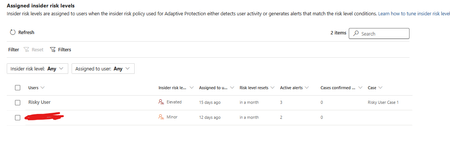
I have two users currently with assigned Insider Risk levels, one elevated and one minor. I have taken the templated DLP policy (DSPM for AI - Block sensitive info from AI sites) which looks for sensitive information being pasted to generative AI sites, and applies a block if the user is an elevated risk user, and a block with override for a moderate/minor risk user (this was audit only originally). For each advanced DLP rule within that policy, I have a separate policy tip which shows so I know which Advanced DLP rule has been hit. However, I'm having some discrepancies with the correct insider risk level being identified by Purview and therefore the wrong advanced DLP rule is being applied. Testing examples: Logged into a Windows 11 PC with the account, and using Medium confidence UK NINO's I try pasting the content into ChatGPT: Elevated risk user: Block with Override Minor Risk user: Block with Override If I try the exact same scenario on a different PC, I can sometimes get to the point where even though its the same set of data, Purview allows me to paste it at after checking the data. Or in another scenario, I was getting both users hitting the "elevated risk" advanced DLP rule. The Devices are all showing as up to date sync wise with DLP policies, and the policy itself is showing as fully synced. Assigned insider risk levels: DLP Rules: Elevated: Moderate/Minor:SolvedNo updates to "Stop clear text credentials exposure" after migrating our MDI sensors to v3
Since migrating our domain controllers to the v3 sensor, the "Stop clear text credentials exposure" recommendation is no longer updating. The latest "Last seen" date correlates with the date we performed the migration, and I know we have a couple entities that have not yet been remediated. If I run a query on the IdentityQueryEvents table in Advanced Hunting, I'm still seeing LDAP queries. Anyone else seeing this?
Passkey Sign‑In Fails in Entra Free Tenants (AADSTS135016 – FIDO Sign‑In Disabled via Policy)
Hello everyone, I’m documenting an issue which seems to be appearing across multiple tenants and multiple threads, but the root cause has never been clearly stated. If I’m mistaken in any part of this analysis, my apologies and I welcome correction. This post is intended to consolidate the symptoms, the misleading error message, and the actual underlying cause so other admins don’t waste time troubleshooting a problem that cannot be fixed through configuration. Summary of the Issue In Microsoft Entra ID Free tenants: Passkeys can be enabled Passkeys can be registered Passkeys appear correctly in Security Info Passkeys work for MFA Passkeys work for self‑service setup But passkey sign‑in fails, consistently, with: AADSTS135016: FIDO sign‑in is disabled via policy This occurs even when: FIDO2 is fully enabled AAGUIDs are correct “Allow self‑service setup” is enabled No Conditional Access policies exist Security defaults are disabled User‑level MFA settings are off Passkey profiles are correctly targeted Browser/device combinations are clean Multiple admins have reported this exact behavior. Why This Error Is Misleading The error suggests that a policy is blocking FIDO sign‑in. However, in Entra Free tenants, the real issue is that the required policy objects do not exist at all. Specifically, Entra Free tenants do not include: Authentication Strengths Passwordless Strength Phishing‑Resistant MFA Strength FIDO2 Strength Conditional Access enforcement Strength‑based sign‑in policies Passkey sign‑in requires these backend objects to bind the FIDO2 credential to the primary authentication flow. Without them, the sign‑in pipeline rejects the passkey and throws error 135016, even though registration succeeds. This is why: Some tenants work (licensed) Some tenants fail (Entra Free) “Fixes” like waiting, renaming profiles, or toggling settings only work in licensed tenants where the backend policy objects exist No amount of configuration resolves the issue in Entra Free This is a licensing limitation, not a configuration problem. Why This Needs Attention Microsoft is actively promoting: Passkeys Passwordless authentication Phishing‑resistant MFA Modern identity security But Entra Free tenants — including personal tenants, small labs, students, developers, and home environments — cannot use passkey sign‑in at all, despite documentation implying otherwise. This creates: Confusion Wasted time Misleading error messages Failed deployments Frustration for users who purchased physical passkeys A contradiction between Microsoft’s marketing and actual product behavior Passkeys are a security feature, not an enterprise feature. Basic passkey sign‑in should not be locked behind Entra ID P1. Request to Microsoft Please consider enabling basic passkey sign‑in for Entra Free tenants. At minimum: Update documentation to clearly state that passkey sign‑in requires Authentication Strengths (P1+) Update the error message to reflect the real cause Provide guidance for admins deploying passkeys in small or personal tenants This would reduce confusion and align the product with Microsoft’s own passwordless security goals. Closing If anyone has additional data points, please add them here. This issue is affecting multiple tenants and deserves a clear, authoritative answer from Microsoft. Thanks.105Views0likes0CommentsMicrosoft Fabric metadata in Microsoft Purview
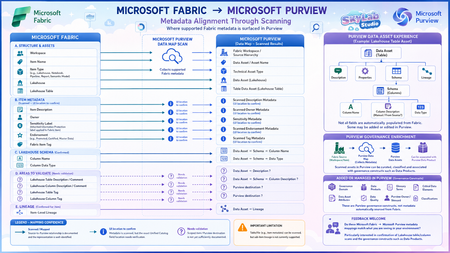
I’ve been mapping how Microsoft Fabric metadata is surfaced in Microsoft Purview through Data Map scanning, and I’ve created this visual to make the relationship easier to understand. The diagram separates: Documented mappings – such as Fabric items, Lakehouse tables, schema and item-level lineage. Metadata known to be scanned, but where the exact Purview UI location needs confirmation. ? Areas still needing validation – particularly Lakehouse table/column descriptions and tags. The principle I’m exploring is: Microsoft Fabric → Purview Data Map Scan → Purview Data Asset → Purview governance enrichment Importantly, a Fabric asset does not automatically become a Purview Data Product. It is first represented as a Data Asset, which can then be governed, enriched and associated with a Data Product. I’d really appreciate feedback from anyone working hands-on with Microsoft Fabric and Microsoft Purview: Does this mapping match what you are seeing in your environment? I’m particularly interested in confirming: Lakehouse table descriptions → Purview Asset Description? Lakehouse column descriptions → Purview Schema → Column Description? Lakehouse table/column tags → where exactly are these surfaced in Purview? Corrections, screenshots or practical experience would be very welcome.277Views3likes4CommentsNeed Microsoft support to resolve a historical tenant association with a domain I recently acquired
Hello, I recently became the legitimate and independent registrant of a domain that had previously been owned or used by an unrelated organization. I have no affiliation whatsoever with the previous domain holder or that organization. I have now received a Microsoft Power Platform notification at an email address under my domain concerning a Default environment belonging to the previous organization. The notification includes a Tenant ID and Environment ID, and the environment name corresponds to that organization. I do not own, administer, or have access to this tenant or Power Platform environment, and I am not seeking access to or control over it. My main concern is that there may still be a historical association between my domain or its email addresses and the previous organization's Microsoft tenant or related services. I would like Microsoft to investigate this and, where necessary, properly separate my domain and its email addresses from any unrelated historical Microsoft accounts, tenants, directories, or services. Most importantly, I want to ensure that this historical association will not adversely affect my ability in the future to use my domain and its business email addresses to create, verify, and use my own Microsoft 365, Microsoft Entra, Power Platform, or other Microsoft business services. At present, I do not have a Microsoft business account, Microsoft 365 tenant, or Power Platform tenant of my own. As a result, I appear to be unable to use some of the normal business support channels that require an existing tenant or administrator account. Could someone please advise me on the appropriate way to get this matter reviewed by Microsoft Support? If a Microsoft employee or official support representative can assist or direct me to the appropriate private support channel, I would greatly appreciate it. For privacy and security reasons, I have intentionally not posted the actual domain name, email address, Tenant ID, or Environment ID publicly. I am happy to provide all of the relevant details privately to an authorized Microsoft support representative if required. Thank you for any guidance.Purview DLP Behaviours in SharePoint and OneDrive
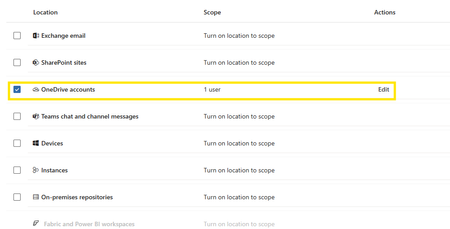
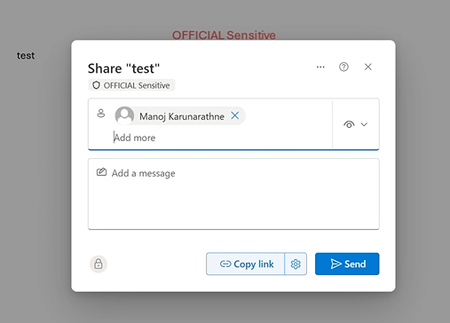
We are currently testing Microsoft Purview DLP policies for user awareness across SharePoint Online, and OneDrive. The policy is configured such that sensitive information (based on a sensitivity label-OFFICIAL Sensitive) shared externally triggers a policy tip, with override allowed (justification options enabled) and no blocking action configured. In SharePoint Online and OneDrive, users are not experiencing any DLP-related behaviour. When attempting to share labelled content externally: No policy tips are displayed No override prompts are presented No indication of DLP enforcement is shown Users are able to share content externally without any awareness prompt or restriction. Expected behaviour: Users should receive a policy tip during the sharing process Users should be prompted for justification when overriding, aligned with the DLP configuration Has anyone observed similar behaviour with DLP in SharePoint Online and OneDrive, particularly in scenarios where no blocking action is configured? Keen to understand if this is expected behaviour, a known limitation, or if there are any configuration considerations or workarounds to achieve a consistent user experience across workloads.425Views1like5Comments
SmartScreen reputation issue for EV Code Signed Windows application
Hello Microsoft Defender Threat Intelligence Team, We are the developer of a legitimate Windows desktop application called "ShangJing". Recently, our users reported that Microsoft Defender SmartScreen displays the following warning when downloading and launching our application: "Microsoft Defender SmartScreen can't verify this file is safe." The application is not malicious and has been digitally signed with a GlobalSign EV Code Signing Certificate. Application information: Product Name: ShangJing Publisher: Zhaoyi Information Technology (Shanghai) Co., Ltd. Certificate: GlobalSign EV Code Signing Certificate File: 尚镜_2.0.0_platinum_setup.exe Issue: Users receive SmartScreen reputation warning when downloading our application. We have already submitted the file through Microsoft Security Intelligence submission portal 7 days ago, but we have not received any update yet. Submission ID: 0c015296-b9cf-4130-9eaf-fc59cd145370 The file is distributed through our official website: https://www.changine.cn/downloads We would like to understand: 1. Is this caused by insufficient SmartScreen reputation for a newly released binary? 2. Is there any additional verification required from the software publisher side? 3. How can we ensure our legitimate application gains proper SmartScreen reputation? Our application is widely used for live streaming and camera-related workflows. It does not contain any malicious behavior. We would appreciate any guidance from the Microsoft team. Thank you.






Events
Learn more about Microsoft Entra Tenant Governance – a built-in solution that helps bring an organization’s tenants under control, reduce shadow-tenant risk, and manage tenant configuration at scale....
Tuesday, Sep 15, 2026, 09:00 AM PDTOnline
1like
1Attendee
0Comments