Recent Discussions

Azure for Students - Locations now restricted by policy
I have been using Azure for Students with my students and recently i noticed that resource locations of new resources are now restricted by a policy. In addition allowed locations vary between different student accounts so you have to check allowed locations with each student. What i recall, I did not not see any info from this change and was a quite a curve ball at first :)Solved2.7KViews2likes6Comments
Microsoft AI-900
Hi How can I enroll my students to take the module AI-900 and get them examined for free? I used to do that 3 years ago when these modules were maintained by a training manager, but since then, it has become community-based, which is why I come to you with the question. I hope you can help me. I need to explain to students how to enroll in the module, how to use it and make the labs, and give them information about the free exam. Kindly advise Regards Dr. Amir Aly University of Plymouth, UKSolved
Voucher requests disappeared
Hi MSLE Team, I'm Arfian. I would like to ask about the voucher that can be requested from the Microsoft Learn for Educators portal. I've submitted several requests, but I haven't received any vouchers, and my requests seem to have disappeared from the portal. Could someone please help me? Thank you.Solved920Views2likes15Comments
Microsoft Learn for Educators: Learning download centre
I am writing to report an issue I am currently facing with the Microsoft Learn for Educators platform. I am unable to access the Learning download centre to retrieve the necessary teaching materials and notes. Despite multiple attempts, the page either fails to load or does not grant me access to the downloadable content. This has hindered my preparation for upcoming lessons and I would appreciate your prompt assistance in resolving this matter.Solved679Views1like12Comments
Azure For Students Subscriptions - "Your email domain is not currently registered with us"
Hello, I am a teacher at a vocational school and we are experiencing a recurring issue with Azure for Students academic verification, affecting multiple students at the same time. Our school setup (for context) Our institution is structured as follows: We have a student domain that is registered and whitelisted with Microsoft as an academic domain, for example: email address removed for privacy reasons We also have a separate organisational domain used for staff and business operations, for example: email address removed for privacy reasons Students are instructed to: Sign in to Azure using their personal Microsoft account (typically Outlook/Hotmail) Use their school email address only for academic verification during the Azure for Students sign-up flow This setup has worked historically, but we are now seeing repeated failures. The issue we are seeing Students complete CAPTCHA and email verification successfully. The process then fails with: “Sorry, your academic status could not be verified.” or similar This happens even when: Students use a private/incognito browser session VPNs and ad blockers are disabled Only one Microsoft account is signed in No account switching occurs during the flow The issue affects multiple students from the same institution, often within the same timeframe. Because Azure for Students verification appears to allow only one attempt, students who fail once are effectively blocked and end up in a support loop. Observations Based on volume and timing, this does not appear to be individual user error. We suspect one or more of the following: A backend verification or account-linking issue An institutional configuration mismatch that is not clearly surfaced A generic or outdated error message that does not accurately reflect the real cause of failure At this point, I am not fully convinced that the error message always represents a true eligibility problem. What we are hoping to learn Are other schools using a similar setup (personal Microsoft account + separate student email domain for verification)? Are there known best practices or preferred configurations for institutions with multiple domains? Is there guidance we can pass on to our IT team to improve compatibility with Azure for Students verification? Is there a way for failed verifications to be reviewed or reset when the institution and domain are valid? Our goal is not just to fix individual cases, but to understand whether our institutional setup could be improved to prevent this issue going forward. Any insight from Microsoft staff or other educators would be greatly appreciated. RobinLBaldwin Mahlah_Murray599Views0likes1CommentHow to Get Started with Power Automate as a Beginner?
Hi everyone, I am completely new to Power Automate. I want to learn how to build flows (cloud/desktop). Can someone guide me on where to start, which features to focus on first, and suggest beginner-friendly tutorials/projects?526Views1like2CommentsInstitution Email Verification & Case Submission Blocked (MSLE Nomination Accepted)
Our institution has been officially accepted into the Microsoft Learn for Educators (MSLE) program under the Educational Institution Option, as confirmed by Rachel MSLE. However, we are currently facing the following issues: Email Verification Failure: When attempting to log in to the MSLE portal using our institution email (the same one submitted during nomination), we receive the error: "Your Institution Email could not be verified!" Support Case Submission Blocked: The portal does not allow us to create a new support case. It appears stuck or unresponsive when trying to initiate a support request. Form Submission Confusion: Although the form was accepted after login, the system still blocks access and does not recognize the verified email. We have followed all the steps outlined in the welcome and onboarding emails, including reviewing the program guide and attempting to join the MSLE Community. However, due to the above issues, we are unable to proceed further. We kindly looking for assistance in resolving the email verification and support case submission issues. If possible, maybe MSLE program direct contact or support channel (email or otherwise) where we can escalate this matter. Thank you for your help.Solved446Views1like8Comments
Stopcode 0x7B inaccessible boot device
I tried to boot my Dell Optiplex 3080 MT installed with Windows 11 pro from USB stick bootable to ESET SysRescue, it seem the PC did not liked it and display stopcode 0xB7 and its windows tsrt up repair did not help to fix it, I can manage to boot the PC from other device the SSD which is installed with windows 11 but not from the Windows 11 installed in the NVMe M2 neither from HDD which also has win 11 installed. The partitions on the SSD read MBR and the partitions on the NNVME M2 and HDD read GPT, is it possible that the USB stick has changed the setting to read the DSSD partition MBR What shall I do? I feel that BIOS changes may be required. Any help will be very much appreciated.Solved421Views0likes1CommentSkillable Labs for AZ-801
Good morning, All, I have a quick question regarding labs for the AZ-801 Cert. When I log into my MSLE account to create a course. I have AZ-800 as a course, but AZ-801 is not listed. I was wonder if MSLE does not offer Labs for the AZ-801 or is this something my college will have to request to be added to our course list. We started offering the AZ-800 & AZ-804. I do have a vendor for our e-books, and they do have their own Labs as part of the Book, but I would like to also Offer official MS labs, for my students. We also Teach MS-102 and MD-102 course, which I would also like to see if MSLE has those Labs as well. Thank you and Information. Prof. Wilson Broward CollegeSolved
MSLE Portal isn't working
Hello team, Today I was trying to login into MSLE Portal getting following message please look into it We're sorry, but something went wrong. Please try again, and if this persists, contact the website administrator. Error ID # [9c304bb7-ef2f-4be8-b756-2ab6a4007a48] 10/10/2025 4:10:04 PM UTC NAM e46d36f6-ece6-4cc6-a30e-bd682ea99b04Solved370Views1like6CommentsFree two-day AI-900 Train-the-Trainer Bootcamp!
Level Up Your AI Teaching with Microsoft’s AI-900 Bootcamp The National Applied AI Consortium (NAAIC), in partnership with Microsoft, invites you to a free two-day AI-900 Train-the-Trainer Bootcamp this July. This training was created to help community college faculty confidently teach Microsoft Azure AI Fundamentals. Led by a Microsoft Certified Trainer, this interactive training will prepare you for the AI-900 certification, introduce the Microsoft Learn for Educators (MSLE) platform, and provide access to official courseware, teaching resources, and labs. What’s included: Live instruction from a certified Microsoft trainer Hands-on labs and teaching materials Certification exam voucher upon full participation Post-training access to a dedicated Teams channel with session recordings, materials, and peer support Key Dates: Application Deadline: July 7, 2025 Training Dates: July 11 & 18, 2025 | 9:00 AM–3:00 PM EDT Eligibility: Faculty from U.S.-accredited community colleges are welcome to apply APPLY HERE Seats are limited, reserve your spot today and bring certified AI expertise to your classroom.354Views2likes0CommentsLab Credits and First course
Hello everyone, I’m reaching out to learn how other colleges handle student access to Azure when offering introductory AI or cloud-based courses my goal is to teach Microsoft Azure AI fundamentals. My understanding is that each student is asked to pay individually for Azure access. This model won’t work well for our institution or our student population. I would also like more than 30 day trial of Azure to test out the materials. For those of you who teach AI, cloud computing, or Microsoft Learn for Educators courses, I’d really appreciate your insight: How does your college provide Azure access for students? Do you use institution-wide Azure credits or centrally fund Azure usage? Are there specific Microsoft AI courses (e.g., Microsoft Azure AI fundamentals) that your institution uses as their first one? Any details about processes would be extremely helpful. My goal is to offer hands-on AI learning without placing a financial burden on students, and I’m hoping to learn from your approaches. Thank you in advance for your guidance and experiences! Best regards, Joe342Views2likes3CommentsWelcome to MSLE
Hey everyone! I’m Carlos, one of the MSLE Community Managers here to help out. We’re super excited to have you join the MSLE Community! If you’d like support in English, just hit the Start a Discussion button on the right to connect with me and other faculty members—we’re here for you!328Views3likes5Comments💡 Building Future-Ready Skills: ESGTS and Microsoft Certifications
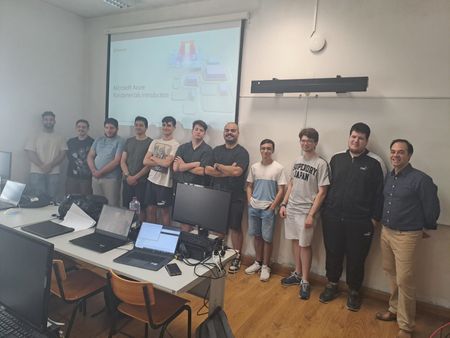
Hello everyone! I’m a lecturer at the Escola Superior de Gestão e Tecnologia de Santarém (ESGTS) in Portugal, and I’d like to thank Microsoft for the great work they’re doing with the Microsoft Learn for Educators (MSLE) program. We first heard about it in February 2025, when we started our onboarding process. The program immediately caught our attention because it offers two complementary learning paths, Microsoft Certifications and Microsoft Applied Skills, both of which align perfectly with the courses our School already teaches in Computer Science. The flexibility of these learning paths, some longer (Certifications) and others shorter (Applied Skills), along with multilingual support and hands-on labs through the Skillable platform, without students or teachers needing to use their own Azure credits, were key reasons why we decided to adopt the program. We’ve also seen growing interest in the topics covered by Microsoft certifications such as AI, AZ, DP, MS, and SC, among others. We quickly began training and certifying our teaching staff using the vouchers provided through the MSLE program, with the goal of soon extending this training to our students as well: In addition to our academic training, our School’s strategy also focuses on developing students’ skills using official vendor content. This effort led to our first in-person MSLE training session — AZ-900: Azure Fundamentals — held on June 11 and 12, 2025. More Info: https://www.ipsantarem.pt/esgts-microsoft-learn-for-educators-az-900-azure-fundamentals-1a-edicao/302Views9likes2Comments


Events
Olá, 👋 Espero que estejam bem! Tem dúvidas sobre o Programa MSLE? Nós temos as respostas! Participe das nossas Office Hours do MSLE: um espaço para conectar, aprender e receber apoio personal...
Monday, Jul 20, 2026, 06:00 PM PDTOnline
0likes
1Attendee
0Comments
¿Tienes preguntas sobre el Programa MSLE? ¡Tenemos las respuestas!
Únete a nuestras Horas de Consulta del MSLE: tu espacio para conectar, aprender y recibir apoyo personalizado.
✅ Aclara tus ...
Tuesday, Jul 21, 2026, 07:00 AM PDTOnline
0likes
0Attendees
0Comments
Recent Blogs
- 3 MIN READApr 03, 2026168Views2likes0Comments
- 2 MIN READWe’re excited to announce the launch of new AI-900 lab simulations, designed to help educators deliver more interactive, scalable, and learner-friendly AI experiences. Moving forward, all AI‑900 lab ...Mar 13, 2026439Views1like0Comments