Forum Widgets
Latest Discussions
 48Views2likes1Comment
SKU, quota and policy restrictions on Azure for Students and Free Subscriptions
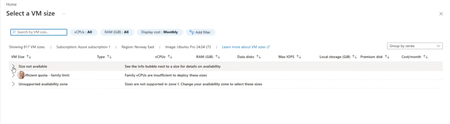
Subject: Azure for Students VM Availability Appears Inconsistent Across Students Hello everyone! We're seeing an issue across multiple cohorts using Azure for Students subscriptions, and I'm hoping someone can clarify whether there are additional restrictions being applied behind the scenes. We understand and accept the recent changes regarding: Allowed deployment regions for Azure for Students subscriptions The 4 vCPU quota limitations Regional capacity constraints We've updated our teaching materials accordingly and have troubleshooting guidance for students. However, we're observing behaviour that appears inconsistent between students with what seem to be identical subscription types. Examples: Student A can deploy several B-series VM sizes in an approved region. Student B can deploy only one VM size in the same approved region. Student C sees "Size not available" for every VM size in multiple approved regions. Student D eventually succeeds only after trying several approved regions, despite having available credit and no existing VMs. In one recent case, a student had: A Free subscription $200 credit available No deployed VMs No Allowed Regions policy visible (which made troubleshooting particularly confusing) Most regions the student tested showed one or more of the following: No available VM sizes Family quota limit messages Unsupported availability zone messages Eventually, Denmark East allowed deployment of a Standard_B2als_v2 VM, while several other regions did not. I have collected examples from multiple students and am seeing several different failure modes: Total Regional Core quota exceeded (expected and understandable) Allowed Locations policy restrictions VM size unavailable in approved regions Policy assignments showing "Not Registered" because Microsoft.PolicyInsights is not registered The challenge is that students with apparently identical Azure for Students subscriptions are not encountering the same restrictions. Has Microsoft introduced additional backend controls, SKU filtering, capacity restrictions, or subscription-specific policies that are not surfaced clearly through the Azure portal? From an educational perspective, the lack of consistency is making it difficult to provide reliable lab instructions because one student's successful deployment path may not work for another student with the same subscription type. My questions are: Are there additional backend restrictions beyond the visible Allowed Locations policy and published vCPU quotas? Is VM size availability being dynamically restricted per student subscription? Are regional capacity controls being applied differently across Azure for Students subscriptions? Is there a recommended method for identifying which regions and VM families are actually deployable for a specific student before beginning a lab exercise? Any clarification would be greatly appreciated, as we're trying to reduce classroom troubleshooting time and provide students with more reliable deployment guidance. Thank you.CvWykJun 04, 2026Copper Contributor28Views0likes3CommentsUpcoming Updates to the MSLE Program Structure
The Microsoft Learn for Educators (MSLE) program goals include helping educators integrate in-demand technical skills into their teaching and better prepare students for today’s workforce. Through the program, educators gain access to ready-to-teach Microsoft Official Curriculum, including courseware, assessments, and teaching resources aligned to industry-recognized Microsoft Certifications. MSLE also provides professional development opportunities, certification pathways, and a global community of educators, enabling faculty to stay current, collaborate with peers, and deliver engaging, real-world learning experiences. As we look ahead to the upcoming fiscal year, we’re making an important update to how the MSLE program is structured. What’s changing Currently, educators can participate in MSLE either as an individual educator or as part of an educational institution, with institutions receiving a distinct set of expanded benefits. Moving forward, we will no longer differentiate between these two participation models. All participants in the MSLE program will be classified as individual educators, creating a more unified and streamlined experience for our global educator community. What this means for you As part of this change: The majority of MSLE benefits will remain the same, including access to Microsoft Official Curriculum, teaching resources, and the global educator community Lab access will continue to be available, however labs will no longer be offered at no cost as a standard program benefit We understand how valuable hands-on lab experiences are for teaching and learning, and we are working to ensure continued access through updated models. Looking ahead We will be sharing more details in the coming weeks to support your planning as you prepare for the upcoming school year, including: Updated guidance on lab access and options Changes within the MSLE portal and program experience Resources to help you adapt your course planning If you have questions or would like to connect with other educators, we encourage you to stay connected via the MSLE Tech Community for support, discussion, and updates. Thank you for your continued partnership and for the important work you do to equip students with in-demand technical skills. Warm regards, The Microsoft Learn for Educators Team19Views0likes0CommentsUnable to Access Learning Download Center
Folks, I hope you're well. Its been a while (10 years precisely) since I last had my MCT credentials. I took a different learning path and pursued my PhD and meanwhile a lot has changed. The old transcripts, badges, certifications are gone The old portal is gone, and despite trying everything that I could possibly think of, I am unable to get my old credentials on the new portal (although all of my certifications are expired, but having no record of them means my profile appears as that of a beginner). Obviously, Access to MCT and LDC is gone. However, recently I decided to get my MCT renewed, and of course for that I must offer the course as per the requirement. One of my colleagues got our university registered as the Microsoft Academy and I am added as an Instructor (profile verified already). Now, the portal allows me to register for the course ( Develop Generative AI Solutions with Azure OpenAI Service, AI-050) that I am planning to offer in the upcoming quarter), but unfortunately, I have no access to MCT Portal (very obvious) and even to Learning Download Center (which is concerning, since I'm a verified instructor, and need the official resources to prepare and deliver). I was wondering if you could please point me in the right direction. Thanks Best Regards P.S. I still believe that miracles do happen, and every once in a while posts like this once land directly in Admin's inbox. Is it too much to ask for? probably. Is it impossible to get it sorted? Not really.SolvedomeraliJun 01, 2026Copper Contributor260Views0likes2Comments Aditya008May 15, 2026Copper Contributor23Views0likes0Comments
Unable to tag distribution lists (DLs) in Viva engage posts
Dear All, It would be helpful to have a feature in Viva Engage posts that allows us to tag DLs when needed. While planning a post, I noticed that cross functional teams are not part of the community for specific reasons, which I understand. Instead of reposting in their community, it would be useful if we could tag DLs so the original message reaches everyone intended.gibhnovo123May 05, 2026Copper Contributor16Views0likes0Comments
Microsoft survey branching
Branching issues here, I have 6 questions, i branched Q4 to a sub question Q4a, the issue is that 5 and 6 is hidden and only shows when 4a is open, i want 5 and 6 to be showing regardless of the branching in 4. I have already tried the expected fix with the "Go To" as below Q4 Option A → Q4a → Q5 Option B/C → Q5 Q5 → Q6 (normal flow) But still not working, the form just stops at Q4 and only opens with options are selected showing Q4a , 5 and 6 How do i fix this?SandyG1Apr 30, 2026Copper Contributor17Views0likes0Comments
Microsoft Showcase School and MCE Vouchers...
Hello Microsoft Tech Community, My name is Diogo Azeredo, and I am the STEAM Coordinator at escolaglobal, a Microsoft Showcase School based in Portugal for over ten years. We recently became aware that Microsoft had sent an email informing us about the possibility of requesting new vouchers for MCE (Microsoft Certified Educator) exams — up to two per educator — free of charge, until March 15th, by completing a form. Unfortunately, due to a network intervention at our school that affected our email services, we did not receive this notification in time. By the time we were informed, the deadline had already passed. Given these circumstances, I would like to kindly ask if there is any possibility to still request these vouchers, or if there is an alternative way to access this opportunity. We would greatly appreciate any guidance or support you can provide on this matter. Thank you very much in advance.DiogoAzeredoApr 22, 2026Copper Contributor130Views0likes1Comment📣 Last Call: Help Shape the Future of AI Skills Navigator for Higher Ed
We’re finalizing upcoming AI Skills Navigator Customer Feedback Sessions and are looking for a few MSLE educators to join a live focus group with our product team. This is a unique opportunity to: ✅ Preview AI Skills Navigator before broader rollout ✅ Share real-world classroom and curriculum use cases ✅ Influence how AI skilling experiences are designed for higher education ✅ Provide direct input that helps shape upcoming product capabilities If you're interested in how AI can better support your students — this is your chance to help guide what comes next. 🕒 What to Expect Live demo of AI Skills Navigator Facilitated discussion with the product team Open forum to share feedback from an educator’s perspective Time commitment: 1 hour Participation logistics will be shared with selected volunteers. 👉 Interested in joining? Please complete the Learning Product Customer Connections Participant Opt-in Form Selected participants will be contacted by Ifrah, Customer Experience Program Manager, with next steps this week. Spots are limited — we hope to hear from you! — The AI Skills Navigator Product Team40Views0likes0Comments📣 Call for Volunteers to participate in a focus group on AI Skills Navigator
We’re looking for volunteers to join an upcoming AI Skills Navigator Customer Feedback sessions! Share feedback, influence product direction, and help shape how AI Skills Navigator supports educators and students. What to expect Demo of AI Skills Navigator A facilitated discussion with the AI Skills Navigator product team Opportunities to share feedback on educator use cases Early insight into where AI Skills Navigator is headed for higher education 📅 Session details: Participation logistics will be shared with selected volunteers. Time commitment: 1-hour 👉 Interested? Please fill out Learning Product Customer Connections Participant Opt-in Form. Ifrah, the Customer Experience Program Manager, reach out to you with the next steps during the week of April 20th. Thank you for helping us build better skilling experiences for educators and learners! — The AI Skills Navigator Product Team84Views0likes1Comment

Tags
- announcement51 Topics
- msle community call16 Topics
- msle events13 Topics
- onboarding13 Topics
- msle labs13 Topics
- course update12 Topics
- certifications for students10 Topics
- exam vouchers for educators9 Topics
- exam vouchers for students9 Topics
- certifications for educators8 Topics