Recent Discussions

How to enable and requirement for RC4 , NTLM v1 and SMB1 on Windows 2022 for legacy app and clients
Hi Active Directory migration from Windows Server 2012 R2 to Windows Server 2022, For applications or clients running on legacy operating systems such as Windows Server 2003, Windows Server 2008/2008 R2, and Windows 7, the following protocols may be required for successful authentication and communication with Windows Server 2022 Domain Controllers. NTLMv1 AuthenticationRC4 Kerberos EncryptionSMBv1 File Sharing Protocol(If applicable) TLS 1.0 / TLS 1.1(If applicable) LDAP Simple Bind / Unsigned LDAP. Please advise the requirements and steps.28Views0likes1Comment
How can I save PowerPoint presentations from SlideShare for offline use?
I use Microsoft PowerPoint for studying and creating presentations, and sometimes I find useful presentations on SlideShare that I’d like to keep for offline reference. What is the easiest way to save a SlideShare presentation in a format that can be opened or edited with Microsoft PowerPoint? I came across ahttp:// https://slidesextract.com/ that can download presentations for offline use Would this be a suitable option for getting a presentation and then opening it in PowerPoint?
DP-100 Course retirement but still available via MSLE
Dear Microsoft Learn for Educators Team, I hope you are doing well. I am reaching out with a question regarding the DP‑100 course. Although the Designing and Implementing a Data Science Solution on Azure certification has been officially retired, it still appears as an available option within MSLE. In the upcoming semester, I am planning to run classes based on the DP‑100 curriculum. Before finalizing the course structure, I would like to confirm whether student lab environments for DP‑100 will still be provided through MSLE, or whether they will be replaced with labs from a different, updated learning path. This information is essential for determining whether I should prepare a replacement course or whether DP‑100 will remain fully supported for educators. Thank you very much for your guidance.Solved100Views0likes3Comments
Institution verification blocked by AVE, and support case form is failing
Hello, I am unable to complete institution verification for Microsoft Learn for Educators, and both documented support channels are currently failing for me. What is happening: 1. My institution verification was rejected with a "Blocked" response from AVE. 2. The in-portal Create a Case form returns "An error has occurred while processing your request. Please try again later" every time I submit, so I cannot raise a ticket through the documented route. I understand at least one other educator has reported this same combination recently, so I am writing directly in the hope this can be routed manually. I believe the AVE block is because our institutional domain is pathfinderfoundation.co.in rather than a .edu or .ac.in domain. In India, a large proportion of accredited private higher education institutions operate on .co.in and .org domains, so the suffix is not an indicator of accreditation status here. AICTE records are the authoritative source. Institution details: Name: Pathfinder Research and Training Foundation (PRTF) Website: https://pathfinderfoundation.co.in/ Accreditation: Approved by the All India Council for Technical Education (AICTE), the statutory national regulator for technical and management education in India, under the Ministry of Education, Government of India. AICTE Permanent Institution ID: 1-43701706366 AISHE Code: C-72792 Programmes offered: 1. Post Graduate Diploma in Management (PGDM), AICTE approved, two-year full-time, 120 students per batch. The programme is AI-centric by design, with Year 2 specialisation tracks in AI and Data Sciences, and Marketing and Finance. 2. Professional certification programmes in cloud and AI, delivered on campus as continuing education alongside the PGDM. Both fall within the Educational Institution Option scope, which covers accredited degree, diploma, certificate, and continuing or further education programmes. Faculty verification: I am Associate Professor in the AI and Data Science department. My profile, showing my institutional email address, is published at https://pathfinderfoundation.co.in/mentor-and-guest-faculty/ Domain ownership: pathfinderfoundation.co.in is owned and operated by the institution.. Intended use: Microsoft Official Curriculum maps onto our existing teaching plan. AI-900 and AI-102 into the AI and Data Sciences track, PL-300 and MB-220 into Marketing and Finance, AZ-900 and DP-900 as core digital foundations. Could someone please complete verification manually, or advise on an alternative route while the case form is unavailable? I am happy to provide any further documentation. Thank you, Aayan Kumar Associate Professor, AI and Data Science Department Pathfinder Research and Training Foundation (PRTF) email address removed for privacy reasonsSolved97Views1like1Comment
Looking for tips and advice for teaching MSLE courses
Hello, For the past several semesters I have simply turned students loose to complete the MSLE labs in their own time and at their leisure and that has worked but I'd like to change that this coming Fall. How do you guys manage and teach your courses? How do you get resources and materials to give the students guidance to help them through the labs? I am simply looking for ways to improve upon what I am doing and to add more value to the student's educational mission.Solved55Views0likes1Comment
Azure for Students eligibility for a newly nominated Microsoft Learn for Educators institution
Hello Microsoft Learn for Educators Community, My name is Hussam Al-Hmoud. I am a Microsoft Certified Trainer (MCT) since 2010 and the Microsoft Learn for Educators (MSLE) Program Advisor for ITA Academy. Our institution has recently been successfully nominated in the Microsoft Learn for Educators (MSLE) program. I am preparing to deliver a Cloud Computing Security course and would like to ensure that our students can take full advantage of the resources available through MSLE. I would appreciate your guidance on the following questions: 1. Is ITA Academy eligible to provide Azure for Students accounts or any Azure-related student benefits through MSLE? 2. If yes, what is the process for enabling these Azure benefits for our students? 3. Is our institution eligible to request Microsoft certification exam vouchers for students through MSLE? 4. If student vouchers are available, which Microsoft certification exams are currently eligible, and what requirements must be met before requesting them? Our goal is to provide every student with hands-on Microsoft Azure experience and, where possible, help them earn Microsoft certifications as part of their learning journey. Thank you for your time and guidance. I look forward to your response. Best regards, Hussam Al-Hmoud Microsoft Certified Trainer (MCT) since 2010 Microsoft Learn for Educators (MSLE) Program Advisor ITA AcademySolved
MSLE: verification link expired, institution address validation also fails (UNYT)
I am registering as an Individual Educator in Microsoft Learn for Educators (MSLE) for University of New York Tirana, Albania. Timeline: Completed initial profile with institution email ******@unyt.edu.al Institution address field consistently rejected with this exact error: "Please enter proper address as the Address is incorrect or the Address was not able to be sent through the validation process." I tried multiple verified address formats for the institution, including: "Ish-shkolla e mesme elektrike, Rruga e Kavajës, pranë 21 Dhjetorit (Sheshi Ataturk), Tiranë" (official registered address) "Rruga e Kavajës, Tiranë 1000" "21 Dhjetori, Tirana" "Rruga Kavajes" (without Albanian diacritics, in case of character encoding issues) All combinations were tried with City: Tirana, Country: Albania, Zip code: both 1000 and 1001 - all rejected with the same error. Received "Action needed: Verify your email account" email from Microsoft Vetting Services (email address removed for privacy reasons) on 24 July 2026 Clicking the verification link now redirects back to the profile creation page instead of confirming status - link appears expired (5-day window stated in the email had passed) The in-portal "Create a Case" support form returns "An error has occurred while processing your request" The msacademicverify.com/Contact page (linked from the verification email for further questions) does not load at all Could someone from the Microsoft Learn for Educators team help me complete verification manually, or resend a working link, and clarify what address format is expected for Albania?Solved201Views0likes8Comments
Azure for Students eligibility issue
Hello, I have an active GitHub Student Developer Pack verified until March 16, 2028. I successfully connected my GitHub account to my Microsoft account. When I try to activate Azure for Students (offer MS-AZR-0170P), I receive: "You're not eligible for an Azure free account." My Azure Portal has no subscriptions, and I have never activated Azure for Students on this Microsoft account. Could you please check my eligibility and help me activate Azure for Students? Thank you.74Views0likes1CommentAzure for students - issues after University name change
Hello, I work as a lecturer at a university that recently changed its name. Since the change, our students have been unable to enroll in Azure for Students - they keep receiving the message “we’re unable to verify your student status.” Could you advise who can help resolve this issue? Our university helpdesk hasn’t been able to assist, and I’d like to support my students myself. P.S. I will provide the changed university name in a private message. 🙂Azure for Students Starter missing?
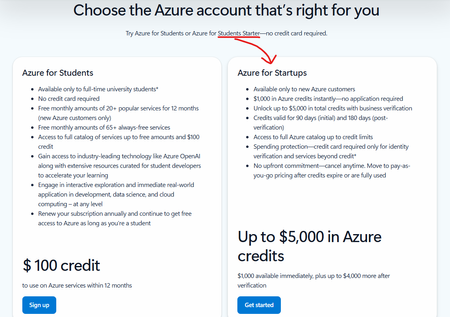
Hi, I noticed this on the Azure for Students sign-up page a couple of months ago: "Azure for Students Starter" is still mentioned as an option, but the card on the page is for "Azure for Startups". This seems like a mistake. I was wondering where the correct place to report this is? Or, is Azure for Students Starter no longer available?93Views0likes1CommentOutlook has been locked out for days
I am the sole Global Administrator of my Microsoft 365 tenant My main account has been locked out for days due to a broken Microsoft Authenticator registration (Error 500121). I have tried: Adding GitHub and personal email as alternate methods Signing out of all devices Clearing cache and cookies multiple times Reinstalling Microsoft Authenticator multiple times Removing 2-step verification where possible I was able to sign into Microsoft 365 (admin center / web apps) with alternative email using “Sign in another way” options, but I am still unable to access Outlook (desktop and mobile) — which is the main goal. In Microsoft additional security options - changed some settings. I removed two-step verification because Outlook keeps prompting for approval through the Microsoft Authenticator app. Authenticator app does not let me add my work account it is showing an error. Thus unable to approve the code in the authenticator app, stuck in the loop. When I removed two-step verification in Microsoft additional security options, signed out of all the devices, cleared cache and cookies, attempted to sign in again, being prompted to enter backup email for the verification code, which is not being sent after numerous attempts while I received notifications to that email that two-step verification was removed. Stuck. Any tips would be great. Thank you!62Views0likes1Comment
Institution verification form will not allow me to add Address
I work for an academy trust and have tried using my Trust address and one of the schools I'm based at address. Trying to get this set up so I can show my team these courses and allow them to access the learning as well, but I don't want it to be this difficult. I contacted support and they directed me here after no progress. Literally no matter what I try the form does not work.Solved120Views0likes3CommentsUpcoming Updates to the MSLE Program Structure
The Microsoft Learn for Educators (MSLE) program goals include helping educators integrate in-demand technical skills into their teaching and better prepare students for today’s workforce. Through the program, educators gain access to ready-to-teach Microsoft Official Curriculum, including courseware, assessments, and teaching resources aligned to industry-recognized Microsoft Certifications. MSLE also provides professional development opportunities, certification pathways, and a global community of educators, enabling faculty to stay current, collaborate with peers, and deliver engaging, real-world learning experiences. As we look ahead to the upcoming fiscal year, we’re making an important update to how the MSLE program is structured. What’s changing Currently, educators can participate in MSLE either as an individual educator or as part of an educational institution, with institutions receiving a distinct set of expanded benefits. Moving forward, we will no longer differentiate between these two participation models. All participants in the MSLE program will be classified as individual educators, creating a more unified and streamlined experience for our global educator community. What this means for you As part of this change: The majority of MSLE benefits will remain the same, including access to Microsoft Official Curriculum, teaching resources, and the global educator community Lab access will continue to be available, however labs will no longer be offered at no cost as a standard program benefit We understand how valuable hands-on lab experiences are for teaching and learning, and we are working to ensure continued access through updated models. Looking ahead We will be sharing more details in the coming weeks to support your planning as you prepare for the upcoming school year, including: Updated guidance on lab access and options Changes within the MSLE portal and program experience Resources to help you adapt your course planning If you have questions or would like to connect with other educators, we encourage you to stay connected via the MSLE Tech Community for support, discussion, and updates. Thank you for your continued partnership and for the important work you do to equip students with in-demand technical skills. Warm regards, The Microsoft Learn for Educators Team132Views1like1CommentSKU, quota and policy restrictions on Azure for Students and Free Subscriptions
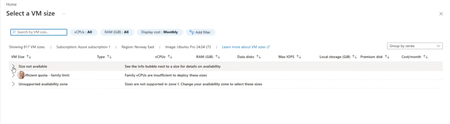
Subject: Azure for Students VM Availability Appears Inconsistent Across Students Hello everyone! We're seeing an issue across multiple cohorts using Azure for Students subscriptions, and I'm hoping someone can clarify whether there are additional restrictions being applied behind the scenes. We understand and accept the recent changes regarding: Allowed deployment regions for Azure for Students subscriptions The 4 vCPU quota limitations Regional capacity constraints We've updated our teaching materials accordingly and have troubleshooting guidance for students. However, we're observing behaviour that appears inconsistent between students with what seem to be identical subscription types. Examples: Student A can deploy several B-series VM sizes in an approved region. Student B can deploy only one VM size in the same approved region. Student C sees "Size not available" for every VM size in multiple approved regions. Student D eventually succeeds only after trying several approved regions, despite having available credit and no existing VMs. In one recent case, a student had: A Free subscription $200 credit available No deployed VMs No Allowed Regions policy visible (which made troubleshooting particularly confusing) Most regions the student tested showed one or more of the following: No available VM sizes Family quota limit messages Unsupported availability zone messages Eventually, Denmark East allowed deployment of a Standard_B2als_v2 VM, while several other regions did not. I have collected examples from multiple students and am seeing several different failure modes: Total Regional Core quota exceeded (expected and understandable) Allowed Locations policy restrictions VM size unavailable in approved regions Policy assignments showing "Not Registered" because Microsoft.PolicyInsights is not registered The challenge is that students with apparently identical Azure for Students subscriptions are not encountering the same restrictions. Has Microsoft introduced additional backend controls, SKU filtering, capacity restrictions, or subscription-specific policies that are not surfaced clearly through the Azure portal? From an educational perspective, the lack of consistency is making it difficult to provide reliable lab instructions because one student's successful deployment path may not work for another student with the same subscription type. My questions are: Are there additional backend restrictions beyond the visible Allowed Locations policy and published vCPU quotas? Is VM size availability being dynamically restricted per student subscription? Are regional capacity controls being applied differently across Azure for Students subscriptions? Is there a recommended method for identifying which regions and VM families are actually deployable for a specific student before beginning a lab exercise? Any clarification would be greatly appreciated, as we're trying to reduce classroom troubleshooting time and provide students with more reliable deployment guidance. Thank you.Solved326Views1like4Comments- 50Views0likes0Comments
Unable to tag distribution lists (DLs) in Viva engage posts
Dear All, It would be helpful to have a feature in Viva Engage posts that allows us to tag DLs when needed. While planning a post, I noticed that cross functional teams are not part of the community for specific reasons, which I understand. Instead of reposting in their community, it would be useful if we could tag DLs so the original message reaches everyone intended.36Views0likes0CommentsMicrosoft survey branching
Branching issues here, I have 6 questions, i branched Q4 to a sub question Q4a, the issue is that 5 and 6 is hidden and only shows when 4a is open, i want 5 and 6 to be showing regardless of the branching in 4. I have already tried the expected fix with the "Go To" as below Q4 Option A → Q4a → Q5 Option B/C → Q5 Q5 → Q6 (normal flow) But still not working, the form just stops at Q4 and only opens with options are selected showing Q4a , 5 and 6 How do i fix this?82Views0likes2Comments📣 Last Call: Help Shape the Future of AI Skills Navigator for Higher Ed
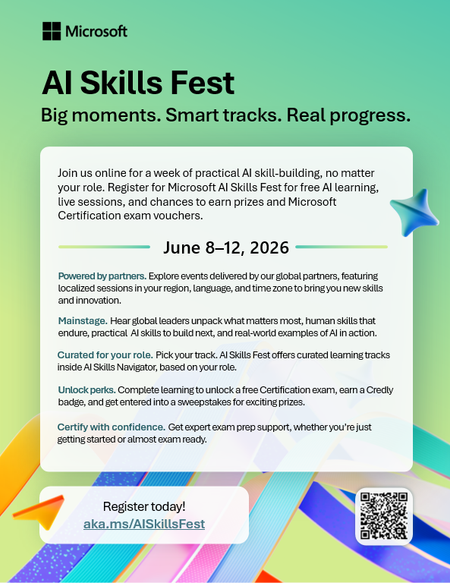
We’re finalizing upcoming AI Skills Navigator Customer Feedback Sessions and are looking for a few MSLE educators to join a live focus group with our product team. This is a unique opportunity to: ✅ Preview AI Skills Navigator before broader rollout ✅ Share real-world classroom and curriculum use cases ✅ Influence how AI skilling experiences are designed for higher education ✅ Provide direct input that helps shape upcoming product capabilities If you're interested in how AI can better support your students — this is your chance to help guide what comes next. 🕒 What to Expect Live demo of AI Skills Navigator Facilitated discussion with the product team Open forum to share feedback from an educator’s perspective Time commitment: 1 hour Participation logistics will be shared with selected volunteers. 👉 Interested in joining? Please complete the Learning Product Customer Connections Participant Opt-in Form Selected participants will be contacted by Ifrah, Customer Experience Program Manager, with next steps this week. Spots are limited — we hope to hear from you! — The AI Skills Navigator Product Team65Views0likes0Comments

Events
Olá, 👋 Espero que estejam bem!
✨Participe da sessão de introdução ao programa MSLE para Educadores!
Nesta sessão: ✅ Vamos explorar os benefícios e o alcance do programa ✅ Conhecer em deta...
Tuesday, Sep 01, 2026, 08:00 AM PDTOnline
0likes
0Attendees
0Comments

Olá, 👋 Espero que estejam bem! Tem dúvidas sobre o Programa MSLE? Nós temos as respostas! Participe das nossas Office Hours do MSLE: um espaço para conectar, aprender e receber apoio personal...
Tuesday, Sep 08, 2026, 12:30 PM PDTOnline
0likes
0Attendees
0Comments
Recent Blogs
- 3 MIN READApr 03, 2026198Views2likes0Comments
- 2 MIN READWe’re excited to announce the launch of new AI-900 lab simulations, designed to help educators deliver more interactive, scalable, and learner-friendly AI experiences. Moving forward, all AI‑900 lab ...Mar 13, 2026471Views1like0Comments