Recent Discussions

Azure for students - issues after University name change
Hello, I work as a lecturer at a university that recently changed its name. Since the change, our students have been unable to enroll in Azure for Students - they keep receiving the message “we’re unable to verify your student status.” Could you advise who can help resolve this issue? Our university helpdesk hasn’t been able to assist, and I’d like to support my students myself. P.S. I will provide the changed university name in a private message. 🙂
Azure for Students Starter missing?
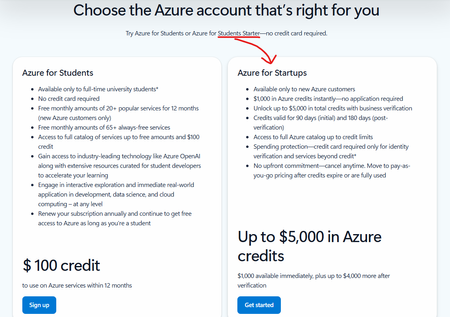
Hi, I noticed this on the Azure for Students sign-up page a couple of months ago: "Azure for Students Starter" is still mentioned as an option, but the card on the page is for "Azure for Startups". This seems like a mistake. I was wondering where the correct place to report this is? Or, is Azure for Students Starter no longer available?38Views0likes1Comment
Outlook has been locked out for days
I am the sole Global Administrator of my Microsoft 365 tenant My main account has been locked out for days due to a broken Microsoft Authenticator registration (Error 500121). I have tried: Adding GitHub and personal email as alternate methods Signing out of all devices Clearing cache and cookies multiple times Reinstalling Microsoft Authenticator multiple times Removing 2-step verification where possible I was able to sign into Microsoft 365 (admin center / web apps) with alternative email using “Sign in another way” options, but I am still unable to access Outlook (desktop and mobile) — which is the main goal. In Microsoft additional security options - changed some settings. I removed two-step verification because Outlook keeps prompting for approval through the Microsoft Authenticator app. Authenticator app does not let me add my work account it is showing an error. Thus unable to approve the code in the authenticator app, stuck in the loop. When I removed two-step verification in Microsoft additional security options, signed out of all the devices, cleared cache and cookies, attempted to sign in again, being prompted to enter backup email for the verification code, which is not being sent after numerous attempts while I received notifications to that email that two-step verification was removed. Stuck. Any tips would be great. Thank you!28Views0likes1Comment
Upcoming Updates to the MSLE Program Structure
The Microsoft Learn for Educators (MSLE) program goals include helping educators integrate in-demand technical skills into their teaching and better prepare students for today’s workforce. Through the program, educators gain access to ready-to-teach Microsoft Official Curriculum, including courseware, assessments, and teaching resources aligned to industry-recognized Microsoft Certifications. MSLE also provides professional development opportunities, certification pathways, and a global community of educators, enabling faculty to stay current, collaborate with peers, and deliver engaging, real-world learning experiences. As we look ahead to the upcoming fiscal year, we’re making an important update to how the MSLE program is structured. What’s changing Currently, educators can participate in MSLE either as an individual educator or as part of an educational institution, with institutions receiving a distinct set of expanded benefits. Moving forward, we will no longer differentiate between these two participation models. All participants in the MSLE program will be classified as individual educators, creating a more unified and streamlined experience for our global educator community. What this means for you As part of this change: The majority of MSLE benefits will remain the same, including access to Microsoft Official Curriculum, teaching resources, and the global educator community Lab access will continue to be available, however labs will no longer be offered at no cost as a standard program benefit We understand how valuable hands-on lab experiences are for teaching and learning, and we are working to ensure continued access through updated models. Looking ahead We will be sharing more details in the coming weeks to support your planning as you prepare for the upcoming school year, including: Updated guidance on lab access and options Changes within the MSLE portal and program experience Resources to help you adapt your course planning If you have questions or would like to connect with other educators, we encourage you to stay connected via the MSLE Tech Community for support, discussion, and updates. Thank you for your continued partnership and for the important work you do to equip students with in-demand technical skills. Warm regards, The Microsoft Learn for Educators Team59Views0likes0Comments 27Views0likes0Comments
Unable to tag distribution lists (DLs) in Viva engage posts
Dear All, It would be helpful to have a feature in Viva Engage posts that allows us to tag DLs when needed. While planning a post, I noticed that cross functional teams are not part of the community for specific reasons, which I understand. Instead of reposting in their community, it would be useful if we could tag DLs so the original message reaches everyone intended.19Views0likes0Comments
Microsoft survey branching
Branching issues here, I have 6 questions, i branched Q4 to a sub question Q4a, the issue is that 5 and 6 is hidden and only shows when 4a is open, i want 5 and 6 to be showing regardless of the branching in 4. I have already tried the expected fix with the "Go To" as below Q4 Option A → Q4a → Q5 Option B/C → Q5 Q5 → Q6 (normal flow) But still not working, the form just stops at Q4 and only opens with options are selected showing Q4a , 5 and 6 How do i fix this?27Views0likes2Comments📣 Last Call: Help Shape the Future of AI Skills Navigator for Higher Ed
We’re finalizing upcoming AI Skills Navigator Customer Feedback Sessions and are looking for a few MSLE educators to join a live focus group with our product team. This is a unique opportunity to: ✅ Preview AI Skills Navigator before broader rollout ✅ Share real-world classroom and curriculum use cases ✅ Influence how AI skilling experiences are designed for higher education ✅ Provide direct input that helps shape upcoming product capabilities If you're interested in how AI can better support your students — this is your chance to help guide what comes next. 🕒 What to Expect Live demo of AI Skills Navigator Facilitated discussion with the product team Open forum to share feedback from an educator’s perspective Time commitment: 1 hour Participation logistics will be shared with selected volunteers. 👉 Interested in joining? Please complete the Learning Product Customer Connections Participant Opt-in Form Selected participants will be contacted by Ifrah, Customer Experience Program Manager, with next steps this week. Spots are limited — we hope to hear from you! — The AI Skills Navigator Product Team49Views0likes0Comments📣 Call for Volunteers to participate in a focus group on AI Skills Navigator
We’re looking for volunteers to join an upcoming AI Skills Navigator Customer Feedback sessions! Share feedback, influence product direction, and help shape how AI Skills Navigator supports educators and students. What to expect Demo of AI Skills Navigator A facilitated discussion with the AI Skills Navigator product team Opportunities to share feedback on educator use cases Early insight into where AI Skills Navigator is headed for higher education 📅 Session details: Participation logistics will be shared with selected volunteers. Time commitment: 1-hour 👉 Interested? Please fill out Learning Product Customer Connections Participant Opt-in Form. Ifrah, the Customer Experience Program Manager, reach out to you with the next steps during the week of April 20th. Thank you for helping us build better skilling experiences for educators and learners! — The AI Skills Navigator Product Team99Views0likes1Comment
New resource for MSLE educators: A research informed guide to generative AI
Announcing a new resource for MSLE educators (and anyone supporting research): The Academic Researcher’s Guide to Generative AI: Methods and Prompting with Microsoft 365 Copilot Chat. This is a practical, research-informed guide for faculty, graduate students, and research staff who want to use generative AI as an assistant and tool for thinking—without compromising scholarly integrity. Guide sections include - Foundations + limitations: how generative AI works and why critical engagement matters Robust prompting as a research skill (clarity, structure, and documentation) Workflow-ready use cases you can run in Microsoft 365 Copilot Chat (any license level), with an emphasis on transparency and disclosure For departments or research groups seeking a common reference for responsible AI‑assisted research practices, this resource provides a useful starting point and can be accessed through the link provided.123Views0likes0CommentsApril 2026 MSLE Newsletter available now!
Head over to the blog section and read the newest edition of the MSLE Newsletter, also available in Arabic, Chinese (Traditional), French, Portuguese, and Spanish From the Microsoft Learn for Educators community page, select Blogs from the top navigation menu. There, you’ll find the Microsoft Learn for Educators News blog where you can find the newsletter. Additional language versions can be found as attachments to the blog.114Views0likes0CommentsMicrosoft Showcase School and MCE Vouchers...
Hello Microsoft Tech Community, My name is Diogo Azeredo, and I am the STEAM Coordinator at escolaglobal, a Microsoft Showcase School based in Portugal for over ten years. We recently became aware that Microsoft had sent an email informing us about the possibility of requesting new vouchers for MCE (Microsoft Certified Educator) exams — up to two per educator — free of charge, until March 15th, by completing a form. Unfortunately, due to a network intervention at our school that affected our email services, we did not receive this notification in time. By the time we were informed, the deadline had already passed. Given these circumstances, I would like to kindly ask if there is any possibility to still request these vouchers, or if there is an alternative way to access this opportunity. We would greatly appreciate any guidance or support you can provide on this matter. Thank you very much in advance.146Views0likes1Comment
GMSA Password length
Hi All, Hope you are doing well! Do we have any official document from Microsoft that tells how many characters would be used for a GMSA account password? I understand that 240-byte, randomly generated passwords will be used; however, I would like to understand how many characters would be used in 240 bytes. Thank you in advance! Regards, Sajin P S61Views0likes0CommentsExcel vba
I am trying to move rows containing "Click to chat" from an Excel sheet to a new sheet and delete the blank rows. The code below is giving me an error to debug, and the line below in bold is highlighted. I don't know what to do. Can you assist? Sub MoveClickToChatRows() Dim wsSource As Worksheet Dim wsTarget As Worksheet Dim lastRow As Long Dim i As Long Dim targetRow As Long Set wsSource = ActiveSheet Set wsTarget = Sheets.Add wsTarget.Name = "Click_to_Chat" lastRow = wsSource.Cells(wsSource.Rows.Count, "A").End(xlUp).Row targetRow = 1 ' Copy header wsSource.Rows(1).Copy wsTarget.Rows(1) targetRow = 2 For i = lastRow To 2 Step -1 If InStr(1, wsSource.Rows(i).Text, "Click to chat", vbTextCompare) > 0 Then wsSource.Rows(i).Copy wsTarget.Rows(targetRow) wsSource.Rows(i).Delete targetRow = targetRow + 1 End If Next i End Sub42Views0likes0CommentsMSLE AI Bootcamps
Greetings, I am wondering if anyone here has delivered training geared or related to MSLE AI Bootcamps specifically the Copilot Prompt-a-thon and Generative AI for Teaching. I'd like to know the experience to expect from such a delivery and an estimated preparation time, labs, etc. For reference, let's say you have to deliver Microsoft Copilot Prompt-a-thon Workshop for Higher Education Leaders for a client in person. Thank you for your inputs !91Views0likes0CommentsCall for Volunteers – Focus Group for New AI-900 Simulation
We’re excited to invite you to help shape the future of the AI-900: Microsoft Azure AI Fundamentals course. We’re seeking volunteers to test the new AI-900 simulation lab environment and share feedback on content alignment, student readiness, usability, and how simulated labs compare to traditional live, hands-on labs. If you’re interested in participating in a live virtual focus group, please complete this Microsoft Form. We’ll collect your name, institution, and institution email so we can follow up. A member of our team will reach out soon with next steps. Thank you for your continued support of the Microsoft Learn for Educators community. Your feedback plays a critical role in improving learning experiences for educators and students alike.133Views2likes1Comment
findMeeting REST API does not support shared mailbox?
I'm building a bot using the MS Outlook Calendar REST APIs. I have a case where my user who is an executive assistant wants to create a meeting in the delegate mailbox she/he have access to. We are currently using findMeeting API to fetch the available for a set of users and this works perfectly for the logged in user. But, when we try to access the shared mailbox calendar using this API, it shows unsupported scenario. We do have Calendars.Shared .Read permissions. /me/findMeeting - works /user/{sharedmailboxEmailId}/findMeeting - gives Unsupported Scenario error. Is this functionality not working? Couldn't find any document mentioning this. Alternative API getSchedule doesn't work in our case. Thanks in Advance!203Views0likes5CommentsAzure For Students Subscriptions - "Your email domain is not currently registered with us"
Hello, I am a teacher at a vocational school and we are experiencing a recurring issue with Azure for Students academic verification, affecting multiple students at the same time. Our school setup (for context) Our institution is structured as follows: We have a student domain that is registered and whitelisted with Microsoft as an academic domain, for example: email address removed for privacy reasons We also have a separate organisational domain used for staff and business operations, for example: email address removed for privacy reasons Students are instructed to: Sign in to Azure using their personal Microsoft account (typically Outlook/Hotmail) Use their school email address only for academic verification during the Azure for Students sign-up flow This setup has worked historically, but we are now seeing repeated failures. The issue we are seeing Students complete CAPTCHA and email verification successfully. The process then fails with: “Sorry, your academic status could not be verified.” or similar This happens even when: Students use a private/incognito browser session VPNs and ad blockers are disabled Only one Microsoft account is signed in No account switching occurs during the flow The issue affects multiple students from the same institution, often within the same timeframe. Because Azure for Students verification appears to allow only one attempt, students who fail once are effectively blocked and end up in a support loop. Observations Based on volume and timing, this does not appear to be individual user error. We suspect one or more of the following: A backend verification or account-linking issue An institutional configuration mismatch that is not clearly surfaced A generic or outdated error message that does not accurately reflect the real cause of failure At this point, I am not fully convinced that the error message always represents a true eligibility problem. What we are hoping to learn Are other schools using a similar setup (personal Microsoft account + separate student email domain for verification)? Are there known best practices or preferred configurations for institutions with multiple domains? Is there guidance we can pass on to our IT team to improve compatibility with Azure for Students verification? Is there a way for failed verifications to be reviewed or reset when the institution and domain are valid? Our goal is not just to fix individual cases, but to understand whether our institutional setup could be improved to prevent this issue going forward. Any insight from Microsoft staff or other educators would be greatly appreciated. RobinLBaldwin Mahlah_Murray607Views0likes1CommentMissed today's community call? Access the recording here!
If you were not able to attend today's MSLE Community Call, you can access the recording here: https://techcommunity.microsoft.com/t5/s/gxcuf89792/attachments/gxcuf89792/microsoft-learn-for-educators-events/217/1/Microsoft%20Learn%20for%20Educators%20January%20Community%20Call-20260129_100145-Meeting%20Recording.mp4 Keep an eye on our events page for the date of our next call. We hope to see you there!74Views1like0Comments

Events
Olá, 👋 Espero que estejam bem! Tem dúvidas sobre o Programa MSLE? Nós temos as respostas! Participe das nossas Office Hours do MSLE: um espaço para conectar, aprender e receber apoio personal...
Monday, Jul 20, 2026, 06:00 PM PDTOnline
0likes
1Attendee
0Comments
¿Tienes preguntas sobre el Programa MSLE? ¡Tenemos las respuestas!
Únete a nuestras Horas de Consulta del MSLE: tu espacio para conectar, aprender y recibir apoyo personalizado.
✅ Aclara tus ...
Tuesday, Jul 21, 2026, 07:00 AM PDTOnline
0likes
0Attendees
0Comments
Recent Blogs
- 3 MIN READApr 03, 2026168Views2likes0Comments
- 2 MIN READWe’re excited to announce the launch of new AI-900 lab simulations, designed to help educators deliver more interactive, scalable, and learner-friendly AI experiences. Moving forward, all AI‑900 lab ...Mar 13, 2026439Views1like0Comments