
Forum Widgets
Latest Discussions

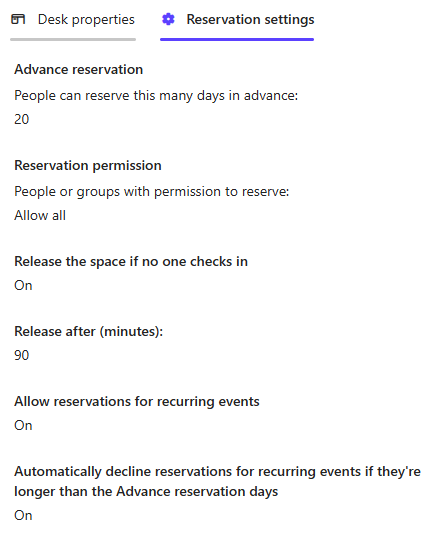
Microsoft Places desk declined despite check-in
Each We've just started using Places in our office and a few users have reported recieving a desk decline email due to no check-in on the desk, despite them using the check-in button on the Places app to check-in on arrival to the office. Has anyone seen this previously? Each desk has two monitors, which I have associated with the desks in the Teams Pro Management portal to enable detection and check-in. Reservation settings for all desks are as below.ChrisF875Feb 26, 2026Copper Contributor80Views0likes1Comment
Publish an Excel Add-in by just submitting the add-in manifest to Microsoft Marketplace
I am working on Excel Add-in built using the react template. We are planning to host the add-in code on our domain and update the manifest to point to the URL for our domain. Can I just submit the add-in manifest to Microsoft to publish it in Microsoft Marketplace?26Views0likes1CommentExtending Protection for Confidential SharePoint Online Files
Sensitivity labels offer great protection against unauthorized access, but sometimes files that aren’t encrypted escape from a document library. SharePoint Online can now use sensitivity labels configured with user-defined permissions (UDP) to extend protection to downloaded files. The magic works by configuring permissions on download based on the membership of the user who downloads a file. https://office365itpros.com/2026/02/26/sensitivity-label-extend-protection/15Views0likes0CommentsHow to Integrate Tasks from Teams Copilot to To-Do List
Microsoft Teams Copilot makes it easy to track action items from meetings and discussions. By integrating these tasks with Microsoft To Do, you can streamline your workflow and stay on top of your responsibilities. This blog will guide you through the process of syncing Copilot tasks with your To Do list. https://dellenny.com/how-to-integrate-tasks-from-teams-copilot-to-to-do-list/588Views0likes4Comments
Outlook web UTF-8 charset
Outlook Web sends emails in my organization using the ISO-8859-1 character set. However, Copilot claims: "Outlook Web (Outlook on the Web, OWA) does not generate your messages in ISO-8859-1. It always uses UTF-8." My Outlook Web only switches to the UTF-8 character set if the email contains Unicode characters that cannot be displayed in ISO-8859-1. How can I enforce UTF-8 globally for my organization?bjoernvFeb 25, 2026Copper Contributor32Views0likes1Comment
How to public mobile layout to web
Hi, I have prepared a Power BI dashboard using the mobile layout, and we would like to make this mobile view available on the web. However, I can only see it working in the Power BI mobile app, and I am experiencing difficulties when trying to implement it on a web page. Is there any way to publish the mobile layout on the web? If so, how? Thanks.justevysFeb 25, 2026Occasional Reader1View0likes0CommentsHow to Use Scoped Graph Permissions with SharePoint Lists
This article explains how to use scoped Graph permissions to restrict app access to lists and list items in SharePoint Online and OneDrive for Business sites. It's a follow-up to other articles covering how to restrict app access to SharePoint Online sites and files. Scoping app access to specific objects is important because otherwise apps can access everything in SharePoint Online, and that isn't good. https://office365itpros.com/2026/02/25/scoped-graph-permission-lists/13Views0likes0Comments
I can't add an O365 email to Outlook desktop client but I can access it from the web
I can't add a O365 to Outlook desktop client but I can access from the web This a weird thing, whenever I try to add in Outlook from File > Add Account I get the message "Something went wrong and Outlook couldn't set up your account". From Control Panel > Mail > Email accounts > New > Manual Setup > here I put the email and gets stuck at "Searching for... Settings" and then " An encrypted connection to your email is not available, click Next to attempt using an unencrypted connection", so I do that and get the error "We're sorry we couldn't set up your account automatically. To try setting up the account yourself click Next" which is basically the same. Everything works fine in the browser, any ideas on this?jorgecgFeb 24, 2026Copper Contributor19KViews1like11CommentsMicrosoft Extends DLP Policy for Copilot Protection to All Storage Locations
Microsoft has enhanced the DLP policy for Copilot to cover Office files held in any storage location instead of only Microsoft 365 locations like SharePoint Online and OneDrive for Business. The change is made in the Office augmentation loop, a little-known internal component that coordinates use of connected experiences by apps. Extending the DLP policy to cover all locations makes perfect sense. https://office365itpros.com/2026/02/24/dlp-policy-for-copilot-storage/96Views0likes0Comments
Assist me with Shared Mailbox Alias Configuration in Outlook 365
We have a shared mailbox with different email alias configurations for various applications. Each application needs to send emails using its respective alias. Shared Mailbox Name: email address removed for privacy reasons Application 1: From email ID – email address removed for privacy reasons Application 2: From email ID – email address removed for privacy reasons Similarly, I need to define aliases for each application. Could you please assist me with setting this up in Outlook 365? Additionally, could you explain if there are any limitations related to using aliases?MichealmaryFeb 23, 2026Copper Contributor253Views0likes4Comments


Tags
- office 3658,130 Topics
- exchange2,061 Topics
- microsoft 3652,009 Topics
- admin1,437 Topics
- sharepoint1,291 Topics
- microsoft 365 apps1,215 Topics
- microsoft 365 groups791 Topics
- outlook746 Topics
- microsoft teams662 Topics
- security642 Topics