Recent Discussions

The prompt "Important security and quality fixes are missing from my device"
my system is not installing the necessary updates automatically. This issue concerns me because it may leave my device vulnerable to security risks and prevent it from functioning properly with the latest features and improvements.7Views0likes0Comments
A large number of animations and special effects consumed the CPU and memory.
I have noticed that a large number of animations and special effects in Windows 10 are heavily consuming my CPU and memory resources, which seems to be a major factor behind my system's lag. Even with only a few applications open, these visual effects consistently push my processor and RAM usage to high levels, making the overall experience feel sluggish and unresponsive during normal use.4Views0likes0CommentsThe Windows 10 system UI will experience severe lag.
My Windows 10 system UI has been experiencing severe lag lately. Simple actions like clicking the Start menu, opening the notification center, or even switching between application windows often result in the entire interface freezing for up to 30 seconds at a time, during which only my mouse cursor remains responsive, and this happens consistently throughout my daily workflow regardless of the applications I have running.5Views0likes0Comments
When switching projection modes, all options in the pop-up sidebar are grayed out.
When I press the Win + P shortcut to open the Projection Mode sidebar, the four options—Computer Screen Only, Duplicate, Extend, and Second Screen Only—are all grayed out and unavailable, making it impossible to switch display modes. After trying to reconnect the external monitor and restarting the computer, some options became available again, but the issue reoccurs intermittently, especially when connecting the monitor via a docking station.7Views0likes0CommentsThe battery icon shows that the battery is fully charged, but the actual charge level is not
When the laptop is plugged in and charging, the battery icon in the lower-right corner of the taskbar shows that the battery is fully charged, but the actual battery charge level is only about 90%. After checking the power settings, I found that the charging threshold is set correctly.4Views0likes0Comments
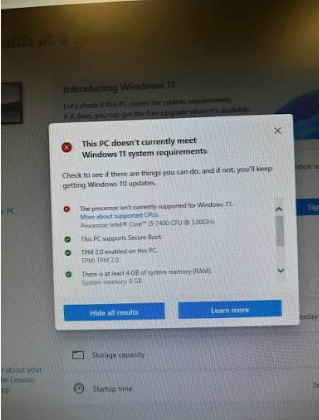
Older PCs may not support newer Windows versions
My hardware may not support the newer system requirements, leading to compatibility problems, slow performance, or failure to update properly. I want to understand how to identify if my hardware is incompatible and what options I have to optimize or upgrade my older PC to run newer Windows versions smoothly.9Views0likes0CommentsHow do i check if a trojan/wacatac is running in the background
I need to determine if the trojan or Wacatac malware is actively running in the background on my Windows system, but I'm not sure how to properly check for hidden processes that might be disguised as legitimate system tasks. Could someone guide me on the best way to verify if this specific threat is currently executing, whether through Task Manager inspection, using built-in Windows security tools, or examining startup entries and suspicious network connections, so I can confirm if my system is compromised or if the detection was a false positive?3Views0likes0CommentsAfter clicking Safely Remove Hardware, the name of the external device appears as garbled characters
After connecting multiple external devices, when you click the “Safely Remove Hardware” icon in the lower-right corner of the taskbar, some device names in the pop-up list appear as garbled characters, making it impossible to identify which specific device is being referred to and increasing the risk of accidentally disconnecting the wrong device.2Views0likes0Comments
I can't open it from the right-click menu anymore.
When you right-click a file in File Explorer, select Open with, and choose an app, a system pop-up appears stating that the app cannot run on this device, even though the same app was previously able to open this type of file without any issues.5Views0likes0CommentsTeams is running in the background, and keyboard shortcuts won't open the Teams chat window
When I press the Win + C shortcut, nothing happens, and the Teams chat panel does not pop up. The Teams app is running in the background, and the Teams icon is visible in the taskbar. After trying to restart Teams and restart the computer, the shortcut still does not work properly.4Views0likes0Comments
Windows 11: Background recording features consume resources
On Windows 11, I'm noticing that the background recording features, like the Xbox Game Bar or the new Studio Effects, are consuming an excessive amount of system resources even when I'm not actively using them. This is causing a noticeable performance hit on my PC, and I'm looking for a way to completely disable or limit these background recording processes to free up CPU and memory.6Views0likes0Comments
Uninstallers may leave leftover files on Windows 11
When uninstallers remove a program on Windows 11, they often skip shared libraries, user settings, and cached update files, leaving behind hundreds of megabytes of clutter across your system drive and registry. These orphaned items can accumulate over time, slowing down search indexing, causing startup delays, and even triggering error messages when you try to reinstall the same software later.3Views0likes0Comments- 7Views0likes0Comments

Why is the computer stuck in the login loop?
My Windows PC keeps getting stuck in a login loop where I enter my password, the screen goes black for a moment, and then it returns to the login screen without ever loading the desktop. I have already tried restarting multiple times and running startup repair, but nothing fixes this endless cycle, and I urgently need help to get back into my system.7Views0likes0Comments
Unable to update Windows, and I am unable to unroll the system too
I am unable to update Windows; it's not downloading beyond 99% in the update window. Brattary drining is high, so I want to unenroll the current device from the Windows Insider program for now, which I am unable to do. When I unroll it, it's showing unrolling is queued but not unrolling. Help me to unroll this device and get me to a stable update by Windows so I can work smoothly.10Views0likes0Comments






Events
Have a question about Windows 11, device management, security, updates, or modern endpoint operations? This hour is dedicated entirely to your questions. Bring what's top of mind—from Windows 11 adop...
Thursday, Aug 20, 2026, 08:00 AM PDTOnline
0likes
8Attendees
2Comments
Have a question about Windows 11, device management, security, updates, or modern endpoint operations? This hour is dedicated entirely to your questions. Bring what's top of mind—from Windows 11 adop...
Thursday, Sep 17, 2026, 08:00 AM PDTOnline
0likes
4Attendees
0Comments
Recent Blogs
- 6 MIN READExplore the latest Windows, Windows Server, device management, and security updates from July 2026.Aug 03, 2026460Views0likes0Comments
- Learn how KMS with TPM attestation strengthens activation security and prepares enterprises for future compliance.Jul 22, 20265KViews0likes1Comment