configuration
2207 TopicsWindows 11 won't let me delete a folder even though I'm the admin
I've got a folder on my Windows 11 PC that refuses to delete. Every time I try, it says I need permission from myself—which makes no sense since I'm the only account on this machine and it's an admin account. I've already tried taking ownership, running as administrator, restarting Explorer, and booting into Safe Mode. Still blocked. It's not a system folder either, just a regular one I created a while back and no longer need. Anyone know what's going on or how to get rid of it?10Views0likes1CommentWindows 11 keeps resetting my audio output device back to default
Every time I restart my PC, Windows 11 resets my audio output back to the default speakers instead of my USB headset. I've set it manually in Settings and in the Sound Control Panel, but after a reboot it's back to the wrong device. I've already disabled audio enhancements, updated my audio drivers, and turned off "Allow applications to take exclusive control." Still happens. Anyone else dealing with this or know how to make it stick?90Views0likes2Comments
File History has stopped functioning
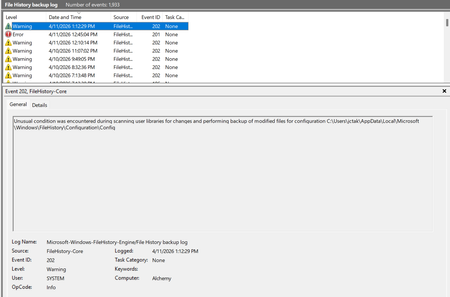
My file history program has stopped functioning. I tried searching the internet for some of these error messages and I have not found anything that has a solution that works. I tried deleting the backup on my backup drive, and also deleting the file history data/configuration folders so it would "start fresh" and I still keep getting errors. Here are some of the errors: Also have gotten a bunch of different errors for "reparse points". This is one example. I tried to exclude some of these folders from the backup but it didn't seem to help. But how do I find and eliminate a "reparse point" so it doesn't cause the file history to fail? And why doesn't file history just ignore those folders and go on and back up everything else?3.9KViews6likes38Comments
There is a problem with File History; a protest is lodged.
Your Microsoft technical team has repeatedly corrupted file history. Since the July 28th/August 13th updates KB5101684/KB5120249, my file history has reappeared. Backups to the D drive are successful, but the backup times cannot be synchronized. Newly created or saved Word documents, images, videos, etc., still show "No previous version available" in "Properties → Previous Versions". The folder is not being corrected; its date is automatically changed. Until Wednesday's updates KB5124008, KB5126052, KB5126146, KB5122878, and KB890830, the file history was corrupted and disabled, resulting in an "InconsistentState" entry in C:\Users\User\AppData\Local\Microsoft\Windows\FileHistory\Configuration. Why did Microsoft disable it? Everyone is using it, and I'm extremely angry. Many users have reported encountering this issue on various forums. Microsoft, stop deceiving us! I demand that Microsoft review this matter immediately and release an emergency update as soon as possible to restore the file history to its original state. The five updates installed are:KB5122878,KB5126146,KB5124008,KB5126052,KB890830 Anyone else experiencing the same issue as me can report it to the media and have Microsoft confirm the error. Furthermore, "File History" itself is not listed in Microsoft's "Deprecated Features List." While other backup features suggest that Microsoft has no plans to discontinue it. Microsoft is going to pretend it doesn't exist.147Views2likes5Comments
Widgets panel takes forever to load and sometimes won't open at all
The Widgets panel has been super slow lately. It sometimes takes 20–30 seconds to load, and occasionally it just won't open no matter how many times I click the icon. I've already restarted the Widgets process, cleared its cache, and checked for updates. Nothing helped. It's a clean install with no third-party tweaks. Anyone run into this or know what's causing it?99Views0likes4Comments
Did Windows finally add "Update and shut down" to the power menu?
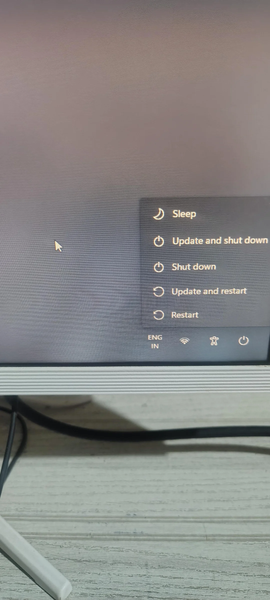
I just noticed this on my lock screen—Windows now shows "Update and shut down" and "Update and restart" directly in the power menu. No more digging through Settings or waiting for the update to finish before I can shut down. Is this something that just rolled out recently? I've been wanting this for years. Has anyone else seen it show up on their machine?27Views0likes0CommentsStuck in BIOS on my Windows 11 portable console – touchscreen only
So I was messing around with my Windows 11 handheld console and somehow ended up in the BIOS. Now I can't get out. The only input that works is the touchscreen, and none of the usual exit options seem to do anything. I've tried tapping around, looking for a save and exit or discard changes option, but it's not responding the way I'd expect. Not sure if I accidentally changed something or if it's just being stubborn. Anyone know how to exit BIOS when you're stuck with only touchscreen controls? Really don't want to force shutdown if I don't have to.81Views0likes3Comments
Issues with Windows Security Defender Antivirus
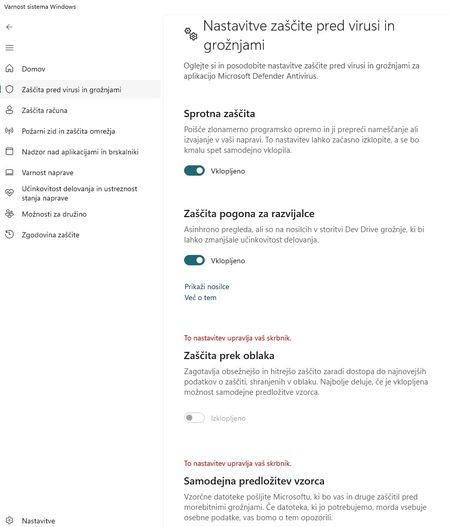
Hello, A few days ago, I noticed that the "Cloud-delivered protection" and "Automatic sample submission" options in Defender are greyed out, with the message "This setting is managed by your administrator" displayed in red above them. Incidentally, I *am* the administrator—please see the attached image. I have two operating systems running Windows 11; the settings are fine on the second one, but not on my primary system, and this is bothering me. I would appreciate help on how to fix this. Resetting the Defender application itself doesn't solve the issue, nor does reinstalling the system via Windows Update. I’ve already tried a few things—including using AI—but without success. It appears to be a setting that is locked in the registry. Please help.35Views0likes1CommentWMIC Deprecation: Why remove it entirely instead of providing a backward-compatible stub?
I am writing to express my frustration regarding the recent removal of the Windows Management Instrumentation Command-line (`wmic`) tool from recent Windows 11 builds. Like many IT professionals, I maintain dozens of legacy batch scripts that rely on `wmic` for basic system queries (such as pulling the local date and time). Automatically removing this tool breaks decades of established scripts, causing unnecessary downtime and forcing us to rewrite code that has worked flawlessly for years. While I understand the push to modernize and transition administrators toward PowerShell and CIM cmdlets, removing the executable entirely feels like a heavy-handed approach. **A Proposed Solution:** Instead of a hard break, why couldn't Microsoft replace the legacy `wmic.exe` with a lightweight stub or alias? This stub could accept the traditional `wmic` command-line arguments, translate them, and delegate the work to the modern PowerShell/CIM equivalents under the hood. Backward compatibility has always been one of Windows' greatest strengths. Please consider adding a compatibility layer for fundamental system tools before deprecating them completely, rather than breaking the IT infrastructure that relies on them.171Views0likes2CommentsHEIC image extension not working on Windows 11, are there any heic extension alternatives?
Hello everyone, help! Recently I transferred some HEIC photos from my iPhone to my Windows 11 computer, and I realized that the HEIC image extension suddenly stopped working, and double-clicking on the image directly prompts “Unable to open this file”. It used to work, so I'm not sure if it's a system update issue or if the extension has crashed. I tried to reinstall HEIF Image Extensions in Microsoft Store, but it still doesn't work, even some people said to buy HEVC Video Extensions, which is too pitiful for Microsoft ......😓. So I would like to ask everyone, is there any more stable HEIC image extension alternatives, preferably free ones, that can open HEIC images directly on Windows 11, without having to convert the format every time. Does anyone have the same problem? Please recommend a reliable method! 🙏Solved103KViews3likes10Comments