licensing
381 Topics
Windows License Will Not Transfer to New Motherboard
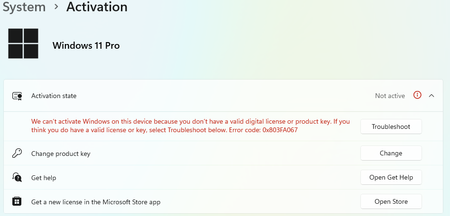
I've gone in circles for 2 days now with AI support bots, trouble shooters, and agonizing search engine queries. In my old PC setup, I had Windows 11 Pro; under the activation tab in settings, it shows it is linked to my Microsoft account. Great, should be a piece of cake. I install a new mobo and fresh install windows 11 pro after migrating the M.2 to the new mobo, and I am met with this screen when I try to input the same, old Windows key: Whatever, I'll follow the troubleshooter: Fantastic, I'll follow both of those links because SURELY that is all I have to do to resolve this: It doesn't list any devices, which is complete BS because I can see everything in my Microsoft devices: It doesn't list any of my other devices, despite being logged in to the new PC with my MS account? The red note for my old Mobo is referencing that I unassembled my current PC, reassembled it with the old hardware, reformatted and fresh installed windows - and could see that it Windows 11 Pro was activated and tied to my MS account in settings. Cool cool, time to contact support through 'Get Help'. Reactivating Windows 11 after hardware change > No > yes > on this PC > No > Contact support It seems that it knows my key is correct, however it dumps me into a deadend: Man, this feels awesome! I guess I will continue down the rabbit hole and """"contact support"""": I followed the prompts, entered in my 63digit cmd.exe > "slmgr /dti" from my current PC (AND MY OLD PC AFTER SPENDING HOURS REHOOKING MY OLD MOBO ****BACK UP**** TO CONFIRM I HAVE DONE EVERYTHING CORRECTLY, AND GRABBING THAT ID TOO) and I'm ultimately met with a dead end. So after "contacting support", I decided to use the support bot feature on microsoft's site, where I still cannot reach a real person. I'm beyond livid and exhausted at this point; somehow, spending 30-45 minutes to write up this post seems like the best way to "Get Help", ironically. it refuses to connect me to someone real, and the above 'activate-by-ID' doesn't work for my new (or old) PC setup IDs. Any help is appreciated. I read online that if I get in contact with an agent, they can help swap the license over - I just can't connect to anyone.154Views0likes8CommentsDifficulty in Accessing BIOS/UEFI Settings on Windows PC
I'm having trouble accessing the BIOS or UEFI settings on my Windows PC. Whenever I try to enter the BIOS during startup, the screen either remains blank, quickly flashes by, or I can't find the right key to press, making it difficult to change essential system settings. Despite following common methods like pressing F2, DEL, or F12, I am unable to access the BIOS menu, which is preventing me from making necessary adjustments to my system.77Views0likes3CommentsWindows Opening Apps You Never Clicked. Is this correct?
Windows keeps opening apps I never clicked, and it happens randomly while I am working or even when I am away from the keyboard. This is frustrating and possibly a security concern, so I need help figuring out why these apps launch on their own and how to stop them.14Views0likes0CommentsSave the date: Windows Office Hours – September 17, 2026
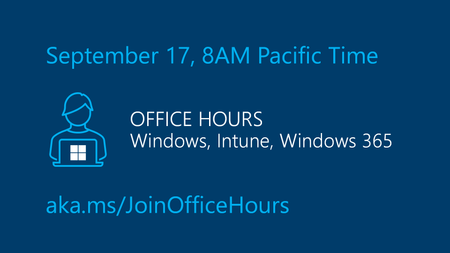
The next Windows Office Hours is coming up on September 17 from 8:00–9:00 AM PT. Spend an hour connecting directly with Microsoft experts across Windows, Microsoft Intune, Configuration Manager, Windows 365, Windows Autopilot, security, public sector, FastTrack, and more. Whether you're looking for guidance, troubleshooting help, or best practices, this live discussion is an opportunity to get your questions answered. This is a live, chat-based event with no video and no meeting link. Simply join the discussion, ask your questions, and participate in conversations with Microsoft engineers and specialists. Can't make it? Add your questions to the event page ahead of time and we'll cover them during the session.39Views0likes0Comments
How to fix a slow boot mac and make it run faster in startup?
My MacBook Pro (i7, 16GB RAM and 512GB SSD) has started taking a really long time (10 minutes) to boot up and reach the desktop, and I'd like to speed up the startup process. I'm not very technical, so I'm hoping for some practical, safe steps I can follow. In fact, this Mac has plenty of free storage and don't know why my Mac is taking so long to turn on. What are the most common reasons a Mac's startup slows down over time? And how can I fix a slow boot mac and make my mac boot faster in startup?94Views0likes10CommentsWindows 11 search bar randomly stops working – can't type anything
Every few days, the search bar in Windows 11 just stops responding. I click it, but nothing happens—no cursor, no typing, no results. Restarting Explorer fixes it temporarily, but the issue comes back after a while. I've tried rebuilding the search index, restarting the Windows Search service, and running the troubleshooter. None of it sticks. It's a clean install, no weird tweaks or third-party tools that should interfere. Anyone run into this or know what's actually causing it?71Views0likes1Comment
Reclamo técnico — Windows Update / Fallo crítico de arranque / Activación
Reclamo técnico — Windows Update / Fallo crítico de arranque / Activación El 28/08/2026, luego de una actualización de Windows 11, mi instalación dejó de iniciar correctamente. La actualización involucrada es KB5120998, correspondiente a Windows 11 25H2 / OS Build 26200.9278, publicada por Microsoft el 27/08/2026. El sistema pasó de funcionar normalmente a presentar durante el arranque: DRIVER_UNLOADED_WITHOUT_CANCELLING_PENDING_OPERATIONS y posteriormente: STOP 0xC000021A STATUS_SYSTEM_PROCESS_TERMINATED El fallo persistió incluso intentando iniciar mediante Safe Mode (F4) y Safe Mode with Networking (F5), por lo que no se trataba de un problema de una aplicación o proceso de inicio del usuario. Se realizó un proceso completo de recuperación utilizando Windows Recovery Environment (WinRE) y reparación offline de la instalación. Durante el diagnóstico se identificaron problemas en el Component-Based Servicing (CBS) / Component Store. Los intentos de reparación con DISM no pudieron completarse correctamente y se obtuvo: 0x800F0915 CBS_E_REPAIR_CONTENT_MISSING Entre los componentes involucrados se identificó: wow64_microsoft-windows-errorreportingcore 10.0.26100.9278 También fue necesario intervenir sobre la configuración de arranque UEFI/EFI para intentar recuperar el sistema. La recuperación de la instalación original finalmente no fue posible, por lo que, después de agotar los procedimientos de reparación, fue necesario formatear y reinstalar Windows. La reinstalación tuvo que realizarse dos veces, ya que la primera instalación presentó problemas al intentar recuperar la configuración/cuenta anterior. Por lo tanto, el incidente produjo la siguiente cadena: KB5120998 ↓ Windows 11 25H2 / Build 26200.9278 ↓ Fallo durante el arranque ↓ DRIVER_UNLOADED_WITHOUT_CANCELLING_PENDING_OPERATIONS ↓ 0xC000021A ↓ Safe Mode también falla ↓ WinRE / reparación offline ↓ CBS / Component Store: 0x800F0915 ↓ Recuperación UEFI/EFI ↓ Imposibilidad de recuperar la instalación ↓ Formateo ↓ Dos reinstalaciones de Windows Actualmente existe además un segundo problema: la licencia original que estaba funcionando en este mismo equipo ya no es validada después de la reinstalación. Windows devuelve: 0x803FA067 También intenté utilizar el mecanismo de activación mediante Installation ID, pero el sistema/web de activación de Microsoft tampoco reconoce correctamente dicho identificador.149Views0likes1CommentWindows 11 Active fail
We cannot activate Windows on this device because we don't have a valid digital license or product key. If you believe you have a valid license or key, please select the troubleshooting option below. Error code: 0xC004C003 After selecting the "Troubleshooting" option, some issues caused the interruption of our troubleshooting process. Please make sure you are connected to the Internet. Wait for a few minutes and then try again. (0x80070005) The computer is connected to the network. Version: Windows 11 Professional Insider Preview Version Number: 25H2 Installation Date: 2026/8/24 Evaluation Expiration Date: 2027/11/1 7:43 Operating System Version: 26220.9223 Feature Pack: Windows Feature Experience Pack 1000.26100.446.0109Views0likes4Comments
Why does changing the monitor's scaling percentage affect screenshots?
I have noticed that when I change the scaling percentage of my monitor, the screenshots I take appear differently, often becoming blurry or displaying at unexpected resolutions. I would like to understand why this happens and find out if there is a way to capture screenshots that are unaffected by the display scaling settings.139Views0likes4Comments
Can I upgrade my Windows 11 license from home to pro without reinstalling?
I have an ASUS tower PC about 2 years old. I have been happily running Windows 10 Pro from a license I owned previously. Now that Windows 10 is no longer supported, Microsoft has "upgraded" me to Windows 11 Pro, overwriting Win 10, but is unlicensed and so limits my Win 11 functionality. For example- I can't change many of the Windows settings. I am blind and need to change a number of settings just to use my computer. My desktop is constantly prompting me to provide a Win 11 Pro license key. I tried using the Win 10 Pro license key but that didn't work. I tried installing Win 10 and 11 dual boot, but my PC doesn't allow dual boot. The ASUS PC includes a license of Windows 11 Home, but I can't use it with the installed Windows 11 Pro. I could install Win 11 Home, but that would start from scratch and lose some of my local data and put my settings back to default, which in my case would be ausability nightmare. The easy way out is to just get a new license for Win 11 Pro. Then Windows and the settings would just stay the way they are, and enable all of my apps,data and settings. To keep this from getting too expensive, can I buy an upgrade license from Win 11 Home to Pro? If so, can I use it without reinstalling Windows 11? If that doesn't work, can I downgrade my installation of Win 11 Pro to Win 11 Home without reinstalling? If neither of the above is possible, I’ll have to just buy a new license of Windows 11 Pro. Where do I get that? Are there any options to keep the cost down to that of an upgrade rather than a net new license?181Views0likes5Comments