licensing
218 TopicsWindows update active hours constraint
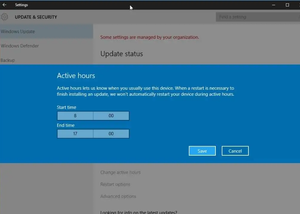
I’m trying to avoid my machine rebooting while I am not around to exercise a modicum of control. In my Windows Update settings I have disabled “get the latest updates as soon as they’re available” and I have “pause updates” set to 1 week. In the advanced settings I have disabled “get me up to date”, and I have enabled “Notify me when a restart is required”. Today I sat down to my PC to discover that it had terminated all my running programs and rebooted. Without any kind of prompt or warning. Which brings me to “Active Hours”. Active hours can be set automatically or manually and I thought I could set them to 00:00 to 23:59 to prevent updates running without me being around. But no, Microsoft absolutely prevents the active hours from covering a period longer than 18 hours. Why??? So far as I can tell, I have done everything available in the settings to prevent what nevertheless happened at some point in the last 24 hours. I am not aware of an urgent zero-day security problem that demanded an instant patch. Why did my machine do a forced restart when so far as I can tell I have clearly insisted that it not do so? I must be missing something! Any suggestions?21Views0likes0Comments
Windows 11 install from iso can't get past adding Microsoft account
I'm desperate, thought I had researched enough how to sort my windows 11 install. My laptop told me I could upgrade plenty of times, windows healcheck tells me it's compatible. I decided I should do a clean install and foolishly on a summary from online search it said I could do this my reseting my pc - I did this but in reinstalled windows 10 and then despite running updates multiple times gave me no options for upgrade to windows 11, despite the system is eligible... so I try installing from and iso virtual mount... takes forever, but it looks like I've succeeded until I need to add microsoft account... Then I try this and it says success you've proved you're human and then it just hangs... nothing happens... HELP!!!25Views0likes1Comment
Windows 10 Commercial ESU - Unsure if it's working
Hi! Our organization has purchased Windows 10 Commericla ESU licenses for a handful of computers that we do not wish to update to Windows 11. I have applied the licenses following the steps outlined in this document: https://learn.microsoft.com/en-us/windows/whats-new/enable-extended-security-updates#install-and-activate-the-esu-key I ran the verification command (slmgr.vbs /dlv) and confirmed that the command indicates that this computer has installed Year 1 of Commercial ESU. However, I still see "Your version of Windows has reached the end of support" when I navigate to Settings/Update & Security/Windows Update. Is this just a visual bug, or is this an indication that I have not properly enrolled this computer into Commercial ESU. So far, both computers I have tested this on are showing the same behavior. Thank you in advance.81Views0likes1Comment
Upgrade to windows 11 Pro from unlicensed Home version
Hi I have build a computer and I downloaded unlicensed Windows 11 Home to a usb drive (from microsoft) and installed it as operative system. Then my manager bought a 11 pro license key (misunderstood each other) instead of windows 11 home license key. Now I try to write in the 11 pro license key but it doesn't work. I get an error message when I push next. I thought it would upgrade to pro automatically. So my question is: does this not work? what should I do? I don't want to reformat the computer since I have bought office package and another program.40KViews4likes16Commentsupgrade - keep ALL - the Windows 22H2 to Windows 25H2, by running from Windows 10, the setup.exe
Can upgrade - keep ALL - the Windows 10 Pro 22H2 to Windows 11 Pro 25H2, by inserting USB Stick installation media of 25H2 and run from Windows 10 Pro 22H2 File Manager the setup.exe file as Admin,...? Or, Not, is needed to boot from USB Stick installation media of 25H2...?46Views0likes1Comment
Purchased upgrade from Home to Pro through MS Store - No confirmation, can't install
Hi All As per the title, I bought an upgrade for Win 11 Home > Pro from the MS Store earlier today. I've not received any form of confirmation email, but the purchase is showing in my account. However, I can't find a way to actually execute the upgrade. Can anyone provide any insight on how to sort this one out? Thanks in advance!24Views0likes1CommentWindows 11 install not Recognising Windows 10 Pro Product key
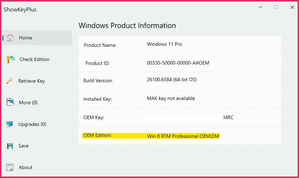
Hi all, I have a HP Prodesk G4 and have performed a fresh windows 11 install. The install is not picking up the Windows 10 Pro OEM Product Key from the BIOS that these devices came installed with. When I go into the Activation settings, it states it is a Digital Licence instead of an OEM licence. When I run ShowKeyPlus it is listing the OEM edition as Windows 8 as shown below (have blanked out most of the product key). This device came installed with Windows 10 Pro and even confirmed this by checking with the Serial number on HP support website. I suspect the windows 11 install is not picking up the OEM product key as it doesn't think it is Windows 10 (but maybe wrong) Any help will be appreciated as I really haven't budgeted to purchase a new Licence. Cheers Jeff39Views0likes1CommentSave the date: Windows Office Hours - October 16, 2025
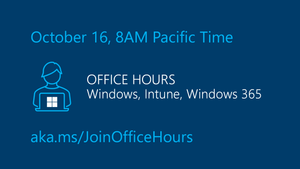
Join us at our next monthly Windows Office Hours, on October 16th from 8:00-9:00a PT! We will have a broad group of product experts, servicing experts, and engineers representing Windows, Microsoft Intune, Configuration Manager, Windows 365, Windows Autopilot, security, public sector, FastTrack, and more. They will be standing by -- in chat -- to provide guidance, discuss strategies and tactics, and, of course, answer any specific questions you may have. For more details about how Windows Office Hours works, go to our Windows IT Pro Blog. If you can't make it at 8:00 a.m. Pacific Time, post your questions on the Windows Office Hours: October 16th event page, up to 48 hours in advance.49Views0likes1Comment