features
2725 Topics
Phone Link Not Syncing Messages
On my Surface Pro 11 I'm having issues with Phone Link not syncing text messages with my Pixel 9 Pro. I've tried removing the apps from my surface and phone and starting fresh, but nothing helps. I would really appreciate any help anyone can offer. Thanks9Views0likes0Comments
How do I snip and capture a screenshot on my mac?
I recently started using a Mac and I'm still getting used to the keyboard shortcuts and basic features. On Windows 11, I was used to quickly snipping part of the screen when I needed to save or share something, but I'm not sure how to snip on mac. What is the easiest way to capture a screenshot on mac? Sometimes, I need to take full screen screen and sometimes for a scrolling screenshot. In addition, I also need to crop and edit the screenshot. P.S. It is an MacBook Pro M5 with the latest macOS.68Views0likes10CommentsWin11 Settings app crashes when trying to open the Storage page after connecting an external drive
After connecting an external USB storage device, opening Settings → System → Storage may sometimes cause the Settings app to crash or become unresponsive. If no external storage device is connected, the page loads normally. This issue occurs more frequently on storage devices formatted as exFAT or those containing a large number of files.36Views0likes2CommentsWhat is the best png to jpg converter without losing quality?
I recently switched to Windows 11 and I'm looking for the best way to convert PNG images to JPG format while keeping the quality as high as possible. The PNG screenshots are more than 1MB and I want to change it to 100 kb jpg. I understand JPG conversion isn't 100% lossless, but I want to minimize any visible quality drop. My question: Is there a reliable png to jpg converter without losing quality? P.S. I tried the built-in Photos app "Save As" option but the size does not change.47Views0likes10CommentsHow to convert html to markdown file on Windows 11?
I often save web pages or articles as HTML and want to turn them into clean Markdown so I can use them in note apps or documentation tools. I'm not very technical, so I'm looking for an easy way to convert html to markdown on Windows 11 — ideally a free tool, website, or app rather than something that requires coding knowledge. If anyone knows a reliable converter or a simple step-by-step method, I'd really appreciate the help. Thank you!55Views0likes10CommentsWMIC Deprecation: Why remove it entirely instead of providing a backward-compatible stub?
I am writing to express my frustration regarding the recent removal of the Windows Management Instrumentation Command-line (`wmic`) tool from recent Windows 11 builds. Like many IT professionals, I maintain dozens of legacy batch scripts that rely on `wmic` for basic system queries (such as pulling the local date and time). Automatically removing this tool breaks decades of established scripts, causing unnecessary downtime and forcing us to rewrite code that has worked flawlessly for years. While I understand the push to modernize and transition administrators toward PowerShell and CIM cmdlets, removing the executable entirely feels like a heavy-handed approach. **A Proposed Solution:** Instead of a hard break, why couldn't Microsoft replace the legacy `wmic.exe` with a lightweight stub or alias? This stub could accept the traditional `wmic` command-line arguments, translate them, and delegate the work to the modern PowerShell/CIM equivalents under the hood. Backward compatibility has always been one of Windows' greatest strengths. Please consider adding a compatibility layer for fundamental system tools before deprecating them completely, rather than breaking the IT infrastructure that relies on them.168Views0likes2Comments
How do I rotate PDF pages and save the changes for free?
I have a PDF with a few pages that are sideways, while the rest are in the correct orientation. I need to rotate only those pages by 90 degrees and save the file so they still appear correctly when someone else opens it. I usually view PDFs in Microsoft Edge, but I’m not sure whether rotating a page there changes the saved file or just the way I see it. Is there a free way to make the rotation permanent without Acrobat Pro? I’d also be interested in whether the same method can rotate every page when an entire PDF is upside down. Thanks for any guidance. NathanReed67Views0likes2CommentsSave the date: Windows Office Hours – September 17, 2026
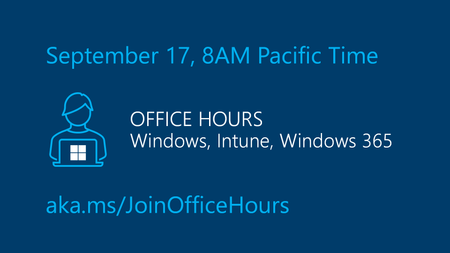
The next Windows Office Hours is coming up on September 17 from 8:00–9:00 AM PT. Spend an hour connecting directly with Microsoft experts across Windows, Microsoft Intune, Configuration Manager, Windows 365, Windows Autopilot, security, public sector, FastTrack, and more. Whether you're looking for guidance, troubleshooting help, or best practices, this live discussion is an opportunity to get your questions answered. This is a live, chat-based event with no video and no meeting link. Simply join the discussion, ask your questions, and participate in conversations with Microsoft engineers and specialists. Can't make it? Add your questions to the event page ahead of time and we'll cover them during the session.38Views0likes0Comments
Windows explorer bug: renaming files highlights file name while editing, removing entire name
This has been a problem for several years with Windows explorer. If you work decently fast editing a file name, either by clicking on it or pressing F2, and then start typing immediately, Explorer automatically selects the whole name after about a second. This is really annoying since it removes the entire name if you're typing when this happens.27KViews35likes53Comments
Windows 11 has got to be the worst Operating System I've ever used in my life
I've never ever been this disappointed in a software product as much as I am disappointed with Windows 11. I've always held onto the current WIN for as long as I could, and last month I bit the bullet and thought I'd give WIN11 a go, and I'm regeretting it ever since. It's not even, "omg this is new, I don't know how to use it" type of frustration - no, the OS is a complete mess, it's unstable, messy, unprofessional, and the entire thing felt fake and dysfunctional on so many levels. It really makes my blood boil. When I drag the volume all the way down in the sound mixer, it doesn't mute the app, I have to click on the app icon itself When I select a lot of files, and I click in that little small gap in-between each file, it deselects all of them When I have a lot of windows open and I would hover over them to select one, it rarely catches it from the first try. I'd click the window I want to use and it never selects it If I have a file path selected in a window, I click away, and I click back again on that window, I get the drop down list of paths that lead to that path and I end up clicking on a completely different path that would take me out of the window I selected When I click on and out of a folder, it updates in the Quick Access bar and in doing so, it glitches the entire UI across all windows open I could go on and on and on, this has got to be the worst product I've ever used. I have a couple big projects I'm finishing now, but after I'm done, I'm going back to Windows 10, and I'd stay with that until it gets hacked by Anonymous or something. My lord what a joke of a product.13KViews37likes37Comments