update management
1257 Topics
File History timestamp sync bug still broken in KB5124010 - Anyone else?
To the Microsoft technical team Hi everyone,Quick post to see if anyone else is still running into File History timestamp sync issues on the latest builds. Test Environments: Laptop: Windows 11 25H2 (OS Build 26200.8973) Desktop: Windows 10 22H2 (OS Build 19045.7725) The Issue:This problem started back in July (KB5101684 / KB5120249). While KB5124010 fixed the scheduled backup failure and Reconnect drive prompt from KB5124008, the timestamp and version sync bugs remain unfixed: Triggering Run now manually in Control Panel does not update the Last backed up timestamp to the current time. For newly created files (such as Word files), File Properties > Previous Versions displays: No previous versions are available. Changes to the contents of older files will not display the latest timestamp version; only the date and time of the previous version will be shown. A new entity version of the file has been created without any modifications. Other users (including community members in Japan and previous discussion threads) have confirmed identical behavior. File History is essential for daily backups, so getting this sorted out is critical.I'm really on the verge of a breakdown... Hopefully, the security patch will be completed in October. If you are experiencing this issue, please upvote and comment on my Feedback Hub report so the Windows engineering team prioritizes a fix: Feedback Hub Link: https://aka.ms/AA13n22w47Views0likes3Comments
Win11 update problem, PC hang after update
It has been happening since last 2 months. When updating window 11, the PC requested for a reboot but hung up in the bios screen. I have to switch off using the power button twice and the PC rollback to previous state. I have updated to the latest BIOS firmware. The motherboard is gigabyte B560M DS3H V2. How to solve?29Views0likes1Comment
Weird font and personalization issues after september update
Since the Windows September update, our company laptops have been experiencing numerous issues. It starts with all desktop customizations being reset, and changes are lost with every restart. The desktop background keeps reverting to a solid black color, the keyboard switches to an English layout, and taskbar settings are lost. The issue with the black background is reportedly a known problem following the August update (KB5120998). However, this issue was supposed to have been fixed with the September update. The affected PCs have build version 26200.9550 or 26200.9457 installed. The KB5124010 update is also reported to cause a black background in some cases, though this is said to be due to a crashed explorer.exe process. The explorer.exe process runs flawlessly on our PCs. We also installed the KB5124010 rollback for this known issue as a test, but it did not make any difference. The worst part, however, is the font, which in most applications looks as if the resolution is incorrect. Strangely enough, the font appears completely normal in some applications, such as Windows Settings. The screenshots show both the incorrect and the correct fonts. The incorrect one looks as if the text were poorly printed and then scanned back in. It’s terrible. I've read about the issues with the background image and personalization, but it seems like no one else is having this font problem? Unfortunately, uninstalling the update didn't solve the problem. Enabling ClearType doesn't fix the problem either, and the setting resets after a restart. Otherwise, I’ve tried: sfc /scannow, dism /online /cleanup-image /checkhealth, installing KIR, clearing the font cache, and restarting the font service. At this point, I don’t know what else to do, and I’m worried that the problem won’t be fixed by an upcoming Windows update, since it doesn’t seem to be a known issue.69Views0likes2CommentsThe KB5124010 File History backup issue persists Unresolved issue from KB5101684
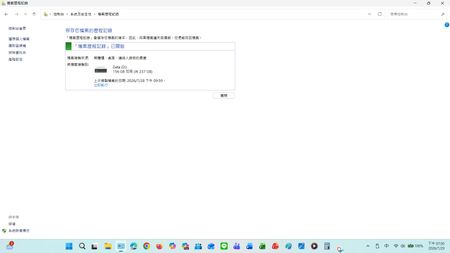
Current version: Laptop: Windows 11 25H2 OS Build 26200.8973 Desktop: Windows 10 22H2 OS Build 19045.7725 After installing KB5124010, the previous KB5124008 issue was resolved, and the scheduled backup function returned to normal. However, the serious file history synchronization error initially introduced after installing KB5101684/KB5120249 on July 28th still persists. Steps and Observations: After modifying and successfully saving files on drive D, manually triggering a backup via Control Panel > System and Security > File History > Execute Now : Timestamp mismatch: The date and time of the last copy failed to update to the latest save time. For newly created files (such as Word files), File Properties > Previous Versions displays: No previous versions are available. The contents of older files do not show the latest timestamp version; only the date and time of the previous version are displayed. A new entity version of the file without modification was created. Expected Behavior: Initially, the KB5124010 update was intended to address issues with KB5124008 and KB5101684. Actual Behavior: However, unexpectedly, it only fixed the following issue: This update resolves an issue where file history might fail to back up or restore files to an external drive or network location. Affected devices might incorrectly display a "Reconnect Drive" message even if a compatible backup drive is connected and functioning correctly. Feedback Hub report: https://aka.ms/AA13n22w I'm telling the truth; the file history was normal before updating KB5124010 and KB5101684. I don't see export Application log events for FileHistory.exe or KERNELBASE.dll in the Event Viewer. Has anyone else reproduced this behavior on Windows 10/11? I would also greatly appreciate it if the Windows team could investigate and fix this issue. This is a post I made where people commented that they had encountered similar issues, and there were also test results from others. : KB5101684/KB5120249 caused File History errors, but Microsoft has not acknowledged them. | Microsoft Community Hub Welcome to comment if KB5101684 or KB5120249 caused the same File History issue. | Microsoft Community Hub I want to ask Microsoft, why are there abnormal in the file history logs after these two updates? | Microsoft Community Hub Win 10/11 file history is malfunctioning after an update why has not Microsoft fixed this issue yet? | Microsoft Community Hub https://learn.microsoft.com/en-nz/answers/questions/5972265/windows-11-file-history-not-updating-correctly-aft https://learn.microsoft.com/en-nz/answers/questions/5978256/win-11-25h2kb5101684-os-builds-26200-8973-and-2610 https://www.w2eb.com/kb5124010-file-history-initial-backup-incomplete/https://www.w2eb.com/kb5124010-file-history-initial-backup-incomplete/ https://www.nichepcgamer.com/archives/post-132469.html https://gazlog.jp/entry/windows11-file-history-not-fixed-for-some/ https://www.windowslatest.com/2026/09/23/microsoft-confirms-windows-11-quietly-stopped-backing-up-your-files-due-to-a-new-bug-in-september-2026-update/ https://error-daizenn.hatenablog.com/entry/2026/10/01/000906#google_vignette https://aka.ms/AA13n2f3 https://aka.ms/AA13n22w My question is shown in the screenshot below: After modifying and successfully saving files on drive D, manually triggering a backup via Control Panel > System and Security > File History > Execute Now : Timestamp mismatch: The date and time of the last copy failed to update to the latest save time. For newly added files such as Word documents, File Properties > Previous Versions shows: No previous versions are available, or the content of older files does not display the latest timestamp version of updated/newly added files.157Views0likes0Comments
(KB5124010) Niepowodzenie instalacji dnia 1.10.2026 — Ox800f0922
Mam problem z instalacją aktualizacji (Aktualizacja dla systemu Windows (KB5124010) Niepowodzenie instalacji dnia 1.10.2026 — Ox800f0922). Próbowałem też ponownie zainstalować system (Windows Update - Opcje zaawansowane - Odzyskiwanie - Rozwiązywanie problemów za pomocą usługi Windows Update Ta opcja jest teraz niedostępna) instalowanie zakończone niepowodzeniem, nie mogę zainstalować ponownie systemy za pomocą Windows Update. Próbowałem też zainstalować ponownie poprzez utworzenie bootowalnego pendrive za pomocą "Media creation tool" ale też nie mogłem zainstalować, a nawet naprawić systemu. Pobrałem plik obrazu systemu Windows kliknąłem na niego następnie został zamontowany on w napędzie, po wejściu do napędu i klikmięciu "setup.exe" również nie miałem możliwości instalacji systemu. W jaki sposób naprawić system aby zainstalować najnowszą aktualizację i mieć sprawny system? P.S jeżeli to zły dział to proszę o przeniesienie tematu.62Views0likes0CommentsWindows 11 is not suited for work
Hello everyone, I just took the effort to register on this website to let some steam off. I would like to express my profound disliking about Windows 11. This morning, after some vacation days, I resumed working and windows, despite all the settings in place against this, decided to apply updates which stopped some of my peripherals from working. Of course, this included the GPU and the Bluetooth card, meaning that I could no longer join the meeting I was into. Enough. This is just the latest item on a list which has been growing longer and longer since many years ago, after Windows 7 went on retirement. It had issues, but at least it felt like it had some kind of reasoning behind. I am really fed up, and I just wanted to share my experience. Why does everyone still use it? Just why? Why do developers still code for this platform, which is clearly not working? Windows, and especially Windows 11, is just the most wrong possible tool for work. But probably also for anything else which is not a useless operation. Thank you, Microsoft. Sincerely, Davide40Views0likes0Comments802.1x wired network profiles missing after upgrade to Windows 11 24H2
Issue Description: During the upgrade of workstations to Windows 11 24H2, the IEEE 802.1X wired network security profiles are occasionally not restored after the upgrade process completes. As a result, affected devices fail to authenticate against Cisco ISE, leading to a loss of LAN connectivity. The issue appears to occur randomly and does not show any clear correlation with specific hardware models or workstation configurations. We are using Feature Updates to upgrade workstations to Windows 11 24H2, deployed through SUP in SCCM/MECM. This approach works best for us because it does not require any user interaction during the upgrade process. I developed a remediation script that is triggered by a scheduled task based on a specific event ID generated when Cisco ISE rejects authorization. The script successfully restores the locally stored 802.1X profiles and resolves the issue. However, I am wondering whether there is a better or more native way to handle this scenario. Has anyone experienced a similar issue with Windows 11 24H2 and 802.1X profiles? Any advice before we open a support case with Microsoft Support?43Views0likes0Comments
Task manager and power options gone after 26H2 update
I saw online that the 26H2 update came out, so I went and downloaded it. Once it restarted and everything, I went to shutdown only to see that the only option in the power menu was lock. I thought that was odd, and then I noticed task manager was gone. I googled the issue and it said that some registry could have disabled it, and when I went to it, "disabled tsk manager" or something like that was set to 1. I changed it to 0, and since I couldn't restart I held the power button. When I got back in it had reverted to true again. I decided to roll back the update, used a cmd prompt to get into the recovery environment, and it couldn't roll back the feature update. I chose point in time restore, and it's doing that now. Why did this happen? When I initially looked up the issue it seemed to be a previous issue unrelated to 26H2. Why did this happen?13Views0likes0CommentsCan't move Windows 11 Pro key to new machine
I'm in the middle of building a new PC and am unable to move my Windows 11 Pro license to it. I have verified with cmd that it is Retail channel and license, IIRC it was purchased as Windows 10 Pro and upgraded. On the system activation page it says "Windows is activated with a digital license linked to your Microsoft account." This is a retail license I purchased several years ago. I retrieved the key from the old machine using Regedit. If I try to enter this into the Activation settings page on the new PC with "Change Product Key" it says "We can't activate Windows on this device because you don't have a valid digital license or product key. If you think you do have a valid license or key, select Troubleshoot below. (0x803fa067)" Hitting the troubleshoot button on the system activation page says "We weren't able to activate Windows on this device." Selecting "I changed hardware on this device recently" on the new PC says "We can't find any devices linked to your Microsoft account that can be used for reactivating the device you're using right now. Make sure you're signed in with the same Microsoft account you linked to the Windows 10 digital license on this device or try again later." Clicking "See other devices linked to your Microsoft account" bring up the Reactivate Windows page with the message "We can't reactivate Windows from these devices." I have verified that both machines are linked into the same account and show up in my devices list. I removed the old PC from devices hoping that would help, but it has made no difference. It took a little bit but I was ale to get the PC to show up on my account again, though with less details then had been there previously (it may still be updating.) I have followed the link to the "Get Help" app, but when I sign in it says "Sorry, but we're having trouble signing you in." "AADSTS500200: User account 'MYACCOUNTHERE' is a personal Microsoft account. Personal Microsoft accounts are not supported for this application unless explicitly invited to an organization." I tried calling Microsoft support numbers fort the US, and after a great deal of time and effort eventually got past the AI which kept sending me to the directions I had already followed whenever I use the word "activation." I eventually figured out how to get someone on the line and after explaining my problem I was then put on hold for them to transfer me for help, after ~30 minutes the hold music stopped and it went silent. Waited another 10 minutes and nothing so hung up and called again. Could not get them to forward my call to a person again and now whenever I call one of their support numbers it says "Hello, thanks for calling Microsoft, for assistance with Windows Support please visit us online at help.microsoft.com. Thanks for calling Microsoft, have a good day." and hangs up on me. I'm absolutely livid at this as it seems they've flagged my number to ignore it now and I'm left with no way to contact Microsoft support to get my issue resolved.59Views1like1Comment
Windows Updates
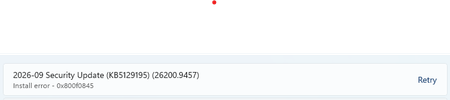
The following updates are failing to install on my PC after repeated attempts: 2026-09 Preview Update (KB5124010) (26200.9550) Install error - 0x8007370b 2026-09 .NET Framework Security Update (KB5126052) Install error - 0x8007370b I've tried resolving it on trouble-shooter and restarting computer but neither works. Please advise.56Views0likes5Comments