update management
837 Topics
Win11 Update KB5063878 killed my SSD, how do I request a refund from Microsoft?
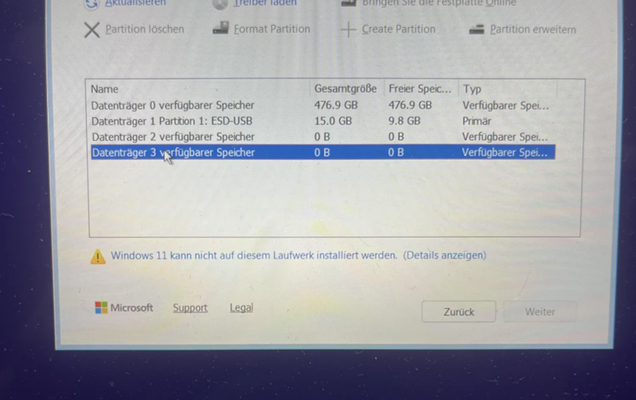
Hi, as the heading states - the KB5063878 update has bricked my Samsung MP600 Gen4 M2 SSD. I was playing some games last night, and got a "Unexpected Store Exception" error with consequently booting into BIOS. Any reboot after that only boots into BIOS, and Slot 1 M2 disk is not discovered. I made a image USB stick which booted into the install medium and that actually discovered the disk, but the install fails with error code 0x80042444 - 0x4002f (Disk error). Online I see now an increasing amount of reports about the update killing SSDs. Microsoft NEEDS to retract this update IMMEDIATLY. Where can customers file a refund claim for destroyed hardware as I now am in need of a new SSD for around $160230Views0likes1Comment
Persistent BSODs with Intel X550 and other NICs after Windows 11 24H2 updates
Hello, Since around May/June 2025 cumulative updates for Windows 11 (24H2), my workstation has been experiencing repeated and frequent BSODs with the error: DRIVER_IRQL_NOT_LESS_OR_EQUAL The crash dumps consistently point to network drivers: ixs68x64.sys (Intel® X550 10GbE NIC) aqnic650.sys (Aquantia NIC) In some cases, stack traces also show NDIS, tcpip.sys, or volsnap.sys being involved. This problem persists even after: Clean installing Windows 11 24H2 (build 26100.4946) on a brand new SSD. Updating to the latest Intel X550 drivers (tried older drivers as well). Disabled the onboard Intel NIC and installed a brand new TP Link TX401 10gb NIC (to rule out the Intel card). Updating the motherboard BIOS (April 2024 release, which is the latest). Disabling System Restore (to exclude volsnap.sys). Testing both wired and Wi-Fi connections. Hardware details: CPU: AMD Threadripper PRO 5955WX Motherboard: ASUS Pro WS WRX80E-SAGE SE RAM: 384 GB ECC Storage: Multiple SSDs, brand new NVMe for OS NICs: Intel X550 (onboard), also tested with a TPLink PCIe NIC 10gb Graphic card: NVIDIA RTX 3080 Symptoms: BSODs happen under heavy network activity (e.g., installing Adobe Creative Cloud, large downloads, sync tasks). System is otherwise rock stable (no ECC errors). Issue only appeared after 24H2 updates — Windows 11 was perfectly stable before. Due to these BSODS I skipped several updates since around May until now. At this point I strongly suspect an issue with Windows networking stack compatibility with NIC drivers in 24H2. Is this a known issue? I have no clue on how to begin fixing it anymore. Latest BSOD happened while installing Creative Cloud. This machine is a professional workstation used for audio and video production, so stability is critical. Any guidance would be greatly appreciated. Thank you.13Views0likes0CommentsKB5063878 fail to install error 0x800f0991
In my environment i got around 4000 devices, 3300 +- have received it for 700 still not able to receive it i did all the sfc, the DISM try to instal the. msu nothing, always getting for those devices the error 0x800f0991. the quality update and feature update are push through intune. Did someone have the same issue has me. Thank you19Views0likes0CommentsWindows 11 system Bluetooth headphones frequently disconnect and become silent.
After connecting Bluetooth headphones to a Windows 11 computer, they frequently disconnect automatically and produce no sound output during connection (the headphones work normally when connected to other devices). Attempts to reinstall the driver and reset Bluetooth settings have been ineffective.38Views0likes2CommentsWhat is an enablement package?
Windows 11, versions 22H2 and 23H2 share a common core operating system with an identical set of system files. As a result, the new features in Windows 11, version 23H2 are included in the latest monthly quality update for Windows 11, version 22H2 but are in an inactive and dormant state. These new features will remain dormant until they are turned on through the “enablement package,” a small, quick-to-install “master switch” that activates the Windows 11, version 23H2 features. The enablement package is a great option for installing a scoped feature update like Windows 11, version 23H2 as it enables an update from version 22H2 to version 23H2 with a single restart, reducing update downtime. This enables devices to take advantage of new features now. For version 22H2 devices that receive updates directly from Windows Update or Windows Server Updates Services (WSUS), devices automatically get the enablement package by installing the feature update to Windows 11, version 23H2.14KViews3likes1Comment
No option to Download and install Windows 11 in Windows Update
I'm still on Windows 10 Home. Ready to go to Windows 11. When I run the PC Health Check, it says "This PC meets Windows 11 requirements". WINDOWS UPDATE in SETTINGS doesn't have the "Upgrade to Windows 11 is ready - and it's free!" download and install screen. Does that mean anything? Should I wait for that or just upgrade to Windows 11 from somewhere else? - I now have Windows 10 Home version 22H2. Will the Windows 11 update be Windows 11 Home? - Do I really need to use Windows 11 Installation Assistant?Solved92Views0likes3Comments
Feedback on Windows 11
I've been a Windows customer since the beginning. I was doing computing back on the TSR-80, when we still saved information on audio tape. However, with the changes in the last few versions of Windows; I feel I can on longer use a Windows product. I've been using a Windows 11 system for several months now, and I've hated every time I had to use it. With the increase in non-optional "optional" and non-removable features; I've decided that it's time to move onto a Linux based system. Sincerely, a former Microsoft customer.12KViews10likes45Comments