
Forum Widgets
Latest Discussions

The New Start Menu Is a Perfect Example of Microsoft Forcing Unwanted “Features” on Users
I’m posting this because I’m beyond fed up with the direction Microsoft is taking with Windows, and the latest Start Menu redesign is really unwelcomed. Whoever decided to implement the new “All” section with forced Categories, Grid/List views, and a permanently attached app list seems to have completely forgotten something fundamental: this is my Start Menu, not theirs. I’ve already turned off every bit of clutter I can — Recommended, recent files, “suggestions,” all of it. Yet Windows still insists on injecting an enormous block of UI I never asked for and will never use. I don’t care whether it’s Categories, List, or Grid. I don’t want any of it. I want the Start menu to show ONLY the pinned items I chose, nothing else, the same way it worked for years. But now? Microsoft has deliberately removed the ability to collapse, hide, disable, or eliminate this lower “All” section entirely. It wastes space, disrupts workflow muscle memory, and provides zero value for users who already know exactly what they need. It’s an unwanted visual and functional takeover of the one UI element that should be the most personal and customizable. This is exactly the type of “change for the sake of change” that pushes long‑time Windows users away. It feels like decisions are being made by people who never actually use Windows for real work, and who believe their design experiments matter more than respecting users’ preferences. I’m tired of being forced into UI experiments I never opted into. I’m tired of updates that remove more choice than they add. And I’m tired of Microsoft ignoring the most universal feedback users keep giving: Stop shoving new UI elements in our faces and give us back full control over our own operating system. If Microsoft wants people to stay enthusiastic about Windows instead of increasingly frustrated with every forced redesign, then we need true user‑controlled customization — not “pick between three unwanted layouts,” not “view modes,” not scripts, not policies, not third‑party hacks. Just a simple, basic ability to hide what we don’t want. Give us the Start Menu we choose, not the Start Menu you decide we should have.William_HolmesFeb 20, 2026Brass Contributor326Views7likes4Comments
What is your opinion on smart control app?
I kept Control folder access ON for now as I can manually allow blocked actions. But I might also turn this other feature OFF in the future as I'm slowly getting tired of it too. It blocks some actions made by Steam, Ubisoft Connect, etc. when I start a particular game. Too much hassle manually allowing blocked actions.ThiangoFeb 20, 2026Iron Contributor399Views0likes3Comments
Windows 11 24H2/25H2 System Freeze After January 2026 Updates – Lenovo ThinkPad G2
Dear Microsoft Support Team, We would like to raise a high-priority technical support case regarding a stability issue observed after installing the January 2026 cumulative updates on our Windows 11 devices. Environment Details: Device Model: Lenovo ThinkPad G2 (multiple units) OS Versions: Windows 11 24H2 and 25H2 Update Installed: January 2026 Patch Tuesday cumulative update (KB number can be provided) Deployment Method: WSUS / Intune / Windows Update (specify accordingly) BIOS Version: (Installed Latest available from Lenovo) Issue Description: After installing the January 2026 cumulative updates, devices intermittently experience a complete system freeze. The system becomes fully unresponsive: Mouse and keyboard input stop responding No BSOD is displayed Task Manager cannot be opened System recovery is only possible via hard reboot (power button) Frequency: The issue occurs randomly, both during active use and idle state. Multiple users across our environment are impacted. Troubleshooting Performed: Reinstalled OEM-certified Lenovo display drivers Disabled Fast Startup Ran SFC and DISM health checks (no integrity violations) Updated BIOS to latest version Setting power idle mode, then work normally Request: - Please confirm whether this is a known global issue under investigation. - Advise if any hotfix, Known Issue Rollback (KIR), or registry-based mitigation is available. - Provide guidance on additional diagnostic logging required at kernel or driver level. - Confirm whether crash dump analysis is recommended for this scenario. We are prepared to provide additional diagnostic logs, memory dumps, or reproduction steps upon request. Kindly treat this as a priority case due to multi-user impact in a production environment. Thank you for your support. #Windows11, #Windows 11 24H2, Windows Update, Cumulative Update, System Freeze, Lenovo ThinkPad, Display Driver, EnterpriseSupport_AdminFeb 20, 2026Copper Contributor805Views5likes9CommentsSearch Service refuses to run
Ever since installing W11 64 in Novemeber my search function refuses to run. I have tried a half dozen fixes from DISM, to re-specifying Security settings to an re-install via ISO (keeping programs). My search settings still say my organization controls some settings even though I have tried to clean them off (no longer working) Outlook is useless to me without search capabilities. Do i need to wipe the drive and reinstall W11 and my programs. I am at mu exhaustive limits. Any help out there. TonyTonyPass_PersonalFeb 20, 2026Copper Contributor24Views0likes1Comment
settings were not migrated from previous OS installation due to partial or ambiguous device match
I can't access the files on my external ssd drive. The Event record = settings were not migrated from previous OS installation due to partial or ambiguous device match Device Manager = present but Volumes tab shows "-"s Disk Management = not present I am not a newbie and it is very rare I cannot fix a computer/IT issue on my own but this one has me stuck. Windows is up to date, BIOS is up to date, drivers, etc. I've done ALL the things suggested online. I even wiped my computer and reinstalled everything, still not working. I need a fix for this, I need the files. HELP!amymacFeb 19, 2026Occasional Reader14Views0likes0CommentsHow to Install or Uninstall RSAT in Windows 11
Remote Server Administration Tools (RSAT) is an essential tool for Windows administrators. This tool is designed to help administrators manage and maintain the servers from a remote location. Remote Server Administration Tools (RSAT) are used by IT administrators to handle Windows Server roles and features. It was introduced in Windows Server 2008 R2. Viewing Remote Server Administration Tools List in Windows 11 Open the Command Prompt App with Administrative Privileges. Type the below command and press Enter key. Get-WindowsCapability -Name RSAT* -Online | Select-Object -Property DisplayName, State You'll get a list of all RSAT features and their current state whether installed or not present. Related: (external link removed by moderator) Installing Remote Server Administration Tools in Windows 11 Launch the Windows 11 Settings app. Select Apps from the left pane. Choose Optional features. Read More At: (external link removed by moderator)ammarjavedFeb 19, 2026Iron Contributor2.4MViews9likes106CommentsUnknown XBOX 360 controller for Windows 11 installation
I am posting this here because X-Plane forums did not have any response to this problem. A user there noted when they transitioned to Windows 11 they started experiencing this problem. Hi, I was using X-Plane 11/12 software the other day and in the logs I recieved this: Hardware ADDED(28de, 11ff) - Controller (XBOX 360 For Windows) at path \\?\hid#vid_8087&pid_0ac2#6&2a20919&0&0000#{4d1e55b2-f16f-11cf-88cb-001111000030} 0:00:00.000 I/JOY: REGISTER Joystick device: Controller (XBOX 360 For Windows) - VID:10462PID:4607, this is a familiar device. I do not use an XBOX 360 controller. I used to have Monect PC software, but I had deleted it months ago, and the device manager shows nothing under Monect PC remote software. I cannot find this VID/HID anywhere in my device manager, it just keeps appearing by will, almost like malware, even if I try removing controller settings, it returns one way or another. Please help, for I want to use my mouse for flight simming software since I am currently not in possession of my joystick. All the PID/HIDS here do not have that 8087. The 8087 identifier is usually with Intel related drivers/devices. This is what happens when my X-Plane 11/12 software is terminated in the log file. 0:20:48.150 I/JOY: UNREGISTER Joystick device: Controller (XBOX 360 For Windows) - VID:10462PID:4607 The even stranger part is that it does not appear in joy.cpl. More context here:PioneerwadaFeb 19, 2026Occasional Reader17Views0likes0Comments
USB drive not showing up in file explorer
Hi The laptop makes usual ding noise when the USB drive is added but there is no option to open the files from File Explorer. I've done some research and tried various things - restart, uninstalling drivers etc and have found myself on the Event Viewer page for the USB drive. The following is displayed: Device settings for USBSTOR\Disk&Ven_SanDisk&Prod_Cruzer_Blade&Rev_1.00\04016924101322110935&0 were not migrated from previous OS installation due to partial or ambiguous device match. I'm thinking this is the problem?? But how do I fix it? Many thanks in advance for any helpFC1Feb 19, 2026Copper Contributor154Views0likes3Comments
Where / How to find "Ask a question"
CAN ANYONE TELL ME how to reliably and repeatably find the Link to "Ask a question" or "Start a Discussion"! Yes, I am Starting a Discussion now ONLY because I accidentally stumbled upon a Start a discussion link. I am often wondering around in the various Community Hubs, Discussions, Screens, etc. trying to find that link - and don't laugh because I am serious, but sometimes for 30 minutes or more and sometimes finally giving up. I love the Community and the support here, but WHY is it so hard to "Ask a Question" I will post the question somewhere else when I finish here - if I can once again find the link to ask a question. And sorry to be such a pain over this and although a long-term Community participant, but this has been a lingering problem for me, going back years and years. ron in shawneeroninkansasFeb 19, 2026Brass Contributor83Views2likes5CommentsUser Folder displaying wrong name and icon
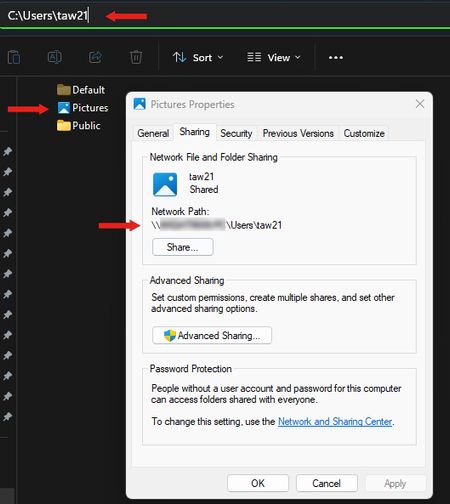
I recently noticed that my personal user file is displaying the name "Pictures" and has the Pictures icon. However, when I click on the folder, everything is correct within the folder and the address bar shows the correct folder name. I've attempted to attach an image here; I had to paste several images together to create the attached image, so I know that the address bar would not actually be visible at this point, but if I click on the Pictures folder then the address bar it becomes visible. Thanks, TomTAW211NAFeb 19, 2026Copper Contributor15Views0likes0Comments

Tags
- Features1,953 Topics
- configuration1,881 Topics
- device management1,265 Topics
- Update management993 Topics
- Application Management869 Topics
- security762 Topics
- deployment539 Topics
- community429 Topics
- accessibility268 Topics
- licensing227 Topics