User Profile

AlexH980
Steel Contributor
Joined May 06, 2019


User Widgets
Recent Discussions
Re: Why do I not have permission to access a brand new notebook that I just created in the web app?
misaifan I don't think I found a solution but I'm not locked out of any notebooks at the moment. Either MS fixed something on their end, or I abandoned the notebook and forgot about it.1.2KViews0likes0CommentsIs there a list of Office 365 features that are exclusive to Windows 10?
As per the title question, I'm interested to know if there are certain features within Office 365 that are either exclusive or perhaps work better in a Windows 10 environment, compared to Windows 7. I didn't turn up any helpful articles while searching for this the other day, suggesting that there are no feature or performance differences in O365 between the two OS environments. Does that sound accurate though? As an anecdotal example, I've found that trying to locate and open a Word document from the Word desktop app that is saved on SharePoint or OneDrive is much easier in Windows 10 than it was in Win 7.1.3KViews0likes1CommentMoving Large Volume of Data from OneDrive to SharePoint - Potential Error to watch out for?
Outside of the limitations described in this article, are there any other limitations that a user should be aware of before moving large volumes of data between OneDrive and SharePoint using the web app? Internet quality? CPU and/or RAM requirements? Let's say I wanted to move 5000 times with a total of 50GB from OneDrive to SharePoint using the web app. While that's within the limitations noted by MS, what potential issues may I run into?846Views0likes0CommentsRe: Launching a New Org Intranet Featuring Yammer/VE for Org News
Topics and hashtags will be important for organizing content for sure. Also, a part of my theory here is that making content easier to publish (via Yammer) would lend well towards sustained activity in the communities. The more I think about it, the less sure I am about whether this will amount to savings (effort, time, training, etc.). Yammer is another tool for IT to administer and manage to some degree. Even if the active users are mainly community managers, it's still added overhead. I think the core value-add here that Yammer should be easier to understand and adopt compared to SharePoint. I suspect the majority won't need special training to understand how post to Yammer. Either way, this is a decision that needs to be considered from the top-down.1.2KViews0likes0CommentsLaunching a New Org Intranet Featuring Yammer/VE for Org News
Has anyone recently explored launching a SharePoint intranet using Yammer as core component for news and sharing resources? I'm working on a project where the client is starting with a single communication home site that will be managed by only a handful of staff for an organization of a few hundred. There are no plans to expand this into additional sites. We're still assessing the scope and scale of the site content, but if there is a need to publish a LOT of internal content, it may be too much for them to manage. That's why I'm considering Yammer to manage the majority of org news. Even a single community would allow multiple committees and departments to share their news and resources to a wide audience. All of which would be embedded into the home site. There are several other benefits, but I'm curious to know if anyone here as already walked this path. Happy to hear your experiences and your advice for a SharePoint/Yammer hybrid home site.1.4KViews0likes2CommentsHow to Automatically trigger "Send to OneNote" add-on in Outlook on the Web?
Is it possible to automatically trigger the STO plugin anytime emails are added to a specific folder in Outlook? I'm aware that I can send emails to OneNote without the plugin, but I have yet to find a method that does AS GOOD of a job as it. This is the process I'm working on: email received by specific sender > Rule triggered to move email to sub-folder > Send to OneNote plugin triggered > email printed as new note in target Notebook section > create message in Team channel with link to new Note If someone knows of a good FLOW that can do this, please let me know.Why do I not have permission to access a brand new notebook that I just created in the web app?
OneNote has been driving me crazy and I cannot fathom why it's so difficult to access my notes without some kind of permissions or syncing issue. After the Windows 10 app refused to let me access my primary notebook (despite opening it from the web app), I re-logged into the app to see if that would restore permissions, but no luck. So I created a brand new notebook from the web app and got as far as creating a new section before the same issue appeared. How and why am I locked out of a brand new notebook in the web app? Am I missing something, or is this experience broken?Moving on from the unreliable SharePoint News Connector
This might be more of a rant than anything else, but I'm wondering if anyone else has had issues with the "SharePoint News Connector" not posting consistently. Sometimes the connector posts immediately, sometimes it's a few days behind and sometimes it just doesn't bother to post at all. We've essentially given-up on it and are now looking into Power Automate to fill the gap. I hope 2022 brings a much-needed overhaul to Team channels, bots and connectors.3.6KViews1like1Comment- 529Views0likes0Comments
Re: Target Dimensions for Image Column in Lists
It's for the Gallery view in Microsoft/SharePoint Lists. For example, I want to include the logo for our clients in a list, but the logo image dimensions vary greatly. Lists doesn't seem to resize the image, nor does it give any guidance on what size/dimensions the cover image should be. So if I upload an image to a record and it's too large, then it looks really bad.831Views0likes0CommentsDo not have permissions to edit a new notebook in my own OneDrive?
As per the title, I cannot seem to edit a brand new notebook in my own OneDrive for Business. Here's the breakdown of what's happening: Shared a folder with a colleague (w/ edit permissions) from my OneDrive Created the notebook in said folder Created a section and was then promptly locked from making any further edits to the notebook Colleague cannot edit either. Tried giving them "direct access" but that setting doesn't stick because the folder properties seem to override them Colleague created their own notebook in my shared folder; they can edit but I cannot. OneNote web app keeps saying that I don't have permissions to edit either notebook (despite being the owner of the folder and creator of one of the notebooks) Tested same process in my test tenant and that worked just fine. I can open and edit other files in the folder just fine. This issue seems to be limited to OneNote and my account Logged out of O365, closed the browser and logged back in, but no change. Anyone have thoughts? We are completely dumbfounded why we can't collaborate on shared notebooks.Re: Tasks by Planner and To Do is not picking up the name which are already created via api
gaurav_gupta to the best of my knowledge, this is normal behavior. You can create multiple boards with the exact same name because the board name is not a unique identifier. For example, I can open a board in the Planner web app, and use the "Copy Plan" function to create an exact duplicate of my board in the same M365 Group. Also, you can find the board ID in the export file.1.1KViews0likes0CommentsRe: Hide or deactivate "Posts"
hridev it may not be possible to hide or delete the Posts tab, given how deeply integrated they are in Team channels. It may be possible with PowerShell but that may have unintended consequences. Don't quote me on whether PowerShell can do this or not; I do not know for sure. If your goal is to prevent staff from posting to a channel, you may find some success with Channel Moderation. I know it's not what you're looking for but it's something you can do today if you haven't tried yet.11KViews0likes2CommentsRe: New Milestones App in Teams did what we've been asking to see in Planner for years
JayCeeDomingo good question... no I don't think so. I reinstalled Milestones and the activity log is missing on my side too. Not sure why it's missing, unless it was removed in an update. Weird.7.6KViews1like3CommentsRe: Unable to view MS Tech Community message replies if logged into the Tech Community
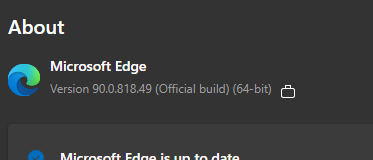
Deleted As best as I can tell, Windows 10 and Edge are up to date and current. I also tried my work laptop (also W10) but the result was the same. Here's the Edge version I'm currently on. What's interesting to me is that some site elements look a little...janky... when i'm logged into this account. Like the page isn't loading everything correctly, but I'm not sure what could have caused that. This issue is persistent between multiple browsers and devices. The only common denominator is this account.2.6KViews0likes1CommentRe: Unable to view MS Tech Community message replies if logged into the Tech Community
A couple of weeks ago, I suddenly found myself unable to see view discussion replies from this account. While I can create my own discussions, and read the OP for other users discussions, this strange problem seems to be isolated to my account and I'm not sure why. I can view post replies when not signed in I can view post replies when signed in to another account I cannot view post replies in Private mode I cannot view post replies in Microsoft Edge or Brave from this account (both are up to date) I've cleared cookies in Edge but it did not make a difference Anyone have any thoughts on what's happening? Did I anger someone? Nothing in my profile s2.6KViews0likes5Comments
Recent Blog Articles
No content to show