User Profile

reditguy
Iron Contributor
Joined Jan 15, 2019


User Widgets
Recent Discussions
Group policy for Sharefile
Hey all, we are going to be using ShareFile for our file services and they have the ability to map a drive using Group Policy. All our office PCs onsite are Azure AD joined and users login with their AzureAD accounts and hence connected to Intune. https://www.citrix.com/downloads/sharefile/clients-and-plug-ins/citrix-files-for-windows.html https://support.citrix.com/article/CTX228273#group Scroll to 'Group Policy Definitions' First, I feel we would need to push out this app to the office desktops so that the Citrix group policy files are there on the PC. Then it would need to copy the files over from the citrix folder to the Windows group policy folder (as mentioned in second article) Third, it would actually need to do the group policy where it maps a drive to a particular location This is at least how I think this needs to be done. How would we accomplish this or is there a better way? Thanks.1.9KViews0likes1CommentDLP and Intune for third party apps
Hi, we are considering use ShareFile for our cloud server needs....they do have a mobile application and desktop application. They don't have the ability to prevent downloads/printing from mobile devices built into their platform so is there a way I can accomplish this via Intune/MDM/Conditional Access? We would also like to be able to only allow access to the desktop apps only to certain users outside our office network, any way to accomplish this? And force access to the app only from machines joined to Azure AD and/or Intune? Thanks.Outlook freezing
Hi, we have a user that is having an issue with her Outlook freezing and I think we narrowed it down to emails that have .jpg or other images as attachments and we try to preview or open them. She is using Office365 version 2006 64bit. This user had a similar issue with Version 1908 as well, and on two completely different PCs (and her current one is a week old), so I don't think a repair or reinstall will fix it. Any ideas? Thanks.985Views0likes0CommentsMultiple users parked call
Hi, if an admin puts a call on Park it gives a park code.....is there a way for multiple users to pickup the same parked call to be in the call together from with the person who called in originally? If not, what's the best way to handle something like this? Thanks.1.5KViews0likes1CommentTeams client issues
Hi, we have been having a few continuous issues with Teams and wanted to see if anyone has the same issues or a resolution? FYI we all use the Teams Windows desktop client and do not have a SBC or anything, we strictly use the Phone system license from O365 1) When a user (most of us) puts someone on hold it takes probably 4-6 seconds to actually put the call on hold and we aren't sure when that even happens....and worse it sometimes takes ~10 seconds to resume the call. This is particularly frustrating for our receptionist who has trouble with it when multiple calls come in. 2) When a call comes in it shows the name and the # but once we answer the call it just shows the #, we have to manually add the # as a contact with a name for it to show the name and that is obviously too difficult to do with all incoming calls. SFB didn't have this issue. Any ideas?795Views0likes0CommentsRe: Call Queues and Auto attendants
LinusCansby When I call my # it goes straight to MY voicemail...not the one I put in the settings. Doesn't looks like it ever goes to CQ2. How do I call Cq2 directly? Should I be assigning actual #s and licenses to CQ1, CQ2, and auto attendant? If so, how and which ones?7.2KViews0likes3CommentsRe: Call Queues and Auto attendants
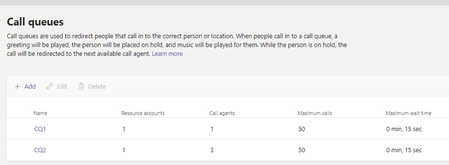
LinusCansby UPDATE: I set it up as per the below with screenshots and it isn't working as expected. I set my # (pretending to be receptionist) as the main# in CQ1....but when someone calls my # it doesn't flow to CQ2 (where it rings other users), and it doesn't send the call to someone else's VM as defined CQ1 CQ 2 Auto Attendants7.1KViews0likes5CommentsRe: Call Queues and Auto attendants
LinusCansby Last questions...for today: 1) One thing I am confused about in Auto Attendant, is how does it know which the main# is? Or will that be determined by me adding the reception account in Call Group 1? 2) I setup the call groups first and then the auto attendant correct? (First CallGroup 2, then 1...then Auto Attendant)? 3) On the first page of the autoattendant setup, I leave the Operator field blank correct? This way the external caller doesn't get any prompts or anything? 4) Is the reception account and/or phone# supposed to be a resource account? Do I need resource accounts in this scenario? 5) In call group 2, can't I just add a group instead of 'other users' and have it set to attendant routing so it rings them all at once? What info will they see when the call comes in / forwards from reception? Right now they see 'forwarded by reception' at least. 6) I know the call groups 1 and 2 need resource accounts but does auto attendants need one as well? UPDATE: Question.....if I have AutoAttendant handle the vacation schedule and business hours and redirect call to CallGroup1, why do I need a callgroup2? If the receptionist is in callgroup1, can't the teams client handle the rest of it (also ring callgroup, which is defined in the Teams desktop client)? And then it does eventually go to voicemail? Will this not be sufficient? And this way the vacation schedule and work hours and still set for this #? Thanks so much.7.2KViews0likes6CommentsRe: Call Queues and Auto attendants
LinusCansby Hey, would love your help on this...sent you a PM In the meantime: 1 ) Are you saying in the below config it will eventually get to VM after 20 seconds? 2) How do I set the reception account as an agent? Right now our main# is tied directly to a user phone, and the phone# is assigned to that user (reception).7.3KViews0likes10CommentsCall Queues and Auto attendants
Hi, I have a few different posts but wanted to create a new one for this. We are trying to figure out if we need to use call queues and auto attendants for what we need. Basically, our main office# is tied to a user account with a phone system license, and we are trying to set it up so that when someone calls our main #, and reception doesn't pick it up, it forwards to a call group after 10 seconds, and then if no one picks up, then go to voicemail. I see no way to do this in the user's desktop client. I do see a way to ring call group and reception at the SAME TIME and then go to voicemail, but that doesn't work as the users in the call group obviously get annoyed getting all of reception's calls. Secondly, calls going to the reception line are also going to the call group after hours on their mobile phones since they are logged into Teams there as well, another annoyance. I think there are ways to mute this in some way in the mobile Teams client but its such a pain. Few considerations: Reception HAS to be able to pick up calls when it rings...the outside caller should not need to press 1 for Sales, 2 for IT, or 0 for operator or anything; calls should go directly to reception. We would like the business hours for the call group etc. to be between 7am-7pm EST, and then all calls outside these hours go directly to a voicemail (reception or otherwise but should be an email as well if possible). How do we handle this? Thanks.7.7KViews0likes14CommentsRe: Teams and Skype for Business co-existence
Paul Husted Thanks, the problerm is at our firm and industry people except a live person to answer right off the bat...not hit 0 to talk to someone...is that possible with an auto attendant or call queues? Also, say I keep it the way it is today without auto attendants or call queues...is there a way for it to forward directly to voicemail after 7pm or something?2.1KViews0likes1CommentRe: Teams and Skype for Business co-existence
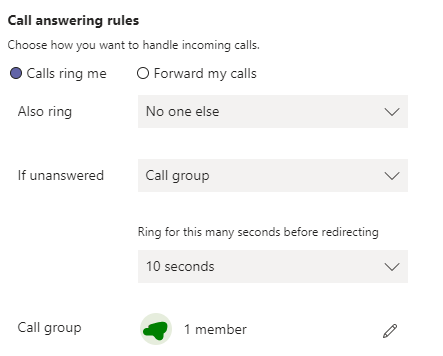
Paul Husted LinusCansby paul-lange Paul Lange Thanks #1 - In SFB, there was an option to ring call group after 5 seconds (or longer) and if no one picks up it goes to VM. In Teams there seems to be no such option. If we have it to initially set to ring to no-one and then call group 10 seconds later, and no one still picks up the call just dies. We can have it so that the first option is to ring call group (at the same time) and then VM after 10 seconds, but that annoys the call group users and rightfully so, as it should only forward to them when the receptionist doesn't pick up. I noticed some call group settings under Teams Admin - Users - User - Voice section, so wasn't sure if this was different than the client settings. reg #2 - Just want to mention again that we are using Call groups and not really call queues, we can't have auto-attendant during business hours because someone HAS to pickup the phone live, its just the way our business functions. Any suggestions?2KViews0likes3CommentsRe: Teams and Skype for Business co-existence
Paul Husted LinusCansby paul-lange Paul Lange Hi, we moved the receptionist to Teams only mode and things improved considerably. I have 2 additional questions: 1) what is the different between the call group settings in the Teams admin portal and user's desktop client call group settings? Is there a way to make it so that the first option is no one, and then ring call group after 10 seconds, and then to voicemail? Like it did in SFB? Can I use some other call plan feature for this? 2) Is there a way I can set it so that calls after 6pm do NOT ring the call group and go directly to VM or something after a few seconds from the main receptionist line?2.1KViews0likes6CommentsTeams call-group and caller ID issues
Hi, we are now all Teams-only mode for everyone in the firm. When the receptionist answers a call it shows the name and # as it should. When another call comes in it automatically minimizes the first call and then only shows the #, so its hard for the receptionist to know which call is which, especially when there are multiple calls, since it only shows the phone# from then on. Also, for call groups I see I can set it on the Teams admin portal and also the user's Teams client, which takes priority? How does call order work? It seems to be different settings.927Views2likes0CommentsTeams as default for Outlook calls
Hi, I already posted 10 other Teams questions but I have one more. For some users...when they go to their contact in Outlook and click on a number to dial, it opens Skype for Business to make the call and not Teams (the user is in Teams only and SFB is completely shut down). I did change the settings under default apps for SIP and calls and such, but it didn't help. One thing is some are on Outlook 1803/1809 and some are on 19xx Any ideas?16KViews1like8Comments
Recent Blog Articles
No content to show