Forum Widgets
Latest Discussions
BUG? Hero Webpart's first Tile's image is always blurry/poor quality
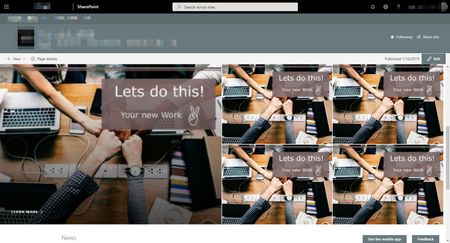
Good day everybody, For a long time I've had a problem with the Hero web part and am more and more convinced now that it's a bug: The image of the first or large left tile is always blurred or of poor quality, as if it appears in a smaller tile. See example below. I have tried various file formats (jpeg, png, bmp), tried out all aspect ratios according to https://support.office.com/en-us/article/image-sizing-and-scaling-in-sharepoint-modern-pages-dc510065-b5a5-4654-bc94-e3ecbbb57d8d (4: 3, 16: 9) - without success. I tried everything from 1024x768 to 3036x768.... When I edit the web part and click on "Republish", the big tile appears sharp. As soon as I do a browser refresh (F5), it will appear blurry. This error appears is independent of tenant, users, browser, and browser. It also makes no difference whether I used "auto-selected" or "custom image" and select the image by drag-and-drop or from the document library of the page. The example image below has a resolution of 72dpi with 1880x1230 pixels If it is not a bug and the fault lies with me, I urge you for help. Thank you!Collab-Constructor_93Apr 21, 2026Copper Contributor4.8KViews0likes7Comments
File versioning not working in Document Library
I'd very much appreciate some feedback here before I pull the last of my hair out! I have a document library. Versioning and check out is enabled. Major versions only. I'm using the native 'Version' column, but it just stays empty, despite the document showing as Approved in the library As a test, I created a new document library, enabled versioning, check ins and approvals and uploaded a file. Even after approving, the version number doesnt show I have tried getting the meta data from the file before and after to see if that will update the Version but it doesn't work. Any help would be greatly received!GavynJamesApr 21, 2026Copper Contributor515Views0likes1Comment
SharePoint List Rule to send email not allowing shared mailbox email address
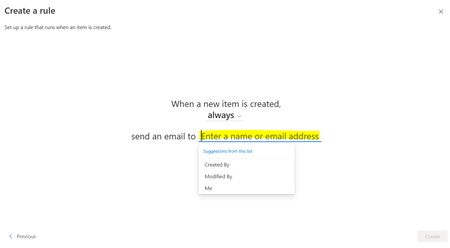
Hi I have tried to search for an answer to this to no avail. We have a SharePoint list and want to create a rule that sends an email when a new list item is created. Sounds simple but I can't seem to add a SharedMailbox email address only UserMailbox email addresses. We do have a work around where we have created a rule in outlook instead that when the email arrives to the UserMailbox forward it to the correct SharedMailbox but it seems a bit silly that I can't directly add a SharedMailbox to the SharePoint list directly from the below. See below the screenshot of where I am trying to insert the SharedMailbox email address. It doesn't find it and if I add it in manually the create rule button doesn't activate. Am I missing something? Thank you!slw_willsApr 20, 2026Copper Contributor2.6KViews3likes5CommentsSharePoint & AI (Knowledge Agent)
In my tenant, I cannot use some of the basic AI features of the Knowledge Agent. I tried to use the "Create list" prompt, but every call failed with the message: "Something went wrong, and I couldn't complete your request. Please try again later." I have a Copilot license, and some other features are working as expected. I encountered many errors in the browser console that violate the following Content Security Policy directive: "script-src 'unsafe-eval'" (see attached image). "violates the following Content Security Policy directive: "script-src 'unsafe-eval'" I tried an inPrivate browser session already without any changes in the behavior.39Views0likes0Comments
SharePoint List Migration to new Tenant
Hi All, I am preparing for a tenant-to-tenant migration of 60+ SharePoint lists that function as the back-end for various PowerApps. Since we are doing a staggered cutover, I need to perform an initial migration now and then run 'Delta' syncs over the next few weeks to catch new records, updates, and deletes. My primary challenge is that SharePoint's native ID column is not preserved during manual migrations (PowerShell/CSV), which will break our App logic and Lookups. How have others handled cross-tenant list synchronization at this scale? Specifically: How do you maintain record relationships and deep links when the system IDs change? What is the most efficient way to handle deltas across 60 lists without buying expensive 3rd-party migration tools? thanks, JakeJakeGoldenApr 20, 2026Copper Contributor36Views0likes1Comment
Automated emails from SharePoint when new file added to sites document library
I have noticed in the last few months that I have been receiving emails from SharePoint Online when a new file has been added to a sites document library, these files specifically come from attachment questions on MS Forms we have in place. I have been trying to find out where these alerts are managed but to no avail. I first thought to check the old soon to be deprecated alerts area, no rules set up. I then check the new rules section....nothing. Also ran an audit from that site to see what actions were taking place at the time of the email....no results. Finally tried to run a mail trace but "SharepointOnline" isn't a user object/mailbox in our database so no result would come back. Has anyone else had any experience with this or luck managing it?JonPAHApr 20, 2026Occasional Reader28Views0likes1CommentCan not delete page from search results
I need help deleting a page from search. This is a translated page. I have already deleted the page, the page is deleted from all recycle bins. Same for the original page. The translated page is still showing up in the search results (this happened on friday). What else I tried: - Reindexed the SitePages library => didn't help - Reindexed the entire SiteCollection => didn't help either - Delete the page in the admin center (https://contonso-admin.sharepoint.com/_layouts/15/searchadmin/searchresultremoval.aspx) => Error message that the page cannot be found did not help - New page created under the same URL (original + translation), published, deleted again => New page was in the search results, disappeared again, old page is still in the search results. So it didn't help either. How can I really remove a search result from the search? I waited 4 days now and the page is still in the search results and everything I tried is not working properly.hst_deApr 20, 2026Copper Contributor18Views0likes0Comments
Metadata being lost/corrupt
Anyone seen this happen before ? I have a metadata column called Business Area which has a choice column. Not too many files in the library, less than 100. We then group by Business Area. The pic above shows a file that was in a Business Area called Regulation and Assurance - but the file for some reason loses the correct value in the column and pops out in its own 'unknown' business area. To fix it we have to change the column back to the correct value. This happens on a few different libraries that are setup like this.GaryS123Apr 20, 2026Iron Contributor15Views0likes0Comments
Users unable to determine who has access to document library due to security groups
Greetings, Maybe I went about this the wrong way. Looking for advice on either the proper way we should be moving forward on this or any other comments or insight we should be considering. This is for SharePoint online via Microsoft 365 Business license. Scenario: 1. SharePoint Document Library per department (Each Document Library exists in its own SharePoint site), essentially being used as a company drive. 2. Some users should only officially have access to specific folders in some of the document library. 3. If say a person in accounting has access to some specific folders, and either they are replaced or a new accounting user comes in.... should be able to reference the access the existing person has in order to give the same access to the new user. 4. Common Request: Give UserB the same folder access as UserA. 5. Some users should have access to the entire document libraries while other users only have access to specific subfolders. Current Implementation: 1. In Entra, created Security Groups that tied to specific folders. -- For Example for the accounting folder, only management has access to the entire folder but the accounting staff only have access to specific folders. So like there is a FiscalYear2024 folder, so I created a security group called sec-Accounting-FiscalYear2024 and assigned the members that should only have access to that folder and not the rest of the library. -- My thought behind this was if a new user was replacing the existing user or joining the department, I can just reference the existing user security group membership and copy it to the new user. 2. In the SharePoint document Library, I create a shareLink that is assigned to the security group I made for that access. Then I give that link to the users I assigned the membership to. Current Issue: 1. Aside from the official document sharing/access that is being done from the security groups above. There are occasions where users of a sharepoint need to share specific files or folders to other users. 2. However, they are all panicking and confused because aside from themselves they are unsure who has access to the existing folders/files in the document library. 3. When going to manage permissions of a file/folder, it only shows the group assigned to it but not the members of the group. 4. So since users can't see the members of the group assigned to a folder, they have no idea who has access to that folder and are getting confused. If this was an NTFS drive, it would be super easy for users to see who has access and etc by looking at the properties but I'm stuck behind some limitations of sharepoint I didn't realize existed until I tried to implement certain workflows. Any advice here would be greatly appreciated, as my implementation has turned into a point of frustration for end users. Thank you in advance!47Views1like1CommentQuick Launch missing from SharePoint subsite after deleting links
The Quick Launch navigation has disappeared from one SharePoint subsite (Marketing) after I deleted some placeholder links on a Marketing page. It was working previously, and still appears on other subsites in the same site collection. In Site Settings, Quick Launch is still enabled, but there is no option to add or edit navigation links anymore, and the left navigation is completely gone on this subsite. Has anyone seen this before or know how to restore the Quick Launch for just one subsite? Thank you!MeaganUTSWApr 18, 2026Copper Contributor37Views0likes1Comment





Tags
- SharePoint Online18,287 Topics
- Document Library3,219 Topics
- Lists3,141 Topics
- Sites2,617 Topics
- admin2,254 Topics
- sharepoint server2,046 Topics
- Permissions1,989 Topics
- files1,725 Topics
- developer1,608 Topics
- microsoft lists1,580 Topics