Forum Widgets
Latest Discussions

New Calendar List Template
What's the plan with the new Calendar List Template? It's modern look but not linked to Events, no fields, no explanation of its difference from events, no alternative Events list (which is poor but the best we have)... How do I create an SPO Events list? I used to add an Events web part and click "add event;" now the link is disabled. The web part is configured to all events on the site (not a specific list). I can't even copy it from an existing list in another site. There's a migrated SP2013 Events list on the site, but that didn't previously prevent the creation of a new one...CaroleSLJan 22, 2026Iron Contributor8Views0likes0Comments
How to extract full SharePoint Site Usage Analytics via API (avg time, device, heatmap)?
Hello everyone, I'm trying to automate the extraction of SharePoint Site Usage Analytics reports, but I'm running into a limitation where the data exposed by Microsoft Graph API does not match the analytics available in the SharePoint UI or the exported Excel report. In the SharePoint site analytics page, I can see metrics such as: Unique viewers Site visits Average time spent per user Usage by device Usage by time (heatmap) Trend charts for the selected period (7 / 30 / 90 days) There is also a Download button that exports an Excel file containing all these analytics. However, when I query Microsoft Graph using the SharePoint usage reports endpoints (for example: getSharePointSiteUsageDetail), the API only returns a subset of the data: { "lastActivityDate": "2026-01-20", "uniqueViewers": "28", "siteVisits": "615", "avgTimeSpentPerUser": null, "byDevice": null, "byTimeHeatmap": null, "fileCount": "759", "activeFileCount": "45", "pageViewCount": "615", "visitedPageCount": "28", "reportRefreshDate": "2026-01-20", "reportPeriodDays": "7" } As you can see: Fields like avgTimeSpentPerUser, byDevice, and byTimeHeatmap are always returned as null. The numeric values (unique viewers, visits, etc.) are also different from what the SharePoint UI shows for the same time range. The Graph data appears to be delayed and aggregated differently compared to the UI. From what I can tell: These metrics seem to exist internally (since the UI and Excel export clearly show them). But they are not exposed through any documented Graph API endpoint. The Excel download does not appear to have a stable or supported API endpoint that can be called programmatically. My questions Is there any supported way to programmatically retrieve the full SharePoint analytics dataset (including avg time, device breakdown and time heatmap)? Is the Excel export endpoint accessible via any supported API? Are these fields intentionally not exposed in Microsoft Graph? If this is not possible today, what is the recommended approach for automating this type of analytics collection? Any clarification or official guidance would be greatly appreciated. Thanks in advance!marcojuniorJan 22, 2026Occasional Reader12Views0likes0Comments
User Accounts Not Populating with Filters in Directory with PnP V4
I'm working on building a staff directory for my org. I'm leveraging the PnP Modern Search Web Parts for this directory. I am having issues with 5 user accounts not populating in the Search Results Web Part with the department or office filters applied to the SearchTerms box. I have RefinableString03 set to People:Department and People:SPS-DEPARTMENT. RefinableString09 is set to People:OFFICE and People:SPS-Location. If I set the SearchTerms box to *, the 5 missing user accounts populate along with other accounts that needed filtered out. The location/office and department attributes are set for each of these accounts. They show in the hovercard for each account. It seems that the department and office/location attributes are not being picked up by the SearchTerm filter when the RefinableString03 and or RefinableString09 are applied to the Search Results Web Part. User account attributes are synced from our on-prem AD environment. What piece am I missing here?k_bettsJan 22, 2026Occasional Reader12Views0likes0CommentsIntermittent failures when creating new libraries in modern SharePoint
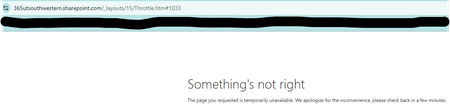
Hi everyone, I’m seeing an issue in our modern SharePoint Online site collection where creating new document libraries has started failing. This site has worked normally for years, but over the past week, most library creation attempts haven't worked. 1) The page briefly flashes or glitches during the creation process. and 2) A non‑ending spinning wheel when I hit "create" or 3) Creation attempts return “Something's not right.” error page. The failures happen across all subsites, in multiple browsers, and I’m a Site Collection Administrator. No permission changes were made recently. Has anyone seen similar intermittent library creation failures in a modern site collection, or know what might cause this kind of inconsistent behavior? Any guidance would be appreciated. Thanks! MeaganMeaganUTSWJan 22, 2026Copper Contributor45Views0likes3Comments
Hoe kun je een Excel Werkmap in SharePoint delen en bepaalde informatie verbergen?
Bij een klant van mij wordt in SharePoint door twee personen gewerkt met een gedeelde Excel werkmap. Beide gebruikers kunnen gelijktijdig muteren en ze zien in real time welke aanpassing de collega maakt. Tot zover geen probleem. Nu willen ze de werkmap ook delen met personen buiten hun organisatie. Deze mogen niet muteren, maar ze mogen ook niet alle regels van de werkmap zien. Hoe kan ik dat regelen in SharePoint?JanKrooshof7881Jan 22, 2026Copper Contributor10Views0likes0Comments
PNP Search Results sort by title
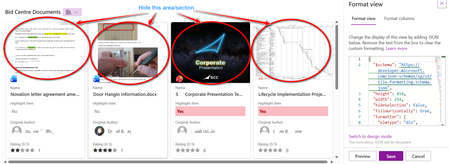
Hi. I have a PNP Search results webpart, that brings me all the Document Libraries in SharePoint site (that are not the standard ones Like site assets, pages etc) I want the results to be sorted, but i tried with sort column and it does not work, I want it to show in alphabetical order If i use "edit sort order" and select by title, it gives me an error I added a RefinableString where i have the title but it is still not sorting it How can i get this list sorted without having to add another column for the Title (with out the link) THank youMVCuserJan 22, 2026Brass Contributor78Views0likes1CommentTo hide the file preview section in a SharePoint Document library gallery card with JSON
Hello All, I have a SharePoint document library and I created a gallery view for it. I displayed several columns/metadata on the gallery view. I want to disable/hide the file preview section in this card. I believe this can easily be done by changing some code in JSON at the Format view Advanced. However, I don't know how to do it. I hope there is someone, in this form, could be able to help me. Thanks in advanced.46Views1like1Comment
Page Redirection
Hello, I am trying to simulate a migration scenario in SharePoint Online and am running into a limitation I cannot resolve. For demo/testing purposes, I have two SharePoint Online sites (e.g. Old and New). I would like to redirect a small number of individual pages from the old site to corresponding pages in the new site, while the rest of the old site remains unchanged. Example: Redirect https://ps3c.sharepoint.com/sites/Old/SitePages/Test.aspx to https://ps3c.sharepoint.com/sites/New/SitePages/Test.aspx The page is a modern SharePoint page, and the URL itself is fixed for the purpose of the demo (i.e. users or tools open the page directly on *.sharepoint.com). All documentation I could find only describes redirecting entire SharePoint sites, not individual modern pages. Client-side approaches (JavaScript, HTML meta refresh, etc.) also appear to be blocked in modern SharePoint. Is there any supported or recommended way in SharePoint Online to implement page-level redirects for modern pages, or is this currently not supported by design? Kind regards10Views0likes0Comments
Change in SharePoint File Selection Behaviour
Has anyone noticed this in the last week/s? Basically before, you used to be able to SELECT files without opening them. Now, 5-6 times out of ten, if I try to select a document or folder it opens instead. Like, even when i am clearly clicking the checkmark to the left of the file/folder, it will STILL OPEN in the browser, rather than just selecting. It's like the file open behaviour has gotten more sensitive or something? It's really frustrating because my users need to add metadata to documents by selecting them, and now they have to fight with SharePoint nearly every time.SylvieLetJan 22, 2026Copper Contributor65Views1like1CommentMaking a FAQ using lists need help with json formatting colors
So I was following a tutorial on Youtube on how to make a FAQ list but I cant get the formatting right. There are 4 columns in this list Title, Question, Answer, Show More Basically I have it grouped by title and then grouped by question The problem is the as you can see in the screenshot below the title and question are all the same color I want them to be a different color. I have also attached the JSON I am using in formatting below. But basically I need help figuring out how to make the title in this case documentation different from the questions. { "$schema": "https://developer.microsoft.com/json-schemas/sp/v2/row-formatting.schema.json", "schema": "https://developer.microsoft.com/json-schemas/sp/v2/row-formatting.schema.json", "hideSelection": true, "hideColumnHeader": true, "hideListHeader": true, "groupProps": { "headerFormatter": { "elmType": "div", "attributes": { "class": "sp-row-card" }, "style": { "color": "#333333", "background-color": "#F7F7F7", "flex-grow": "1", "display": "flex", "flex-direction": "row", "box-sizing": "border-box", "padding": "8px 12px", "border-radius": "6px", "align-items": "center", "flex-wrap": "nowrap", "overflow": "hidden", "margin": "4px 6px 6px 4px", "min-width": "max-content", "box-shadow": "0 1px 3px rgba(0,0,0,0.1)" }, "children": [ { "elmType": "img", "style": { "max-width": "28px", "max-height": "28px", "margin-top": "0", "border-radius": "3px", "margin-right": "12px" } }, { "elmType": "div", "children": [ { "elmType": "span", "style": { "padding": "4px 6px", "font-weight": "600", "font-size": "16px", "color": "#B31B24" }, "txtContent": "@group.fieldData.displayValue" } ] }, { "elmType": "div", "style": { "flex-grow": "1" }, "children": [ { "elmType": "div", "style": { "display": "flex", "flex-direction": "column", "justify-content": "center" } } ] } ] } }, "rowFormatter": { "elmType": "div", "attributes": { "class": "sp-row-pwc-bg" }, "style": { "display": "flex", "justify-content": "flex-start", "color": "#222222", "padding": "8px 16px", "border-radius": "6px", "max-width": "920px", "margin": "6px 8px 8px 60px", "background-color": "#FFFFFF", "box-shadow": "0 1px 4px rgba(0,0,0,0.08)", "align-items": "center", "flex-direction": "column" }, "children": [ { "elmType": "div", "style": { "text-align": "left", "font-weight": "600", "font-size": "16px", "color": "#E4002B", "user-select": "none" }, "txtContent": "" }, { "elmType": "div", "style": { "margin-top": "8px", "font-weight": "400", "font-size": "14px", "color": "#5A5A5A", "white-space": "pre-wrap" }, "txtContent": "[$Answer]" }, { "elmType": "button", "customRowAction": { "action": "defaultClick" }, "txtContent": "Show more", "attributes": { "class": "sp-row-button" }, "style": { "display": "=if([$ShowMore] == 'Yes', 'inline-block', 'none')", "margin-top": "10px", "color": "#FFFFFF", "background-color": "#E4002B", "border": "none", "padding": "6px 16px", "border-radius": "4px", "cursor": "pointer", "font-weight": "600", "font-size": "14px", "text-align": "center", "box-shadow": "0 2px 6px rgba(228,0,43,0.3)" } } ] } }rmartoriJan 22, 2026Copper Contributor61Views0likes1Comment


Resources
Tags
- SharePoint Online18,205 Topics
- Document Library3,198 Topics
- Lists3,120 Topics
- Sites2,589 Topics
- admin2,239 Topics
- sharepoint server2,041 Topics
- Permissions1,977 Topics
- files1,714 Topics
- developer1,599 Topics
- microsoft lists1,565 Topics