Forum Widgets
Latest Discussions

Site header: overflows to navigation bar
We use SharePoint for our intranet, and with a rebrand coming, we're building new headers for each of the sites that make up the intranet. Since we first built our sites, the site header behaviour seems to have changed: it overflows vertically into the navigation bar, rather than constraining it to the height of the actual header (above the nav). Not ideal, but I'd adjusted where the business logo sits in the height to work well. However, when you scroll down and the header compresses, this chops the top half of the logo off. Anyone have any similar experience/solutions? I don't want to deploy a CSS code, as that's likely to break later. Alternatively, if the lovely people at Microsoft could put it back to constrain it within the banner height, that'd be great. It's easier to create a super wide image (to avoid gaps) than it is to juggle the variables when height overflows differently on different screens. Thanks in advance!JoeRApr 02, 2026Copper Contributor26Views0likes2Comments
Upcoming change: Retirement of noise suppression capability for ODSP video
We're writing to inform you of an upcoming change to video playback features in OneDrive and SharePoint. What's changing: Starting July 1, 2026, the noise suppression feature for video playback on OneDrive and SharePoint will be retired. This feature, which reduces background noise during video playback, will no longer be available in the web playback experience. Based on usage data and our ongoing effort to streamline the video experience on OneDrive and SharePoint, we've made the decision to deprecate this capability. Please share your feedback through Noise Suppression Feature Survey so we can continue to improve the video experience on OneDrive and SharePoint. What this means for your content: Your video content is not affected. No original files will be modified or re-encoded – this change only impacts the playback experience. Noise suppression will no longer be available as a playback toggle option when viewing videos stored on OneDrive or SharePoint. No changes to other video and audio playback features – including playback speed controls, captions, and transcripts – remain available and are unaffected by this change. What administrators need to know: No admin action is required. The noise suppression option will be removed automatically after the retirement date. There are no tenant-level settings to manage for this change. Alternative options: If noise suppression is important to your workflow, please consider these alternatives: Pre-process your audio using a dedicated noise removal tool before uploading to OneDrive or SharePoint. Record in a quieter environment or use a directional microphone to minimize background noise at the source. We value your feedback: We understand this change may affect some of your workflows, and we want to hear from you. Please share your feedback through Noise Suppression Feature Survey so we can continue to improve the video experience on OneDrive and SharePoint. All other video playback capabilities on OneDrive and SharePoint remain fully available. We're committed to continuing to invest in features that help you get the most out of your video content.23Views0likes0Comments
Anyone having issues moving SharePoint web parts today?
I have received several reports this morning regarding issues with moving web parts in both communication sites and Teams sites. I was able to reproduce, but am unsure if this is an internal issue or some larger issue. When trying to move web parts instead of moving between sections or around the flexible section it simply highlights all text boxes in the vicinity. This also occurs when attempting to move web parts using the "move section" button in the properties bar. Anyone else experiencing this issue this morning?JustDiggzApr 01, 2026Copper Contributor66Views1like2Comments
SharePoint without Sync (Advice Needed)
Our biggest challenge with SharePoint is how to roll it out to End Users with no SharePoint Experience (many of these users are engineers/site based on slow(ish) internet connections. We have large (+100,000) document libraries with long paths. Sync has been a massive issue, the default behaviour has been to just use File explorer to access files, resulting in sync errors and accidental deletion of files. I am looking for advice on turning OFF sync (in the document library settings) I have concerns about doing this, as there are always times when it is easier to Sync, and this is essentially a global setting (set for all users) Has anyone had any real life use cases/experience of doing this. I cannot think of any alternatives.ChrisGray97Apr 01, 2026Brass Contributor527Views1like11Comments
Install a webpart but do not see it in SharePoint!
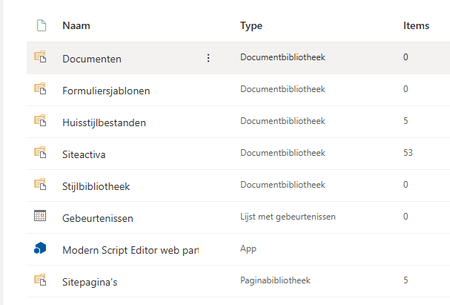
Hi, I have installed the Modern Script Editor webpart. When i go to Site Content my webpart is displayed: But when I edit a SharePoint page and try to select the Modern Script Editor Web part it isn't showed in the webpart screen !!! What do i do wrong? Even when i select Create a app is see the app installed: What do i have to do be able to select the script editor webpart in the webpart screen? Gr. PPeter_KiersMar 31, 2026Copper Contributor158Views0likes2CommentsTrying to use Lists as a very basic CRM but having search issues
Hey All, I have a small business I'm considering using Lists to track some very basic client info and build a client database that is accessible to all employees on the company SharePoint site (we use MS 365). Workflow would be something like: Client calls in Receptionist(s) answer If new client, create an entry with first/last name, phone #, email address, their spouse's name (if any) and a Notes section to jot down notes from the call. If current client, receptionist can use search to find client, make new notes, read previous notes, etc That is basically it. I have this set up in Lists right now as a test with just two clients, each with a spouse. When I do a search for the person's name (Bill or Franklin), it returns a result. When I search for their spouses name (Susan), it returns nothing. I've run through the settings, reindexed the list, etc, and I just can't get a simple search to work. Am I attempting to use this correctly? Both name columns are single line fields. TYIA for any input!CynapseMar 30, 2026Copper Contributor56Views0likes4CommentsConnect to Outlook button greyed out for select users
Hi All, Some of our users are facing the issue where their Connect to Outlook button is greyed out on their SharePoint calendar. This is a classic list and they are on classic Outlook, with all the adequate permissions. Myself and my colleagues are unable to replicate this, we are on both classic and new Outlook and the button is available. We have created accounts to mirror their permissions exactly and still can not replicate it. Is Microsoft slowly removing this feature? It would be great to have some confirmation so we can confirm if this is an issue for us to resolve or if unfortunately there is nothing we can do about it. Thanks!JackFVMar 29, 2026Copper Contributor24Views0likes1Comment
Horrible sharing URLs in Sharepoint
What is the story with Sharing URLs - they are horrible! In classic SharePoint you could click/drag over a document and you had a user-friendly URL that linked to the document and could be pasted directly into documents, emails etc. Permissions were set once based on the organisation's policy. The link was completely separate to access. Now it creates a horrible unprofessional looking GUID filled thing! In addition, you now have to specify the type of sharing/access you are providing - in most cases existing access is fine! - which can then result in completely unnecessary permissions entries that now have to be managed/audited. Not only was it fine the way it was, it was better! Any chance of sorting this out?JohnTMMar 26, 2026Brass Contributor7KViews0likes12Comments
e: Tabs and Accordian page layout SPO Modern
Hi, Has anyone been able to obtain a preview or seen beta testing of the option to insert tabs and accordians into page sections? It is due for rollout in April but am just wondering what kind of functionality it will have: SharePoint: Collapsible sections on modern pages – You’ll have the ability to show page sections in an accordion view (collapsed or expanded) or as tabs. The accordion view will be collapsed by default, but can be set to show expanded. https://www.microsoft.com/en-us/microsoft-365/roadmap?filters=&searchterms=67147 Thanks AlanAJP2019Mar 26, 2026Copper Contributor3KViews0likes2CommentsUPDATE: Support for Structured/Managed Navigation enabled on Modern Pages in Classic Team Sites
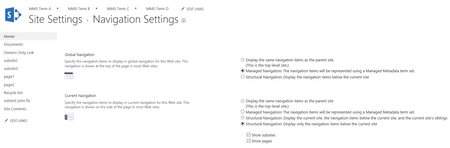
Hi everyone! Thank you for the feedback around wanting to move to the “modern” team site experiences, and needing support for structured/managed navigation. We’re pleased to announce that we have addressed this issue and will be rolling out the fix to the worldwide production environment in the coming days. Thank you for your patience – and to the community for helping us identify some issues during the initial First Release preview! With this update if you have enabled publishing on a classic team site, your structured or managed navigation will now render correctly in the modern experience (both global and current navigation), including any scoped or audience-targeted links. We haven’t pulled all the classic settings into the modern panels yet, so when you need to edit the navigation elements, the edit link will direct you to the classic settings page. Navigation settings on a classic team site: Now render correctly on a modern page: Additionally, subsites will correctly inherit from the parent web when structural navigation is used. Parent site: Subsite: We hope this unblocks you as you move to the modern user experience (UX). Try it out, and let us know if you have any questions. Thanks, Sean!47KViews25likes113Comments


Tags
- SharePoint Online18,272 Topics
- Document Library3,216 Topics
- Lists3,138 Topics
- Sites2,613 Topics
- admin2,251 Topics
- sharepoint server2,046 Topics
- Permissions1,986 Topics
- files1,724 Topics
- developer1,606 Topics
- microsoft lists1,580 Topics