
Forum Widgets
Latest Discussions
Copilot Chat vsus. Microsoft 365 Copilot. What's the difference?
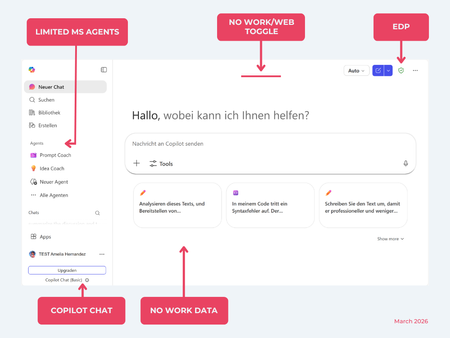
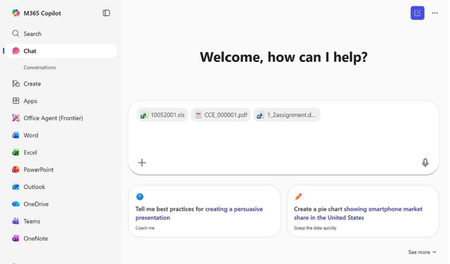
While their names sound similar at first glance, Microsoft 365 Copilot and Microsoft 365 Copilot Chat, they differ in several aspects. And more importantly: one is built on top of the other. What is Copilot Chat (Basic)? First things first. Microsoft 365 Copilot Chat is often simply called Copilot Chat. Copilot Chat (Basic) generates answers based on web content, while Microsoft 365 Copilot (Premium) is also grounded on users' data, like emails, meetings, files, and more. Since early 2025, Microsoft 365 Copilot Chat has been available to all users in organizations, becoming the entry point to AI assistance for many organizations. Copilot Chat (Basic) is the foundational Copilot experience available at no extra cost for everyone with an eligible Microsoft 365 plan, including: Microsoft 365 E3 / E5 Microsoft 365 A3 / A5 Microsoft 365 Business Standard & Business Premium Copilot Chat (Basic) is secured, compliant, and it does not required the full Copilot add-on license. Copilot Chat (Basic) is able to ground responses on: Public web content. Content explicitly shared or work data manually uploaded to the chat by the user. On-screen content or content displayed on-screen in apps like Outlook, Word, Excel, PowerPoint, and OneNote. When it comes to agents, Copilot Chat (Basic) offers these features: You can create your own declarative agents grounded on public web content with Agent Builder. You can use agents built by your org grounded on organizational data with the pay-as-you-go method. There are Microsoft prebuilt agents available like Prompt Coach, however Microsoft premium prebuilt agents like Researcher or Analyst are not included. The screenshot below shows how Copilot Chat looks and highlights its main capabilities. Note the Upgrade button, meaning this is not Microsoft 365 Copilot, but the Copilot Chat (Basic) experience. Note that EDP (Enterprise Data Protection) is available in Copilot Chat (Basic). What is Microsoft 365 Copilot (Premium)? Microsoft 365 Copilot (Premium) is a paid add-on license that builds on top of Copilot Chat and unlocks Copilot's full power. It is available for selected Microsoft 365 plans, including: Microsoft 365 E3 / E5 Microsoft 365 A3 / A5 Microsoft 365 Business Standard & Business Premium With a Microsoft 365 Copilot license, users get everything Copilot Chat (Basic) offers, plus much more: Data grounding: Microsoft 365 Copilot (Premium) includes Copilot Chat grounded on web and/or on user's Microsoft 365 data like emails, meetings, chats, and documents. Office apps: It integrates deeply into Microsoft 365 apps like Outlook, Teams, Word, Excel, and more. The integration includes features like Edit with Copilot allowing Copilot to adjust live your documents or email based on your prompts. Custom agents: It brings the capability to create your own declarative agents grounded in organizational data and/or web data. You can create agent either using Agent Builder or Copilot Studio. MS prebuilt agents: Premium prebuilt agents like Researcher and Analyst are included in Microsoft 365 Copilot (Premium). The screenshot below shows the Copilot chat experience for users who have a Microsoft 365 Copilot license. Note that EDP or Enterprise Data Protection also applies here How can I access Microsoft 365 Copilot Chat? Today, Copilot Chat is accessible via https://m365.cloud.microsoft or https://copilot.cloud.microsoft using your Entra ID (work or school account). One important difference in day-to-day experience: Users with a Microsoft 365 Copilot license typically see Copilot prominently surfaced across Microsoft 365 apps. Users with Copilot Chat only may not see it pinned by default on the Microsoft 365 home page. To improve discoverability, Microsoft 365 Copilot administrators can pin Copilot Chat via the Microsoft 365 admin center, ensuring that users can easily access it without friction. Especially convenient is that if you use the M365 Copilot Chat app on Windows, you can open Copilot using the keyboard shortcut Ctrl + C. What’s the difference? The differences between Copilot Chat and Microsoft 365 Copilot mainly come down to: Licensing Data grounding (web-only vs. personal work data) Integration depth within Microsoft 365 apps I’ve listed the key differences in the comparison below. 👇Solved
Using Copilot to help with 1:1 meeting prep for managers?
I tried using Copilot to summarize our last meeting notes and pull up recent emails but it doesnt really give me a structured agenda or remind me about open action items from previous meetings. Anyone using Copilot for meeting prep in a way that actually works? Or is there a better approach for structuring recurring 1:1s in Teams?MeggyB360Apr 02, 2026Copper Contributor5Views0likes0Comments
Copilot File Downloads Expire Immediately – Error Across App, Browser, and Incognito
Hi, I’m running into a recurring issue when Copilot generates downloadable files. Every time I try to download the file (almost immediately), I get the following error message: “File unavailable. Generated files expire after a short period. Please regenerate if needed.” This happens consistently, even when I regenerate the file multiple times. I’ve tested this in several places and the issue is the same everywhere: Copilot App Browser version Incognito / Private mode The file appears for a moment, then instantly becomes unavailable. I’m unable to download anything before it expires. Is this a known issue, and is there a workaround? Thanks in advance for any guidance.satnamdApr 02, 2026Copper Contributor236Views1like3CommentsLimitations of Microsoft 365 Copilot for Excel workflows?
I've been exploring Microsoft 365 Copilot for Excel workflows recently. It works well for simple queries, but I still find it limited when dealing with: - messy data cleaning - converting images/PDFs into structured tables - more complex data transformations Curious how others are using Copilot for these scenarios? Are you relying purely on Copilot, or combining it with other tools/workflows?122733Apr 02, 2026Copper Contributor21Views0likes0CommentsAgentOps: The Missing Layer Between DevOps and AIOps
In the last decade, the way we build and operate software has transformed dramatically. DevOps broke down the walls between development and operations, enabling faster delivery, continuous integration, and scalable infrastructure. Then came AIOps, promising to harness artificial intelligence to monitor, analyze, and automate IT operations at scale. https://dellenny.com/agentops-the-missing-layer-between-devops-and-aiops/27Views0likes0CommentsWhat’s new in Copilot Chat Quality Roadmap — March 2026
We’re building Copilot Chat in the open. The March updates to the Copilot Chat Quality Roadmap show how we’re making Copilot Chat more flexible and easier to work with. You can share more information at once, interact in more natural ways, and get more complete answers—all while staying within the secure Microsoft 365 environment. Here’s what’s new and coming next. All Features shown here are available at no additional cost to users with a qualifying Microsoft 365 or Office 365 license. March Highlights: 🚀 Discover What’s New: Try the latest quality features today Code Interpreter localization improvements: Correct rendering of non-Latin characters in charts and generated files. Try this: Ask Copilot to create a chart or report with labels with non-Latin characters. You’ll see the text display correctly in the output file. 🚧 What’s Next: Explore upcoming quality features in development Upload different content types together: Upload multiple files at once to get faster, more complete answers. Try this: Drag and drop two or more files (for example, a Word document and an Excel spreadsheet) into Copilot Chat at once. Then ask a question that spans both, such as “What does this spreadsheet say about the project described in this document?” Code Interpreter Sensitivity Label Inheritance: Files generated by Code Interpreter automatically keep the same sensitivity labels as the source data. Try this: If you use Copilot’s Code Interpreter on a file labeled Confidential, any files it generates (for example, a summary or visualization) will automatically be labeled Confidential in OneDrive. 📌 Bookmark the monthly Copilot Chat Quality roadmap and tell us what you want to see next: https://aka.ms/copilotchatroadmap81Views1like0CommentsCost Optimization for Copilot and AI Agents on Azure
Artificial Intelligence is no longer experimental it’s operational. Organizations are rapidly deploying copilots, AI agents, and generative AI solutions on Azure to drive productivity, automate workflows, and unlock insights. But there’s a reality that quickly follows every successful deployment: cost becomes a concern. https://dellenny.com/cost-optimization-for-copilot-and-ai-agents-on-azure/26Views0likes0CommentsInside Microsoft 365 Copilot: How It Actually Works
An architect’s perspective on grounding, orchestration, and the real engine behind AI productivity If you’ve used Microsoft 365 Copilot, you’ve probably had that moment: “How is this thing actually doing all of this?” It reads your emails, summarizes meetings, drafts documents, and somehow feels aware of your work context. But beneath the polished UX lies a system that’s far more structured—and deliberate—than a simple chatbot. https://dellenny.com/inside-microsoft-365-copilot-how-it-actually-works/32Views1like0CommentsRemoval of Copilot Chat Availability in M365 Apps?!?
Received a post in Message Center today and would like clarification as to what capabilities Copilot Chat will retain as it is unclear from the message. This is a huge impact to users who have already adopted Copilot Chat in Word, Excel, PowerPoint and OneNote as well as training materials (both our own and those provided here by Microsoft). Will users be able to access Copilot Chat (basic) via pinned app in M365 apps? Will users only be able to access via web browser? The section below noted in red is very confusing (from the Microsoft message) -- who gets what features as both are mentioned in same paragraph? ---------------------------------- Microsoft 365 Copilot Chat – Updates to Copilot in Word, Excel, PowerPoint, and OneNote Starting April 15, 2026, Copilot will no longer be available in Word, Excel, PowerPoint, and OneNote for Copilot Chat users. To ensure a high-quality experience, we are reserving the full Copilot experience in these apps—with advanced reasoning and model choice—for users with a paid Microsoft 365 Copilot license. There are no other changes for users without a Microsoft 365 Copilot license. Copilot Chat still offers secure, AI web chat and the Word, Excel, and PowerPoint agents for chat-first content creation within the Microsoft 365 Copilot app. Additionally, users still get Copilot in Outlook with inbox and calendar grounding.Beth_P1230Mar 31, 2026Iron Contributor6.7KViews6likes16Comments





Tags
- tips and tricks264 Topics
- microsoft 365 copilot245 Topics
- Getting Started215 Topics
- copilot chat195 Topics
- troubleshooting191 Topics
- copilot in teams105 Topics
- management and extensibility70 Topics
- training and resources69 Topics
- Copilot in SharePoint68 Topics
- accessibility65 Topics