Forum Widgets
Latest Discussions

Config Question: Microsoft 365, Microsoft Authenticator, Mac Mail Users
Hello All, We are currently using Microsoft 365 which is "hosted" or "federated" through GoDaddy. I want to pilot Microsoft Authenticator, so that we can have either MFA, SSO, or a combo of both. I'm running into a possible issue when I enable MFA for myself, as an enduser. We run TEAMS, and I only get asked to re-login into Teams to authenticate, which does work. However, if Mac Mail running as a client on the endpoint machine, should I assume that MFA will not work, since it is always communicating to the "hosted/federated" backend? That it never disconnects the connection? If there is something I should do differently with the config, I'd appreciate the guidance here.10Views0likes0Comments
SSO from PingOne to Entra app failing; Not matching on sub value and can't find by email
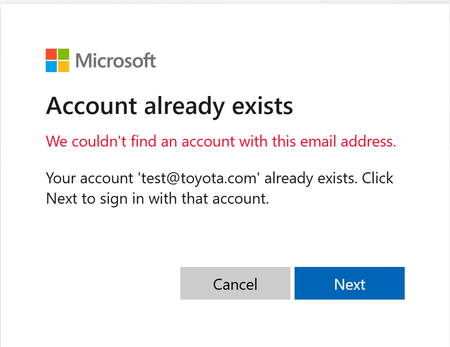
I am trying to implement SSO from PingOne to my Azure app I have registered in Entra External ID. When I don't have the PingOne account pre-provisioned, the sign-in flow provisions the account but with a bad value for the "Issuer" (the tenant id is incorrectly appended to the end of the issuer URL). This leads to a AADSTS500208 error. If I use Graph API to pre-provision the user with the proper "Issuer" URL, I get a message on the Entra prompt that says "Account Already Exists. Click next to sign in". Clicking Next gives the following error message: We couldn't find an account with this email addressewhitesideApr 01, 2026Copper Contributor14Views0likes1Comment
Login Catch-22: locked out of Work account due to MFA mismatch.
"I am the owner of the domain mydomain.be, registered at one.com. I have a Microsoft 365 Business Premium subscription. I am locked out of my work/school tenant admin account (mailto:email address removed for privacy reasons) due to an MFA issue — the Microsoft Authenticator is configured but not delivering push notifications, and the TOTP code length does not match what the login screen expects. I cannot access the admin center. I need to recover Global Admin access to my flavo.be tenant so I can manage users and licenses. I can prove domain ownership via DNS if required.23Views0likes1CommentNgcSet stays NO despite working WHFB setup - RPC 0x800706ba error
Hi everyone, I need help with a Windows Hello for Business certificate trust deployment that's almost working but stuck on the final step. **What's Working:** - Manual certificate enrollment works perfectly: `certreq -enroll -user -config "MyCA.domain.local\MyCA-CA" "MyWHFBTemplate"` - TPM 2.0 is ready, enabled, and functional - All Group Policies applied correctly (computer and user) - CA server healthy, templates published **What's NOT Working:** - `dsregcmd /status` shows `NgcSet : NO` (should be YES) - `NgcSvc` (Microsoft Passport) service is stopped on client - Getting error: "RPC server is unavailable (0x800706ba)" during automatic certificate enrollment - PIN setup fails because NGC containers won't create **The Strange Part:** Manual certificate enrollment works perfectly, but automatic enrollment fails with RPC errors. Both should use the same communication path to the CA. **Environment:** - On-premises certificate trust deployment (no Azure AD) - Domain-joined Windows 11 clients - Windows Server 2019/2022 infrastructure **Questions:** 1. Should NgcSvc start automatically when WHFB policies are applied? 2. Why would manual cert enrollment work but automatic fail with RPC errors? 3. Is there a difference in how system context vs user context accesses the CA? Has anyone seen this specific combination before? Any ideas what could cause this behavior? Thanks for any help!datafog87Mar 27, 2026Copper Contributor244Views0likes4Comments
Hotmail to Outlook Migration Broke My Account
A year or two ago, I updated my Microsoft account to try and migrate from hotmail.com to @outlook.com. Since then, my Microsoft account is broken. I log in with my @outlook.com email, but account.microsoft.com displays my hotmail.com email everywhere. Mobile apps will not stay logged in properly and kick me out after a day. On my account info page my @outlook.com email isn't even listed and hotmail.com is listed as primary, but only logging in with @outlook works. I'm pretty sure when I originally tried to migrate my account some exception wasn't handled properly part way through the process and my account is in some sort of database limbo. Is there anyone at Microsoft here that can help with this? Also, sorry if this isn't the right place to post this, but a call with Microsoft support pointed me here and there doesn't seem to be a "Microsoft Account Support" hub or space on this platform. If anyone knows of a better location feel free to suggest that as well. Thanks!31Views0likes0Comments
SMS code is not sent due to blocking
Hi! Sorry, I was using a translator to write this thread. About two weeks ago, I lost access to my Microsoft account. I haven't forgotten my password, and I haven't logged in from a new device—the system simply decided something was wrong and decided to send me an SMS code to verify my identity. I currently live in Russia and have a Russian SIM card. My government has blocked receiving SMS codes from foreign companies (WhatsApp, Telegram, Microsoft, etc.). I enter the last four digits of my phone number and click "Send Code," but then it says "This feature is currently unsupported." I've submitted recovery forms numerous times, but the account is very old and some of the information has simply been lost! I was barely able to contact a live person from Xbox support, and they opened a service request for recovery. The operator handling my issue completely ignores my messages. The only response he gave was that the form I sent him by email couldn't confirm my identity. He didn't even notice that I just needed a security code for the email address I used to REGISTER the account, as I couldn't receive an SMS code due to the political situation in my country. Today, I contacted a real Microsoft employee again, and he told me to write here because engineers often respond to messages and they can send me the code by email. Please help me. This account has no material value other than a copy of Minecraft. This account is precious as a memory and something that helped me through an important period in my life. Thank you for reading this thread.Philipp_GesMar 12, 2026Copper Contributor145Views0likes1Comment
ADFS - Service Unavaible over WAP
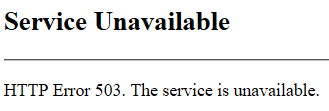
Hi, We have a simple ADFS enviroment with a WAP in a DMZ and an internal ADFS server. Problem is that we are not able to access the Test-Signon-Page (https://fqdn.domain.com/adfs/ls/IdpInitiatedSignon.aspx) or published OWA over the WAP. Internally everything is working fine and also from the WAP I can access the internel ADFS Server with the Test-Signon-Page and OWA with ADFS without problems. But from the internet over the WAP we are always getting: Through WAP we are also publishing Exchange Activesync which is working without problems. I dont see any events in the eventlog, also with tracelogs. I don't see anything interesting in Fiddler on the client. Do you have any ideas? Kind regards PatrickPatrick BMar 05, 2026Brass Contributor1.2KViews0likes1Comment
Microsoft Feedback Portal account is not working
I changed my Microsoft password a year ago, and it updated everywhere other than the Feedback Portal. As a result, I get an error when I try to login, or do anything on the page. Microsoft account support's suggestion was to login to the Feedback Portal which is insane given I'm having issues accessing it. How can I get this issue resolved? I've got three separate support tickets now and they keep asking me to wait 24 hours to get the issue resolved. Can someone from the Feedback Portal team please contact me to resolve this?" This is what Microsoft Support have said: "understand your frustration, and yes—this is an account‑related issue because the Feedback Portal is still tied to your old alias, which causes login conflicts and forces you out. Your Microsoft account itself signs in correctly, but the Feedback Portal is pulling outdated identity data that you cannot update on your own. Since you cannot access the Portal to submit feedback, directing you back there is not a workable solution. What you need is for Support to escalate this to the internal Identity/Feedback Platform engineering team so they can manually correct the outdated alias mapping on the backend. In this situation, the Feedback Portal and Tech Community teams are the ones who manage and maintain that specific platform. Because the issue appears on the Feedback Portal side—even though your Microsoft account is working normally—only their dedicated team can make the necessary corrections on their end. That’s why we are guiding you to connect with them through the links provided: https://techcommunity.microsoft.com/ or https://feedbackportal.microsoft.com/feedback. They will be able to review the portal‑specific account data and assist you further. I understand why this is frustrating. Since you’re unable to stay signed in to the Feedback Portal, I completely see why posting there isn’t possible for you. However, I do need to be transparent: I’m not able to escalate this issue directly to the Feedback Portal team, as they don’t provide internal escalation channels for us and only accept requests through their own platform. "bobbyeagleMar 04, 2026Brass Contributor81Views0likes2CommentsCase 2512040040001886 - Cannot Access Account
Since the 4th of December we have been patiently waiting on MS Tech support to assist on resolving our Case with no success endless calls and endless promises with no luck. How do you proceed in using Microsoft for a Business if they don't deliver on the support. My business is taking the brunt of it. I suppose another call holding for hours and another Support person promise a solution. No other methods to log complaints as you cannot log into your Account Portal.StephenDuPlessisMar 04, 2026Copper Contributor113Views0likes2Comments

Tags
- Authentication356 Topics
- office 365218 Topics
- security164 Topics
- Identity72 Topics
- admin67 Topics
- multi-factor authentication64 Topics
- Azure AD52 Topics
- Authenticator app49 Topics
- exchange43 Topics
- microsoft 365 apps40 Topics