modern authentication
29 Topics
Trapped in an Authenticator Loop
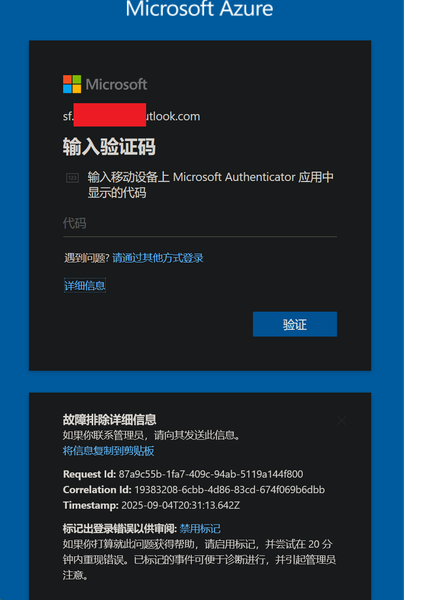
Dear Community, please help! I am trapped in an Authenticator Loop. I've got a microsoft workplace account, but if I want to log in, I have to type in a code from the microsoft authenticator app. I downloaded the app, but in order to use it, I have to log into my account and in order to do so, I also have to type in a code from the authenticator app, which I don't get, because to get the code I would have to log into the authenticator app, what I would need a code for... No matter which link I click, I can't open anything before I enter the code, which I can't get. I am using teams on mac, either on a firefox browser or on the desktop app and the authenticator on an Iphone. Please don't just tell me "don't use teams on a mac", this wasn't my choice. Unfortunately, my emplyer's IT support also is chronically unavailable. So is here anyone who could help me? I've already gone through the usual deleting the app, using another browser etc. options. Best Lukas1.6KViews0likes6Comments
**bleep**. Security Update (like KB5101650) breaking SmartCard Authentication for Office 2024 apps to O365
Looking for some support on this issue. I have Win11 clients that were upgraded from 24H2 to 25H2 last year. They were functioning well until earlier this year when the Cumulative Updates started breaking smartcard authentication on our clients (day after installing/rebooting/cache clearing). This seems to be a known issue but are there any real fixes? Symptom is that after the update is installed, next day (after a reboot or cache cleared) the user starts their Outlook or Teams application, when receiving the prompt that says "you will be prompted for your PIN" nothing follows, you will see the blue dots circling and after 5 or so minutes it times out. Clicking on the "..." shows an informational message error #50058, which says that not enough information was provided. The authentication process is failing... BTW - web authentication works just fine, it's just the local application (Teams, Outlook, etc.) that fail. I found that creating a new account on the system seems to work just fine, but for people that have established accounts and program environments that are setup for them to work, creating a new account is very unappealing to them. I'd like to be able to just get their current accounts working. Creating a new profile, wiping current profile info from registry doesn't seem to work thanks to automagic backups the OS is doing, but even that would still require setting up a new profile and copying over non AAPDAT file structure info... Does Microsoft not have a fix to this "known" issue? I spent a few weeks really digging into this and the best I can find as a work around is to disable the automatic backups of the NTUSER.DAT, blow away current profile info in registry, rename current profile structure, and then have the user login "anew". Again, this still requires a copy of the non-AAPDAT data back into the new structure (at least permissions won't be an issue) but that will not restore all application-based information for that user--that still will have to be re-created, which I think the users will not want to do because it means starting over from scratch.403Views0likes2Comments
NgcSet stays NO despite working WHFB setup - RPC 0x800706ba error
Hi everyone, I need help with a Windows Hello for Business certificate trust deployment that's almost working but stuck on the final step. **What's Working:** - Manual certificate enrollment works perfectly: `certreq -enroll -user -config "MyCA.domain.local\MyCA-CA" "MyWHFBTemplate"` - TPM 2.0 is ready, enabled, and functional - All Group Policies applied correctly (computer and user) - CA server healthy, templates published **What's NOT Working:** - `dsregcmd /status` shows `NgcSet : NO` (should be YES) - `NgcSvc` (Microsoft Passport) service is stopped on client - Getting error: "RPC server is unavailable (0x800706ba)" during automatic certificate enrollment - PIN setup fails because NGC containers won't create **The Strange Part:** Manual certificate enrollment works perfectly, but automatic enrollment fails with RPC errors. Both should use the same communication path to the CA. **Environment:** - On-premises certificate trust deployment (no Azure AD) - Domain-joined Windows 11 clients - Windows Server 2019/2022 infrastructure **Questions:** 1. Should NgcSvc start automatically when WHFB policies are applied? 2. Why would manual cert enrollment work but automatic fail with RPC errors? 3. Is there a difference in how system context vs user context accesses the CA? Has anyone seen this specific combination before? Any ideas what could cause this behavior? Thanks for any help!565Views0likes4CommentsMicrosoft Feedback Portal account is not working
I changed my Microsoft password a year ago, and it updated everywhere other than the Feedback Portal. As a result, I get an error when I try to login, or do anything on the page. Microsoft account support's suggestion was to login to the Feedback Portal which is insane given I'm having issues accessing it. How can I get this issue resolved? I've got three separate support tickets now and they keep asking me to wait 24 hours to get the issue resolved. Can someone from the Feedback Portal team please contact me to resolve this?" This is what Microsoft Support have said: "understand your frustration, and yes—this is an account‑related issue because the Feedback Portal is still tied to your old alias, which causes login conflicts and forces you out. Your Microsoft account itself signs in correctly, but the Feedback Portal is pulling outdated identity data that you cannot update on your own. Since you cannot access the Portal to submit feedback, directing you back there is not a workable solution. What you need is for Support to escalate this to the internal Identity/Feedback Platform engineering team so they can manually correct the outdated alias mapping on the backend. In this situation, the Feedback Portal and Tech Community teams are the ones who manage and maintain that specific platform. Because the issue appears on the Feedback Portal side—even though your Microsoft account is working normally—only their dedicated team can make the necessary corrections on their end. That’s why we are guiding you to connect with them through the links provided: https://techcommunity.microsoft.com/ or https://feedbackportal.microsoft.com/feedback. They will be able to review the portal‑specific account data and assist you further. I understand why this is frustrating. Since you’re unable to stay signed in to the Feedback Portal, I completely see why posting there isn’t possible for you. However, I do need to be transparent: I’m not able to escalate this issue directly to the Feedback Portal team, as they don’t provide internal escalation channels for us and only accept requests through their own platform. "180Views0likes2CommentsExcel authentication token reuse for access to Log Analytics
I have noticed that Excel is not able to reuse the authentication token when accessing Log Analytics workspaces if an expired token was renewed for a single sheet in a workbook. Scenario: 1 workbook with 1+ worksheets Each worksheet is a different query to LA (KQL query displayed in Excel for ease and consolidation) Access to LA is protected by the usual access controls (Conditional Access; Security Reader role + Session control) After a period of time, session and token expire and require renewal User receives a prompt stating the token has expired and needs to be renew User clicks on "Sign-in" and successfully completes the prompts (u/n+pwd+MFA) Expected result: The new token will be reused for subsequent connections to LA within the same workbook Actual result: User is prompted to re-authenticate for each and every connection in the workbook resulting in as many auth requests as there are connections Workaround: After successfully completing the first auth request, close Excel and re-open it and run "Refresh all" This successfully completes refresh of all data without any additional re-auth requests Is this behaviour by design or due to a configuration? Is there a way to address this so that the first token is re-used by all other connections without having to close and reopen the workbook?Solved202Views0likes2Comments
My Azure login is stuck at MFA and cannot proceed
In August, I was still able to log in to Azure, and by logging in through GitHub I could bypass 2FA. But now, no matter how I try, logging in via GitHub always requires 2FA. I can’t access my Azure account anymore—nothing works. The system prompts me to use Microsoft Authenticator to confirm a two-digit code in real time. My Microsoft Authenticator on my iPhone is logged into the same Microsoft account, but I’m not receiving any verification requests for Azure login. No matter how much I refresh, nothing shows up. I’ve already updated the Microsoft Authenticator app to the latest version from the App Store. However, my personal Microsoft account works fine and can log in without any issues.419Views0likes2Comments
Microsoft Authenticator Passkeys for Entra ID on unmanaged devices
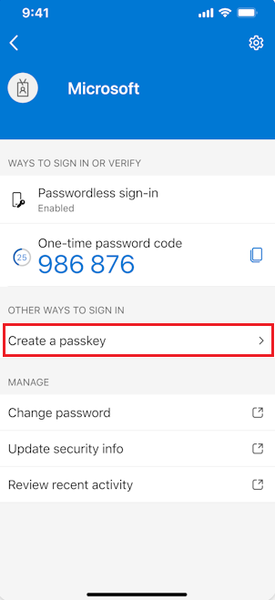
Hello, has anyone successfully registered passkeys on an unmanaged phone in an organisation with device compliance policies? Use case is to provide a phishing-resistant MFA option via Authenticator app for logging into apps on their desktop. Users already have authenticator app on their phone and do number matching MFA. https://learn.microsoft.com/en-us/entra/identity/authentication/how-to-register-passkey-authenticator?tabs=iOS When I select "Create a passkey" - I need to log into my account. However I'm blocked from successful authentication because I have conditional access policies to require compliant devices. As my mobile phone is not enrolled into Intune, I never get to the step where the passkey is created and registered. Based on the constraints - it seems like passkeys cannot be used for unmanaged/BYOD devices for organisations that have device compliance policies. It can only be used for users who have enrolled their mobile phone. Looking to see if anyone has tips or different experience using passkeys on unmanaged mobile phones to log into Entra?823Views0likes1CommentWindows Hello for Business 0x80090010 NTE_PERM
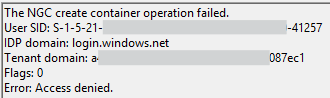
Hi all, I'm encountering an issue with Windows Hello for Business on the latest version of Windows (July 2025 update). The setup process fails during initialisation, and no biometric or PIN options are being provisioned for the user. Environment: Windows version: 11 24H2 Enterprise (latest update) Deployment mode: Hybrid Cloud Trust Hybrid joined devices Symptoms: Users are prompted to set up WHfB but the process fails at the last step with error 0x80090010 Users who already have WHfB authentication methods created can successfully login Event ID 311 & 303 in the User Device Registration logs Screenshots: Troubleshooting so far: Unjoined and rejoined to Entra ID Granted modify permissions on folder in which NGC container would be created Rolled back to June 2025 update (this worked) So it seems like this is caused or related to the latest Windows Update, which is rather unfortunate for us as we are just beginning to rollout WHfB for our organisation. I'm posting here to raise awareness of the issue, if there is a more appropriate place to post then please suggest.17KViews6likes18Comments