Forum Widgets
Latest Discussions

Sole Global Admin locked out - lost MFA device, SSPR phone verification returns error
Hello, I am the sole Global Administrator of a Microsoft 365 Business Standard tenant and I am completely locked out of the account. What happened: - My phone with Microsoft Authenticator was physically destroyed. - I installed Authenticator on a new phone. My personal account restored from cloud backup, but the work account only appears as a "connected account" - it shows no TOTP code and receives no push notifications. Push requests still go to the old device. What I tried while my admin session was still alive: - Entra ID > per-user MFA > "Require selected users to provide contact methods again" - saved successfully. - User > Authentication methods > "Require re-register multifactor authentication" - returned "Delete operation failed. Try this command again or delete them one by one in the user authentication methods blade." - The Authentication methods list for the user was EMPTY, and default sign-in method showed "No default". "Add authentication method" button was greyed out. - "Revoke sessions" - succeeded, but this also terminated my own admin session and signed me out of Outlook and OneDrive. - aka.ms/mfasetup cannot be reached because it requires a fresh MFA challenge. Self-service password reset (passwordreset.microsoftonline.com): - First verification via alternate email succeeds every time (I have full access to that mailbox). - Second verification fails: both "Text my mobile phone" and "Call my office phone" return "Sorry, we ran into a problem contacting you." I tried +370xxxxxxx, 370xxxxxxx and 8xxxxxxxx formats - same error every time. This looks like a service-side failure, not a formatting issue. - Sign-in Helper now also reports "Account blocked due to multiple incorrect password attempts." Error codes seen: 500121 and AADSTS50133. I have tried calling Microsoft support in several countries. The automated system either asks for an internal extension number or the AI assistant disconnects the call before reaching a human. There is no second Global Admin and no recovery codes. I can provide the tenant ID, user unique identifier, subscription order number and proof of access to the billing email address privately. Requesting escalation to the Data Protection team for admin account recovery. Any guidance on how to reach a human agent would be greatly appreciated. Thank you.RadanarasMBAug 20, 2026Copper Contributor90Views0likes2Comments
**bleep**. Security Update (like KB5101650) breaking SmartCard Authentication for Office 2024 apps to O365
Looking for some support on this issue. I have Win11 clients that were upgraded from 24H2 to 25H2 last year. They were functioning well until earlier this year when the Cumulative Updates started breaking smartcard authentication on our clients (day after installing/rebooting/cache clearing). This seems to be a known issue but are there any real fixes? Symptom is that after the update is installed, next day (after a reboot or cache cleared) the user starts their Outlook or Teams application, when receiving the prompt that says "you will be prompted for your PIN" nothing follows, you will see the blue dots circling and after 5 or so minutes it times out. Clicking on the "..." shows an informational message error #50058, which says that not enough information was provided. The authentication process is failing... BTW - web authentication works just fine, it's just the local application (Teams, Outlook, etc.) that fail. I found that creating a new account on the system seems to work just fine, but for people that have established accounts and program environments that are setup for them to work, creating a new account is very unappealing to them. I'd like to be able to just get their current accounts working. Creating a new profile, wiping current profile info from registry doesn't seem to work thanks to automagic backups the OS is doing, but even that would still require setting up a new profile and copying over non AAPDAT file structure info... Does Microsoft not have a fix to this "known" issue? I spent a few weeks really digging into this and the best I can find as a work around is to disable the automatic backups of the NTUSER.DAT, blow away current profile info in registry, rename current profile structure, and then have the user login "anew". Again, this still requires a copy of the non-AAPDAT data back into the new structure (at least permissions won't be an issue) but that will not restore all application-based information for that user--that still will have to be re-created, which I think the users will not want to do because it means starting over from scratch.LeroyGAug 19, 2026Tin Contributor149Views0likes2CommentsDisabling authentication methods in Entra having no effect
Fairly new to MS365 here and we're trying to restrict which MFA methods our users can use. We want our users to be able to either use the Authenticator app or a FIDO2 key depending on their role, in addition to a TAP to do the initial login. We're testing disabling various methods via the Authentication methods page in Entra. As a representative test we set TAP to disabled and it gave an error when I attempted to issue a TAP for a user via the user's Authentication methods page in Intune. However we don't get consistent results with other auth methods: Authenticator, Security key (FIDO2) and SMS. I put a specific group in the 'Enable and target' > 'Exclude' section for all 3 and was still able to configure Authenticator and a phone for SMS. When viewing the methods configured for the user, only the security key was listed under 'unusable methods'; hence the policies for Authenticator and SMS appear to have no effect. Similar tests with just one auth method yield the same result. Is there something we're doing or understanding wrongly about how these policies work?RichardP860Aug 13, 2026Copper Contributor1.1KViews1like3CommentsTrapped in an Authenticator Loop
Dear Community, please help! I am trapped in an Authenticator Loop. I've got a microsoft workplace account, but if I want to log in, I have to type in a code from the microsoft authenticator app. I downloaded the app, but in order to use it, I have to log into my account and in order to do so, I also have to type in a code from the authenticator app, which I don't get, because to get the code I would have to log into the authenticator app, what I would need a code for... No matter which link I click, I can't open anything before I enter the code, which I can't get. I am using teams on mac, either on a firefox browser or on the desktop app and the authenticator on an Iphone. Please don't just tell me "don't use teams on a mac", this wasn't my choice. Unfortunately, my emplyer's IT support also is chronically unavailable. So is here anyone who could help me? I've already gone through the usual deleting the app, using another browser etc. options. Best LukasLukasMaerzAug 12, 2026Copper Contributor428Views0likes3Comments
Stuck in an authenticator loop
I have a 365 Business account. Haven't logged in for a while due to reasons, i was just starting up as a sole trader. Anyway decided now is the time to resurrect it and get up and running, except Authenticator doesn't work because I changed my phone, and my back up email is out of date, and no longer exists. I have tried the support web chat which wants to send a code to authenticator or my back up email. Just called the help line that referred me to the web chat which doesn't work, I couldn't get past the bot. So I am stuck. Any recovery options does not recognise my log in details, i think this is because its been a while since I logged in (I still pay but ....) but I can't resurrect it because I don't have a way of getting a code due to authenticator/back up email as cited above. I am really at a loss as to what to do. I don't want to abandon it and start again as there are documents in my one drive that I need. Can anyone help please. (I think all that needs to happen is an update to my back up email and then I can get going). I am the sole administrator on my business account.RoisMJMBAug 12, 2026Copper Contributor122Views1like3Comments
Microsoft Teams and Authenticator lockdown
I’m having a very frustrating issue with Microsoft Teams. I am able to log in to teams using my normal personal email and account ONLY ON THE WEB BROWSER. From the web browser, I am not able to access the business channel that I am in. When attempting to log in on the downloaded mobile Teams App, I am sent directly to Microsoft Authenticator, which after waiting several hours, waiting even a full day, is still displaying a message about repeated verification attempt and to wait and try again later. I have accessed Microsoft support chat and they had no help for me. I need the authenticator lockdown to refresh and it will not.AustinNorthcuttAug 10, 2026Copper Contributor82Views0likes1CommentMicrosoft Authenticator & Microsoft Work Accounts
I am moving my data and apps from my previous Android phone to a new Android phone. I have run into a problem with the Microsoft Authenticator app. I have several Microsoft work accounts which Microsoft Authenticator on the new phone says I need a QR code to recover the account. However, when I go to the Security page for the Microsoft work accounts, click on "Add Sign-In Methods", there is no option for an authenticator app. I should point out that I do have Microsoft Authenticator for these accounts installed and working on some tablets and iPads. How do I fix this so I can use my new Android phone? Thank you.Solved171Views0likes5CommentsStrange redirect when signing in - phishing?
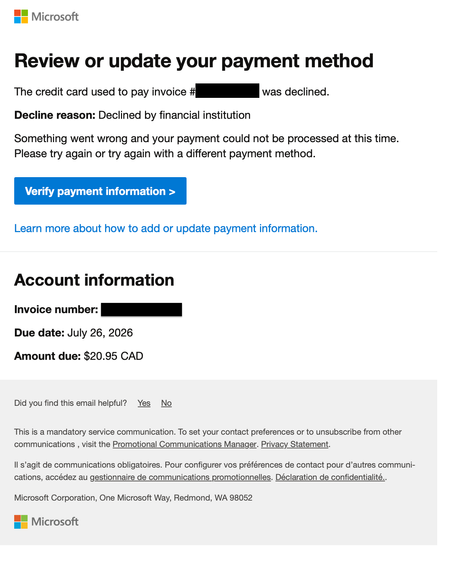
I just restarted my Business Standard 365 license today and this afternoon got an email from email address removed for privacy reasons with the following content: But when I clicked on the 'Verify payment information' button I am redirected to a page with the following URL: https://admin.cloud.microsoft/Error/UnAuth?errorCode=100014 looking like this: This looks highly suspicious (Times New Roman font, URL with no top-level extension such as .com, unusual graphics). Is this legitimate or a phishing attempt? Now, when I try to login to admin.microsoft.com to check my account the same suspicious "Sign out and login with a different account" page pops up repeatedly.203Views0likes6Comments

Tags
- Authentication372 Topics
- office 365223 Topics
- security173 Topics
- Identity79 Topics
- multi-factor authentication76 Topics
- admin74 Topics
- Authenticator app64 Topics
- Azure AD54 Topics
- microsoft 36546 Topics
- exchange44 Topics