microsoft 365
48 Topics
Hacked Microsoft Account Recovery with Semi Access
I'm at a complete loss and it is infuriatingly ridiculous. I am entirely unable to get a hold of a human being at Microsoft and am being turned down by automated responses nonstop. So here's what's happening: My Microsoft account has been hijacked (obviously not this one) for its valuable Minecraft account and has now been sold. I am logged into my account via my PC, have full access of the main email address, but I have been locked out of my account using the alias email. Whenever I want to log in to my account, it wants to instead send a code to an email address I do not own and can't access. I have tried the Sign-In Helper, the Recovery Form, the hotline, the support email without any result, let alone a non-automated response. I sadly don't have the Recovery Code of my 15 year old-ish account. Since I still have full access of my email address I get updates of security info being changed and what not. Last month a stranger sent me screenshots of someone trying to sell my Minecraft account, for which I myself have received multiple buying offers, and voila yesterday I received notification of my alias mail address changing followed by Minecraft server apps being added to my Microsoft account. While I had already given up retrieving my account, whenever I get notifications my heart sinks a new while some hope sparks up again. Do you people have any idea of what I could do? I don't even rule out legal actions at this point. While I do of course have the email address of the hijacker and the buyer, I fear that contacting them results in me being locked out permanently. I'm just begging to catch the attention of anyone involved with Microsoft. This being walled out with automated responses is killing me.
Microsoft values a hacker's disposable email more than your email linked to Microsoft for 8 years
My Pc was compromised and my session tokens were stolen . I had security info connected with my email and phone number . I also had passkey setup on both my pc (after reset) and my phone . It took one click for the hacker to remove the security features . They setup their own security info and added a disposable email instead of mine . I was somehow able to log in to the account using my pc passkey , as it was already signed in . First I requested to change the hacker's email to my one , which was useless cause the wait time period was 30 days . But in doing so I locked myself out of recovering the account with the mail that notified me that my security info was changed . I went to account recovery which only allowed me to change the password not the email so its still connected to the hacker's email . My frustration is the hacker can 1 click change my forever linked email since accounts creation . But when i try to do so they prevents me to do that stating that "there was recent security information change and the account will not allow for additional change for 30 years" . I opened up "account recovery form" and filled it out , point to be noted there were no fields where I could enter my details of my problem they just ask some basic information . After sometime they send a mail stating provided information is not enough . How am i suppose to provide more information if there are no fields for additional information . I contacted Microsoft agent , they guided me to reply to the account recovery form mail which did not worked as I was not allowed to reply on such email . I contacted Microsoft agent again , this time they told me I will be getting an email with account recovery form and I should mention every details . Well it was the same recovery form I used earlier with limited fields . I still field out the form and after sometime I was mailed by mailto:email address removed for privacy reasons to provide additional details for my identify , I was again requested to submit an account recovery form on https://account.live.com/acsr?cs=1 which was the same link with limited fields to provide information . I proceeded but in the end I was told that I have reached the daily limit for submitting form for this account . Just to be sure I mailed mailto:email address removed for privacy reasons the requested details .138Views0likes0Comments
**bleep**. Security Update (like KB5101650) breaking SmartCard Authentication for Office 2024 apps to O365
Looking for some support on this issue. I have Win11 clients that were upgraded from 24H2 to 25H2 last year. They were functioning well until earlier this year when the Cumulative Updates started breaking smartcard authentication on our clients (day after installing/rebooting/cache clearing). This seems to be a known issue but are there any real fixes? Symptom is that after the update is installed, next day (after a reboot or cache cleared) the user starts their Outlook or Teams application, when receiving the prompt that says "you will be prompted for your PIN" nothing follows, you will see the blue dots circling and after 5 or so minutes it times out. Clicking on the "..." shows an informational message error #50058, which says that not enough information was provided. The authentication process is failing... BTW - web authentication works just fine, it's just the local application (Teams, Outlook, etc.) that fail. I found that creating a new account on the system seems to work just fine, but for people that have established accounts and program environments that are setup for them to work, creating a new account is very unappealing to them. I'd like to be able to just get their current accounts working. Creating a new profile, wiping current profile info from registry doesn't seem to work thanks to automagic backups the OS is doing, but even that would still require setting up a new profile and copying over non AAPDAT file structure info... Does Microsoft not have a fix to this "known" issue? I spent a few weeks really digging into this and the best I can find as a work around is to disable the automatic backups of the NTUSER.DAT, blow away current profile info in registry, rename current profile structure, and then have the user login "anew". Again, this still requires a copy of the non-AAPDAT data back into the new structure (at least permissions won't be an issue) but that will not restore all application-based information for that user--that still will have to be re-created, which I think the users will not want to do because it means starting over from scratch.528Views0likes2Comments
Stuck in an authenticator loop
I have a 365 Business account. Haven't logged in for a while due to reasons, i was just starting up as a sole trader. Anyway decided now is the time to resurrect it and get up and running, except Authenticator doesn't work because I changed my phone, and my back up email is out of date, and no longer exists. I have tried the support web chat which wants to send a code to authenticator or my back up email. Just called the help line that referred me to the web chat which doesn't work, I couldn't get past the bot. So I am stuck. Any recovery options does not recognise my log in details, i think this is because its been a while since I logged in (I still pay but ....) but I can't resurrect it because I don't have a way of getting a code due to authenticator/back up email as cited above. I am really at a loss as to what to do. I don't want to abandon it and start again as there are documents in my one drive that I need. Can anyone help please. (I think all that needs to happen is an update to my back up email and then I can get going). I am the sole administrator on my business account.481Views1like3CommentsMicrosoft Authenticator & Microsoft Work Accounts
I am moving my data and apps from my previous Android phone to a new Android phone. I have run into a problem with the Microsoft Authenticator app. I have several Microsoft work accounts which Microsoft Authenticator on the new phone says I need a QR code to recover the account. However, when I go to the Security page for the Microsoft work accounts, click on "Add Sign-In Methods", there is no option for an authenticator app. I should point out that I do have Microsoft Authenticator for these accounts installed and working on some tablets and iPads. How do I fix this so I can use my new Android phone? Thank you.Solved690Views1like5Comments
Strange redirect when signing in - phishing?
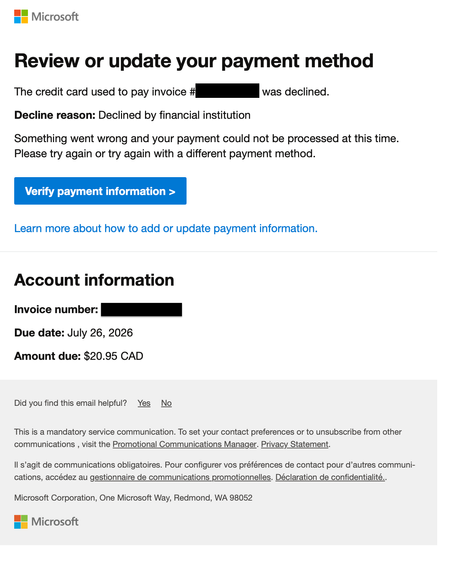
I just restarted my Business Standard 365 license today and this afternoon got an email from email address removed for privacy reasons with the following content: But when I clicked on the 'Verify payment information' button I am redirected to a page with the following URL: https://admin.cloud.microsoft/Error/UnAuth?errorCode=100014 looking like this: This looks highly suspicious (Times New Roman font, URL with no top-level extension such as .com, unusual graphics). Is this legitimate or a phishing attempt? Now, when I try to login to admin.microsoft.com to check my account the same suspicious "Sign out and login with a different account" page pops up repeatedly.730Views0likes6CommentsAuthenticator não funciona
Tenho um e-mail corporativo (sou o adm único, nao tem ti) que faço login na conta do powerbi, contudo, meu celular com o authenticator foi perdido e já nao tenho mais acesso, por este motivo, nao consigo mais logar na conta pq ele sempre direciona para o authenticador que nao tenho mais acesso e não abre a possibilidade de receber o codigo por outro meio, (sms ou email). ja tentei vários recursos (chat, telefone do suporte) para recuperar a conta e nao consigo. Todas as opções direcionam para o autenticador. solicito a microsoft que dê uma solução, resetando o autenticador anterior para que eu possa acessar a conta e incluir métodos alternativos de desbloqueio, ou sugira outra solução.263Views0likes1CommentHow do I get support so I don't loose my account?
I have a business 365 account but changed address and so my credit card payments stopped. However, I can't log in to my account because I also have an authentication problem (my authentication app on iPhone is still working but the entry for this account has gone and there is a new one called "Microsoft Entra ID" but when I go to get the authentication code this "Entra ID" authenticator does not produce it). To get help from Microsoft it always asks for authentication. I would like to keep this account and start paying again but I can't find a way to get help to fix the authentication problem because raising a ticket or talking to an agent requires authentication. I got my final warning email today saying Warning—your online services will be deprovisioned and your data deleted in seven days There must be some way to get a call from Microsoft so I don't loose my account and all my data?Solved318Views0likes6CommentsVaihdoit uuteen puhelimeen. Authenticator ongelma
Vaihdoit uuteen puhelimeen. Microsoft Authenticator ei ole enää saatavilla vanhalla laitteellasi. Et voi kirjautua Microsoft 365 -työtilillesi, koska MFA-vahvistus vaaditaan. Sinulla ei ole pääsyä mihinkään vaihtoehtoiseen todennusmenetelmään. Tarvitset apua suomeksi, jos mahdollista.426Views0likes1Comment
Hotmail to Outlook Migration Broke My Account
A year or two ago, I updated my Microsoft account to try and migrate from hotmail.com to @outlook.com. Since then, my Microsoft account is broken. I log in with my @outlook.com email, but account.microsoft.com displays my hotmail.com email everywhere. Mobile apps will not stay logged in properly and kick me out after a day. On my account info page my @outlook.com email isn't even listed and hotmail.com is listed as primary, but only logging in with @outlook works. I'm pretty sure when I originally tried to migrate my account some exception wasn't handled properly part way through the process and my account is in some sort of database limbo. Is there anyone at Microsoft here that can help with this? Also, sorry if this isn't the right place to post this, but a call with Microsoft support pointed me here and there doesn't seem to be a "Microsoft Account Support" hub or space on this platform. If anyone knows of a better location feel free to suggest that as well. Thanks!206Views0likes1Comment