microsoft 365
4039 Topics
Key Features to Look for in CAD Software Cloud Hosting Solutions
Businesses using resource-intensive design applications increasingly rely on CAD Software Cloud Hosting Solutions to improve accessibility, collaboration, and performance. However, choosing the right hosting environment is essential for maintaining productivity and ensuring smooth design workflows. Organizations should carefully evaluate several important features before selecting a cloud hosting provider. One of the most critical features in CAD Software Cloud Hosting Solutions is high-performance infrastructure. CAD applications often require significant processing power, GPU acceleration, and large memory capacity to handle complex rendering and modeling tasks efficiently. A hosting environment with powerful virtual workstations helps designers, architects, and engineers work without lag or performance bottlenecks. Remote accessibility is another important consideration. Reliable CAD Software Cloud Hosting Solutions should allow users to securely access applications and project files from any location or device. This flexibility supports remote and hybrid work environments while enabling teams to collaborate on projects in real time. Centralized storage also simplifies file sharing and version management across distributed teams. Security and data protection are equally important. Businesses handling sensitive design files should look for hosting providers that offer encrypted connections, automated backups, disaster recovery options, multi-factor authentication, and proactive monitoring. These features help safeguard intellectual property and minimize the risk of data loss or unauthorized access. Scalability is also a key advantage of cloud-hosted CAD environments. As project requirements grow, businesses should be able to increase computing resources and storage without major infrastructure investments. Additionally, reliable technical support and uptime guarantees are essential for uninterrupted operations. Providers like Apps4Rent offer CAD cloud hosting environments designed to support high-performance workloads, secure remote access, and collaborative design workflows for modern businesses.9Views0likes0CommentsBest Practices for Secure Yahoo Mail to Office 365 Migration
Businesses moving to Microsoft 365 often choose Yahoo Mail to Office 365 Migration to improve communication, strengthen security, and access advanced collaboration tools. While the migration process offers significant operational benefits, organizations must follow proper security practices to protect sensitive emails, contacts, and business data during the transition. One of the most important steps in Yahoo Mail to Office 365 Migration is performing a detailed pre-migration assessment. Businesses should review mailbox sizes, verify user accounts, and identify unnecessary or outdated data before initiating the transfer process. This helps reduce migration complexity and minimizes the risk of incomplete data transfers. Secure authentication methods are also essential during the Yahoo Mail to Office 365 Migration. Enabling multi-factor authentication for administrator accounts and user mailboxes helps prevent unauthorized access during the migration process. Businesses should also use strong passwords and restrict administrative permissions to authorized personnel only. Another best practice for Yahoo Mail to Office 365 Migration is ensuring an encrypted data transfer. Secure migration tools and encrypted communication channels help protect emails and attachments while data is being transferred between environments. This is particularly important for businesses handling confidential client or financial information. Organizations should also create backup copies of existing Yahoo Mail data before migration begins. Backups provide an additional layer of protection in case unexpected issues occur during the transition. Testing mailbox functionality after migration is equally important to verify email delivery, folder structure, and user access permissions. Proper planning, user communication, and technical support can significantly reduce migration risks and downtime. Apps4Rent provides professional migration services that help businesses complete Yahoo Mail to Office 365 Migration securely while maintaining data integrity, minimizing disruptions, and ensuring a smooth transition to Microsoft 365.9Views0likes0CommentsI built a free, open-source M365 security assessment tool - looking for feedback
I work as an IT consultant, and a good chunk of my time is spent assessing Microsoft 365 environments for small and mid-sized businesses. Every engagement started the same way: connect to five different PowerShell modules, run dozens of commands across Entra ID, Exchange Online, Defender, SharePoint, and Teams, manually compare each setting against CIS benchmarks, then spend hours assembling everything into a report the client could actually read. The tools that automate this either cost thousands per year, require standing up Azure infrastructure just to run, or only cover one service area. I wanted something simpler: one command that connects, assesses, and produces a client-ready deliverable. So I built it. What M365 Assess does https://github.com/Daren9m/M365-Assess is a PowerShell-based security assessment tool that runs against a Microsoft 365 tenant and produces a comprehensive set of reports. Here is what you get from a single run: 57 automated security checks aligned to the CIS Microsoft 365 Foundations Benchmark v6.0.1, covering Entra ID, Exchange Online, Defender for Office 365, SharePoint Online, and Teams 12 compliance frameworks mapped simultaneously -- every finding is cross-referenced against NIST 800-53, NIST CSF 2.0, ISO 27001:2022, SOC 2, HIPAA, PCI DSS v4.0.1, CMMC 2.0, CISA SCuBA, and DISA STIG (plus CIS profiles for E3 L1/L2 and E5 L1/L2) 20+ CSV exports covering users, mailboxes, MFA status, admin roles, conditional access policies, mail flow rules, device compliance, and more A self-contained HTML report with an executive summary, severity badges, sortable tables, and a compliance overview dashboard -- no external dependencies, fully base64-encoded, just open it in any browser or email it directly The entire assessment is read-only. It never modifies tenant settings. Only Get-* cmdlets are used. A few things I'm proud of Real-time progress in the console. As the assessment runs, you see each check complete with live status indicators and timing. No staring at a blank terminal wondering if it hung. The HTML report is a single file. Logos, backgrounds, fonts -- everything is embedded. You can email the report as an attachment and it renders perfectly. It supports dark mode (auto-detects system preference), and all tables are sortable by clicking column headers. Compliance framework mapping. This was the feature that took the most work. The compliance overview shows coverage percentages across all 12 frameworks, with drill-down to individual controls. Each finding links back to its CIS control ID and maps to every applicable framework control. Pass/Fail detail tables. Each security check shows the CIS control reference, what was checked, what the expected value is, what the actual value is, and a clear Pass/Fail/Warning status. Findings include remediation descriptions to help prioritize fixes. Quick start If you want to try it out, it takes about 5 minutes to get running: # Install prerequisites (if you don't have them already) Install-Module Microsoft.Graph, ExchangeOnlineManagement -Scope CurrentUser Clone and run git clone https://github.com/Daren9m/M365-Assess.git cd M365-Assess .\Invoke-M365Assessment.ps1 The interactive wizard walks you through selecting assessment sections, entering your tenant ID, and choosing an authentication method (interactive browser login, certificate-based, or pre-existing connections). Results land in a timestamped folder with all CSVs and the HTML report. Requires PowerShell 7.x and runs on Windows (macOS and Linux are experimental -- I would love help testing those platforms). Cloud support M365 Assess works with: Commercial (global) tenants GCC, GCC High, and DoD environments If you work in government cloud, the tool handles the different endpoint URIs automatically. What is next This is actively maintained and I have a roadmap of improvements: More automated checks -- 140 CIS v6.0.1 controls are tracked in the registry, with 57 automated today. Expanding coverage is the top priority. Remediation commands -- PowerShell snippets and portal steps for each finding, so you can fix issues directly from the report. XLSX compliance matrix -- A spreadsheet export for audit teams who need to work in Excel. Standalone report regeneration -- Re-run the report from existing CSV data without re-assessing the tenant. I would love your feedback I have been building this for my own consulting work, but I think it could be useful to the broader community. If you try it, I would genuinely appreciate hearing: What checks should I prioritize next? Which security controls matter most in your environment? What compliance frameworks are most requested by your clients or auditors? How does the report land with non-technical stakeholders? Is the executive summary useful, or does it need work? macOS/Linux users -- does it run? What breaks? I have tested it on macOS, but not extensively. Bug reports, feature requests, and contributions are all welcome on GitHub. Repository: https://github.com/Daren9m/M365-Assess License: MIT (free for commercial and personal use) Runtime: PowerShell 7.x Thanks for reading. Happy to answer any questions in the comments.2.3KViews2likes2Comments
The latest mobile apps killed mobile first when working with files
Hi, I really enjoyed working only with mobile devices when we started with M365. On iOS the OneDrive app was paramount when organising files in SharePoint/Teams Sites. Easy up- and downloads, drag‘n drop. Move and copy all was there to manage a companies files on mobile devices even when only on mobile network connections. But the upgrades that happened over the last 1-2 years completely break this kind of workflows. There is no really mobile-first paradigm visible anymore. The OneDrive app was worst. All the pretty well integration file management stuff is gone. No drag‘n drop. No useful integration into iOS Files app. Copying between OneDrive and SharePoint got a pain. Bulk operation just silently fail. Files get renamed without any warning (numbers get added to the name or are just increased so no one will ever find the file again). So just two simple usability examples that are a mess: to select multiple files in a folder you have to press the word ‚Select‘ that is not a button or something. This shows up like a column heading in the file view. Right beside ‚Name‘ and ‚Date Modified‘. Why are active user elements placed in table headings? If you browse into some SharePoint folders and quickly want to go back to your OneDrive files you either have to press the back button over and over again until your back to the top level view or you can press-hold the back button and then select ‚Files‘. Butthe latter brings you to the top level Library view and you still have to manually go to ‚Files‘. The old app design just had a top menu bar where views could easily be switched. Am I the only one who wants to work on mobile devices? Does Microsoft still expect everyone to use a laptop and run desktop apps? Annoying.12Views0likes0Comments
MCA billing account stuck in "under review" status for 4+ days, no resolution
I'm the Global Admin for a Microsoft 365 tenant (domain: fortunamg.net) recently transitioned from a GoDaddy CSP reseller relationship to a direct Microsoft Customer Agreement (MCA) billing account. After setting up the MCA billing account and adding a payment method, I attempted to make an edit to my billing account address (updating to the new 9-digit zip code format). This triggered an "Account under review" status, which states the review usually takes up to 2 days. It has now been over 4 days with no update or email notification. This review is blocking me from purchasing a subscription, which I need to do to restore an active Microsoft 365 subscription on this tenant (currently showing as "Disabled" following the GoDaddy detach). Billing Account ID: 7793dd6e-68c9-5362-c5e2-3fe091b9854c Domain: fortunamg.net Could someone help check the status of this review or escalate to the appropriate team? Phone support has been unable to resolve this. Thank you.28Views0likes2Comments
New Unified Contacts in Microsoft Teams and Outlook, now generally available
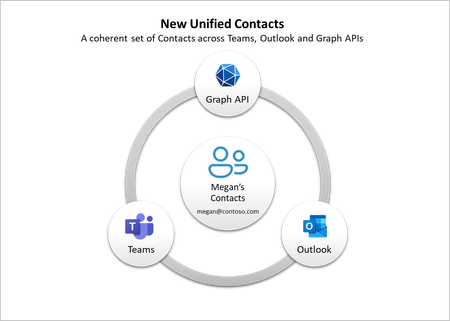
We are excited to announce the general availability of the new unified contacts experience in Teams and Outlook. Now you can seamlessly access and manage the same set of contacts across Microsoft Teams and Outlook for an integrated and efficient collaboration experience.483KViews5likes46CommentsSole Admin Locked out of Microsoft tenant -- MFA Error 500121
Sole Admin Locked out of Microsoft 365 Tenant- MFA Error 500121 using OTPKEY Im the original administrator of a Microsoft 365 Business Basic tenant for the City of Briarcliff. Tenant: mailto:email address removed for privacy reasons Admin Account: mailto:admin@briarcliffar.onmicrosoft I can succesfully enter the correct password, nut MFA verification fails with error code 500121. I have original microsoft 365 setup email showing the admin account The microsoft purchase receipt and Order ID. Access to billing email account Control of the cityofbriarcliff.gov domain through Cloudflare. The tenant was never fully configured beyond the initial setup process. I was able to sign in originally and reached the Connect and Configure your domain page but did not complete deployment. I need assisstance with recovery of the sole administrator account and MFA reset for tenant. I can provide provide proof of purchase, original setup email, billing information, and proof of control of cityofbriarcliff.govMicrosoft Power Platform community call - June 2026
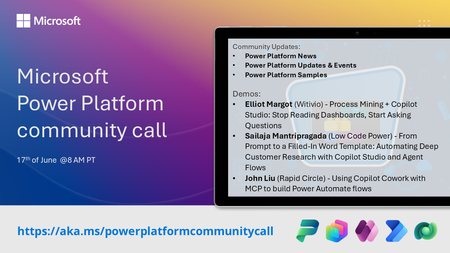
💡 Power Platform monthly community call focuses on different extensibility options for builders, makers and developers within the Power Platform. Typically demos are from our awesome community members who showcase the art of possible within the Power Platform capabilities. 👏 Looking to catch up on the latest news and updates, including cool community demos, this call is for you! 📅 On 17th of June we'll have following agenda: Power Platform Updates & Events Latest on Power Platform samples Elliot Margot (Witivio) - Process Mining + Copilot Studio: Stop Reading Dashboards, Start Asking Questions Sailaja Mantripragada (Low Code Power) - From Prompt to a Filled-In Word Template: Automating Deep Customer Research with Copilot Studio and Agent Flows John Liu (Rapid Circle) - Using Copilot Cowork with MCP to build Power Automate flows 📅 Download recurrent invite from https://aka.ms/powerplatformcommunitycall 📞 & 📺 Join the Microsoft Teams meeting live at https://aka.ms/PowerPlatformMonthlyCall 💡 Building something cool for Microsoft 365 or Power Platform (Copilot, SharePoint, Power Apps, etc)? We are always looking for presenters - Volunteer for a community call demo at https://aka.ms/community/request/demo 👋 See you in the call! 📖 Resources: Previous community call recordings and demos from the Microsoft 365 & Power Platform community YouTube channel at https://aka.ms/community/videos Microsoft 365 & Power Platform samples from Microsoft and community - https://aka.ms/community/samples Microsoft 365 & Power Platform community details - https://aka.ms/community/home93Views0likes1Comment