Forum Widgets
Latest Discussions

Guest user invites other guest user
Hello, I'm testing a scenario in SharePoint where I need guests to be able to invite other guests (not already existing in the directory). Config applied: Entra ID (external collab settings) - “Anyone in the organization can invite guest users including guests and non-admins” is enabled SharePoint online (tenant level) - External sharing set to "new and existing guests" for both SharePoint and OneDrive At site level - Sharing set to “New and existing guests” - Members with Edit permissions can share files and folders No sensitivity label applied Default sharing link type: Set to “Specific people” Test scenario Internal user shares a file with Guest A - works Guest A (with Edit permissions) tries to share the same file with: Another existing guest - works A new external email - fails Error received: “Your organization's policies don't allow you to share with these users. Please contact your IT department for help.”cristinapalominoApr 17, 2026Copper Contributor24Views0likes0CommentsQuick Launch missing from SharePoint subsite after deleting links
The Quick Launch navigation has disappeared from one SharePoint subsite (Marketing) after I deleted some placeholder links on a Marketing page. It was working previously, and still appears on other subsites in the same site collection. In Site Settings, Quick Launch is still enabled, but there is no option to add or edit navigation links anymore, and the left navigation is completely gone on this subsite. Has anyone seen this before or know how to restore the Quick Launch for just one subsite? Thank you!MeaganUTSWApr 16, 2026Copper Contributor17Views0likes0Comments
Restirct user access to SPO Root SiteCollection
Hi everyone, In a tenant, the SharePoint Online root site collection was deliberately locked down to a very small audience. We are currently seeing some issues that could be related to this. While investigating, I noticed that some Microsoft documentation seems to imply that the root site collection plays a special role and should be accessible for the users, for example: https://learn.microsoft.com/en-us/sharepoint/modern-root-site https://learn.microsoft.com/en-us/troubleshoot/sharepoint/sites/url-that-resides-under-root-site-collection-is-broken However, I couldn’t find any explicit or official recommendation stating whether restricting access to the root site collection is supported or discouraged. So my question is: Is it a best practice or implicit requirement that the root site collection remains broadly accessible for M365 / SharePoint Online to work reliably? Thanks!mobunApr 16, 2026Occasional Reader9Views0likes0Comments
Webpart "See All" ASPX link Not displaying List of News for Read-Only Users
We have an extremely simple Sharepoint site in M365 Sharepoint that we created a very simple News webpart, list form, 1 item, from news posted to this site only. The idea being people come and see the most recent news post, they click "See All" to view more if they desire. Visitors can see this link and go and view the article, along with any other news article posted to this site if they have the direct link, but only people with Edit or higher access are able to click the "See All" link and get a list of more news articles. People with regular Visitor/Read access see the title of the list but the page is otherwise empty like it's failing to return query results. We've chopped up the URL since it's aspx and have at least figured out the point of failure is in the : &serverRelativeUrl part of the link. If they chop off link before that variable, they can get an (albeit unformatted) list of the news articles. I am absolutely not a Sharepoint guru. We've inspected the permissions on the Site Library, we've reindexed the site, we've even experimented with different usergroups, nothing seems to change this behavior. Can anyone explain what's happening here and how to fix it or is this just busted behavior in Sharepoint Webpart command link?Lucinda_PoeApr 16, 2026Copper Contributor121Views2likes1CommentHow best to apply extensive edits to a live page?
What are best practices for extensive editing of a live page? I've seen some cautions against working in a prolonged editing session of a live page without publishing it. Instead, some recommend making a working copy of the live page and then when the working copy is ready to publish, you would change the live page URL to something else, followed by changing the working page URL to the original live page's URL and then publishing. What are the pros and cons of this approach? Is there a better way?kimberly32Apr 16, 2026Copper Contributor31Views0likes1Comment
Users unable to determine who has access to document library due to security groups
Greetings, Maybe I went about this the wrong way. Looking for advice on either the proper way we should be moving forward on this or any other comments or insight we should be considering. This is for SharePoint online via Microsoft 365 Business license. Scenario: 1. SharePoint Document Library per department (Each Document Library exists in its own SharePoint site), essentially being used as a company drive. 2. Some users should only officially have access to specific folders in some of the document library. 3. If say a person in accounting has access to some specific folders, and either they are replaced or a new accounting user comes in.... should be able to reference the access the existing person has in order to give the same access to the new user. 4. Common Request: Give UserB the same folder access as UserA. 5. Some users should have access to the entire document libraries while other users only have access to specific subfolders. Current Implementation: 1. In Entra, created Security Groups that tied to specific folders. -- For Example for the accounting folder, only management has access to the entire folder but the accounting staff only have access to specific folders. So like there is a FiscalYear2024 folder, so I created a security group called sec-Accounting-FiscalYear2024 and assigned the members that should only have access to that folder and not the rest of the library. -- My thought behind this was if a new user was replacing the existing user or joining the department, I can just reference the existing user security group membership and copy it to the new user. 2. In the SharePoint document Library, I create a shareLink that is assigned to the security group I made for that access. Then I give that link to the users I assigned the membership to. Current Issue: 1. Aside from the official document sharing/access that is being done from the security groups above. There are occasions where users of a sharepoint need to share specific files or folders to other users. 2. However, they are all panicking and confused because aside from themselves they are unsure who has access to the existing folders/files in the document library. 3. When going to manage permissions of a file/folder, it only shows the group assigned to it but not the members of the group. 4. So since users can't see the members of the group assigned to a folder, they have no idea who has access to that folder and are getting confused. If this was an NTFS drive, it would be super easy for users to see who has access and etc by looking at the properties but I'm stuck behind some limitations of sharepoint I didn't realize existed until I tried to implement certain workflows. Any advice here would be greatly appreciated, as my implementation has turned into a point of frustration for end users. Thank you in advance!15Views0likes0Comments
Modern Lists Missing Ribbon to Add/Edit Items
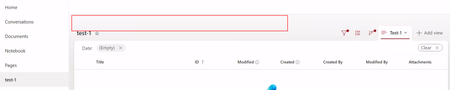
Has anyone run into this with SharePoint? In the modern experience, I’m not seeing the ribbon/options to add or edit items at all, but when I switch to the classic experience, everything shows up as expected. I’ve checked permissions and basic settings, but nothing obvious stands out. Starting to wonder if this is a configuration issue, a feature setting I’m missing, or something specific to modern UI limitations. Has anyone dealt with this before? What ended up being the fix? Thanks. This is how my modern experience currently looks. When I switch over to the classic experience, I can see those options again.ppinzonApr 13, 2026Copper Contributor122Views1like6CommentsI need some simple layman explanation
Hi, I am involved with an implementation of an epm system that is integrated into sharepoint M365 and I started reading on its manual on the setting it up for the first time. I know the steps but I wish to get some simple understanding of why the steps are needed since I am not a very technical person. The tool involves the deployment of an addin in Microsoft word (both web and desktop app). The manual said the addin app can be installed by the user directly from app store or being deployed by the M365 administrator to group of users...but in the section for M365 administrator to deploy this addin app, it said that permission needs to be granted to the app. The permissions are: openid profile sites.selected user.read So why is it ok to let user install directly (without any instruction to set permissions) but when M365 administrator do it, it suddenly needs the given permission? In addition, the manual said to run a powershell script in order to grant permission to the sharepoint site created for the epm system integration. it wrote that sharepoint admin must have Microsoft graph powershell SDK installed and run the script being signed in as site owner. What is this powershell script that it needs special installation to run? Then something mention that when deploying the addin to a group of users, there is a step to run a manifest script. This step might need to be re-execute if there is changes in the addin development. What is this Manifest meant for in Sharepoint? What does it do? Thank you in advance.fornight1515Apr 13, 2026Copper Contributor42Views1like1Comment
How do I make a main hubsite link available on every SharePoint page and site?
We have multiple hub sites in SharePoint, but one central landing page, HUB SITE that should be accessible from everywhere. How can we provide a consistent global link or navigation to this page across all sites and pages, including system pages where the hub header is not visible?SolvedEvanSP_555Apr 10, 2026Brass Contributor90Views0likes2CommentsPnP Template Error: "Invalid field name {guid}
Hello, I'm trying to apply a site template from one SharePoint Online site to another using PnP PowerShell. I have custom lists, some of them with a specific dependency chain: List X has a lookup to List Y. List Y has a lookup to List Z. All libraries/lists have "Allow management of content types" enabled. The cmdlets I run: Export: Get-PnPSiteTemplate -Out template.pnp -Handlers All -IncludeAllClientSidePages -PersistBrandingFiles Import: Invoke-PnPSiteTemplate -Path template.pnp The Error: During the Invoke process, I get: Invoke-PnPSiteTemplate : Invalid field name {guid} targetsharepoint site What I’ve tried: I attempted to manually remove the ID="{guid}" attributes from the XML inside the .pnp package, but that just makes the template schema invalid. Verified that I am connected to the target site with owner permissions. How can this issue be fixed? Any help would be greatly appreciated! Thanks!41Views0likes0Comments

Tags
- SharePoint Online18,282 Topics
- Document Library3,219 Topics
- Lists3,140 Topics
- Sites2,617 Topics
- admin2,254 Topics
- sharepoint server2,046 Topics
- Permissions1,989 Topics
- files1,725 Topics
- developer1,607 Topics
- microsoft lists1,580 Topics