Recent Discussions

How to let windows 11 "never combine taskbar buttons"?
How to let windows 11 "never combine taskbar buttons"?Solved904KViews641likes1327CommentsWindows 11 taskbar labels
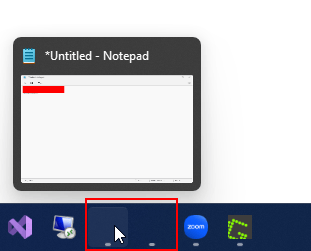
I was eager to install the official Windows 11 release today, however upon reading first I noticed that ungrouping taskbar icons / showing labels is not available anymore in Windows 11. Why the heck would you remove such a useful feature? This is the only thing preventing me from installing Windows 11. Will this feature come back? Might as well stick with Windows 10 until it sees its return (if ever). Solving this with third party tools is a no go.Solved380KViews92likes131CommentsUngroup items on the Taskbar in Windows 11
I need help on how to ungroup items on the Taskbar in Windows 11223KViews83likes113Comments
Calendar events disappeared from taskbar in Windows 11 insider build
I am on the following windows build: Edition Windows 11 Home Single Language Version 21H2 Installed on 24/07/2021 OS build 22000.100 Experience Windows Feature Experience Pack 421.18901.0.3 In Windows 10, the taskbar calendar used to show events of the day. That has disappeared in Windows 11. Is there a way to enable this?215KViews71likes86CommentsHow can I Install Windows 11 on a New Hard Drive?
I need help with installing Windows 11 on a hard drive. I'm not sure about the precise steps necessary for installing the operating system on the new hard drive. Is the process different from previous versions? If so, I would appreciate an outline of the new steps required. I hope somebody can provide advice on how to complete this process successfully. If there are any potential issues or problems I need to watch out for. Thanks. [Updated] I ended up using an ISO burner (www.howtogeeker.com/install-windows-10-on-new-ssd) to make a Windows 11 bootable hard drive—super easy. Just burn the ISO, boot from the USB, and follow the prompts. The only thing to watch for is picking the right hard drive so you don’t accidentally wipe the wrong one!108KViews51likes6Comments
Windows 11 - Different Icons in different Virtual Desktops
Hi, I don't know if the developers at windows will read this but thank you for the work you've done on virtual desktops in Windows 11. However, it would also be great if Microsoft can work towards having different icons in different virtual desktops. While i can change the backgrounds and rename them, it means I constantly need to open apps just to have them sitting in a specific desktop which in turn becomes memory heavy. It would be great if i could demacate apps for separate use (e.g music production, video production, programming) into different desktops via the icons I've installed or created shortcuts for on the corresponding desktops. That way when i switch desktops, the icons i see reflect the use or function of that desktop without me clicking on the start button to find apps needed or even seeing all apps for all functions pinned to the task bar or worse case scenario, all app icons for all functions in specific function desktops. Thanks. PS - another great improvement would be the ability to turn off recommendations on the start button or an option to show all apps (not just pinned ones) by default. It's hard getting used to this new way.87KViews49likes40Comments
Windows 11, Start button menu, make it show all apps by default
I upgraded to Windows 11 this week and I don't like the new Start button menu. I don't want "pinned" apps. I want to see All Apps in a list like before. Why don't we get the option to choose how we want things to look? So frustrating. Barbara298KViews45likes154Comments
Win11 taskbar only at the bottom of the screen - it needs to be changed!
https://www.microsoft.com/en-us/windows/windows-11-specifications https://support.microsoft.com/en-us/windows/send-feedback-to-microsoft-with-the-feedback-hub-app-f59187f8-8739-22d6-ba93-f66612949332Solved48KViews45likes53CommentsMy computer beeps and black screen
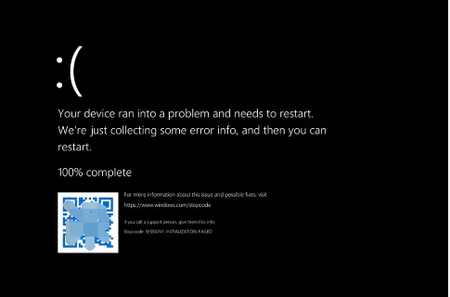
Sometimes, usually around night time, I'll hear a sudden beep sound coming from my computer. It's not a notification beep or an error beep. It's happened multiple times, and I'm not sure what's causing it. Sometimes the beep is accompanied by a brief black screen or a flicker, but other times it just disappears as quickly as it started. The other issue my computer will go to a black screen for a few seconds before reverting back to normal. This has happened even when I'm in the middle of using the computer, and it's not related to any specific task or program. I've tried restarting my computer and checking for updates, but the issues persist. Has anyone else experienced anything similar.948Views44likes2Comments
Calendar Events in Windows 11
PLEASE MICROSOFT Removing the ability for users to add, remove, modify, and not least of all even view their Outlook calendar in the same, sane, logical place where it was in Windows 10 was a big mistake in Windows 11 and is one I hope is fixed by October 6th. We get you're trying to get everyone to use the Calendar Widget that is built into the OS but in my opinion the Widget serves an entirely different purpose and does not come close to replacing the simplicity of clicking on the clock to open up the calendar - where days with scheduled events were all clearly visible; giving users the ability to click on any given day, seeing what was on the calendar, all the where's, who's, and what's all in line, you could add in the address of the engagement and account for traffic & parking time, you could invite others, add notes, and you even had the ability to set either 1 to 2 different reminder notifications that Windows would deliver - all within the systray. (Personally, I usually set one for the day before & another an hour immediately beforehand.) I know I am far from the only user who relies upon the Windows Calendar to organize my business & personal life. The fact that (after generating an "app-specific 2FA password", etc. etc.) the MS calendar synchronized seamlessly with my Apple iCloud account as well as my Google account, + events added directly via Outlook, and I could have a single calendar accessible at any time instantly via the system tray, that was in my opinion the best upgrade to the entire user interface provided within Windows 10. No one is saying you need to axe the Calendar widget (although no one is denying it still needs a lot more development either) but please bring back the taskbar Calendar or provide users with an alternative that is actually comparable in features, ease of use, etc.52KViews38likes17Comments
Windows explorer bug: renaming files highlights file name while editing, removing entire name
This has been a problem for several years with Windows explorer. If you work decently fast editing a file name, either by clicking on it or pressing F2, and then start typing immediately, Explorer automatically selects the whole name after about a second. This is really annoying since it removes the entire name if you're typing when this happens.26KViews35likes48Comments
When Windows 11 will support 7gen i7-7500U intel processcor
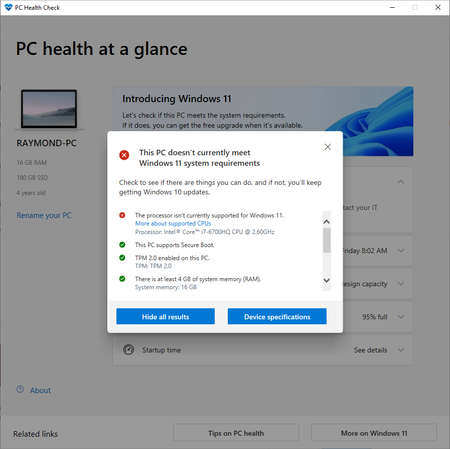
Hii everyone I have aroud 4 years old computer(running Windows10) that has the i7-7500U intel CPU. I checked with the "PC health check" app, and the only missing requirment update to windows 11 is the proccessor. Does Micorsoft will update the Windows11 to support this CPU also? thank you very much for helping!253KViews35likes112CommentsWindows 11 has got to be the worst Operating System I've ever used in my life
I've never ever been this disappointed in a software product as much as I am disappointed with Windows 11. I've always held onto the current WIN for as long as I could, and last month I bit the bullet and thought I'd give WIN11 a go, and I'm regeretting it ever since. It's not even, "omg this is new, I don't know how to use it" type of frustration - no, the OS is a complete mess, it's unstable, messy, unprofessional, and the entire thing felt fake and dysfunctional on so many levels. It really makes my blood boil. When I drag the volume all the way down in the sound mixer, it doesn't mute the app, I have to click on the app icon itself When I select a lot of files, and I click in that little small gap in-between each file, it deselects all of them When I have a lot of windows open and I would hover over them to select one, it rarely catches it from the first try. I'd click the window I want to use and it never selects it If I have a file path selected in a window, I click away, and I click back again on that window, I get the drop down list of paths that lead to that path and I end up clicking on a completely different path that would take me out of the window I selected When I click on and out of a folder, it updates in the Quick Access bar and in doing so, it glitches the entire UI across all windows open I could go on and on and on, this has got to be the worst product I've ever used. I have a couple big projects I'm finishing now, but after I'm done, I'm going back to Windows 10, and I'd stay with that until it gets hacked by Anonymous or something. My lord what a joke of a product.11KViews34likes35CommentsNewbie help Suggestions win10 to win11
I'm a newbie looking for some guidance on upgrading from Windows 10 to Windows 11. I've heard a lot about the new features and improvements, but I'm not sure if my device meets the system requirements or what the upgrade process entails. I’m also curious about any potential issues I might face during the transition and if there are specific tips or recommendations from experienced users that could help make the upgrade smoother.187Views32likes1CommentWindows 11 Week numbers to taskbar and calendar
Hey microsoft! I like to see week numbers! Please add this feature. I don't want to browse internet for simple things. I found out that you can add dddd or ddd to see week day on taskbar without clicking calendar, but nothing for week number. PS. Add :ss to short time! I wanna see seconds on my taskbar clock!85KViews32likes16Comments
Clipboard History does not recognize the Delete key on Windows 11
I recently moved to Windows 11 (installed from scratch), and as soon as it was ready I activated the Clipboard History with the Win+V shortcut, since I really liked this feature on Windows 10. But after a short while I noticed the Windows 11 Clipboard History does not recognize the Delete key anymore. On Windows 10 this works: - Invoke the Clipboard History with Win+V - Scroll to the entry you want to delete with your arrow keys - Hit Delete on your keyboard and that entry will be removed from the history. Clipboard History remains open so you can repeat this for as many entries as you like. On Windows 11: - Invoke the Clipboard History with Win+V - Scroll to the entry you want to delete with your arrow keys - Hit Delete on your keyboard, then the Clipboard History closes with no error or message. If you invoke the Clipboard History again, the entry is still there. So apparently there are only two options on Windows 11 now, use the "Clear all" button to remove all the entries from the history. Or click the 3 dots next to each entry you want to remove and then click Delete, which is... annoying if compared to Windows 10. Is there a way to make the Delete key work again?7.7KViews31likes41CommentsPC Doesn't Meet Windows 11 System Requirement - i7 6700HQ
Hi team, I just want to provide a feedback about the disappointment that my computer cannot be upgraded to Windows 11. I've been a big fan and supporter of Microsoft in the past 14 years ever since I had a PC and now I feel I am left out. It is a powerful gaming Alienware laptop I bought 4 years ago and it is still functioning very well. I have Visual Studio, SQL Server, Docker and many other development tools installed and it's been very productive. I feel so disappointed that I cannot upgrade it to Window 11 purely because my CPU is Intel 7th gen (i7 6700HQ). Thus I'm appealing you to consider changing the minimum requirement for Windows 11.111KViews31likes86Comments







Events
Have a question about Windows 11, device management, security, updates, or modern endpoint operations? This hour is dedicated entirely to your questions. Bring what's top of mind—from Windows 11 adop...
Thursday, Aug 20, 2026, 08:00 AM PDTOnline
0likes
7Attendees
0Comments
Have a question about Windows 11, device management, security, updates, or modern endpoint operations? This hour is dedicated entirely to your questions. Bring what's top of mind—from Windows 11 adop...
Thursday, Sep 17, 2026, 08:00 AM PDTOnline
0likes
4Attendees
0Comments
Recent Blogs
- Learn how KMS with TPM attestation strengthens activation security and prepares enterprises for future compliance.Jul 22, 20263KViews0likes1Comment
- A new Windows policy lets IT admins automatically accept SSO permissions.Jul 15, 202615KViews2likes11Comments