Recent Discussions

MATCH formula anomaly?
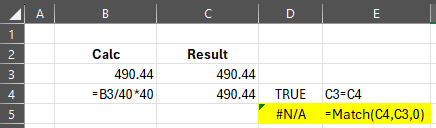
Can anyone explain this? If I simply type 490.44 and then calculate 490.44 as 490.44/40*40 (or even directly B3/40*40) excel recognizes both as equal through a simple A=B calculation yet not with a MATCH calculation. What is more odd is any other number I use does not cause this error...Solved169Views0likes4Comments
Power Query Editor - Unpivot Multiple Delimited Columns
Hello- I'm looking for the most efficient way to unpivot multiple columns that have delimited data. For example, I have the following data: Date User Product Position Job 1/1/2026 1234 ABC Position 1 | Position 2 Job 1 | Job 2 1/1/2026 5678 DEF Position 3 Job 3 And I'm looking for the data to be as follows: Date User Product Position Job 1/1/2026 1234 ABC Position 1 Job 1 1/1/2026 1234 ABC Position 2 Job 2 1/1/2026 5678 DEF Position 3 Job 3Solved81Views0likes2CommentsDynamic Column cell reference with autofill
Hi, I want to increase the column reference in a formula by 2 columns as it is copied across columns. So in Column A the formula is =SUM(D3:E3) When I fill this across Column B I want the formula to be =SUM(F3:G3) I have experimented with the INDEX and COLUMN functions but not been able to get the intended result.Solved56Views0likes2Comments
How do I get support so I don't loose my account?
I have a business 365 account but changed address and so my credit card payments stopped. However, I can't log in to my account because I also have an authentication problem (my authentication app on iPhone is still working but the entry for this account has gone and there is a new one called "Microsoft Entra ID" but when I go to get the authentication code this "Entra ID" authenticator does not produce it). To get help from Microsoft it always asks for authentication. I would like to keep this account and start paying again but I can't find a way to get help to fix the authentication problem because raising a ticket or talking to an agent requires authentication. I got my final warning email today saying Warning—your online services will be deprovisioned and your data deleted in seven days There must be some way to get a call from Microsoft so I don't loose my account and all my data?Solved92Views0likes3Comments
How to filter to include blanks without selecting blanks.....
Good Morning All, I have a spreadsheet on Excel Online version that people fill in for requesting PPE and it has drop down boxes so they can select what they need. The people filling it in are not the most knowledgeable with computers never mind Excel just FYI for context. When the spreadsheet gets filtered eg to show only the requests for Bob, it shows the items for Bob and then the row underneath is row 532 which is outside my data and therefore the drop down boxes do not show so when someone comes to fill it in they can't select what they want to order and just end up free typing which defeats the object and means things can get missed. I want to be able to filter the spreadsheet in any column EG Bob so it shows the items for Bob and then the next row is the next 'available' row which in this example would be row 23 but also people are filling this in daily so row 23 is not set. Tomorrow it will have more data in and the next 'available' row could be row 30 so obviously tomorrow I would like to be able to filter to Bob, see all of Bobs items and then the next row showing is row 30. This is a test doc: https://1drv.ms/x/c/15153d41767146da/IQDVK5iPAiw-SoUyrf9ciYdwAb76zwpiF-IAtr6ISry1KwQ?e=v4vo3C Hope that makes sense and hopefully I am not asking for the impossible! Many Thanks,Solved105Views0likes2CommentsNames in Excel Name Manager
I have a spreadsheet ( I will call it spreadsheet "A") driven by macros that creates a new worksheet each month. I am developing a second spreadsheet I will call it spreadsheet "B") that links to it for a monthly summary. I have given all the cells names that are to be linked. The issue I am dealing with is when a new monthly tab is created on "A", I want the links from "B" to be updated to the new month. The approach I am taking is to delete all of the names in "A" and recreate them for the new month. (The reason I want to delete the older names is because over time, the Names list would grow into a very large list of obsolete names). The problem I am encountering is that when a name is deleted, a dialog box appears that the user has to acknowledge that, Yes, I want to delete this name. I want to make this process transparent to the user. So, my question is: Can I delete a name without generating this dialog box?Solved106Views0likes1Comment
How to add a new month to the existing bar graph?
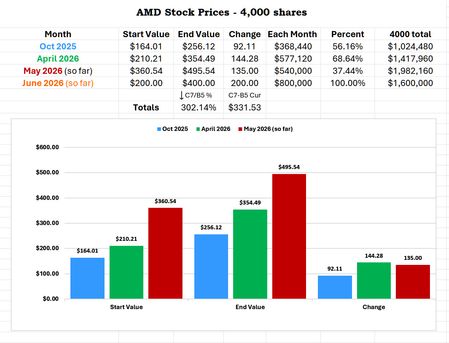
Question: How to add a new month to the existing bar chart? I have 3 rows. Oct 2025, April 2026, May 2026 The headings are: Month, Start Value, End Value, Change The bar chart has the 3 start values and then the 3 end values then the 3 change I added a 4th row and the formulas and they change values as they should. The June values are just dummy values. But I do not know how to add the 4th month to the existing bar chart that updates as well. I can create a new one but then I have to re-create the chart details.Solved101Views0likes2Comments
Tab header font issue when the "new zoom" feature is enabled
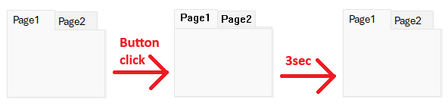
We found a curious font display issue, which can only be reproduced if the "new zoom" feature flag is active: We can reproduce it with build 20026.20076 with the zoom slider visible (e.g. in the "Current Channel (Preview)"), but we cannot reproduce it on the same build with the zoom slider invisible (e.g. on a freshly updated system in the Current Channel, which has not received the staged rollout yet) or with older builds (e.g. the current Monthly Channel build). The problem itself is unrelated to zooming. Repro 1. Create a new Access database. 2. Create a new form in Design View. 3. Add a Tab Control. 4. Set the tab control's "Use Theme" property to "No". 5. Add a button with the following code: Private Sub Command3_Click() Dim start As Double ' Localize the page name, if you use a non-English version of Access Me.Page2.Visible = True ' Simulate long-running operation (3 seconds) start = Timer Do Until Timer > start + 3: Loop End Sub 6. Save and open the form in Form View. 7. Click the button. Expected result: Nothing happens for 3 seconds. Actual result: The tab header's font switches to some old raster system font (MS Sans Serif?). After 3 seconds, the form returns to the 21st century. This issue is easy to work around: just do the long-running operation before setting the Visibility property, this will reduce the font-change to a short flicker. Still, this appears to be an unintended side effect of the changes made for the "new zoom" feature, so I thought it might be helpful to report it while that feature is still being worked on.Solved80Views0likes2CommentsTable Design -How to see which table styles adopted
I have only recently discovered table design / table styles in word and is trying to adopt using it just like Styles in my work. But I realize that I am facing a problem. For word style, i can usually see which style is adopted by clicking in the existing paragraph and check with style is highlighted in the style gallery. This does not seem to work for table styles. I previously set a custom table style and then apply it to an existing table in the document. When I click on the table, I do not see "custom" being highlighted in the table styles gallery. Is there also no way to name table styles like word styles? It gets really confusing to search only by visual shape/colors in the gallery. I really want to remove some of the table styles from the gallery to avoid users from trying to use them.Solved99Views0likes4Comments3 column layout and footnote to appear in the same column bottom of page
Hi, I have a 3 column layout of text. In the third column, I need to insert a footnote. I need the footnote to appear at the bottom of the page but it must be under the third column at the bottom of the page. see below screenshot. I tried several ways to setting the footnote and it still appear on the left hand side (1st column) bottom of the page.Solved29Views0likes4Comments
Column formatted as h]:mm:ss defaults to AMPM time upon editing cell
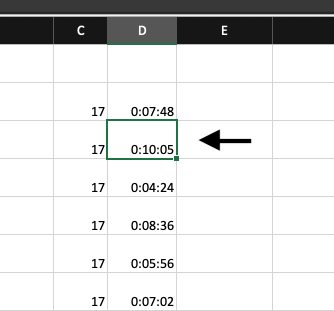
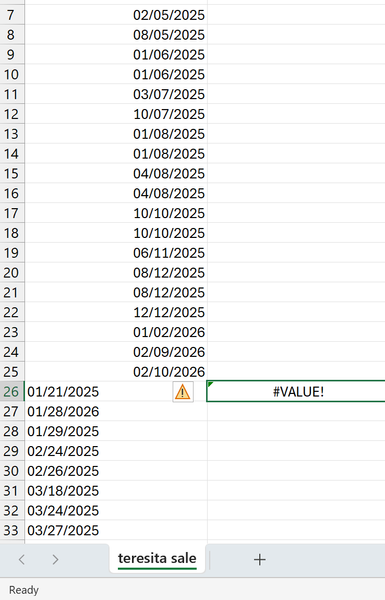
In Excel, I have a list of minutes and seconds as a 'timer for separate tasks' function, but even after formatting the whole column as [h]:mm:ss it is still reading as AMPM time. I also tried formatting the column as h:mm:ss, no change. The minutes and seconds read correctly in the sheet, but when I make a mistake entering the minutes and seconds, and double click on a cell to edit, it reads as an AM/PM. I am on a Mac. Screenshots to show the issue:Solved114Views0likes2CommentsCounts+unique+filter
Hi, I have a problem when I use the following to count the job formula Is =counta(unique(filter($a:$a, ($b:$b=1)*($c:$c=2))) the formula is correct, however, I found an error if no data match all scenarios, the answer should be 0, but, i got “1” now. Could you please help? I tried to set data source instead of whole volume but no changeSolved134Views0likes4CommentsCannot change some cells to date format in Excel
A downloaded Bank statement refuses to allow some but not all cells to be converted to date formats. I have tried simply to format them as dates converted text to columns using both fixed width and delimiter options copied the text to notebook in the hope of stripping off hidden characters =DATEVALUE(A1) ->error Simply justifying the numbers right incantations Any thoughts? Thank youSolved150Views0likes5CommentsNeed quick help counting values from a list for presentation.
Hi All I could usually work this out by searching google and the forum if I had time but its run out so looking for some quick community assistance to get me through the day. I need to count how many times we went to specific locations that are "In area". there is a list of 47 locations and 13 of them are considered "In area" I have a list of jobs in sperate sheets named based on years (2024, 2025, 2026) in those sheets I have a column that lists the location the job was in, which is pulled from a list of locations as a list in the sheet "DataLists". Each year there are approximately 250 jobs and of that 150 are probably in area. In the DataList sheet where the list of locations are pulled from, next to each location listed in column E I have a 1 or 0, in column D, 1 for "in area" and 0 for "out of area". I also have a "Report" sheet that generates a report based on the selected year as a drop down in cell C2 I want to count how many times we went to jobs the were "in area". I tried a quick solution to get me through today and generated a new list in column Q in the DataList sheet with: =IF(D2=1,E2,"") this made a list of only "in area" locations in column Q. Then in one of the year sheets I tried the following formula =SUMPRODUCT(COUNTIF(H3:H200, DataLists!Q2:Q47)) where H3:H200 is the locations of the jobs and DataList!Q2:Q7 is the list of "in Area" and got 3335 which is very wrong as there are only 97 jobs so far in 2026 and maybe 50-60 of those are "In Area" I was going to then expand it to the following in the "Report" sheet. =SUMPRODUCT(COUNTIF(INDIRECT("'"&$C$2&"'!h:h"),DataLists!Q2:Q50)) so it pulls the data from the selected year entered into cell c2 What am I doing wrong here, am I using the wrong function. Sorry only have a few hours before presentation. Ideally I would like the formula in the "Report" sheet, to sum the total number of occurrences from the "year" sheet column H:H for any match from "Datalist" sheet column E:E but only if D:D = 1 I'll take any quick fix at this stage. Cheers AlSolved130Views0likes2CommentsExport mixed text and tabular Excel to PDF
I have a sheet that I need to export from Excel to PDF. The sheet contains text and tabular data. Ideally, I'd like large bold text to export as heading tags, text as paragraph tags, and the tabular data as a table. Currently, any group of cells containing data that are surrounded with blank cells export as a table, even if they don't contain what a human would consider tabular data. I haven't selected the tabular data and chosen Import > Table. I'm not sure if that would help or not. How can I export mixed text and tabular data from Excel and have it be tagged as desired in the resulting PDF?Solved189Views0likes4Comments
Change 'Find' default from "Within: Sheet" to "Within: Workbook"
Title says it all, really. I am almost always searching for a name across different tabs, so it would be great for it to automatically search the whole workbook instead of having to change from sheet to workbook for every. single. search. Thanks!Solved63Views0likes1Comment
How to Compare 2 Columns
Hello, Would appreciate help on comparing column B to column A of these email addresses. Thanks!!Solved2.3KViews0likes4Comments


Events
Recent Blogs
- Microsoft 365 Archive and Syskit Point can help your organization address stale content and improve Copilot results.Jun 11, 202673Views0likes0Comments
- Pin, Snooze, Sweep, and more features can help you organize your inbox and work more efficiently.Jun 05, 20261KViews0likes0Comments