Forum Widgets
Latest Discussions

Feature Request – Read-only and Locked Fields for Pre-filled Microsoft Forms
Microsoft Forms has recently introduced support for pre-filled responses, which is a very valuable addition. However, the lack of read-only fields significantly limits its usability in real-world and enterprise application scenarios. In many workflows, especially those involving bots, kiosks, or guided user interactions, some fields must be pre-populated with system-generated data such as user identity, email, or contextual information. These fields need to remain visible to the user for transparency, but must not be editable in order to guarantee data integrity and prevent tampering. Currently, there is no reliable way to enforce this behavior. Even when using pre-filled URLs, users can still modify the values before submission. This creates a risk of data inconsistency and makes it difficult to maintain a secure and synchronized interaction between the client and backend systems. This is not just a UX limitation, but also a data integrity issue in integrated workflows. As a result, developers are forced to implement server-side validation and ignore user-provided values for critical fields, which defeats the purpose of pre-filling them in the first place. This forces developers to rely entirely on server-side validation, reducing the effectiveness of pre-filled data and introducing unnecessary complexity. While Power Apps can address this limitation, it is often too complex and heavy for simple scenarios where Microsoft Forms would otherwise be perfectly adequate. Suggested improvement: - Allow form fields to be marked as read-only or locked - Optionally support hidden or system fields - Allow pre-filled values to be protected against tampering - Preserve compatibility with pre-filled URLs This feature would enable Microsoft Forms to be used in secure, system-driven workflows without requiring migration to more complex platforms.DiegoMarinoGuglielmoApr 30, 2026Copper Contributor137Views0likes1Comment
Power Automate not pulling all form answers
I have a flow that triggers fine using the "When a new response is submitted" but the "Get response details" is only returning a few of the answers submitted. I can see the full submission the the back end of forms but Power Automate is not pulling a lot of the submitted answers. It has worked fine for 50 times, the automation is long and complex so if possible id like to stay away from deleting and restoring the trigger and get response details...niallharpurApr 28, 2026Copper Contributor98Views0likes1Comment
How to anonymise user file uploads in MS Forms
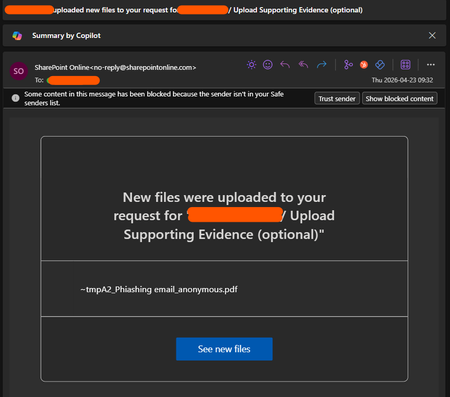
Hi, I've created a form to allow users to anonymously report IT incidents, but when someone uploads a file I'm getting an email from Sharepoint Online telling me the name of the user who's uploaded it. The red in the top right is the users name. The form itself doesn't tell me the username, that part of the anonymisation is working fine, it's just this bit related to file upload. This kind of defeats the point of allowing anonymous reporting, and whilst the users wouldn't know, it is a breach of trust when we're trying to create a positive attitude to security. Is there a way to turn this off?DJMKApr 23, 2026Copper Contributor160Views0likes1Comment
I am Facing Microsoft form related issue
I am Facing Microsoft form related issue, I can see when I am downloading a Excel copy some columns are blank. This is my survey form, and I cannot add manually however this will reflect manipulation in data, as this is technical glitch need assistant from your side on urgent basisDeepika3Apr 09, 2026Copper Contributor140Views0likes1Comment
Disabling Copilot in Forms not possible
Hi everyone, Not sure if this has been addressed before - I couldn’t find anything about it in this forum. Since Copilot is now integrated into Microsoft Forms, there doesn’t seem to be any option to disable it (like in Word, Excel, Powerpoint). What I find frustrating is that every time I open a previously saved form, Copilot automatically runs checks and generates recommendations—which, in my experience, aren’t particularly useful. More concerning is that this process does consume AI credits. I'm on a personal plan with 60 credits, I’d prefer to have control over how and when those are used, rather than having them spent automatically on features I didn’t explicitly choose to use. Microsoft support has confirmed that there’s currently no way to turn Copilot off in Forms. Is anyone else experiencing this, and isn't this something Microsoft should address? Thanks!frequent_travelerApr 05, 2026Copper Contributor312Views1like2Comments
How to remove deleted images that still appear in Bing via TSE cache?
Hello, I am looking for help regarding images that were already removed from the original websites months ago, but they are still appearing in Bing search results. I tried to request removal through the Bing Webmaster Tools, but I encountered the following message: “We can only remove content if we have the URLs for the Source Page and matching Source Image where the content resides. We cannot remove content if we are provided with URLs containing www.bing.com or http://tse because these pertain to search results and are not the original location where the image resides. If this is what you are coming up with for the source image URL, you will need to go to your original query that brought up the image to find the correct source image URL.” The problem is that I no longer have the original URLs of those images because they were deleted from the source websites months ago. The only URLs that still exist are Bing “tse” cached image links. The images themselves appear to be indexed and served directly through Bing, even though the original content no longer exists. These images were removed a long time ago from the original pages, but they are still accessible through Bing search results. I am not sure what else I can do at this point. Is there any email address for Microsoft support that I can contact directly? Or is there another process for removing images that are no longer hosted on the original websites but are still indexed or cached by Bing? It is very important for me that these images are fully removed, as I do not want them to remain publicly accessible in search results. Thank you for any guidance.Natali666Mar 24, 2026Copper Contributor112Views0likes1Comment
Limited to 200 submissions
The helpdesk has confirmed that I have an m365 family subscription. This would allow me to receive 1000 responses in Forms. However, when I log in to Forms with my details, only 200 answers are accepted. In addition, I get a "buy button" on the screen. In other words, Forms "thinks" that I have a free plan. Who can solve this for me?elanMar 04, 2026Copper Contributor141Views0likes1Comment200 answers instead of 1000
The helpdesk has confirmed that I have an m365 family subscription. This would allow me to receive 1000 responses in Forms. However, when I log in to Forms with my details, only 200 answers are accepted. In addition, I get a "buy button" on the screen. In other words, Forms "thinks" that I have a free plan. Who can solve this for me?elanMar 04, 2026Copper Contributor32Views0likes0CommentsFormulaires Forms bloqués
Bonjour, J'ai réalisé 3 formulaires Forms sur Microsoft Forms d'un compte personnel Outlook. Les formulaires ont été distribués auprès de mes proches pendant 1 mois et demi (inscriptions pour un évènement). Soudainement, mon compte Microsoft a été bloqué et les formulaires ne sont plus accessibles depuis le lien de partage. J'ai récupéré mon compte Microsoft en changeant le mot de passe. Les formulaires sont toujours sur l'application mais je n'ai plus aucunes statistiques et ai perdu toutes les données. De plus les liens de partage ne sont toujours pas fonctionnels et les formulaires impossibles à copier. Comment puis-je récupérer les réponses et relancer le lien pour que mes proches puissent continuer d'y répondre ? J'ai demandé à l'assistance technique qui m'a redirigé ici. Bien à vous.SandyBPFeb 13, 2026Copper Contributor55Views0likes0Comments

Tags
- microsoft forms3,487 Topics
- Survey684 Topics
- education370 Topics
- Quiz352 Topics
- forms241 Topics
- Forms Responses151 Topics
- Poll127 Topics
- excel88 Topics
- Registration86 Topics
- power automate86 Topics