Recent Discussions

New Teams: No notification badges in system tray
SOLVED BY THE FOLLOWING: NEW TEAMS IS NOT READY FOR PRIME TIME. When I activate New Teams, I give up having a notification badge in my system tray. I do get notification badges in the taskbar when Teams is minimized there, but not when it's closed and in the system tray. Notifications are turned on in Teams, but interestingly, the System > Notifications & actions setting has a toggle only for "Microsoft Teams Classic." Is that what's missing? I'm still getting the option to switch between new and old Teams. Not sure if that's a Microsoft thing or an organization thing. Will that right itself once New Teams is the only option?Solved74KViews8likes28Comments
Auto-saving transcription files in a folder?
I'm currently working in a project which requires the usage of meeting transcription files (not recordings!), and I couldn't find a foulder at OneDrive, or Sharepoint that contains the transcription files (.vtt), I know I can manually download it at the meeting recap but manually downloading it would make my project kinda pointless, is there any way that I can configure it to automatically save the transcription file at a folder like it happens with recordings? Thank you!6Views0likes0Comments
Teams auto selecting "Missed Calls"
I have the calls tab selected. On that tab I have "All" selected. I then click the Activity tab. Teams is selecting "Missed" on that tab. Why is it selecting "Missed"? The issue is when I click back to the calls tab Teams then selects the "Missed" on the calls area. Now if I click on "All" on the Activity tab and then click back to the Calls tab everything is fine. Seems like it is auto selecting stuff for me I didn't ask it to do.12Views0likes0Comments
Allow only specific external domains
When External Access is set to “Allow only specific external domains” Scenario 1 If Microsoft Teams External Access is set to “Allow only specific external domains”, and a user from a domain not on the allowed list joins a meeting while signed into their work Teams account, Will they still appear with their actual name and organization, rather than as Anonymous? Is this correct? Scenario 2 If a user from a non-allowed domain joins the meeting link through a browser and selects “Join as guest”, Will they appear under the name they manually enter, instead of showing as Anonymous? Is this correct? Scenario 3 If a user joins without authenticating and meeting policy allows anonymous access, Will they appear as Anonymous only in that situation, and not because of the External Access restriction? Is this correct?57Views0likes3Comments
Teams duplicates contacts until it maxed out at 15000
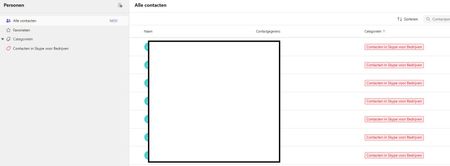
Hi, I have a weird issue with some users, Teams seems to be duplicating old Skype for Business contacts until it maxes out at 15000 contacts. I have been digging into it a bit and found out the location of the folder through Exchange powershell but I can't clear or delete it. Skype for Business is phased out and disabled in my tenant for a long time now so I couldn't do much there, I can't login to it through powershell. We've had Teams since like 2017 so I suspect this is a niche legacy issue popping up recently somehow. Manual deleting is possible through the browser environment but that is such a hassle because it keeps glitching if you delete per 100 and skipping pages and stuff, need to refresh constantly. Just a pain, it would take days. And no guarentee its not coming back either. See screenshots. Does anyone know why this is happening and how to fix this? Thanks for reading, cheers!30Views0likes1Comment
When I install my app to a second channel in Teams, the this.onMessage will nto trigger
I have a bot which when installed to a channel will read messages using this.onMessage, if I add another channel to the same team it will also read the messages without installing the bot on that channel. However if a user installs the bot again, to the second channel which some users do, the second channel will not trigger the onMessage listener except when using the @botname command. I cant log errors anything because it just wont trigger. I feel like the context gets screwed up, all the other listeners fire on other channel Any help please?22Views0likes1CommentBest External Access configuration
I’m looking for guidance on the best Microsoft Teams configuration for the following goal: Objective Prevent random external domains from: Looking up users in Teams Sending 1:1 chats Making direct audio/video calls At the same time: External users invited to Teams meetings should not appear as Anonymous15Views0likes0Comments
How Do I Run Workflows in New Workflows App V2 in Teams?
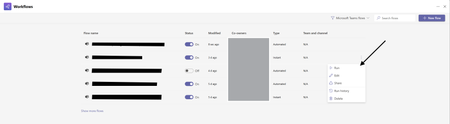
Hello All! I want to give feedback about issues workflow V2 experience in Teams. In the old version of Teams Workflows we could run workflows via this: But now in the New Version I have No Way to Run Workflows Am I Missing something Here? this has been a step back in functionality and ive trained users to use this as a way to run workflows and ive also used this at large in teams.28Views1like0CommentsExternal Accessbto “Allow only specific domains” How does this affect meeting participant identity?
Hi everyone, We have recently changed our Microsoft Teams External Access setting from: “Block only specific external domains” to “Allow only specific external domains.” This means only explicitly approved domains are allowed for 1:1 chat, calling, and federation. I would like clarification regarding how this impacts Teams meetings. Scenario: If a user from a domain that is not on the allowed list is invited to a Teams meeting: If they join the meeting while signed into their work/school Teams account, will they still appear with their authenticated name (e.g., Name (External))? Or will they appear as Anonymous because their domain is not permitted under External Access? My understanding is that External Access (federation) controls chat and calling, but meeting identity is governed separately by meeting policies and authentication status. Can someone confirm if this is correct? Thank you in advance for your guidance.23Views0likes0CommentsTeams on macOS taking up CPU and lagging
I'm not sure if it's because of Tahoe, but Teams will take up 65-90% of my CPU during calls, while only using 0.1% when not on a call. This has been present in the dev betas, 26.0 and now 26.1. If I have other apps running, they or Teams can sometimes lag or glitch. Even with nothing else running, Teams can slow to a crawl.322Views2likes1Comment
Unable to unmirror camera on Microsoft Teams
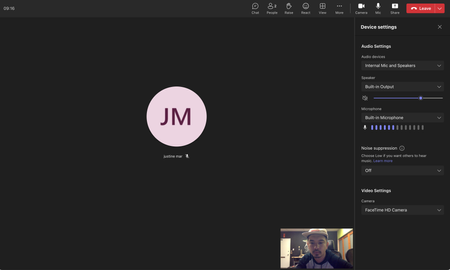
Hello, I am currently unable to un-mirror any camera feeds that go in microsoft teams. The button and option is completely missing in the options. See pic below. What is even more baffling is that I did see this option there earlier but now it is missing. I am on a Mac running macOS Big Sur 11.6 and Microsoft teams desktop app is running version 1.6.00.19353. Why is this option missing and how can I bring it back?1.8KViews0likes3Comments
Why is my conversation view left aligned for me and the person I'm talking to
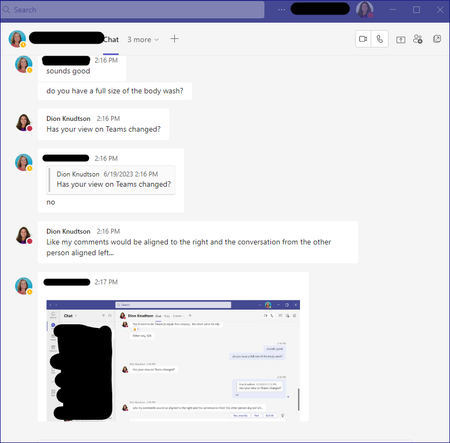
Note - My question is NOT about the Compact view for the left side list of Team conversations. My question is for the conversation area itself. Why is my conversation fully left aligned versus split between my comments on the right and replies on the left? What it is NOW: What is WAS and what I want back. Just an fyi, my screenshot is from someone else, I had to use their screenshot to get the example. Either way, my comments since I'm making them should be right aligned:15KViews0likes10Comments
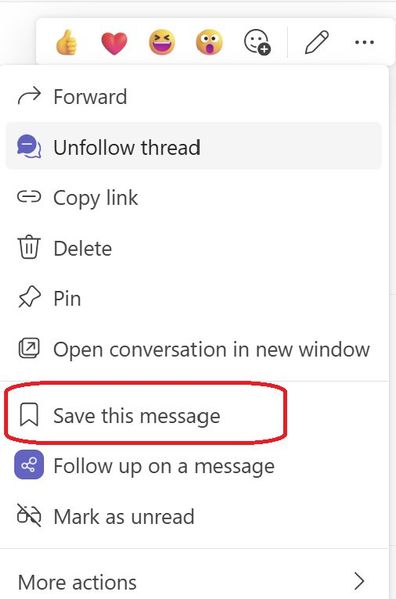
Introducing a new feature on Microsoft Teams: "Save this message"
Exciting news - alongside pinning your posts/messages, you can now save them too. All your saved messages will be neatly organized under the "Saved" menu within Teams, right below the "Followed Thread" section. Look out for a special icon marking your saved messages for easy reference. And the best part? You have the flexibility to unsave messages whenever you wish. Stay organized and never lose track of important information with this handy1KViews1like3CommentsMulti-Language Closed Captions in Webinars?
Hi community! Here is an interesting one. We are planning to use Microsoft Teams' webinar functionality for our upcoming events. Are translated captions a thing? Can we hold a webinar in English and have Teams generate closed captions in Spanish, for example? The latest interpreter features really have my hopes up for this one21Views1like0CommentsHow do you handle employee recognition in Microsoft Teams without it feeling forced?
Hey community, Our HR team is trying to implement a point-based recognitions / incentive program (or rewards whatever you are all calling it in your companies). We are having a bit of trouble finding the right features inside MS Teams to do this. We really don't want this to live outside of Teams because you know how initiatives work in modern work: If people don't see it, they are going to forget about it in a month or two tops. Any recommendations?91Views0likes2CommentsDocument Library Settings
Many times when someone opens a document from a teams document library, it shows the document as modified even though no actual changes were made to the document. The default at my company is that documents open in edit mode and they auto save so one solution would be to set it to open in view only mode, but my company doesn't want to change that at the company wide level. Is there any way to do this at the SharePoint library level? I also don't want to make document checkout mandatory.50Views0likes1CommentNew teams: call queues not showing in search
tried out New Teams and found a big problem: In the calls section, if I type the name of a "call queue" (shared line) .. it will not come up in search. So our staff wouldn't be able to find the Tech support Helpline, for example, through search. In 'old' Teams these call queues showed up with the headset icon making them distinctive. It seems to me that currently the only way to call these call queues using new Teams would be via 10-digit dialing. That won't be acceptable.Solved10KViews3likes45CommentsERROR - Yealink MVC500 - To finish setting up, insert the room console into the Dock’,
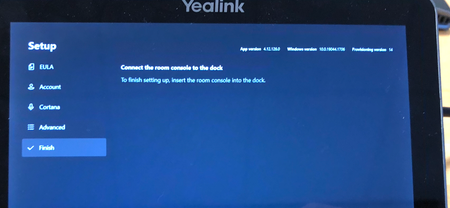
Hi All, I am an IT Technician at a medium-sized company. We have a Yealink MVC500 video conference call system which we purchased in September 2020 for our meeting room. It has worked fine until last month when the MShare (HDMI sharing peripheral unit) stopped working which meant we were unable to screen share. The error which we got was: "The room display is unplugged plug it back in for the best experience". I checked the cabling and could see that the MShare and MTouch (Touch screen device) cables were correctly connected into the corresponding USB ports on the PC but we were still getting the error: "The room display is unplugged plug it back in for the best experience". I checked the driver for the Mshare and could see that it was the latest driver was already installed. I then factory reset the trying MVC 500. Now the problem is I am stuck on the initial settings set-up where the Mtouch (Tablet device) saying is ’To finish setting up, insert the room console into the Dock’, I do not understand what this error means. Even when checking the Yealink MVC500 Official documentation I cannot find any reference to these terms. I'd really appreciate it if someone who knows about the Yealink conference systems can help me. Thanks, Shoaib13KViews1like4Comments

Events
Recent Blogs
- Virtual Desktop Infrastructure (VDI) has long been a critical deployment model for Microsoft Teams, especially for organizations that rely on centralized desktops for security, compliance, and scale....Mar 02, 2026722Views4likes0Comments
- Welcome to the February edition of What’s new in Microsoft Teams. This month’s updates are all about helping you stay in flow: getting the most useful information to you faster, and reducing a few ev...Feb 26, 202610KViews2likes1Comment