workflows
4 Topics
Adaptive Cards in Teams channel messages: fixed narrow width — request for width control
Hi Teams Platform team, We post structured status reports as Adaptive Cards into a Teams channel. The card consistently renders at a fixed width of 448 px on a 1080p display at 100% scaling with a maximized Teams desktop client — well below the available channel message stream width. Wide multi-column tables get truncated or wrapped, which significantly hurts readability. What we've tried No card-level `width` property exists in the Adaptive Cards schema. `msteams.width: "Full"` is documented to apply only to Stageview / task module / tab — silently ignored in channel messages (tested). Same payload via three delivery paths — Incoming Webhook, Logic App "Post adaptive card in chat or channel", and Microsoft Graph `POST /teams/{id}/channels/{id}/messages` — all render at the same narrow fixed width. The constraint is in the Teams channel-message renderer, not in any delivery layer. Minimal repro payload (7-column results table; all field names and values replaced with generic placeholders): { "type": "message", "attachments": [ { "contentType": "application/vnd.microsoft.card.adaptive", "content": { "$schema": "https://adaptivecards.io/schemas/adaptive-card.json", "type": "AdaptiveCard", "version": "1.5", "msteams": { "width": "Full" }, "body": [ { "type": "TextBlock", "text": "Pipeline Report — run-001", "weight": "Bolder", "size": "Medium" }, { "type": "Table", "gridStyle": "accent", "firstRowAsHeaders": true, "columns": [ { "width": 2 }, { "width": 1 }, { "width": 2 }, { "width": 1 }, { "width": 2 }, { "width": 1 }, { "width": 1 } ], "rows": [ { "type": "TableRow", "cells": [ { "type": "TableCell", "items": [{ "type": "TextBlock", "text": "Col-1", "weight": "Bolder", "size": "Small" }] }, { "type": "TableCell", "items": [{ "type": "TextBlock", "text": "Col-2", "weight": "Bolder", "size": "Small" }] }, { "type": "TableCell", "items": [{ "type": "TextBlock", "text": "Col-3", "weight": "Bolder", "size": "Small" }] }, { "type": "TableCell", "items": [{ "type": "TextBlock", "text": "Δ Col-3", "weight": "Bolder", "size": "Small" }] }, { "type": "TableCell", "items": [{ "type": "TextBlock", "text": "Col-4", "weight": "Bolder", "size": "Small" }] }, { "type": "TableCell", "items": [{ "type": "TextBlock", "text": "Δ Col-4", "weight": "Bolder", "size": "Small" }] }, { "type": "TableCell", "items": [{ "type": "TextBlock", "text": "Status", "weight": "Bolder", "size": "Small" }] } ] }, { "type": "TableRow", "cells": [ { "type": "TableCell", "items": [{ "type": "TextBlock", "text": "item-a", "size": "Small" }] }, { "type": "TableCell", "items": [{ "type": "TextBlock", "text": "mode-x", "size": "Small" }] }, { "type": "TableCell", "items": [{ "type": "TextBlock", "text": "0.000/0.000","size": "Small" }] }, { "type": "TableCell", "items": [{ "type": "TextBlock", "text": "+0.00%", "size": "Small", "color": "Good" }] }, { "type": "TableCell", "items": [{ "type": "TextBlock", "text": "0.000/0.000","size": "Small" }] }, { "type": "TableCell", "items": [{ "type": "TextBlock", "text": "-0.00%", "size": "Small", "color": "Attention" }] }, { "type": "TableCell", "items": [{ "type": "TextBlock", "text": "✅ Pass", "size": "Small" }] } ] } ] } ] } } ] } `msteams.width: "Full"` is present but has no visible effect in the channel message context. Feature request Either of: Honor `msteams.width: "Full"` in channel-message context (not just Stageview/task module/tab), OR Add a card-level property (e.g. `msteams.channelWidth: "Full" | "Default"`) explicitly scoped to channel messages. Is this a known limitation with an existing tracking item, or should we also file it on the M365 Feedback Portal for upvotes? Thanks!606Views1like5Comments
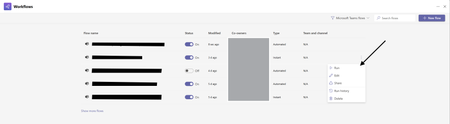
How Do I Run Workflows in New Workflows App V2 in Teams?
Hello All! I want to give feedback about issues workflow V2 experience in Teams. In the old version of Teams Workflows we could run workflows via this: But now in the New Version I have No Way to Run Workflows Am I Missing something Here? this has been a step back in functionality and ive trained users to use this as a way to run workflows and ive also used this at large in teams.229Views1like1CommentWorkflow-webhook not tied to user
Hello! We are developing applications in AWS (sorry, guys), and some workloads require posting to Teams channels using webhooks via Workflows (the new webhook way). We are also using webhooks to notify in Teams when Github actions finish or need interactions. However, when creating the webhook in Workflows it only seems possible to tie the webhook to a regular user. Are there any ways to use a Service Account / Service principal as the webhook/workflow owner? Using a regular user account as the webhook owner is a major drawback, eg. the need to rewrite all webhooks if the user quits the company and is disabled in Entra ID. Regards globus68300Views0likes0Comments