workflows
16 Topics
Adaptive Cards in Teams channel messages: fixed narrow width — request for width control
Hi Teams Platform team, We post structured status reports as Adaptive Cards into a Teams channel. The card consistently renders at a fixed width of 448 px on a 1080p display at 100% scaling with a maximized Teams desktop client — well below the available channel message stream width. Wide multi-column tables get truncated or wrapped, which significantly hurts readability. What we've tried No card-level `width` property exists in the Adaptive Cards schema. `msteams.width: "Full"` is documented to apply only to Stageview / task module / tab — silently ignored in channel messages (tested). Same payload via three delivery paths — Incoming Webhook, Logic App "Post adaptive card in chat or channel", and Microsoft Graph `POST /teams/{id}/channels/{id}/messages` — all render at the same narrow fixed width. The constraint is in the Teams channel-message renderer, not in any delivery layer. Minimal repro payload (7-column results table; all field names and values replaced with generic placeholders): { "type": "message", "attachments": [ { "contentType": "application/vnd.microsoft.card.adaptive", "content": { "$schema": "https://adaptivecards.io/schemas/adaptive-card.json", "type": "AdaptiveCard", "version": "1.5", "msteams": { "width": "Full" }, "body": [ { "type": "TextBlock", "text": "Pipeline Report — run-001", "weight": "Bolder", "size": "Medium" }, { "type": "Table", "gridStyle": "accent", "firstRowAsHeaders": true, "columns": [ { "width": 2 }, { "width": 1 }, { "width": 2 }, { "width": 1 }, { "width": 2 }, { "width": 1 }, { "width": 1 } ], "rows": [ { "type": "TableRow", "cells": [ { "type": "TableCell", "items": [{ "type": "TextBlock", "text": "Col-1", "weight": "Bolder", "size": "Small" }] }, { "type": "TableCell", "items": [{ "type": "TextBlock", "text": "Col-2", "weight": "Bolder", "size": "Small" }] }, { "type": "TableCell", "items": [{ "type": "TextBlock", "text": "Col-3", "weight": "Bolder", "size": "Small" }] }, { "type": "TableCell", "items": [{ "type": "TextBlock", "text": "Δ Col-3", "weight": "Bolder", "size": "Small" }] }, { "type": "TableCell", "items": [{ "type": "TextBlock", "text": "Col-4", "weight": "Bolder", "size": "Small" }] }, { "type": "TableCell", "items": [{ "type": "TextBlock", "text": "Δ Col-4", "weight": "Bolder", "size": "Small" }] }, { "type": "TableCell", "items": [{ "type": "TextBlock", "text": "Status", "weight": "Bolder", "size": "Small" }] } ] }, { "type": "TableRow", "cells": [ { "type": "TableCell", "items": [{ "type": "TextBlock", "text": "item-a", "size": "Small" }] }, { "type": "TableCell", "items": [{ "type": "TextBlock", "text": "mode-x", "size": "Small" }] }, { "type": "TableCell", "items": [{ "type": "TextBlock", "text": "0.000/0.000","size": "Small" }] }, { "type": "TableCell", "items": [{ "type": "TextBlock", "text": "+0.00%", "size": "Small", "color": "Good" }] }, { "type": "TableCell", "items": [{ "type": "TextBlock", "text": "0.000/0.000","size": "Small" }] }, { "type": "TableCell", "items": [{ "type": "TextBlock", "text": "-0.00%", "size": "Small", "color": "Attention" }] }, { "type": "TableCell", "items": [{ "type": "TextBlock", "text": "✅ Pass", "size": "Small" }] } ] } ] } ] } } ] } `msteams.width: "Full"` is present but has no visible effect in the channel message context. Feature request Either of: Honor `msteams.width: "Full"` in channel-message context (not just Stageview/task module/tab), OR Add a card-level property (e.g. `msteams.channelWidth: "Full" | "Default"`) explicitly scoped to channel messages. Is this a known limitation with an existing tracking item, or should we also file it on the M365 Feedback Portal for upvotes? Thanks!813Views1like5Comments
How Do I Run Workflows in New Workflows App V2 in Teams?
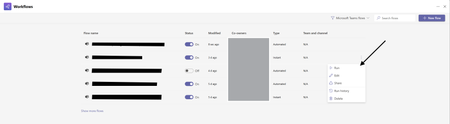
Hello All! I want to give feedback about issues workflow V2 experience in Teams. In the old version of Teams Workflows we could run workflows via this: But now in the New Version I have No Way to Run Workflows Am I Missing something Here? this has been a step back in functionality and ive trained users to use this as a way to run workflows and ive also used this at large in teams.300Views1like1CommentWorkflow-webhook not tied to user
Hello! We are developing applications in AWS (sorry, guys), and some workloads require posting to Teams channels using webhooks via Workflows (the new webhook way). We are also using webhooks to notify in Teams when Github actions finish or need interactions. However, when creating the webhook in Workflows it only seems possible to tie the webhook to a regular user. Are there any ways to use a Service Account / Service principal as the webhook/workflow owner? Using a regular user account as the webhook owner is a major drawback, eg. the need to rewrite all webhooks if the user quits the company and is disabled in Entra ID. Regards globus68323Views0likes0CommentsGetting error when trying to approve workflow
Hello, I have a workflow (request approval (everyone must approve) for a selected item) which was working fine, but just run the workflow again recently and found out that 2nd and 3rd approvers cannot approve the workflow both through outlook and teams. Approvers got "You did your part, no further input is needed" email when they try to respond to the request via Outlook, and got "Something went wrong, wait a bit then try again" message when trying to approve the request through teams. Person who responded to the workflow first could approve the workflow, but only the latter ones cannot approve. There have been some MS updates and thinking that caused this issue with the workflow. Any has the same issue? Thanks a lot1.6KViews0likes1Comment
Sharepoint - Flow to reset certain items to default?
Hello, Our team uses a list to track when we receive certain files. We have a choice column titled Status with 'No Status', 'Received', and 'Complete' options and a Due Date column where we enter the date when that item is due, once received. Instead of manually going into the list and resetting the values, is there a formula/flow I can use to reset items marked 'Complete' to 'No Status' as well as resetting the due date for that row to an empty cell? I don't want to clear/reset the entire columns since certain rows have different due dates and statuses. If one row is marked 'Complete' and the 'Due Date' is today (relative), I would like for those rows to reset back to 'No Status' and due date cell as empty. I appreciate your help in advance!665Views0likes0CommentsSharePoint - MS Word Content Review Flow - Reality Check
I'm a documentation guy, experienced with Sharepoint, but a total Flow newbie. I'm in a contract in the insurance space, in the KM group. I'm developing a documentation library, the aim of which is for drafting and review of Knowledge articles for ultimate publication in another system altogether. I don't want to enable Content Approval and Checkout because it's a small-team Drafting workshop with frequent minor edits, and constant check-outs and approval requests would be a major drag. So I'm trying to work out a document review flow to send MS Word drafts to various expert users. The first action is to send a link to a SharePoint document with a message for them to review, make comments, and save when done. I have worked out how to do this part. But I have this idea that I could create a Status flag for the documents so when a link has been sent out for review, the flow would automatically set the flag for that document to 'Under Review'. Then I could filter out the Under Review documents from the W-I-P documents, so the rest of the team are less likely to edit them while they're being reviewed, without literally checking them out. Is that do-able? Make sense? The other thing I'd like to do is capture the time:date sent in SharePoint in a Sent for Review field. Then there would then be an auto-calculated Due Back field (i.e. five working days after the Sent date), with an email reminder sent midway through day 3. So that's my workflow requirement in a nutshell. I've been looking through all the templates but none of them do exactly this, and many of them seem to assume Content Approval and Checkout, which I'm trying to avoid.SolvedConnect Zapier with Azure Database for MySQL - Flexible Server to automate your business workflows
Zapier is a service that helps you automate repetitive tasks and can connect to various data sources as well as apps. You can easily connect various apps with data stored in Azure Database for MySQL Flexible Server to seamlessly build the integrations you need for your business requirements.5.1KViews1like0CommentsImages in Microsoft Lists with Status via Power Automate for visual progress
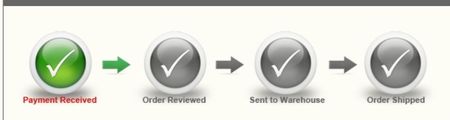
I saw this for a status on a website and thought it might be helpful to have this and would need to talk with the marketing department for graph changes. Have people had success with this or used or have recommendations for it. I have the status with back and forth and it is not as straight forward as some things such as onboarding might not be as straight forward. We have maybe eight or so different status which is not tough yet wonder how it would be with a graphic for such various options.1KViews0likes1Comment